SLI home
User login

A BLOG FOR E-COMMERCE LEADERS

  • Blog
  • Resources
  • Webinars
  • Customer Experience Scorecard

SLI Blog

Posts with User Experience Tag

Improve E-commerce Conversion Rate with 5 Critical Enhancements

Posted by Bob AngusDecember 13, 2017Customer Experience, eCommerce, Merchandising, Navigation Tips, Personalization, Recommendations, Rich Auto Complete, Site Search Tips, User Experience

Your e-commerce business is full speed ahead. But that’s not good enough. You’ve been tasked with higher and higher growth expectations.

ecommerce sales buy button

And now you have even more at stake. You are likely spending more and more to drive traffic to your site. You can’t let that big investment in advertising fizzle with diminishing ROI.

Good news. You have a high-impact driver you can execute against right now.

Improvement to your conversion rate is the greatest lever at your disposal. Even a small conversion rate increase can generate big revenue gains.

This comprehensive guide to e-commerce conversion rates helps you build a winning game plan for your online store, including:

  • What e-commerce conversion benchmarks to use
  • How to analyze your conversion rate
  • How to optimize 7 critical conversion rate drivers

Let’s start by understanding how you can best measure conversion rate.

What is a good e-commerce conversion rate?

Online retailers track many conversions throughout their customer experience. Any action goal can be considered a conversion. A click on your email, a click on an advertisement, or a newsletter signup are considered conversions.

The conversion metric you really want to focus on is a purchase. Your sale conversion rate is calculated by simply taking the number of purchase transactions and dividing that by the total unique visitors to your online store during a time period.

That’s pretty straightforward. But what is a good conversion rate to set as your target goal?

This 2017 holiday shopping to date, average e-commerce conversion rates are showing growth: desktop 4.5% (up 10.6% YoY), smartphone 2% (up 12.3% YoY), tablet 4.3% (up 9.3% YoY), according to Adobe Digital Insights.

And Amazon boasts an amazing 74% conversion rate for its Prime members and 13% for non-Prime visitors back in 2015, based on a Millward Brown Digital study. In comparison, the same study showed the average conversion rate for Top 500 merchants is 3.32%.

Are those the right conversion rate benchmarks for you? Probably not.

It is interesting to set an aspirational goal against Amazon or other leaders that compete in your industry. However, you are best served by benchmarking where your own store is now. Then set a course for continual improvement to drive conversion optimization goals and strategies.

Measure your overall sales conversion rate for your entire website the past year. That’s your starting point. That’s the number you want to beat in 2018.

Then the key is to drill down into your sales-rate performance for different contributing factors and customer segments. That’s where your actionable insights really happen.

Now let’s explore the best way to analyze your conversions to enlighten your growth plans.

How You Can Analyze Your Conversion Rate

Conversion rate is a very useful metric to track. But the real impact to your e-commerce business is analyzing and understanding what is driving your performance and why.

That deeper conversion analysis helps you:

  • Determine what segments are contributing to your overall conversion rate
  • Identify the root causes
  • Prioritize and track success of your optimization game plan

The first step is to build a dashboard that tracks and trends your conversion rate. Google Analytics and many e-commerce platforms provide a dashboard that lets you see your conversion rate over different periods of time.

SLI Systems also has a very powerful dashboard built into the Commerce Console. You get an helpful view of your shoppers’ activities and conversion rate through their shopping journey.
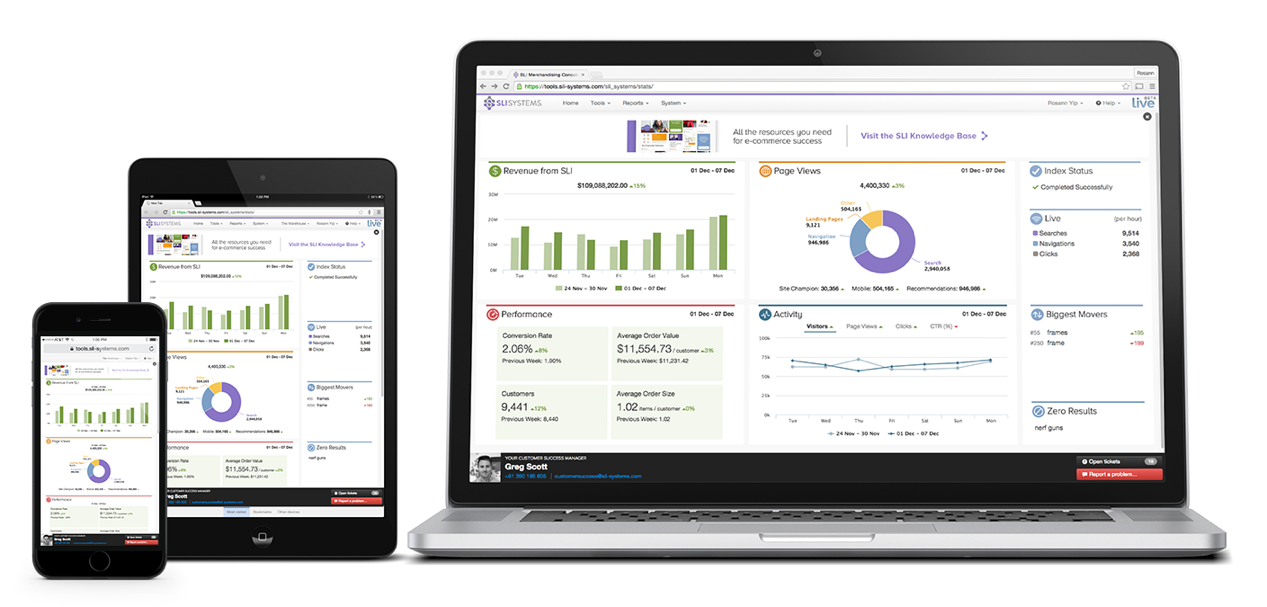
Ecommerce conversion rate dashboard - SLI Systems Commerce Console

Or you can simply use a spreadsheet. Capture your monthly unique visitor metrics and plug in your corresponding sales transaction data to calculate your conversion rates. Again, simply divide transactions by unique visitors to get the conversion rate percentage.

Next you’ll start the drill down analysis.

What Is Driving to Your Conversion Rate?

Your overall conversion rate calculation is an average. Many different factors drive that single number. Some factors contribute significantly more than others. It’s your job to break down those key drivers to find growth opportunities.

Start by segmenting your conversion rate data into categories.

The most common way to split up your data is by different customer audiences. Different types of customers have a different relationship with your e-commerce business. They may also have different purchase intent, which directly impacts your conversion rate.

Your analysis can uncover those segments that likely have differing intent to purchase. Then you can calculate the conversion rate for each segment. And you’ll see which audiences have the greatest influence on your overall conversion rate.

Here are several helpful ways to segment your audience.

  • First-time visitors vs. returning visitors – First-time visitors often make up a big majority of online traffic. But it stands to reason that those first-time visitors who may be unfamiliar with your brand are less likely to purchase than returning visitors.
  • Acquisition channel – Where visitors come from can help tell you how likely they are to buy. Segment by channels like organic search, paid search, social media, advertising, and affiliates.
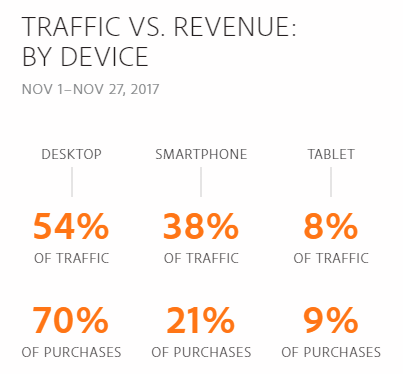
  • Device – The device visitors use may indicate different intent as shown in the Adobe data insights mentioned earlier.
  • Location – Are you a global brand or do you sell domestically? Traffic coming from different international locations may be browsers, not buyers.
  • Other demographics – Google Analytics can help you analyze other demographics like gender, age, or interest affinity groups.

Other popular segmentation you can use to uncover key conversion rate drivers include:

  • Product category – Conversion rates may be higher for different products based on the volume sold, price range, or deliverability. For example, you would expect the online conversion rate to be lower for expensive furniture than easily shipped lower-priced home decor.
  • Promotions and seasons – Different discounting periods or traditional shopping seasons may affect conversion rates.
  • Website elements – You can track conversion rates by different elements of your customer experience.

Make sure you look at your conversion rate over time. Don’t just take a single snapshot in time to make your decisions. A single data point or particular shopping season can skew what you see and may lead you to incorrect decisions.

Calculate your segmented conversion rates into monthly or weekly increments. Go back in time as far as you can. Then you can chart trends and make year-over-year and month-over-month comparisons.

Starting with one segmentation method is also recommended. Add that to your dashboard. Keep tracking that segmented data to see how you are performing. Then expand your analysis to other segment categories.

Your conversion rate analysis helps you find your growth opportunities. But it doesn’t tell you exactly why those different segments are performing the way they are.

Why Is Your Conversion Rate Increasing (or Decreasing)?

Now you can dig a little deeper to understand why your conversion rate is increasing or decreasing. Find the root cause by adding a second dimension to your analysis of a particular segment category.

What is the behavior or characteristic about a given segment that is likely causing sales to go up or down?

The best way to do this is to add one of the other segment categories as that additional dimension. For example, if your primary segmentation is based on acquisition channel, then you can drill down using product category purchased or device used or location demographics.

Analyze that data. Look for trends. Make comparisons.

Maybe your conversion rate was 6% coming from Google Adwords. But the Adwords conversion rate for desktop users was 8% versus 2% for smartphones and 4% for tablets. Now you have an understanding of how the device contributes to that channel’s conversion rate, taking the volume into consideration.

And how did that paid search channel breakdown compare to your other channels? For example, smartphone conversion rate maybe 4% from your emails and 1% from social media.

Identify big shifts and changes. Discover anomalies.

Using the Google Adwords example again, maybe starting in July you see an increase from 5% to 7%. And that higher rate seems to have continued for several months.

Then hypothesize. Ask “why?”

That increase in July may have corresponded with an increase in your PPC bids or budget. Or maybe you launched a new set of keywords for a hot brand. You could hypothesize why the increase happened and continued.

This additional lens into your primary segmentation can uncover the root cause. You are now ready to take action with that data-based knowledge in hand.

How to Prioritize Your Optimization Plan

You are armed with lots of data and valuable analysis. You can now more easily prioritize the action you want to take and build an optimization game plan.

Typically you’ll want to pick one to run every quarter. That single-focus test approach helps you isolate the incremental sales and conversion rate you’ve achieved. You also give enough time to achieve improvements, validate the results with enough traffic, and eliminate most anomalies by running the test for a longer period of time like two or three months.

Which tests should you run first?

It’s always good to start with the test you feel can have the biggest financial impact. Estimate the revenue impacts for all the top activity ideas you have identified. How much would sales increase by each incremental tenth of a percent increase in conversion rate?

Then look at the level of effort and investment cost of running the test. If an activity may have a high-revenue upside while requiring little extra work, then you’ve found a great place to start.

Let’s look at some of the highest conversion boosting opportunities you have.

5 Critical Enhancements for Bigger E-commerce Conversion Rate Optimization

The best conversion rate optimization tests consider the customer experience journey. Understand the different interactions from the first moment a shopper lands on your website, through finding and choosing a product, and all the way to checkout and completing the purchase.

You make many different enhancements to your online customer experience. Here are five design improvements proven to increase conversion rates:
autocomplete site search to increase ecommerce conversion rate

1. Win More High-Purchase Intent Shoppers

Arguably one of the best ways to increase your conversion rate is to win more sales from visitors who already have a high intent to purchase. So how do you know that someone comes to your site with the intention of buying?

Shoppers signal their intent when they use your site search.

SLI studies have found visitors that use search buy at a 2.7x greater rate than visitors who just browse.

Make the act of searching even easier by enticing those visitors who have a specific purchase in mind.

Position your search box in the header and in the center of every page. Provide an engaging prompt to search in the search field. And make the box large and distinctive from other forms. Don’t tuck the search box into the corner or hide it behind a magnifying glass icon that searchers have to click.

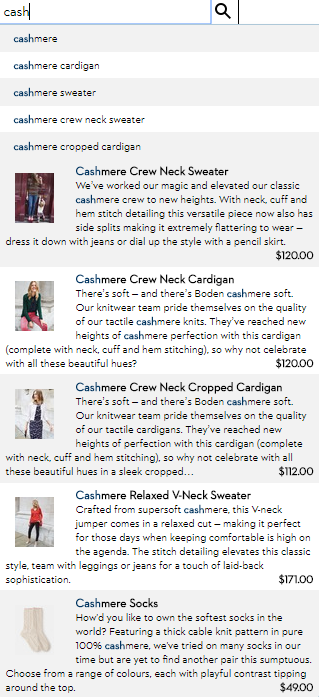
Speed up the search by suggesting possible terms as visitors start typing the first letters of a keyword. This autocomplete functionality draws from your product feed to indicate that productive search results are available. Better yet, you can rank the autocomplete terms by the most popular keywords by clickthrough and purchase data, not just keyword matching.

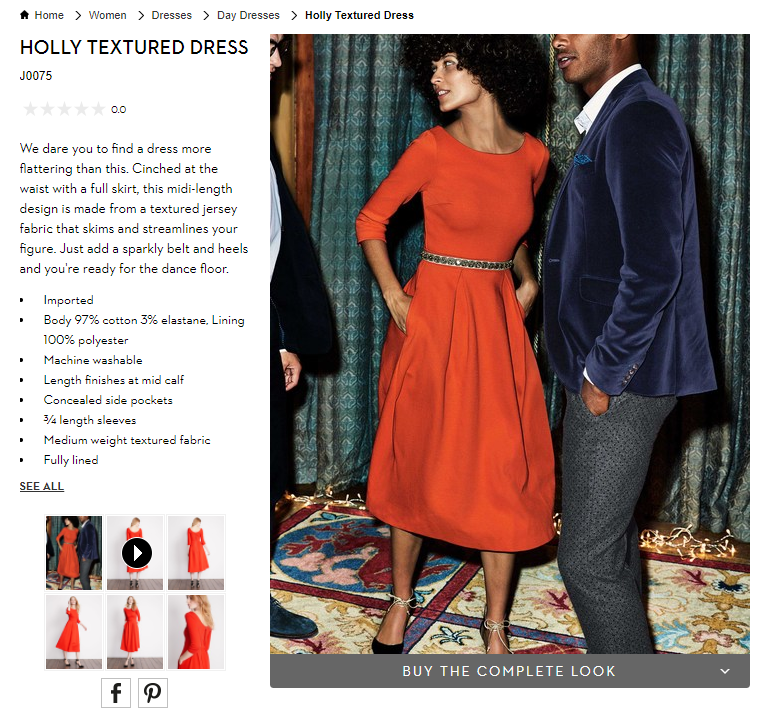
Pro Tip: Enhance your autocomplete feature by presenting specific products in the search suggestions. Display the product name, image, and price for the most relevant products. Boden speeds up the purchase process doing just that.

This enhanced functionality helps your visitors identify products they are looking for even more quickly. Then send them directly to the product page. Skip the extra category page browsing. Bypass the search results page. Get high-purchase intent shoppers directly to a product.

2. Wow Visitors with Visual Merchandising

The key elements of a product landing page are designed to showcase the product so that customers can easily make a purchase decision – product title, descriptions, specs, purchase options, ratings, reviews, and, of course, pricing and discounts.

This product feed information gives shopper the facts. However, we humans actually make purchase decisions emotionally much of the time. Shoppers love the wow factor. That’s where online visual merchandising excels.

e.l.f Cosmetics shows off their eye shadow products with beautiful images and attractive videos from Instagram. These social media images inspire shoppers. Better yet, many of the pictures are user-generated content from customers.

ecommerce visual merchandising with instagram - e.l.f. Cosmetics

Similarly, fashion sites often display extra images since shoppers can’t actually hold the item in their hands. Visual merchandising best practices, like model videos, product pictures from many angles, and custom images that change with color selection, can help drive more sales.

Pro-Tip: Help customers visualize what their experience will be after they make the purchase. Show action shots and product videos that depict how the product is used, what the buyer gets in the box, or how to install it.

3. Merchandising that “You May Also Like”

The top job of merchandising is to promote the products a visitor is most likely to buy. One of the best online merchandising techniques is to use a “You May Also Like” product recommendation strategy on the product page.

Showing alternative products that are similar to the product being viewed is proven to increase conversion rates.

Unfortunately, many e-commerce sites determine the recommended products using simple category and keyword matching. This approach focuses on the product feed data only.

Fortunately, online stores have massive amounts of behavioral and transactional data in addition to product feed data. “You May Also Like” product recommendations that include actual customer behavior are more likely to convert.

For example, Dancewear Solutions recommends several contemporary dance dresses on a product page. It also merchandises complementary products that go with the dresses based on what customers had made purchases in the past.
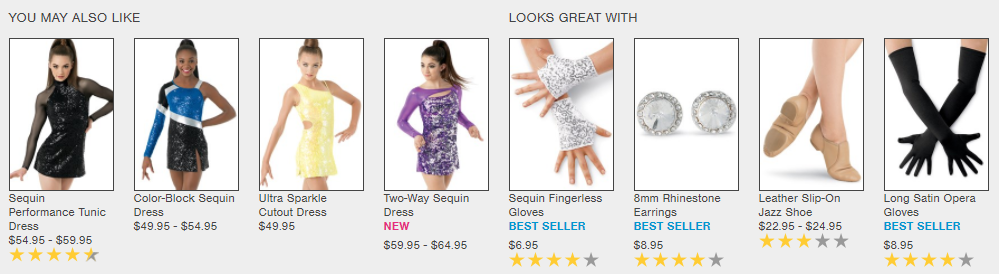
ecommerce product recommendations engine - Dancewear Solutions

Pro Tip: Customers love a personalized shopping experience. In-store salespeople give a personal touch to help customers get exactly what they want. Now artificial intelligence is helping online stores create a similar personal customer experience.

E-commerce personalization uses machine learning to sift through massive amounts of behavioral data to quickly provide smart product recommendations. Contextual personalization can display products that customers are even more likely to buy based on gender, size, brand preference, or the shopper’s location.

4. Help Shoppers Get What They Want Faster
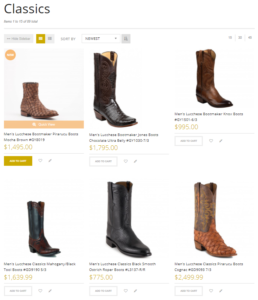
ecommerce merchandising category page buy now button - Allen's Boots

Smart e-commerce companies create as few steps as possible to get to checkout. Customers are more likely to complete their purchase when you allow visitors to add products to shopping carts or go to checkout directly wherever they are on your site.

Don’t limit the use of “Add to Cart” or “Buy Now” buttons to your product pages. Anywhere you merchandise products, even your homepage, is an opportunity for customers to commit to purchasing without an extra click to the product page.

Pro Tip: Include “Add to Cart” button directly in the your category pages and search results pages. That’s what Allens Boots did. This quick enhancement helps speed the conversion, particularly if your customer knows exactly what they want.

5. Eliminate Rational Roadblocks with Content

Don’t rely solely on the product description provided by the manufacturer to influence a buyer. Inform your customers about what a product can do. Offer how-to articles, demo videos, and comparisons against other similar products.

Content has a strong influence on e-commerce conversions both rationally and emotionally. How-to content helps remove rational doubts or questions that make shoppers hesitate. Video content in particular also has an emotional trigger for sales as customers can visualize themselves using the product.

Dollar Tree uses videos to show shoppers curated product ideas and demo top-rated customer favorites.
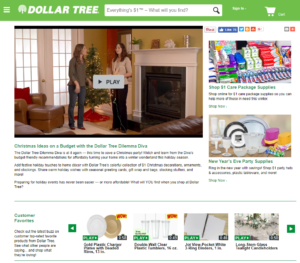
video merchandising for ecommerce - Dollar Tree

Pro-Tip: Include a set of Frequently Asked Questions (FAQs) on the product product. Ask your customer service team for questions that they get about the product. Review common reasons for returns. Think of questions you would have if you were going to pay your own hard-earned money. Then create a strong set of FAQs written in the language that customers use.

There are hundreds more conversion-rate tips that you can test. Make sure to download these best practice e-books to find new ways you can improve your conversion rates:

  • Get the SEO-Driven Revenue You’re Missing

  • The Big Book of Site Search Tips

  • Use Creative Content to Convince Online Shoppers to Buy

  • The Big Book of Navigation Tips

Image Credit: Wikimedia Commons
 

Retail Executive Brief: Customer Experience Trends for 2018

Posted by Bob AngusNovember 30, 2017Analytics, Artificial Intelligence, Customer Experience, E-commerce Research, eCommerce, Merchandising, Mobile, Mobile/Tablets, Personalization, Reporting and Analytics, User Experience

Customer Experience - Convert Buyers with a Great Customer Experience

The pressure is on for retail businesses to deliver on big sales growth expectations. That’s in the face of slow consumer spending growth combined with the tectonic shift in traditional retail channels.

You need to turn more shoppers into buyers. You can’t afford for your investment to bring more shoppers in the door or onto your e-commerce store that leave with an empty cart.

That’s why optimizing your customer experience is more important than ever.

This retail executive brief helps you better understand:

  • How customer experience strategies are evolving
  • What customer experience metrics to track and analyze
  • How to improve your customer experience using top trends in 2018

Let’s first dig into how customer experience is changing.

What is Customer Experience Today?

In the past, customer experience strategies focused on the discrete interactions shoppers had in the sales process. These touchpoints took on even greater importance with online retail channels simply because it was easier to track and optimize each webpage leading up to a sale.

However, this touchpoint-focused approach to improving customer experience can easily miss one critical element… the customer journey.

The journey is the customer experience.

The overall journey can still disappoint customers, even if your online store design, in-store layout and staffing are executed well on individual touchpoints.

Understand the customer journey in your shoppers’ terms. Customer journeys include many things that happen before, during, and after the actual purchase experience.

The journeys can be quite long, though the purchase decision can be extremely fast. Consider the multiple channels, devices, and, yes, direct interactions that may occur over days or even weeks.

Put yourself in their shoes. You buy products for yourself all the time. Think about your entire experience and why you made a purchase or didn’t.

Ask questions like:

  • Where and when did you first learn about a store?
  • What was your first impression of the brand?
  • What triggered you going in the store or to the website?
  • How easy was it to find what you wanted?
  • How did you feel about the product price and value? Product quality? Selection for you?
  • How did you feel about the shopping environment in-store or online?
  • What sales help, customer service or employee interactions did you have?
  • How did the purchase transaction go? Was it fast and easy?
  • How did you get your product? Was shipping fast? Did you need to exchange or return?

Always be asking how you can improve that journey.

Next you need to figure out if you’re on the right path to improvement.

Customer Experience Measurements for Success

How do you know you are improving your customer experience? You’ll want to look at the numbers.

It’s very tempting to dive right into the weeds. Retailers now have so many powerful analytics tools. And data collection is getting easier.

However, direct contribution to macro financial metrics and sales trends can be difficult. Remember, your customer experience is a holistic journey. So your best customer experience metrics are more macro. They are not necessarily analyzing and optimizing discrete touchpoints.

Start by measuring key customer experience outcomes, customer feedback, and employee feedback.

Financial Metrics

The most common outcome metrics are financial. Let’s assume you are already tracking total revenue, profit, and transaction volume. Great financial indicators of your customer experience is Revenue per Customer and Average Transaction Value.

Make sure to also track Revenue per Visit (RPV) for your online channel or if you are a pure e-commerce business. This metric estimates the incremental value of each visitor to your online store. Simply divide your total online revenue by the total number of unique visitors to your website.

Customer Satisfaction

You also need to measure your Net Promoter Score (NPS) to capture how customers feel about you. NPS is a fantastic customer satisfaction metric to track over time. Customer experience and customer satisfaction are closely correlated.

But the most actionable customer experience metric in your NPS comes from the answer to the follow-up question – “Why did you give that rating?”

Categorizing the results of this open-ended “Why” question helps you measure the impact on different factors in the customer journey in your customers’ terms. For example, you may group results by broad areas like customer service, products, or pricing. Or you can go more granular into the touchpoints like checkout experience, shipping, or return policies.

Learn more by further breaking down your NPS by customer segments. You can segment by geography, gender or age demographics, order revenue, or purchase frequency or recency.

Employee Satisfaction

Lastly, you should also measure your Employee NPS. Employee satisfaction is also highly correlated with customer experience. Happier employees lead to better customer experiences.

After all, your employees are most responsible for delivering a great customer experience. All your employees contribute. Even someone behind the scenes in HR, the warehouse, or web development have an impact that trickles into the experience.

Here again, look closely at the “why” to measure and track the drivers that influence your employees’ feelings. Those feelings result in behaviors and actions that directly and indirectly impact your customer experience. Listen to what they say and recommend.

Track these financial and satisfaction metrics consistently. That’s how you will know your customer experience is on the right path.They are your “North Star” numbers.

Once you’ve established those customer experience measurements, you can then go deeper into specific success metrics for operational improvement initiatives. Use Google Analytics and e-commerce platform results for your online channel.

Now let’s look at the latest trends you can leverage to boost your customer experience metrics and sales.

3 Technology Trends that Help You Improve Your Customer Experience in 2018

Retailers continue to leverage technology to improve customer experiences. Much of the change comes from consumer technology use as a pulling factor. For the first time ever, more people say they plan to shop online (59%) than in big box stores during the 2017 holiday season, according to the NRF.

Here are three technology trends that help brands connect better with customers and improve their overall customer experience.

1. Rapid Growth of Mobile Shopping

Mobile Traffic and Sales Statistics - Black Friday 2017 Cyber Monday 2017

The continued rapid growth of smartphone use is undeniably impacting retail sales. Similar to how e-commerce is the growth engine of overall retail, mobile sales are powering e-commerce.

The rising tide is driving much of that growth. Mobile traffic from smartphones and tablets peaked on Black Friday and Small Business Saturday (56% of traffic). Then leveled out to 46% of traffic, almost equivalent to desktop traffic (54%), through Cyber Monday 2017, according to Adobe Digital Insights.

However, the mobile shopping experience is a challenge for retailers. Smartphones and tablets earned a lower percentage of overall sales (30% versus 70% for desktop) and lower conversion rates through Cyber Monday.

Retailers can close more sales with mobile shoppers by continuing to improve their mobile customer experience. Shoppers now find mobile as an easy way to check emails (hopefully your emails), find store locations and hours, get product information, snap and share photos, and compare prices.

Optimizing mobile product discovery and mobile payments are the biggest opportunities for retailers to improve the mobile customer experience.

2. Personalized Merchandising with Artificial Intelligence

Customers want a personalized shopping experience. Sales people help shoppers in the store. Now application of artificial intelligence are helping online stores create a similar personal customer experience.

Online stores have massive amounts of behavioral and transactional data now. The challenge is to harness that data to power real-time merchandising decisions.

That’s where artificial intelligence excels.

Fifty-four percent of e-commerce sites have already implemented or plan to add AI in the future, according research from the Q3 2017 E-commerce Performance Indicators and Confidence Report. And 20% expect to add AI within the next 12 months.

The top application is personalized product recommendations. Eighteen percent of online retailers report they are already using artificial intelligence in their product recommendations strategies. But that number will swell dramatically in 2018 with 38% planning to implement within the next 12 months.

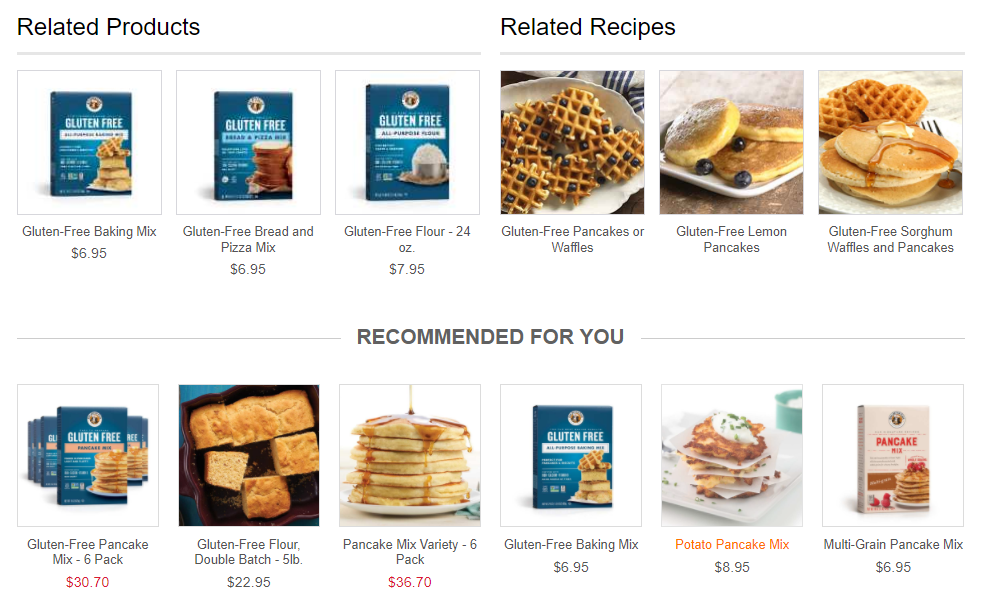
Personalized Product Recommendations Engine - King Arthur Flour

Artificial intelligence can parse user activity, preferences, and sales trends. The result is smart and timely product recommendations that are personal. For example, this type of contextual personalization can be tuned to gender, clothing size, brand preference, or shopper’s location.

Even better for online retailers, this personalization can be experienced by first-time visitors just as well as returning shoppers. So the shopper does not have to take any additional actions to receive the customer experience benefits.

3. Always on Customer Service with Chatbots

Chatbots were introduced as a new technology on the horizon for retailers in our 2017 e-commerce trend webinar. In 2018, chatbots are a must-have element of your online customer experience.

Ecommerce Chatbots - Retail live chat is always on

Think of chatbots like your online version of a sales associate or employee. Except they are always on 24/7/365.

A chatbot is an enhancement from the online chat communication channel. The old chat program still required a human sitting there typing in replies. Those employees had regular shifts. So sometimes customers weren’t getting their questions answered.

Now a chatbot is an always-on program that simulates the conversations your customers have with you. It answers questions, handles specific requests, helps shoppers choose the right product, and executes customer service procedures.

Your customer experience impact is shoppers have better and faster access to what they want when they want it. That’s a huge win. And you win more sales.

Customer adoption, and the resulting better experience and sales, is the biggest reason why chatbots are growing in e-commerce. Additionally two technology drivers are accelerating the deployment of chatbots – smartphones (again) and artificial intelligence (again).

Smartphone use is leading to speaking with a chatbot. Talking is easier than typing. Just say what you need and the chatbot tells you back. Siri, Alexa, and Google Assistant are all voice-enabled chatbots that are quickly growing is use.

Artificial intelligence is helping chatbots be more effective. The chatbot can repeat existing information easily and can be taught to mimic decision-making patterns. But artificial intelligence makes a difference by helping chatbots to actually learn. So your customer experience is continuously improving.

Design Your Customer Experience to Win More Sales

Planning and executing your customer experience strategies is a process of continuous improvement. Deeply understanding your customer’s journey sets you on the right path.

Take advantage of the key trends and technologies. Then test your innovations, measure, and optimize for the satisfaction of your customers and for the results that matter to you.

Ultimately, you can achieve what creative executive Loie Maxwell calls “designed serendipity”. Orchestrate the experiences that produce a customer journey that gives them a winning feeling. Your customers will love it. And you will win more sales.

Is Your Customer Experience Leaking Sales?

Most businesses are leaking online sales in at least 7 critical elements of their customer experience.

The Customer Experience Scorecard grades your e-commerce site using a 42-point checklist proven to increase sales, including:

  • Quickly finding products shoppers are most likely to buy
  • Personalized product recommendations
  • Mobile path to purchase

Want to find your leaks? Find out your quick-win opportunities to take your conversion rates to the next level.

E-commerce Merchandising: The Ultimate Guide to the Newest Techniques

Posted by Bob AngusNovember 16, 2017Analytics, Artificial Intelligence, Customer Experience, E-commerce Research, eCommerce, Merchandising, Navigation, Navigation Tips, Personalization, Recommendations, Refinements, Resources, Rich Auto Complete, Site Search, Site Search Tips, Testing, User Experience

E-commerce merchandising has one goal in mind – connect shoppers with the right product so that they “Add to Cart” fast. Merchandise well and you’ll increase conversion rates and boost your average order values.

But execution is always incredibly difficult.

You have different visitors with different mindsets toward actually buying. Those shoppers are engaging with different parts of your website through their shopping journey.

On top of that, you have to wrangle massive SKU quantities, constant product and pricing changes, and frequent promotions.

E-commerce merchandising is complex.

It is no longer as simple as choosing the products you want to move, setting an attractive discount, and plastering the offer all over your valuable real-estate.

You need to figure out what each shopper is most likely to buy right then.

The leading retail brands are employing the newest e-commerce merchandising techniques to successfully unlock the complex code to winning more sales. They approach effective merchandising along three dimensions:

  • Understanding different customers need different merchandising strategies
  • Deploying the right techniques along the shopping journey
  • Delivering the right product that is most likely to be purchased

Plus, they’re using data to drive that complex decision at scale. And you can too.

Let’s breakdown what you can do to optimize these three elements… and dramatically increase your sales.

Customer-Focused E-commerce Merchandising Strategies

“Traditional” merchandisers that worked for brick-and-mortar retail stores often had a pure product buying background. They would master the data. But that mastery focused inward to the business for the purpose of increasing unit volumes, maximizing margins, and avoiding too much unsold inventory.

Yes. You still need to successfully manage your product buying to be profitable through your online channel. But you also need to understand what’s pulling through those sales and why.

Today, world-class merchandisers start from a different perspective. They think about the customer first. Then they apply their product expertise and merchandising skills to fit what their customer segments want.

You will want to incorporate specific merchandising strategies to help win these different types of customers – from visitors “just browsing” to your most valuable returning buyers.

Earn loyalty with returning visitors and customers

The first segment of shoppers you should consider are your return visitors and previous buyers. Why? Your conversion rates should be significantly higher than first-time visitors.

Better yet, you have some easily executed tactics available to boost extra sales.

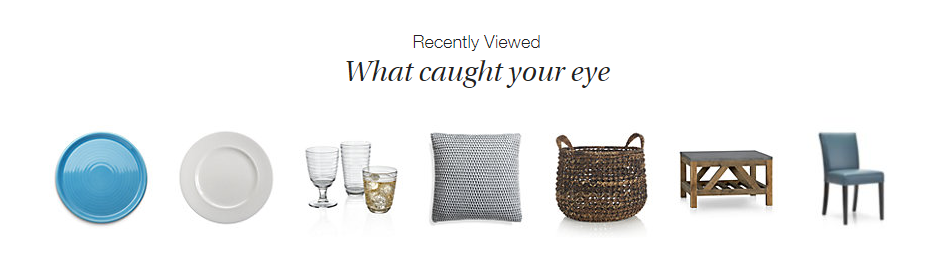
Ecommerce Merchandising Strategy Product Recommendations - Crate and Barrel Home Page Screenshot

Crate and Barrel promotes “Recently Viewed” items on every product page. This makes it super easy for a returning visitor to jump right back to what they were interested in, without having to browse around your site.

This product recommendation strategy also works great on major entry points into your site like the home page or in your shopping cart.

Another source of product data to use for “personalized” products recommendations is your customers’ wish list shopping cart history. These customers have already clearly indicated exactly what they want. So you should boldly give it to them.

Other uses of your visitors’ shopping history include:

  • Highlight a special promotion for wish list items
  • Recommend complementary products that go great with a recent purchase
  • Show a reminder for abandoned cart items
  • Add an easy “Order Again” button
  • Create custom product landing pages for shoppers who clicked your retargeting ads

All of these online merchandising strategies can help grow loyal, repeat buyers and encourage returning visitors to buy more.

But what if someone is a first time visitor? Fortunately, there is another segment of high-value shoppers that you can convert with powerful merchandising.

Win high-purchase intent shoppers

Certain customers come to your site ready to buy. The question is: Are they going to buy from you or go to your competitor?

Who are these high-purchase intent shoppers? They are the visitors that use your site search functionality. SLI studies have found that visitors that use search buy at a 2.7x greater rate than visitors who just browse.

Search users have indicated exactly what they want. They often include a specific product option like a color, size, or material in their query. So you need to quickly get them to the product page for the best selling match.

Don’t make these folks navigate their way to what they want. No extra clicks. You’ll likely lose them even if you have a great price and an amazing free shipping offer.

In fact, there is one merchandising technology that dramatically helps you convert these must-win buyers – autocomplete.

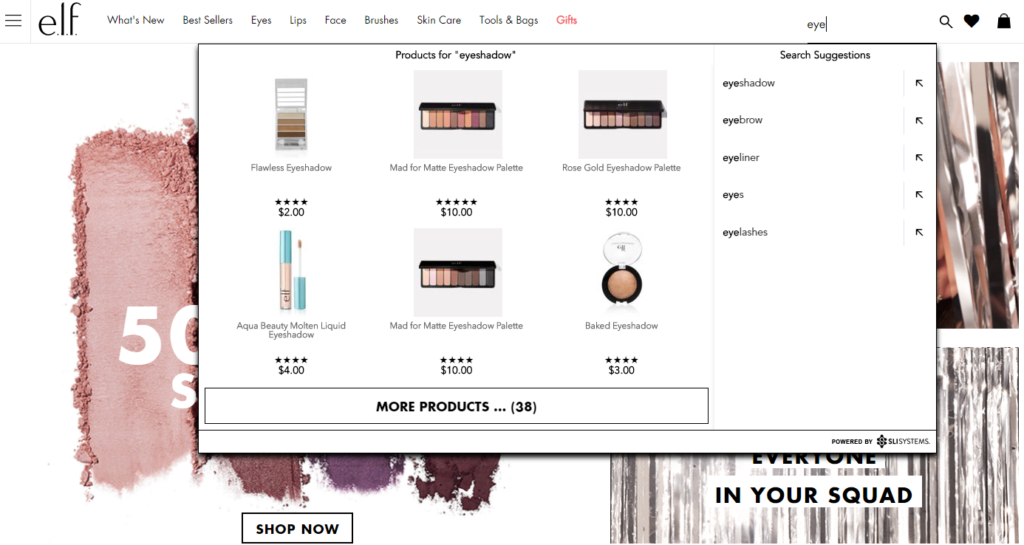
Visual Merchandising Autocomplete E-commerce Site Search - e.l.f. Screenshot

A great autocomplete example is e.l.f Cosmetics. They go beyond simply displaying matching text keywords as the searcher types. They display specific product results while adding visual merchandising with appealing product images.

You are more likely to convert these shoppers by showing a product, not a category. Again, less clicks and browsing is what you want.

That’s just the start. Lock in more sales from high-purchase intent shoppers with other tactics that use search data to improve merchandising.

Now let’s turn our attention to another customer segment, who likely make up the majority of your traffic.

Convert browsers into buyers

Some customers have an idea in mind but may not be ready to buy. In a brick-and-mortar retail analogy, these folks are the “No thanks. Just browsing” shoppers.

They may be “looky loos.” However, your merchandising can effectively nudge these visitors toward a purchase.

Classically online retailers attempt to attract these browsing shoppers by promoting categories or themed product groups like seasonal or clearance categories. However, this approach just keeps them clicking through your site and you hoping they stumble on something that sparks a sale.

And that’s one of the big reasons why many visitors leave an online store with an empty cart. The merchandising kept them in a browsing mindset, not a buying one.

Do not be afraid to promote specific products. Smart online merchandisers are now curating and promoting sets of individual products, not general categories, on their highest traffic pages.

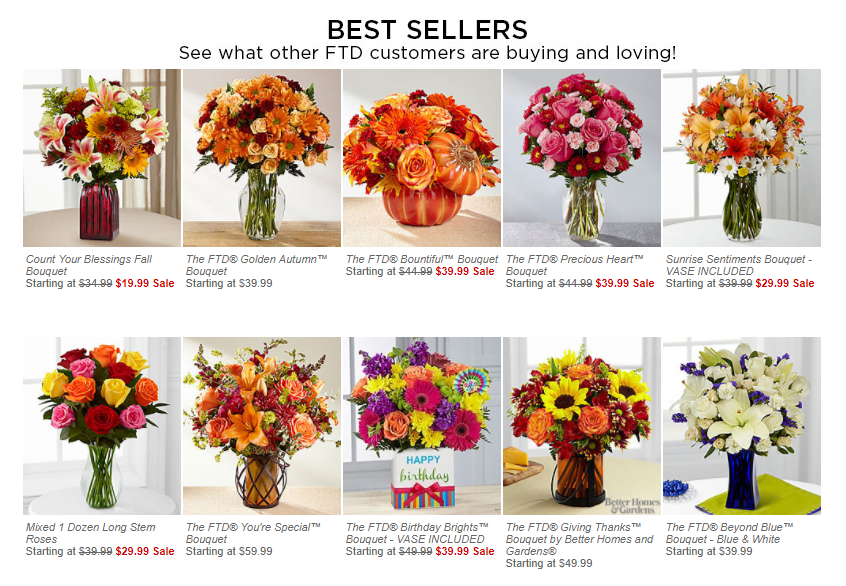
Product Recommendations Strategy - FTD Best Sellers Screenshot

FTD.com gives a big portion of their home page to promote their Best Seller products. What those product recommendations do is switch the shopper to an active “Oh. I need that too.” mindframe. And out of a passive “just looking” mode.

Tap into your massive SKU list to find the top sellers, new products arrivals, seasonal products, or specific sale items. Use your merchandising data analysis expertise.

Then continually test which products are getting the most clicks and conversions.

Simply promoting specific products can help increase the possibility of an impulse purchase, or more likely, can create a desire to come back to your site when they are ready to buy.

Now that you’re thinking from a customer perspective, let’s take your merchandising strategies to the next level. You can optimize the customer experience by where those visitors are on your site.

Merchandising Best Practices For E-commerce Websites

There is a flow to how people shop.

A brick-and-mortar retail store starts merchandising right up front as you walk in the door. Then throughout all the aisles, displays, and checkout counters. The whole store experience is intentionally designed to drive more sales.

An online customer experience also has its flow. Your e-commerce shopping journey can be designed to maximize sales too.

Every part on your site is a merchandising opportunity – the home page, navigation menus, category pages, product pages and your checkout pages.

Hundreds of online site search tips and navigation best practices have been published that can have a big impact on your sales.

Here are the top online merchandising tactics for your e-commerce website that are red hot right now.

Visual Merchandising on Product Pages

Let’s start where customers most often click “Add to Cart” – the product page.

Many elements of the product page help merchandisers showcase that that this is the right product at the right price – product title, descriptions, specs, purchase options, ratings, reviews, and, of course, pricing and discounts.

This information appeals to the rational part of your shopper’s brain.

The part that usually makes the ultimate buying decision is the emotional part of the human brain. That’s where online visual merchandising excels.

Ecommerce Visual Merchandising - Boden Product Page Screenshot

You also want to show off your products. Boden uses model videos, shows products from many angles, and switches custom images by color selection. These extra images give shoppers context when they can’t actually hold the item in their hands. You want them to easily envision what their experience will be after the purchase.

To help shoppers visualize, update product pictures instantly when they select different options like color and allow shoppers to zoom in to the smallest details.

Also, show action shots and product videos that depict how the product is used, what the buyer gets in the box, or how to install it.

Now augmented reality applications are being tested too. From arranging virtual furniture in a picture of your home to trying on different outfits in selfie mode on your smartphone, this next generation of visualization is an e-commerce merchandising innovation you will want to explore.

Personalized Product Recommendations

Product recommendations have long been a valuable online merchandising tool. You can tune your recommendations strategies using best practices for each different page on your site. Now recommendations technology is getting even smarter.

Smart product recommendations are personalized to the individual shopper in real-time. The products displayed adjust automatically based on user activity, preferences, and sales trends.

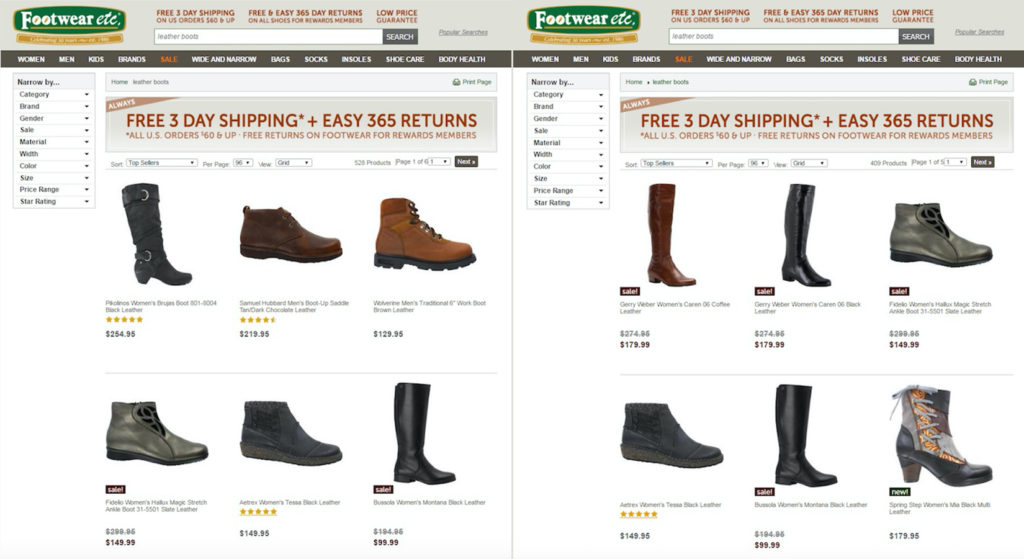
E-commerce Personalization - Footwear Etc Screenshot

Footwear etc. adds a level of personalization based on gender. Product recommendations, search results and category pages use the products or pages previously viewed by the shopper. If a shopper starts out browsing women’s sandals, then recommended product results would boost women’s shoes or accessories on subsequent pages. The screenshot above shows before and after results when a shopper searches for “leather boots”.

This type of contextual personalization can be tuned for many different facets, including gender, size, brand preference, or location.

Not only are these higher-converting recommendations displayed in real-time, but this personalization works for first-time visitors just as well as returning shoppers.

Complementary Sales in the Shopping Cart

You also want to extend those product recommendations to your shopping cart and checkout experience. Just like your grocery store places a rack of candy and magazines in the checkout line, online stores have a great opportunity to capture extra sales right at the point of purchase.

Only for online stores, this upsell merchandising strategy can be even more profitable.

Again, you can personalize the products you merchandise based on real-time data. You know what products they have added to their cart. You know the other products they have viewed.

And most importantly, you know what other products complement those items.

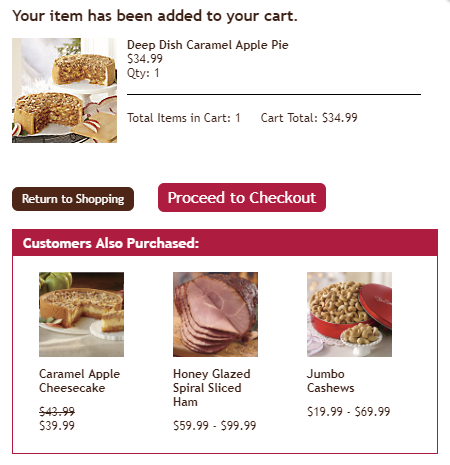
Online Merchandising Product Recommendations in Shopping Cart - Swiss Colony Screenshot

Swiss Colony promotes “Customers Also Purchased” at the beginning of their shopping cart experience.

Other popular recommendation strategies in the checkout experience are “You may also like” and “Complete the set.”

Just be careful to use complementary products. Do not necessarily use the exact same product recommendation logic as your product page. You don’t want to accidently promote an alternative to the product your customer has already decided to buy.

At best, that mistaken recommendation is ignored, meaning a wasted upsell opportunity. At worst, your customer stops and doesn’t complete their order because now they’re not sure if they’re buying what they really want.

So make sure that you are tuning the product recommendations in your shopping cart to complementary products that add to your sales, not disrupt them.

Now let’s use powerful data analytics and technology to deliver the best results without extra work.

Merchandise the Right Product to Win the Sale

You understand the customer. You know how to merchandise for each step of the online customer experience.

Now we can put it all together with great data and your product expertise to personalize the shopping experience… and get the sale.

Data Mining for E-commerce Merchandising

Your website analytics, your product systems, and your e-commerce platform transaction system combine to provide an astonishing array of data. That data can be mined and used to fuel your merchandising decisions.

You just need to look at what you have.

Data you know about your customer:

Your website analytics software offers useful demographic information about your customers and deep insights into what they are doing on your site.

Here are some of the most useful data types that can help your e-commerce merchandising strategy:

  • Traffic Channel: Where did your visitor come from?
  • History: Are they a first-time visitor or returning shopper?
  • Behavior: Where did they go on your site and what did they do there?
  • Gender: Are they female or male?
  • Age: How old are they?
  • Device: Are they on a mobile device, tablet or traditional computer?
  • Geography: Where in the world are they?

Now pair that up with what you know about transactions stored in your e-commerce platform.

E-commerce Platform Data:

Every past purchase provides information that helps you understand what customers are likely to buy in the future.

  • Product Sold: What product exactly is purchased?
  • Options: What sizes, colors, styles, and other product options are purchased?
  • Price: How much did it cost and what was the discount?
  • Order quantity: How many did customers buy per purchase?
  • Time/Date: When did the purchase occur?
  • Payment Method: How did they pay – credit card type, PayPal, on credit/layaway?
  • Shipping: How did the customer want this delivered?
  • Abandoned Carts: What products are selected but never actually purchased?

Best selling products should always be at the top of your merchandising list. But there is even more product data available to you. And that’s your merchandising experience.

Data from your experience:

Lastly, your own experience and intuition adds the special sauce to your merchandising data recipe.

  • Social trends:What’s hot right now with your customers?
  • Brand trends: What product brands can help pull in buyers?
  • Seasonality: What holiday or seasonality drives purchases?
  • Inventory: How much is in stock?

Compile all of this data, analyze it, and determine what products your customers are most likely to buy right now.

However, the challenge with the plethora of available data is… there’s so much data. It’s incredibly difficult and time consuming to effectively wrangle all the valuable data to merchandise to every single visitor on every single webpage for all your products.

That’s where new artificial intelligence technology helps.

Artificial Intelligence Fuels E-commerce Automation

Automating your data processing to power real-time merchandising decisions is quickly becoming a must-have for online retailers.

Fifty-four percent of e-commerce sites have already implemented or plan to add AI in the future, according research from the Q3 2017 E-commerce Performance Indicators and Confidence Report. And 20% expect to add AI within the next 12 months.

So what is the most popular applications for AI right now?

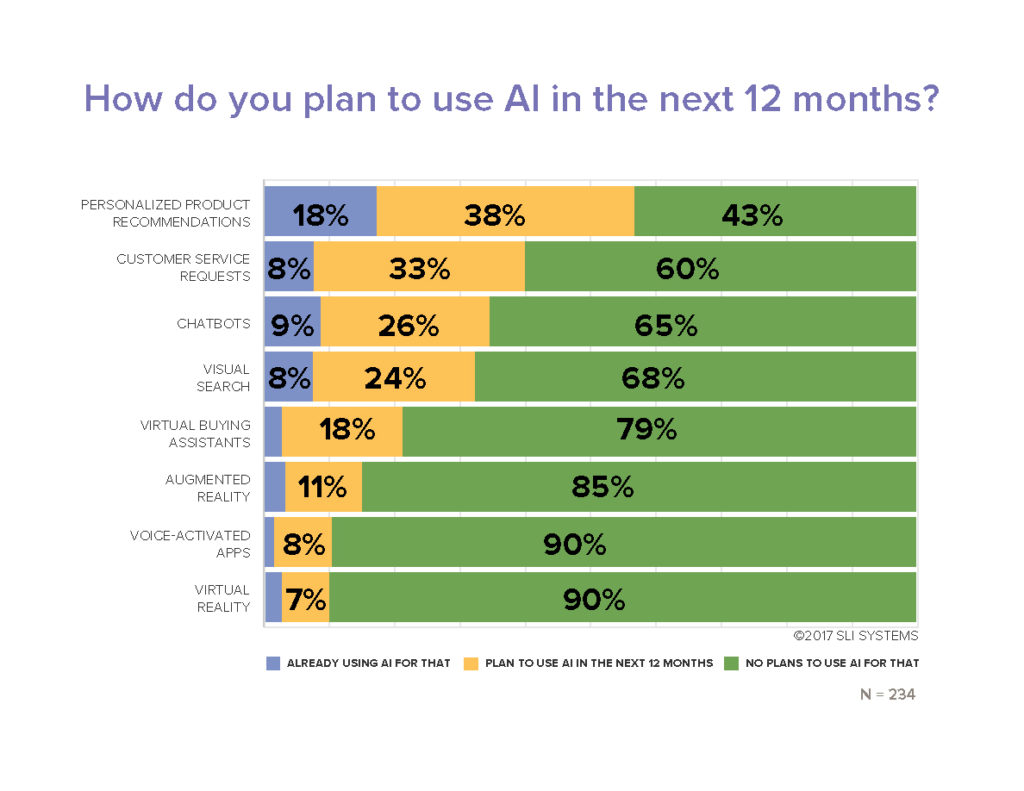
Not surprisingly, merchandising techniques are at the top. Personalized product recommendations is number one. Fifty-six percent of online retailers report that they are already using artificial intelligence in their product recommendations strategies (18%) or plan to implement within the next 12 months (38%).

Other merchandising solutions and visual merchandising technologies are also being accelerated thanks to AI. Virtual buying assistants, chatbots, visual search, augmented reality (AR), and virtual reality (VR) are all designed to help shoppers purchase the right product fast.

Ecommerce Artificial Intelligence Applications Research Chart - EPIC Report Q3 2017

More automation definitely helps maximize results in less time. And in new ways.

But is artificial intelligence going to take your merchandising job away? Absolutely not.

You won’t hand over the keys entirely to your automation systems. You need to maintain a mix of merchandising techniques and always be testing to get the maximum results.

Testing Your Merchandising Strategy Mix

“Always be testing” is more than just a matra. It’s a requirement to truly maximizing your conversion rates and your total online sales.

Most every online retailer tests performance of different on-page merchandising elements. That helps determine your optimal page design. For example, a simple A/B test of your search box location can pay off big by converting high purchase-intent shoppers.

Or determine how many products should be displayed in your product recommendations. Pro tip: SLI Systems’ merchandising best practices show that 4 or 5 products are ideal. And that scrolling carousel presentation of more products doesn’t generate significantly more incremental sales.

Another high-impact test determines the best rules for your site search and product recommendation results. Keyword matching algorithms alone likely do not give your shoppers the most relevant product results, which lowers your conversion rates.

Merchandising-savvy online retailers use a prioritized mix of multiple rules to drive the most sales. They combine artificial intelligence results with pre-defined tuning rules, product and category keyword matching, and sales leader products to generate the maximum online revenues.

More E-commerce Merchandising Tips

The key to your online merchandising success is to figure out what each visitor is most likely to buy.

It’s not easy. But you can drive many more sales leveraging a deep understanding of your customers, the latest technology, and the leading edge online merchandising strategies.

We’ve shared the newest merchandising techniques here. And you have many more proven strategies and tactics available to you. Make sure to grab the hundreds of site search best practices, e-commerce navigation tips, and watch what leading retail brands are doing in these online merchandising webinars.

5 Steps to Creating an Excellent E-commerce User Experience

Posted by Kim Presser, Director of SalesJuly 25, 2017Customer Experience, User Experience

e-commerce_platform

Creating an excellent e-commerce user experience can seem daunting, but it doesn’t have to be. In this article we’ll outline an evaluation and review process that highlights some of the most important and effective ways to create a unique user experience.

These five tips will push you to rethink your site design and navigation with a focus on efficiency and user experience, while also prioritizing merchandising efforts, speed, and customer outreach and support. The end result will be a user experience that places the customer at the center of every aspect of your e-commerce platform. Creating a customized, unique and seamless shopping experience will set you apart from your competition.

Evaluate your site design with fresh eyes

The first step to an excellent user experience is to look at your site through the eyes of your customers. Complete a thorough “walk through” of your site exactly as your customers would. Enter your site, search for products, add them to the cart and complete a transaction.

While doing this, take notes at each stage. You want to create the most seamless and aesthetic design possible.  Once you’re done, have others do the same thing.  Get their feedback on what they did and didn’t like. Customers want a clean, well-designed site that naturally flows throughout the shopping experience. Your design should be clean and uncluttered, and highlight rather than distract from the products.

Streamline navigation

An intuitive and streamlined navigation system is one of the most important aspects of an excellent user experience. Your site navigation should be accessible during all points of the shopping process. Your search engine should be fast and responsive. It should also incorporate autocomplete and accurate product recommendations.

Verify that your product refinements work and makes sense. Your goal is for your customers to successfully complete a transaction with the fewest amount of clicks.

Place value on merchandising

Work with your merchandising team to ensure your product splash pages are unique, engaging and dynamic. Merchandising is often overlooked when tuning your user experience. Make sure your product pages are uncluttered and highlight the key features of your products, while also allowing customers to view product features in greater detail.

Product pages should be aesthetically appealing and intuitively designed. Properly merchandising your products is a critical factor in creating a curated customer experience that feels unique.

Check your speed

Stress test your site to make sure it loads quickly and feels responsive. Speed is king in e-commerce and has a direct impact on sales. Your site should load quickly on different devices and connection types.

This means you’ll need to thoroughly test on desktop, tablet and mobile devices from wired, wireless, and 3G/4G connections. Slow loading speeds or “failure to load” page warnings, particularly on wireless or cellular connections, are a strong indicator that you need to redesign the backbone of your data delivery system. Work toward a fast, seamless shopping experience on as many devices as possible.

Integrate customer outreach during and after checkout

Customer outreach is an excellent way to create a unique shopping experience in which the customer feels prioritized and valued. Outreach should take a number of different forms, including the option to chat with staff on your site, a follow-up email after a transaction and social media outreach.

E-commerce customers today want multiple ways to contact customer service. Meeting this desire is relatively easy, but requires an engaged customer service team with the tools to do the job. Empower your customer service team to be proactive in addressing customers’ questions and complaints. Lastly, incorporate customer feedback into design changes, product descriptions and business practices. This tells your customers you care and value their feedback.

Announcing SLI ESP: Take Mind Reading to the Next Level

Posted by Chris Brubaker, Chief Marketing OfficerOctober 18, 2016Personalization, Success Stories, Uncategorized, User Experience1 comment

There’s no contest: 2017 will be “The Year of Personalization,” and now we have some direct insight to back up this claim. A recent survey distributed to all retailers attending SLI Connect NYC revealed all but one retailer at the show chose “personalization and relevance” as the top trend impacting e-commerce in the next year. What’s more, when asked about 2017 business priorities, all but one retailer chose “personalizing content and recommendations for the customer.” It’s time to make advances in personalization a priority.

Enter SLI ESP

In supporting more than 17.5 billion search queries this year (a 12% lift over last year), SLI has a wealth of insight into delivering a personalized experience for shoppers around the globe. The new SLI ESP instantly and dynamically personalizes the shopping experience – for both first-time visitors and loyal customers – providing results that match shoppers’ needs in real time.

Powered by the patented SLI Buyer Engine, SLI ESP adds contextual personalization to the industry-leading relevancy SLI is known for. We understand the same search term means different things for different people, which is why SLI ESP delivers different results to each shopper in real time. By continuously learning from user behavior and accurately predicting which products to present shoppers through their buying journey, SLI ESP acts as a personal shopper for your visitors, shortening the path to purchase, delighting customers and increasing revenues.

When personalized by gender, SLI ESP beta customer Footwear etc. saw a 10% increase in revenue per visitor to personalized search and navigation pages. They also saw a 5% increase in conversion rate and average order value (AOV).

footwear-before-after

The image on the left shows highly relevant results for “leather boots” based on SLI Learning Search. The image on the right shows how SLI ESP personalizes the results for “leather boots” in real-time based on the customer’s preference for women’s shoes.

Redefine Personalization as Relevance

Shop.org Summit Chief Artemis Berry sums it up well: “There’s not much better than a friend who ‘gets’ you. An e-commerce retailer that does can be a close second. You know the type: Anticipating your needs. Knowing your style. Giving you what you want, before you even know what it is (Medium article).

Berry wisely reminds retailers that while the task may seem daunting, it doesn’t have to be. Her suggestion? Redefine “personalization” as “relevance.”

This concept is more powerful than you might think. Rather than being overwhelmed by the personalization hype, it means you can start making it a reality right NOW.

Talbots executive Rob Schmults says, “If the value of personalization is achieved by relevance, that means personalization is a range rather than an absolute. So rather that being some binary state where either you are or you aren’t, we quickly got to a place where movement across a range was how you made progress… Personalization is not out of reach (NRF Think Tank).”

At SLI, we could not agree more. Not all shoppers are the same and neither are personalization solutions. It is time to delight your customers and keep them returning with the shopping experience that’s as unique as they are.

EASY – A Deciding Factor for E-commerce Technology

Posted by Dawn MortensenJanuary 28, 2016eCommerce, Navigation, Site Search

Easy to use technology for E-commerceEasy is a critical feature for today’s technology solutions – easy-to-implement, easy-to-use, easy-to-measure and easy-to-update. Of course solutions need to be effective and results are the number one point of comparison. But if you’re in the position of choosing technology and you’ve narrowed your options to those with proven results, you’re likely to choose the one that will make it easier for you or your team to achieve the results you want.

After all, there’s only so much you alone can do – you need technology that expands your abilities, rather than giving you one more thing that requires your expertise.

This is how Michael Schuler of the Minneapolis-based Schuler Shoes felt about the company’s website. A year ago, he was the only one who could customize merchandising banners and SEO since it required going into the code to make modifications. He knew this process wasn’t sustainable as the business expanded its product catalog. He needed a merchandising solution that was straightforward enough for anyone on his team to use – he needed it to be easy for his employees to edit promotions and optimize SEO.

Michael Schuler also needed a site search and navigation solution that would provide a consistent product-finding experience for shoppers. He wanted to make it easy for shoppers to find and buy what they were looking for.

At the same time, Schuler was moving the business to a new e-commerce platform and he needed a hosted site search and navigation provider that would easily integrate with the latest version of Magento.

Of course Schuler wanted the solution to work well – choosing a vendor with a solid history, reliable infrastructure and clear, proven results was a given. But easy was a key theme in his search for the right vendor. In the end, he chose SLI Systems as the best fit to achieve his goals. As stated in a case study on Schuler Shoes:

“We chose SLI because it fits well with Magento and offers the features we needed. SLI Learning Search Connect easily plugged into our Magento platform, quickly improving the shopping experience and simplifying merchandising and promotions,” said Schuler.

In fact, yesterday SLI Systems announced it’s the first and only Magento Gold Partner to offer a site search extension for Magento 2.0. Our commitment to “easy” meant that we wanted to have our plugin for Magento 2.0 ready as soon as our customers needed it.

Schuler also achieved his goals of making it easier for his team to manage merchandising and SEO, along with making it easier for shoppers to find the products they wanted.

“With SLI site search, navigation and refinements, we have seen 20% fewer bounces and a 7.5% increase in the time visitors spend on the site, indicating the solutions are helping customers in the ‘pre-shop’ phase before they buy from us in-store or online,” Schuler said.

If you’re in the position of choosing a new technology vendor, look for easy – easy-to-implement, easy-to-use, easy-to-measure and easy-to-update. Add easy-to-show results to this list (as we’ve done with our latest SLI Dashboard), and you’ll be set. Michael Schuler found a solution that was all this, plus provided better results than his previous solution. For him, it was an easy choice.

A New Look at the Shopper Journey – Introducing the SLI Dashboard

Posted by Rachel UpsonJanuary 21, 2016dashboard, Merchandising, Reporting and Analytics, User Experience

devices_dashboard“Big data” is all the buzz. It’s a challenge to merchants and data providers alike. Complex calculations on large volumes of data can be fascinating to a programmer. But these aren’t just numbers – they represent real-life actions of people on a website. If we aren’t careful, our calculations can outsmart the spirit of these actions, resulting in meaningless (or at least misguided) data for merchandisers.

Recently we undertook a project to create a new dashboard for the SLI Merchandising and Reporting Console. With more than 100 metrics already available in our console, it would have been easy to present some of these and call it a day.

But we decided it was time for a fresh start. We talked to our customers about what was most important to them. Then we went further – all the way back to the basics. We examined our underlying calculations to ensure the way we tracked data considered customers on their shopping journey and not just purchases.

Many existing reporting systems, including our own, count events like transactions and compare them to other events like page or session counts. But tracking events in isolation doesn’t always reflect how shoppers behave. Consider a shopper who starts browsing in the early evening, breaks for dinner and returns to make a purchase after putting the kids to bed or the shopper who has a late-night browsing habit and completes her purchase after midnight. Many analytics simplify and examine activity based on a set time period. As a result, each of the previous examples would likely be considered as two sessions – one that failed to convert and one that succeeded – when in actuality each was a single shopper.

A session-focused versus shopper-focused model can cause e-commerce sites to worry needlessly about conversion rates when in actuality the trouble is with how their analytics views the data.

Another example of analytics skewing reality is when a customer completes a transaction and then realizes he forgot something and makes a second purchase. Should one customer be treated as two just because he completed a second transaction? When considering conversions, is a shopper who transacts twice buying one item each time really more valuable than the shopper buying two items in a single transaction? We don’t think so.

The new SLI Dashboard now includes shopper-focused attribution. As a result, SLI looks at all of a shopper’s activity in the 24 hours leading up to a transaction, regardless of when it occurred. A site visitor with activity before midnight that continues into the next day is counted once, and multiple conversions from a single customer are treated as one successful conversion.

Conversion rate and average order value are critical measures of your e-commerce site. You need them to be an accurate representation of how many people successfully found what they were looking for, how many items people bought and how much they spent. The new SLI Dashboard provides a real-life view of how your customers are interacting with your site. In a world of numbers and calculations, let’s remember our customers are people too.

Navigate Mobile Shoppers Toward Sales

Posted by Christina StublerNovember 5, 2015eCommerce, Mobile/Tablets, Navigation

NEW hands-coffee-smartphone-technologyMore than half of all time spent shopping online is done via smartphones and tablets, propelling mobile commerce to grow three times faster than overall e-commerce. In addition to site search, site navigation is one of the most important aspects of the mobile experience.

Here are some tips to help make sure your site navigation is ready for the mobile-and-tablet holiday rush.


Mobile Navigation

The limited space on smartphones and tablets magnifies the importance of intuitive navigation.

To best orient users and guide them through a mobile site (without cluttering the screen), use a simple design. Here are some main best practices:

  • Use drop-down menus with buttons or simple text so you can offer as many drill-down levels as needed while freeing up valuable real estate.
  • Use subpages to expand using familiar icons such as +, – and >. This allows shoppers to easily navigate through categories to exactly the products they are looking for.
  • Give category pages a look and feel similar to search results pages. This gives users a consistent experience across search and navigation.
  • Include a thumbnail image, product title, brief description, price and additional information such as ratings and discounts.

Include Refinements

Just as on your desktop site, refinements make navigation easier for mobile visitors. Since mobile devices have a lot less space for navigation, using a drop-down menu can be a good design choice. Presenting refinements this way saves screen space by hiding them when they are not in use. This helps reduce visual clutter on the mobile site and allows visitors to view more products and content without needing to scroll down.

Offer Infinite Scrolling

You may find that shoppers spend more time on your mobile site if you provide infinite scrolling.

Instead of requiring shoppers to click to the next page, infinite scrolling automatically loads more search results as the user nears the bottom of the page.

Make Links and Buttons Touch-friendly

When designing for touch-enabled devices, keep in mind the size of the human finger and thumb. The touch target for an index finger is 57 pixels and for a thumb it is 72 pixels. Making touch targets smaller than that can lead to user frustration and incorrect clicks. Moreover, don’t require users to pinch and zoom in order to navigate pages as these actions also lead to a negative user experience.

Direct Mobile Users to Mobile Pages

If you have a separate mobile site with a different URL, make sure to automatically send your mobile users to the correct site. You also need to direct search engines to this alternate site in order for your mobile pages to rank well in mobile search results. If you’re using responsive design, this shouldn’t be an issue.

Don’t Assume Desktop Features Will Work on Mobile Devices

A common mistake in mobile development is attempting to port desktop features directly to a mobile device. With a touch-enabled device, the user is not navigating the page with a mouse cursor so functions like hover don’t translate into a positive customer experience. At best, the user will attempt to click the item multiple times to activate the link; at worst, the user will be unable to click through at all and may abandon the site in frustration. Instead, optimize your development for the unique features and uses of each device type. Smartphone users and tablet users may use your site differently so consider both types of users.

For more tips on how to improve your site navigation, download our Big Book of Navigation Tips.


The Next Innovation in E-commerce: Enhanced Rich Auto Complete

Posted by Tanmay BholaOctober 5, 2015eCommerce, Rich Auto Complete, Site Search

racThe world of e-commerce is constantly evolving. When site search was first introduced, the functionality was clumsy at best and completely frustrating at worst. Shoppers typed their entire search query before seeing if the site had what they were looking for. This involved a lot of guesswork and often led to no results or irrelevant results – even when the site had the product shoppers wanted.

In 2008, SLI Systems launched Auto Complete. As soon as users started typing their search query, a search box dropdown instantly displayed search suggestions. In 2011, we were the first site search provider to add images and product suggestions to this experience, which gave birth to SLI Rich Auto CompleteTM and allowed shoppers to find relevant products faster. Each improvement to our Auto Complete experience has increased conversions and customer engagement.

The E-commerce Evolution Continues

Today, we are excited to announce industry-leading enhancements to Rich Auto CompleteTM. Our new Rich Auto Complete experience has been designed from the ground up to speed the path to purchase and engage shoppers on any size device.

After considering a number of usability factors, best practices and client requests, we redesigned the entire experience to increase e-commerce sales, enhance product discovery and reduce the risk of returning “no results.”

RAC Blog ShotGreat for Shoppers

Our latest version of Rich Auto Complete provides better guidance to shoppers as soon as they engage with the search box. We added the ability to show search suggestions based on category, brand or department, which lets shoppers jump to the right section of results. For example, a search for jeans at a large department store might show options for jeans in Women, jeans in Men and jeans in Kids.

Our new dynamic content feature allows users to preview products of interest right within the Auto Complete box. We do this by updating products displayed when users hover over search suggestions, which gives them more choices and increases engagement.

In addition, the new Rich Auto Complete helps you capture more sales from your small-screen shoppers. We’ve created dedicated mobile and tablet designs that automatically display options correctly regardless of device size and orientation. As a result, shoppers can type less and buy more.

mobile_racPowerful for Retailers

Rich Auto Complete uses patented SLI Learning Search® technology to continuously re-rank product suggestions based on user activity. This allows you to showcase the most relevant products to your shoppers, and you can tune the results to control the order in which products appear.

SLI Systems has always customized the look and feel of our solutions to match your e-commerce site. Our new Rich Auto Complete now includes a variety of design options so that you can choose an experience that fits your brand and delights your shoppers.

Our SaaS platform allows your site to evolve alongside our e-commerce solutions. Existing Rich Auto Complete customers will enjoy these new features at no additional cost. New customers can look forward to combining the power of Learning Search® with industry-leading Rich Auto Complete to create a premium search experience

Learn more about accelerating your e-commerce by reading our Rich Auto Complete product brief.

Infographic: 6 Mobile Merchandising Tips for the Holidays

Posted by Dawn MortensenSeptember 16, 2015eCommerce, Infographic, Merchandising, Mobile, Mobile/Tablets, Press, Site Search Tips

mobile merchandising tips holiday 2015


This latest infographic by SLI Systems was also published in Multichannel Merchant on September 10.

Load More

Stay up to date with SLI

Featured Posts

  • Maximize Revenue with Enhanced Product Impact Testing
  • Top Five Ways to Prepare for Peak Season
  • Facets, Facets, Who’s Got the Facets?
  • Personalization: It’s Kind of a Big Deal
  • M is the New E: Mobile Commerce Trends and Predictions

Categories

About SLI Systems

  • What We Do
  • Who We Are
  • Why SLI

Learn

  • Webinars
  • News Room
  • Events

Connect

© Copyright SLI Systems, 2018. All Rights Reserved | US: (866) 240-2812 | Legal