
SLI home
User login

A BLOG FOR E-COMMERCE LEADERS

  • Blog
  • Resources
  • Webinars
  • Customer Experience Scorecard

SLI Blog

Pain-Free Testing Optimizes Search and Navigation

Posted by Shaun RyanMarch 17, 2010Newsletter, Site Search, Testing

If you’ve invested time and energy in an effective, relevant results-oriented site search solution, you’ve probably seen an impact on your web site – higher conversions for people who use the search box, perhaps even a larger average order size for people who search. But have you wondered if your site search is delivering all that it can to your bottom line, and if it could be further improved to generate even greater results?

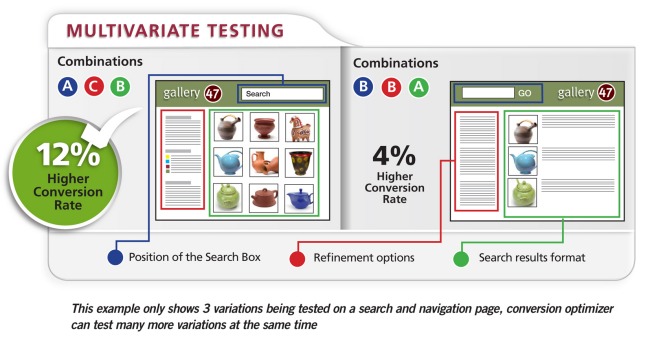
A smart way of optimizing the value you get from your search and navigation is to conduct  testing to objectively decide which design options to use. However, our customers often admit that they don’t test as much as they should because it’s difficult and time-consuming to set up and run tests, and it’s also difficult to decide what they should be testing.

In the absence of testing, many website operators will resort to industry best practices. However, these best practices don’t always make sense for your business – whether for site search or another area of online marketing, as was recently pointed out in a MarketingProfs article about breaking the rules of email marketing.

To solve this problem for our customers, we’ve introduced the Conversion Optimizer, a service for conducting testing. Essentially, we’ve taken all the hard work out of performing tests – you work with your SLI Customer Success Manager to establish the tests, and then you control and watch the tests being performed in real time, via your SLI Merchandising and Administration Console. (You can even stop the test if the results are poor.) And most important, you get results right away, and you can share them with your colleagues.

At SLI, we’re big fans of this testing. It’s the only way to truly understand how variations in your search and navigation features – such as changing the position of the site search box, using a grid view instead of a list view, or tweaking your ranking algorithm – can improve your business. However, thorough testing takes a lot of time and effort, and if it’s not done right, results can be ambiguous or misleading.

We’re making the beta version of Conversion Optimizer tool available to select customers – if you’d like to try it out, contact your Customer Success Manager. And tell us what you think of the new tool. We’d love to hear about the positive changes you’ve made to your site based on test results.
MVTdiagram
Read More

How to Merchandise Your Site Search Results

Posted by geoffbMarch 16, 2010eCommerce, Site Search, Site Search Tips

When people search your site, it’s not enough to just provide a page of results – no matter how relevant the results are (although admittedly, relevance in results does count for a lot). Customers often need added incentive to click a result and make a purchase, and merchandising your site search results pages is a great way to do just that.

Below are a few tips on “Merchandising” taken from our “Big Book of Site Search Tips” which we’ve been discussing the past few weeks. This is a very small sample from a collection of nearly 80 tips – all of which are compiled in a free, downloadable white paper. If you want to see the whole batch of tips, just click here.

And now for this week’s tips…

  • Do create banners relating to specific keywords — Make it obvious to the visitor that they’ve arrived at a search results page displaying the correct product category. When customers search for a brand name or product that you may have a special sale on, you can include a keyword-driven banner at the top of the search results page to highlight that promotion. For example, someone searching for “Merrell” on a shoe retailer site might see a banner on the search results page that says “Free shipping on U.S. orders over $60.” When they click on the banner, they are taken to the site page for that offer.
Banners
  • Use banners to promote free shipping, or shipping discounts — Site visitors are focused on buying once they’ve searched for a particular product. By placing shipping offers within banners on search results page, you provide an additional incentive for shoppers to complete a purchase.
  • Use synonyms to offer more results — For instance, if a site visitor searches for iPods, and your site offers other MP3 players, connect these and other similar items so that they appear together in search results. This provides shoppers with more alternatives, encouraging them to browse similar products.

Download the Big Book of Site Search Tips

Read More

More on Site Search Reporting

Posted by geoffbMarch 8, 2010Site Search, Site Search Tips

Site search and site search reporting are critical parts of your online business success. If you’re not doing so already, you should review your site search reports regularly to make sure your visitors are finding what they seek – AND that you’re using the language of your customers on your site. Did you also know your site search reports offer other useful information as well? Here are a couple tips from our Big Book of Site Search Tips with valuable ways you can use your site search reports to see more ROI from your on-site search solution.

  • Review site search terms for SEO and PPC campaigns – This is a great source for keyword research because it shows the language your visitors are using – and chances are, if they’re using it on your site, they’re also using it on the web.
  • Review your site search quality metrics to ensure your site search relevancy is improving over time – A good site search solution “learns” by tracking visitors’ aggregate search queries and click-throughs to deliver results based on criteria such as popularity. This means that, over time, searchers on your site are presented with the most relevant search results and can find what they’re looking for more quickly and easily. Improved searches result in more satisfied customers and greater sales.

Download the Big Book of Site Search Tips

Read More

Relevance and Reporting

Posted by geoffbMarch 1, 2010eCommerce, Site Search, Site Search Tips

This week we’re offering a couple tips on how to improve relevance of your site search, and also how to leverage data in your site search reports to make improvements. Our own research shows that if people can’t find what they’re looking for on your site within the first few minutes, they’re likely to leave and possibly never return. In other words, if results aren’t relevant – and relevance can alter depending on who’s doing the searching – then your site search hasn’t done its job. Reporting can help you in this area as well.

  • Don’t place search results in alphabetical order – While this might offer a logical way for site visitors to scan results, alphabetical ordering usually has no relation to the relevance of the results. Sometimes it makes sense to offer this as a sort option.
  • Use “landing pages” when visitors type in specific product numbers, or when there is only one result for the search term – For instance, if a customer types in an SKU or product number, they should be taken directly to the page for that product. Another example: If a customer searches for “returns” you may want to take them straight to the page that describes your returns policy. This streamlines the searching process for customers who know exactly what they are looking for.
  • Review your site search quality metrics to ensure your site search relevancy is improving over time – A good site search solution “learns” by tracking visitors’ aggregate search queries and click-throughs to deliver results based on criteria such as popularity. This means that, over time, searchers on your site are presented with the most relevant search results and can find what they’re looking for more quickly and easily. Improved searches result in more satisfied customers and greater sales.


Download the Big Book of Site Search Tips

Read More

Lets Talk Refinements

Posted by geoffbFebruary 23, 2010eCommerce, Refinements, Site Search, Site Search Tips1 comment

This week’s tips – taken from nearly 80 tips in our “The Big Book of Site Search Tips” – focus on refinements in site search. Refinements refer to the filters or categories you create that allow site visitors to narrow the results of a search, so they only see products that fit certain criteria (e.g. price range, 4-star reviews, gender-specific, etc.). Here are some tips to consider when using refinements in your site search (these can also apply to navigational refinements):

  • Don’t show too many refinement options when displaying them as links – Instead, show the most popular and have a “more” option to see the rest. Providing too many refinement options can be distracting. If the site visitor is interested, a “more” option will make it quick and easy to drill down into your site while maintaining the real estate to promote other items.


  • Test the placement of refinements – Businesses provide refinements in different places on their sites, often at the top of pages or in the left navigation pane. The bottom of the page is probably not the best position for refinement options, since visitors have to scroll down the page to view them. Any of these options may work for you and your site visitors, but it is important to test different positions.
 Test the placement of refinements
  • Allow people to navigate between refinements on the same level – In other words, if a visitor clicks on a refinement but then decides they want to see a different refinement, don’t make them click “back” to get to the original search results page first. They should be able to simply click a different refinement option from that page and easily see a new batch of results.

Download the Big Book of Site Search Tips

Read More

The Big Book: Chock Full of Site Search Tips!

Posted by Shaun RyanFebruary 17, 2010Newsletter, Site Search

Download the Big Book of Site Search Tips

Improving the look and feel—and usability—of your site’s search feature usually requires more than one change. Many small changes and enhancements can add up to a major impact on site search, speeding up the search process for site visitors and boosting the likelihood that they’ll make a purchase or find the information they seek. Evidence shows that search has become the key method for navigating through websites, and there’s never been a better time to make small but crucial changes.

To help you in these efforts, we’ve just released a new whitepaper called the “Big Book of Site Search Tips,” available now for free download on our website. We’ve collected nearly 80 tips for making your site search more effective and easy to use. The good news is that many of the tips don’t require large changes to your site – small changes can make a big difference!

For instance, place the search box “above the fold,” high on the webpage, to make sure that site visitors don’t miss it. You can also add a search box to every page of your site, improving the chances that visitors use the search feature. Other tips advise highlighting sale or promotional items within search results, and also indicating whether products are in stock or out of stock on search results pages.

Let us know what you think of these tips, and what results you’ve achieved if you put any tips into practice. If you’d like to suggest any tips for the next edition of the “Big Book,” send them along to newsletter@sli-systems.com or post a comment on our blog, where we’ll reveal a couple of tips each week over the next few months.

Download the Big Book of Site Search Tips

Download the Big Book of Site Search Tips

Read More

Some Tips about Page Lay-out

Posted by geoffbFebruary 16, 2010eCommerce, Site Search, Site Search Tips

Today we’ll share a few more tips from our new white paper “The Big Book of Site Search Tips” (available for free download). As we mentioned last week, the full paper includes nearly 80 tips and suggestions for ways to make small improvements to your web site search to see big results. Here are a few tips related to page lay-out and format we hope you’ll find helpful:

  • Have clear and specific product and content titles in the search results – Titles should be accurate and descriptive about the content your visitors will see when they click on the results. If titles are not accurate, your visitors may not click on a result that is otherwise relevant, or they may click on it only to find that it didn’t contain what they were looking for. If this happens too often, they’re likely to abandon the search, as well as your site.


  • Have consistent image sizes – Search results will look cleaner, and be more readable and easy to scan if the text is not disrupted by images of different sizes. If search results are shown in a grid view, consistently sized images will produce a regular pattern and a better looking page.


ConsistentSizedImage
  • Show the total number of results so visitors know how many are available – This helps them determine how far into the results they want to click. Additionally, if the search term yields a large number of results it may signal to them that they need to narrow their search – or click a refinement option.


  • Have a mobile version of your search results – The mobile version of Amazon.com is not much more than a search page. The number of people accessing the web via mobile devices is growing. On the small window of a mobile device you don’t have room to offer the navigational and promotional options that you have on your normal site. A mobile search is a vital part of any mobile site and will have fewer refinements, sorting and viewing options. In this case, it’s extremely important to offer highly relevant results.


Download the Big Book of Site Search Tips

Read More

Innovative use of social media

Posted by Shaun RyanFebruary 15, 2010eCommerce

Coastal contacts

We recently posted an interview with Braden Hoeppneer from Coastal Contacts. One of the coolest things I found out from Braden is way they’re using social media to sell glasses (a relatively new product line for them). They have a virtual mirror application that lets you up upload a photo and see what the glasses will look like on you. You can then share the images and get feedback from your friends on the glasses. In some ways this is actually an improvement to the in-store shopping experience because you can get input from friends who aren’t shopping with you. Additionally, each time someone shares the virtual mirror images it acts as an ad for coastal contacts, drawing more people to the site. Very cool! Braden shares plenty of other experiences in the interview. I’m sure you’ll find it interesting.

Read More

A Few Basic Tips to Get us Started

Posted by geoffbFebruary 10, 2010eCommerce, Site Search, Site Search Tips

As mentioned in our earlier post, we’re starting a new series of tips here on our blog for improving your site search, as part of our new whitepaper “The Big Book of Site Search Tips” that’s now available. Here is the first batch of tips for you to consider. We’ll be back with another batch of tips next Tuesday…

  • Offer a search box, not a search link – Search boxes are easier to find and use. They make it easier for people to search with fewer clicks. The search box has become iconic, thanks to the popularity of Google, so the presence of a box telegraphs the availability of search easily and quickly.
BFD_SearchBox
  • Make sure your search box is large enough to contain long search phrases – Design the size of your search box to meet the needs of your site visitors. For instance, if visitors on your site use long keywords to search, make sure the box can display the entire term so they can easily see what they typed. Short or small search boxes make it hard to read a long search term, which will increase the likelihood that site visitors will spell it incorrectly.
  • Test different positions for the search box, and note which positions generate the most search traffic – SLI Systems customer Black Forest Décor took this approach, moving its search box from the right-hand upper corner of its site to the center. The online home décor retailer made other changes at the same time, including increasing the size of the search box. The company found that site search revenue per customer increased 84% and the conversion rate increased 34%.


Download the Big Book of Site Search Tips here.

Read More

Site Search Tips: Improve the Way People Find What They Seek on Your Site

Posted by geoffbFebruary 9, 2010eCommerce, Site Search, Site Search Tips1 comment

Today we’re kicking off a new series of blog posts with tips for improving your on-site search. The series is part of a new SLI Systems whitepaper called the “Big Book of Site Search Tips”. The whitepaper contains nearly 80 tips for how companies can improve the look and feel and the relevance of search results pages; as well as how to use search for merchandising and how to get the most out of site search data.

It’s no secret that site search is an ever-more critical part of the online customer experience, and our new paper – and forthcoming series of blog posts – are intended to help companies take care of fairly simple aspects of the search function on their sites to make sure customers find what they’re looking for quickly and easily. The tips will also provide guidance on how to drive more people to use the search box to browse your company’s web site, as research shows that people who use site search convert at 2-3 times the rate of those who don’t.

A 2009 report by Forrester Research for Shop.org shows that retailers rank “improving site search results pages” as the third most important area of focus in 2010;, the report also says 71% of retailers surveyed will make site search/browse results a priority in the months ahead. We want to help retailers (and other content-rich sites) as they take a closer look at their own site search and give them ideas for simple things they can do that can have a tremendous impact – things like making sure the search box appears on every page of a web site, and ensuring that the search box is prominently placed where visitors can easily find it – e.g., not next to another similar looking box, which might be used for newsletter sign-ups.

We’ll get into more tips here on our blog (see our next post), and every Tuesday for the next several weeks we’ll present more tips from the whitepaper. We’re also creating a #SiteSearchTues hashtag on Twitter which we’ll use to post the tips – so feel free to use the same hashtag as you provide feedback or post tips of your own.

The “Big Book of Site Search Tips” is now available for FREE download (registration required) from our web site. We look forward to sharing the tips with you, and hope to hear from you about what’s helped you improve your own site search.

Download the Big Book of Site Search Tips

Download the Big Book of Site Search Tips

Read More

Posts pagination

< 1 … 39 40 41 42 43 44 45 … 64 >

Stay up to date with SLI

Featured Posts

  • Maximize Revenue with Enhanced Product Impact Testing
  • Top Five Ways to Prepare for Peak Season
  • Facets, Facets, Who’s Got the Facets?
  • Personalization: It’s Kind of a Big Deal
  • M is the New E: Mobile Commerce Trends and Predictions

Categories

About SLI Systems

  • What We Do
  • Who We Are
  • Why SLI

Learn

  • Webinars
  • News Room
  • Events

Connect

© Copyright SLI Systems, 2018. All Rights Reserved | US: (866) 240-2812 | Legal