SLI home
User login

A BLOG FOR E-COMMERCE LEADERS

  • Blog
  • Resources
  • Webinars
  • Customer Experience Scorecard

SLI Blog

Posts in Refinements Category

E-commerce Merchandising: The Ultimate Guide to the Newest Techniques

Posted by Bob AngusNovember 16, 2017Analytics, Artificial Intelligence, Customer Experience, E-commerce Research, eCommerce, Merchandising, Navigation, Navigation Tips, Personalization, Recommendations, Refinements, Resources, Rich Auto Complete, Site Search, Site Search Tips, Testing, User Experience

E-commerce merchandising has one goal in mind – connect shoppers with the right product so that they “Add to Cart” fast. Merchandise well and you’ll increase conversion rates and boost your average order values.

But execution is always incredibly difficult.

You have different visitors with different mindsets toward actually buying. Those shoppers are engaging with different parts of your website through their shopping journey.

On top of that, you have to wrangle massive SKU quantities, constant product and pricing changes, and frequent promotions.

E-commerce merchandising is complex.

It is no longer as simple as choosing the products you want to move, setting an attractive discount, and plastering the offer all over your valuable real-estate.

You need to figure out what each shopper is most likely to buy right then.

The leading retail brands are employing the newest e-commerce merchandising techniques to successfully unlock the complex code to winning more sales. They approach effective merchandising along three dimensions:

  • Understanding different customers need different merchandising strategies
  • Deploying the right techniques along the shopping journey
  • Delivering the right product that is most likely to be purchased

Plus, they’re using data to drive that complex decision at scale. And you can too.

Let’s breakdown what you can do to optimize these three elements… and dramatically increase your sales.

Customer-Focused E-commerce Merchandising Strategies

“Traditional” merchandisers that worked for brick-and-mortar retail stores often had a pure product buying background. They would master the data. But that mastery focused inward to the business for the purpose of increasing unit volumes, maximizing margins, and avoiding too much unsold inventory.

Yes. You still need to successfully manage your product buying to be profitable through your online channel. But you also need to understand what’s pulling through those sales and why.

Today, world-class merchandisers start from a different perspective. They think about the customer first. Then they apply their product expertise and merchandising skills to fit what their customer segments want.

You will want to incorporate specific merchandising strategies to help win these different types of customers – from visitors “just browsing” to your most valuable returning buyers.

Earn loyalty with returning visitors and customers

The first segment of shoppers you should consider are your return visitors and previous buyers. Why? Your conversion rates should be significantly higher than first-time visitors.

Better yet, you have some easily executed tactics available to boost extra sales.
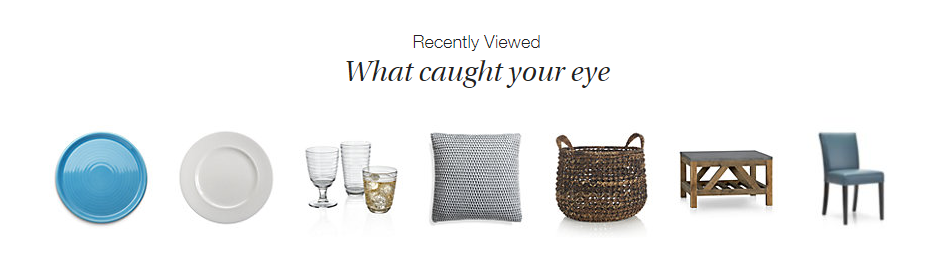
Ecommerce Merchandising Strategy Product Recommendations - Crate and Barrel Home Page Screenshot

Crate and Barrel promotes “Recently Viewed” items on every product page. This makes it super easy for a returning visitor to jump right back to what they were interested in, without having to browse around your site.

This product recommendation strategy also works great on major entry points into your site like the home page or in your shopping cart.

Another source of product data to use for “personalized” products recommendations is your customers’ wish list shopping cart history. These customers have already clearly indicated exactly what they want. So you should boldly give it to them.

Other uses of your visitors’ shopping history include:

  • Highlight a special promotion for wish list items
  • Recommend complementary products that go great with a recent purchase
  • Show a reminder for abandoned cart items
  • Add an easy “Order Again” button
  • Create custom product landing pages for shoppers who clicked your retargeting ads

All of these online merchandising strategies can help grow loyal, repeat buyers and encourage returning visitors to buy more.

But what if someone is a first time visitor? Fortunately, there is another segment of high-value shoppers that you can convert with powerful merchandising.

Win high-purchase intent shoppers

Certain customers come to your site ready to buy. The question is: Are they going to buy from you or go to your competitor?

Who are these high-purchase intent shoppers? They are the visitors that use your site search functionality. SLI studies have found that visitors that use search buy at a 2.7x greater rate than visitors who just browse.

Search users have indicated exactly what they want. They often include a specific product option like a color, size, or material in their query. So you need to quickly get them to the product page for the best selling match.

Don’t make these folks navigate their way to what they want. No extra clicks. You’ll likely lose them even if you have a great price and an amazing free shipping offer.

In fact, there is one merchandising technology that dramatically helps you convert these must-win buyers – autocomplete.
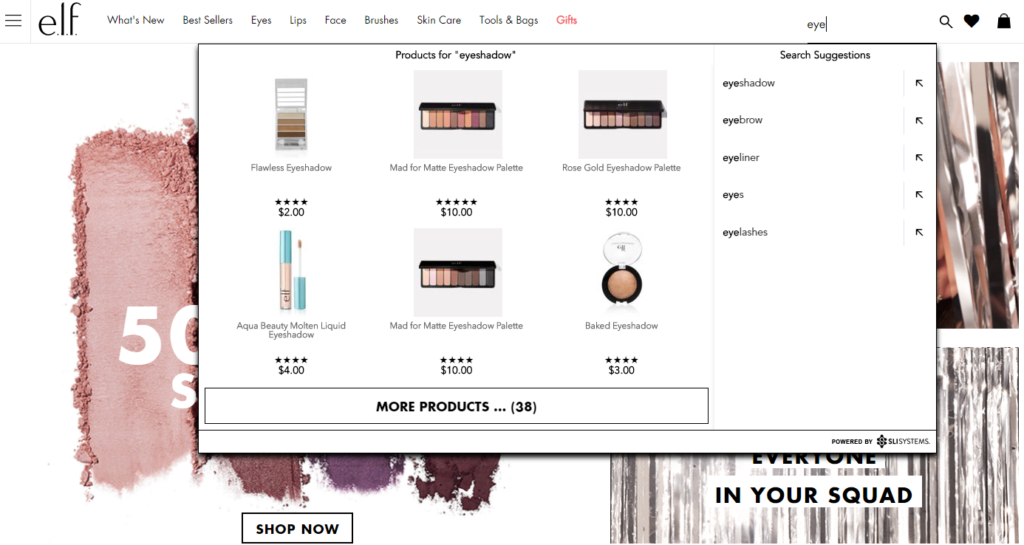
Visual Merchandising Autocomplete E-commerce Site Search - e.l.f. Screenshot

A great autocomplete example is e.l.f Cosmetics. They go beyond simply displaying matching text keywords as the searcher types. They display specific product results while adding visual merchandising with appealing product images.

You are more likely to convert these shoppers by showing a product, not a category. Again, less clicks and browsing is what you want.

That’s just the start. Lock in more sales from high-purchase intent shoppers with other tactics that use search data to improve merchandising.

Now let’s turn our attention to another customer segment, who likely make up the majority of your traffic.

Convert browsers into buyers

Some customers have an idea in mind but may not be ready to buy. In a brick-and-mortar retail analogy, these folks are the “No thanks. Just browsing” shoppers.

They may be “looky loos.” However, your merchandising can effectively nudge these visitors toward a purchase.

Classically online retailers attempt to attract these browsing shoppers by promoting categories or themed product groups like seasonal or clearance categories. However, this approach just keeps them clicking through your site and you hoping they stumble on something that sparks a sale.

And that’s one of the big reasons why many visitors leave an online store with an empty cart. The merchandising kept them in a browsing mindset, not a buying one.

Do not be afraid to promote specific products. Smart online merchandisers are now curating and promoting sets of individual products, not general categories, on their highest traffic pages.

Product Recommendations Strategy - FTD Best Sellers Screenshot

FTD.com gives a big portion of their home page to promote their Best Seller products. What those product recommendations do is switch the shopper to an active “Oh. I need that too.” mindframe. And out of a passive “just looking” mode.

Tap into your massive SKU list to find the top sellers, new products arrivals, seasonal products, or specific sale items. Use your merchandising data analysis expertise.

Then continually test which products are getting the most clicks and conversions.

Simply promoting specific products can help increase the possibility of an impulse purchase, or more likely, can create a desire to come back to your site when they are ready to buy.

Now that you’re thinking from a customer perspective, let’s take your merchandising strategies to the next level. You can optimize the customer experience by where those visitors are on your site.

Merchandising Best Practices For E-commerce Websites

There is a flow to how people shop.

A brick-and-mortar retail store starts merchandising right up front as you walk in the door. Then throughout all the aisles, displays, and checkout counters. The whole store experience is intentionally designed to drive more sales.

An online customer experience also has its flow. Your e-commerce shopping journey can be designed to maximize sales too.

Every part on your site is a merchandising opportunity – the home page, navigation menus, category pages, product pages and your checkout pages.

Hundreds of online site search tips and navigation best practices have been published that can have a big impact on your sales.

Here are the top online merchandising tactics for your e-commerce website that are red hot right now.

Visual Merchandising on Product Pages

Let’s start where customers most often click “Add to Cart” – the product page.

Many elements of the product page help merchandisers showcase that that this is the right product at the right price – product title, descriptions, specs, purchase options, ratings, reviews, and, of course, pricing and discounts.

This information appeals to the rational part of your shopper’s brain.

The part that usually makes the ultimate buying decision is the emotional part of the human brain. That’s where online visual merchandising excels.
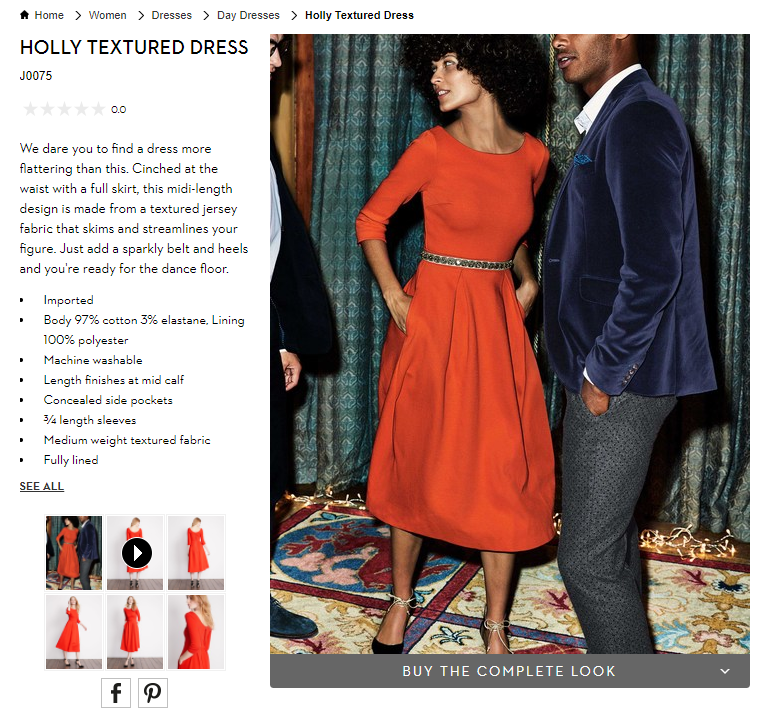
Ecommerce Visual Merchandising - Boden Product Page Screenshot

You also want to show off your products. Boden uses model videos, shows products from many angles, and switches custom images by color selection. These extra images give shoppers context when they can’t actually hold the item in their hands. You want them to easily envision what their experience will be after the purchase.

To help shoppers visualize, update product pictures instantly when they select different options like color and allow shoppers to zoom in to the smallest details.

Also, show action shots and product videos that depict how the product is used, what the buyer gets in the box, or how to install it.

Now augmented reality applications are being tested too. From arranging virtual furniture in a picture of your home to trying on different outfits in selfie mode on your smartphone, this next generation of visualization is an e-commerce merchandising innovation you will want to explore.

Personalized Product Recommendations

Product recommendations have long been a valuable online merchandising tool. You can tune your recommendations strategies using best practices for each different page on your site. Now recommendations technology is getting even smarter.

Smart product recommendations are personalized to the individual shopper in real-time. The products displayed adjust automatically based on user activity, preferences, and sales trends.
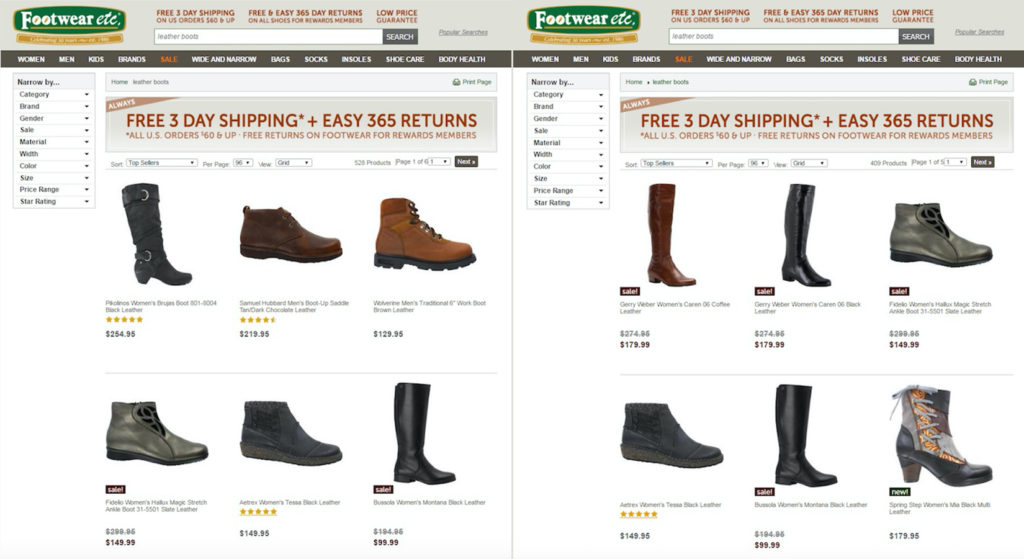
E-commerce Personalization - Footwear Etc Screenshot

Footwear etc. adds a level of personalization based on gender. Product recommendations, search results and category pages use the products or pages previously viewed by the shopper. If a shopper starts out browsing women’s sandals, then recommended product results would boost women’s shoes or accessories on subsequent pages. The screenshot above shows before and after results when a shopper searches for “leather boots”.

This type of contextual personalization can be tuned for many different facets, including gender, size, brand preference, or location.

Not only are these higher-converting recommendations displayed in real-time, but this personalization works for first-time visitors just as well as returning shoppers.

Complementary Sales in the Shopping Cart

You also want to extend those product recommendations to your shopping cart and checkout experience. Just like your grocery store places a rack of candy and magazines in the checkout line, online stores have a great opportunity to capture extra sales right at the point of purchase.

Only for online stores, this upsell merchandising strategy can be even more profitable.

Again, you can personalize the products you merchandise based on real-time data. You know what products they have added to their cart. You know the other products they have viewed.

And most importantly, you know what other products complement those items.
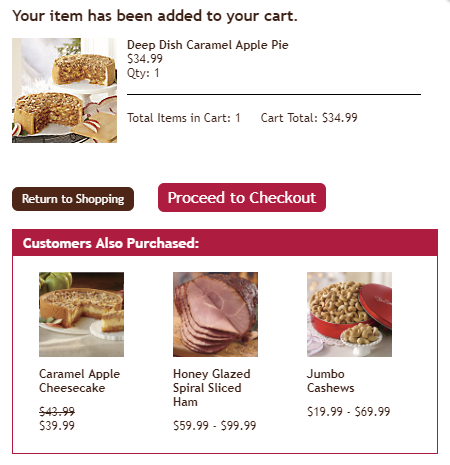
Online Merchandising Product Recommendations in Shopping Cart - Swiss Colony Screenshot

Swiss Colony promotes “Customers Also Purchased” at the beginning of their shopping cart experience.

Other popular recommendation strategies in the checkout experience are “You may also like” and “Complete the set.”

Just be careful to use complementary products. Do not necessarily use the exact same product recommendation logic as your product page. You don’t want to accidently promote an alternative to the product your customer has already decided to buy.

At best, that mistaken recommendation is ignored, meaning a wasted upsell opportunity. At worst, your customer stops and doesn’t complete their order because now they’re not sure if they’re buying what they really want.

So make sure that you are tuning the product recommendations in your shopping cart to complementary products that add to your sales, not disrupt them.

Now let’s use powerful data analytics and technology to deliver the best results without extra work.

Merchandise the Right Product to Win the Sale

You understand the customer. You know how to merchandise for each step of the online customer experience.

Now we can put it all together with great data and your product expertise to personalize the shopping experience… and get the sale.

Data Mining for E-commerce Merchandising

Your website analytics, your product systems, and your e-commerce platform transaction system combine to provide an astonishing array of data. That data can be mined and used to fuel your merchandising decisions.

You just need to look at what you have.

Data you know about your customer:

Your website analytics software offers useful demographic information about your customers and deep insights into what they are doing on your site.

Here are some of the most useful data types that can help your e-commerce merchandising strategy:

  • Traffic Channel: Where did your visitor come from?
  • History: Are they a first-time visitor or returning shopper?
  • Behavior: Where did they go on your site and what did they do there?
  • Gender: Are they female or male?
  • Age: How old are they?
  • Device: Are they on a mobile device, tablet or traditional computer?
  • Geography: Where in the world are they?

Now pair that up with what you know about transactions stored in your e-commerce platform.

E-commerce Platform Data:

Every past purchase provides information that helps you understand what customers are likely to buy in the future.

  • Product Sold: What product exactly is purchased?
  • Options: What sizes, colors, styles, and other product options are purchased?
  • Price: How much did it cost and what was the discount?
  • Order quantity: How many did customers buy per purchase?
  • Time/Date: When did the purchase occur?
  • Payment Method: How did they pay – credit card type, PayPal, on credit/layaway?
  • Shipping: How did the customer want this delivered?
  • Abandoned Carts: What products are selected but never actually purchased?

Best selling products should always be at the top of your merchandising list. But there is even more product data available to you. And that’s your merchandising experience.

Data from your experience:

Lastly, your own experience and intuition adds the special sauce to your merchandising data recipe.

  • Social trends:What’s hot right now with your customers?
  • Brand trends: What product brands can help pull in buyers?
  • Seasonality: What holiday or seasonality drives purchases?
  • Inventory: How much is in stock?

Compile all of this data, analyze it, and determine what products your customers are most likely to buy right now.

However, the challenge with the plethora of available data is… there’s so much data. It’s incredibly difficult and time consuming to effectively wrangle all the valuable data to merchandise to every single visitor on every single webpage for all your products.

That’s where new artificial intelligence technology helps.

Artificial Intelligence Fuels E-commerce Automation

Automating your data processing to power real-time merchandising decisions is quickly becoming a must-have for online retailers.

Fifty-four percent of e-commerce sites have already implemented or plan to add AI in the future, according research from the Q3 2017 E-commerce Performance Indicators and Confidence Report. And 20% expect to add AI within the next 12 months.

So what is the most popular applications for AI right now?

Not surprisingly, merchandising techniques are at the top. Personalized product recommendations is number one. Fifty-six percent of online retailers report that they are already using artificial intelligence in their product recommendations strategies (18%) or plan to implement within the next 12 months (38%).

Other merchandising solutions and visual merchandising technologies are also being accelerated thanks to AI. Virtual buying assistants, chatbots, visual search, augmented reality (AR), and virtual reality (VR) are all designed to help shoppers purchase the right product fast.
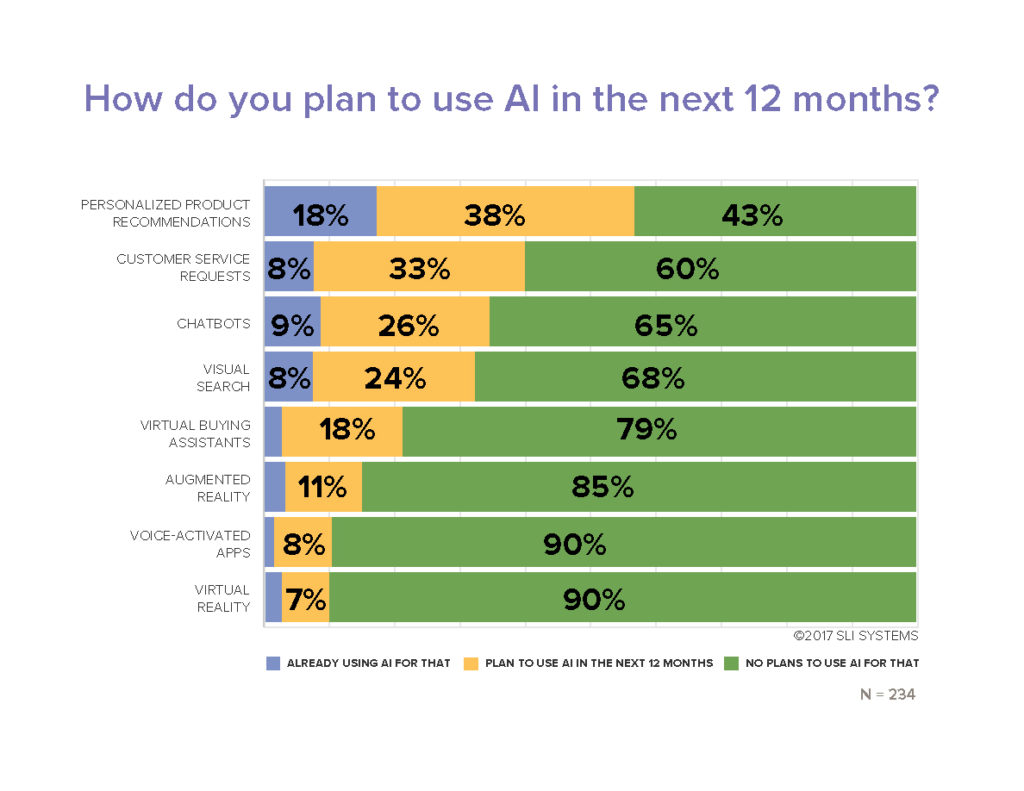
Ecommerce Artificial Intelligence Applications Research Chart - EPIC Report Q3 2017

More automation definitely helps maximize results in less time. And in new ways.

But is artificial intelligence going to take your merchandising job away? Absolutely not.

You won’t hand over the keys entirely to your automation systems. You need to maintain a mix of merchandising techniques and always be testing to get the maximum results.

Testing Your Merchandising Strategy Mix

“Always be testing” is more than just a matra. It’s a requirement to truly maximizing your conversion rates and your total online sales.

Most every online retailer tests performance of different on-page merchandising elements. That helps determine your optimal page design. For example, a simple A/B test of your search box location can pay off big by converting high purchase-intent shoppers.

Or determine how many products should be displayed in your product recommendations. Pro tip: SLI Systems’ merchandising best practices show that 4 or 5 products are ideal. And that scrolling carousel presentation of more products doesn’t generate significantly more incremental sales.

Another high-impact test determines the best rules for your site search and product recommendation results. Keyword matching algorithms alone likely do not give your shoppers the most relevant product results, which lowers your conversion rates.

Merchandising-savvy online retailers use a prioritized mix of multiple rules to drive the most sales. They combine artificial intelligence results with pre-defined tuning rules, product and category keyword matching, and sales leader products to generate the maximum online revenues.

More E-commerce Merchandising Tips

The key to your online merchandising success is to figure out what each visitor is most likely to buy.

It’s not easy. But you can drive many more sales leveraging a deep understanding of your customers, the latest technology, and the leading edge online merchandising strategies.

We’ve shared the newest merchandising techniques here. And you have many more proven strategies and tactics available to you. Make sure to grab the hundreds of site search best practices, e-commerce navigation tips, and watch what leading retail brands are doing in these online merchandising webinars.

Refining Your Site Navigation (Part 2)

Posted by Lauri LarjoJanuary 13, 2016Color, eCommerce, Merchandising, Navigation Tips, Refinements, SEO, User Experience

As we discussed last week, the purpose of refinements is to allow shoppers to find what they are looking for more quickly. By indicating specific characteristics to narrow down the number of options shown in a category, visitors don’t have to scroll through pages of products to find the right one.

There are some simple ways you can deliver an exceptional shopping experience through your refinements.

SLI Color PaletteConsider a Color Palette

Color palettes provide a visually appealing way to show color options for a particular product. Plus, it takes the guess work out of identifying colors with names like vermilion (a reddish orange) or verdigris (a yellowish green). Color palettes are often displayed on the left column with other refinements.

Show Products in the Right Color

Display products in the color shoppers requested. For example, if the default image for a shirt is red, but it is also offered in blue, show the blue shirt when shoppers refine the category to blue.

If your product is available in several colors, let visitors see the color options from the navigation page. One effective way of doing this is to allow visitors to hover over the color palettes directly under the picture of the product. The color of the product changes, while other products on the page remain unchanged.

Use Images

The human brain processes images faster than text. Consider using images to signal certain refinements, such as apparel type (dresses, shirts, pants), brands, ratings, colors and shapes. Of course, images won’t work for some refinements, so use your judgment. Make sure the images you use are clear and simple, so your customers won’t be left guessing.

SLI Navigational ImagesUse Easy-to-understand Navigational Images

If you use navigational images to identify subcategories, make sure they are easy to understand. You want to make sure shoppers don’t accidentally confuse the subcategory images for the product selection.

Provide the following visual cues:

  • Show products as well as subcategories
  • Include the number of results for each subcategory
  • Label the subcategory images clearly
  • Distinguish between the layout of your products and subcategories

Offer Multiple Ways to Unselect Refinements

Let visitors easily change and remove refinements. Customers may want to navigate to the top or up one or several levels within a category. Use a Show All link or a breadcrumb trail to enable a quick link back to a category page or higher navigation levels. Breadcrumb trails help visitors see
 exactly where they are on the site and what refinements have been used.

Another best practice is to use an X or checkmark beside the selected refinements. This allows visitors to easily remove a refinement selection without deleting all the selected refinements and gives shoppers the flexibility they need to find the item they’re looking for. A Clear All option offers a quick “back-to-the-top” navigation alternative.

For more tips on how to improve your site navigation, download our Big Book of Navigation Tips.

Refining Your Site Navigation (Part 1)

Posted by Lauri LarjoJanuary 6, 2016eCommerce, Merchandising, Navigation Tips, Refinements, SEO, User Experience

Refinements allow visitors to quickly narrow down their product selections as they travel through your site. This is one of the best ways (aside from using the search box) that visitors express to you exactly what they want.

The right use of refinements can make the shopping journey easy and intuitive. From broad category pages, you can break down choices into more specific subcategories. On a furniture site, for example, shoppers might start with the Living Room category then navigate to Sofa and Armchairs, Coffee and Side Tables or Living Room Lighting, depending on what they need.

In addition, providing refinements for brand, price, style and color can help shoppers pinpoint the products they had in mind. In my next two blog posts I will outline some practical ways refinements can help you improve your site navigation.

Don’t Show Too Many Refinements

Instead of showing every possible refinement (which can overwhelm shoppers), examine your analytics to see which refinements are used the most and which are hardly used at all. For example, do you really need the option to refine jeans by the number of pockets? If it is useful to your visitors, then show this option only when it’s relevant. A simple list of refinements versus a convoluted one increases your chances of improving your conversion rates.

Only Show Refinements with Results

Show relevant refinements for each category and make sure each refinement option contains results. You may be tempted to provide general refinements across your site for all category pages, but this can lead to a frustrating shopping experience. For example, you wouldn’t want to provide a refine-by-color option if an item is only available in one hue.

SurfStitch_SLIShow the Number of Products for Each Refinement

By indicating the number of products for each refinement, shoppers quickly understand how many results they can expect to find under each option. This guides them to consider other refinements if necessary and assures them they have seen all possible products.

Provide Different Ways of Ranking Products

Let visitors easily re-rank the criteria for how products are shown. Shoppers might want to view products by best sellers, highest rated, new arrivals, most expensive or least expensive. As a default, show products in order of most relevant or most popular. Once a visitor chooses a new order, remember the preference to spare him or her the hassle and frustration of re-ranking products on each category page.

For more tips on how to improve your site navigation, download our Big Book of Navigation Tips.

Are Gender Filters Necessary to Search for Toys?

Posted by Shaun RyanDecember 10, 2015eCommerce, Enterprise Search, Navigation, Refinements, Site Search

genter based search filtersIt was an interesting move when Toys R Us removed the gender filters from its UK website. There has been pressure for toy retailers to do this to stop reinforcing gender stereotypes and Toys R Us obviously decided that this is best for their company. It’s interesting because it is potentially damaging the user experience, making it harder for customers to find the toy that they want.

In my opinion this won’t be the case. I really don’t think that people need a gender facet when searching for toys. The blogger that wrote this article agrees: “My Son Likes Barbie. That Doesn’t Make Him a Girl.” On the other hand, I suspect it will have little impact on changing the behavior of toy buyers.

In fact, this change may actually improve the user experience. It really has nothing to do with gender-based stereotypes but instead with user design. If the gender filter is indeed not necessary for finding the toys you want, then removing it will simplify the search and navigation pages, meaning the user can spend slightly more of their cognitive load on making a purchased decision, rather than on assessing which, if any of the filters they should select.

Assuming Toys R Us has personalized recommendations, it will be interesting to see if the machine learning algorithms behind these will reinforce the gender stereotypes. I suspect, to the disappointment of the pressure groups and Toys R Us, this will be the case.

Customer Success: Natural Wellbeing

Posted by JoeRSeptember 17, 2013Navigation, Newsletter, Refinements, Related Search, Rich Auto Complete, SEO, Site Search

Natural Wellbeing is a site rich with reports, reviews and expert advice about the holistic and natural wellness products they offer. Such quality content can really help move shoppers through purchase decisions – especially for a natural health products site, where first-time buyers can be skeptical. But in order to be useful, the content has to be easily searchable and relevant to the needs of each individual buyer.

When Natural Wellbeing signed with SLI Systems in 2009, I saw a great opportunity to help them bring their rich content into their site search capability. They had a blog, an active social media presence, and a wiki with well-written descriptions of every herbal ingredient that their certified therapists use. But none of these resources were tied to the search results page. We worked closely with them to implement a number of changes.

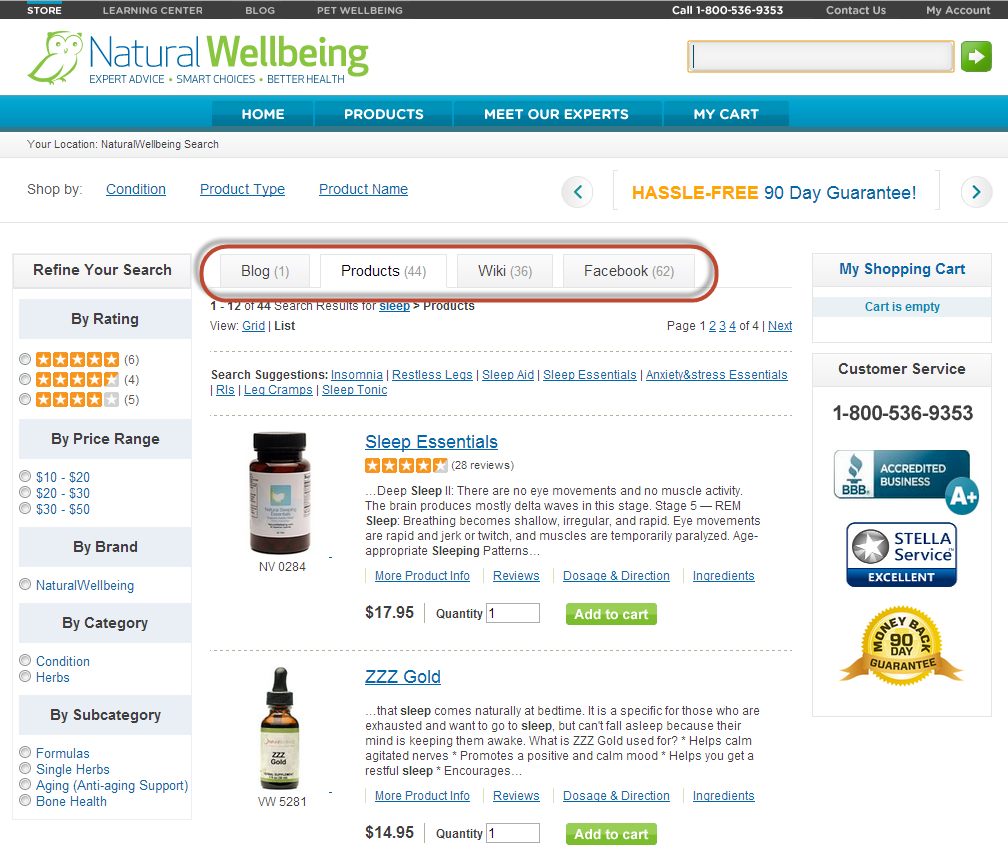
One change was to create a tabbed format to include relevant blogs, wiki content and Facebook content onto each search results page. In the below screen shot, you can see that a search for “sleep” now shows 44 related product results on the product tab, and there are additional tabs for accessing related blogs (1), wiki articles (36) and Facebook posts (62).

refinement_screenshot_11Sep13We also created a set of refinements for them (see the left column in the above screen shot), where users can narrow down the search results by rating, price range, brand, category or subcategory. For example, if a user wants to look at only formulas that contain blends of different herbs and doesn’t want to spend more than $20, they can click the $10 – $20 range in Price Range and Formulas in Subcategory. This narrows the number of product results from 44 to 25, as shown below. From that point, the user may want to look at ratings and read more about the products to decide which they want to purchase.

Since SLI’s site search continually learns and improves, the relevancy of search results improves over time. Natural Wellbeing realizes the benefit of letting SLI’s learning search do its work – it frees them from having to constantly tune results, allowing them to focus on other priorities in their business.

Both Natural Wellbeing and its sister site Pet Wellbeing also use SLI’s Site Champion product, which keeps improving SEO without any work on their part. Site Champion uses visitors’ site behavior to automatically create optimized landing pages that are indexed by Google and other Internet search engines.

In March of this year, I worked with them to add SLI’s Rich Auto Complete, which auto-displays product listings and images based on what users are typing in the search box. Since users can click on these products directly from the search box, the feature shortens the path from searching to buying, which creates a better user experience and improves conversions. Since adding Rich Auto Complete, the sites have received significantly higher page views, search users and search result clicks.

Now I’m working on ways we can help with their push for growth. I heard what they’re doing with email marketing, for example and showed them the types of custom templates and landing pages we can create for those campaigns. I’ve let them know what’s working well for others and have developed solutions that will help them achieve their current goals. It is through casual and interactive conversation that we come up with solutions that make a real impact.  Being an extension of our customers’ team is what I and all SLI Customer Success Managers strive for.

Technical Ability Matters – Don’t Overlook Advanced Site Search

Posted by Terry CostaApril 3, 2013Navigation, Newsletter, Refinements, Rich Auto Complete, Site Search

Changing to a new eCommerce platform is a huge investment, not only in dollars, but time spent integrating your site and training your team on the new features and functions. When you’ve just spent so much time and money upgrading to a new platform, it’s easy to see how adding site search would seem like little more than an additional expense.

But failing to upgrade your eCommerce platform’s search is like upgrading your ski clothes without buying better skis – you may look and feel better, but your technical gear won’t perform well. Upgrading the core search ability of your site can lead to better overall performance and higher conversions.

While platforms do many other things well, they don’t offer specialized features that focus on making your search shine. It’s a fact that visitors who use site search are more likely to convert. So if search is so important, shouldn’t you be paying more attention to it? When you’re looking at your platform’s site search, it’s important to ask a few questions to make sure you’re getting the most out of it.

Are your search results as relevant as they could be?

Advanced site search and navigation improve the quality of search results based on customer shopping behavior and click-throughs, re-ranking products based on popularity. Can it dynamically build SEO pages that continually update to reflect the most popular searches on your site? Pages like this can work toward improving your organic Internet search results rankings.

Are there opportunities for customization?

No two sites are alike, and search features should reflect that. It’s important to implement the features that will appeal to your customers, and make their experience on your site uniquely tailored to their shopping behavior. Don’t let a lack of innovation stifle your site’s growth.

Does your platform share the latest features and best practices with you?

The eCommerce landscape changes quickly and having the best features can make your site stand out from the rest. It’s beneficial to have a partner that understands industry best practices and suggests improvements to site features.

Do you have access to reports and analytics?

The reporting data you get from site search is filled with important insights that can help you understand your users and better target their needs. Having access to the top search terms, poor results and top converting pages can help you anticipate new trends or better promote the most popular search queries.

Does your platform have A/B testing?

Can you make fact-based decisions on the value of certain features, designs, or buttons? A/B and multivariate tests can produce surprising results, because not all customers behave in the same way. In some tests, we’ve seen conversion rates increase when using grid view, while others increase with list view. Since every site is different, you shouldn’t trust a general “rule” – but test it for yourself.

Do you have a dedicated, responsive customer support team?

Having a single point of contact can mean the difference between personalized, responsive service and being continually frustrated from lack of response. Making sure you have strong support will give you time to focus on other business priorities.

If the answer to any of these questions is ‘no’, then I’d suggest taking a good look at what your current site search is really providing you. A good site search will give fairly accurate results and have a few bells and whistles. A great site search will not only deliver relevant results, it will give you crucial insights into what drives your customers and actionable ways to proceed. Additionally, it shouldn’t be so overly complex that you won’t use it.

If you’d like a hassle-free solution and a solid team behind you to help you grow your site, give us a shout at discovery@sli-systems.com. We’d love to hear from you.


CSM of the Month: Kish Maharaj on Monster Cable Products

Posted by Kish MaharajJune 27, 2012Newsletter, Refinements, Related Search, Site Search

I worked closely with MonsterCable.com to implement their latest site search, and it was great working with them. Personally, I enjoy playing with electronics and have brought some of their headphones and home theater products, so when I learned that they were a client I quickly raised my hand and volunteered to work on their site. Since Monster carries such a wide variety of products for different purposes, visitors need to be able to quickly find the right product that fits them. When implementing the site search, I discussed the best methods with the Monster team to find out how to make the left navigation most intuitive for visitors. For instance, if a person searches for “high performance”, one of the first things they should be able to pick is what category it belongs in. Therefore we put category as the top refinement in the left navigation. Then after the person selects a category such as headphones, they may want to see both in ear and on ear headphones in their search results, therefore I recommended to Monster that we install multi select check boxes so that the user is able to include different selections. Another example is that a user may want both 5 star and 4 star rated products in their search result and this is where multi select check boxes come in handy. This feature is very useful because no matter what the refinement is, the user is able to combine refinements on the fly to create a personal view.

Another important feature that I worked with Monster on, was Rich Auto Complete. Monster Products are aesthetically pleasing and come in an assortment of colors, which is why Rich Auto Complete is a vital feature when visitors first touch the search. When typing in the search query they can actually see products show up in real time through the Rich Auto Complete drop down. This helps drive conversions for Monster since customers can directly access the product page by clicking directly on the product descriptions and images inside the drop down.

I also suggested to Monster to put search suggestions and related searches inside their search results. Not everyone will know the exact type of product when searching for a product. They may discover that when they search for “video cable” that they actually need to look for a “composite video cable”. On the other hand if a visitor knows exactly what they want, they can directly type in the SKU number and it will directly jump to the product page. Even if a visitor only has part of a SKU number, the product(s) that contain those numbers will display properly, I personally love this feature.

Send me an email at info@sli-systems.com or call 1 (866) 240 -2812 if you would like to hear more about how I worked with Monster Products.

Help interrupted users return to their previous session with Search History

Posted by Shaun RyanOctober 6, 2011Color, Newsletter, Refinements, Related Search, Rich Auto Complete, Site Search

In an ideal world visitors will come to your website, find what they want and make a purchase. In the real world only a small portion of users will follow this pattern. Many will get interrupted, distracted, or need more time to make a decision for whatever reason. The search history feature is a simple way to allow users to return to their previous session – and the items they were interested in.

An online storefront needs to make it easier for visitors to get directly to the products or information they want in order to improve the chances they’ll make a purchase and increase their engagement with your brand. Enhancing your site search facilitates this no-hassle experience, and there are many ways to do this – for instance, using Rich Auto Complete, offering related search suggestions, and adding refinements. Displaying a search history is another way to improve your site’s usability and drive sales.

As visitors are searching, you can record their queries and make it easy for them to perform these searches again when they come back to the site without having to re-enter keywords, or even remember what they searched for. Displaying the search history in a clearly labeled “Recent Searches” box can serve as a reminder of their previous session and give customers access to the items they’re interested in with just a click or two. You can add the search history list to your search results pages, as well as product pages and your home page, so that visitors can access this list from anywhere on your site.

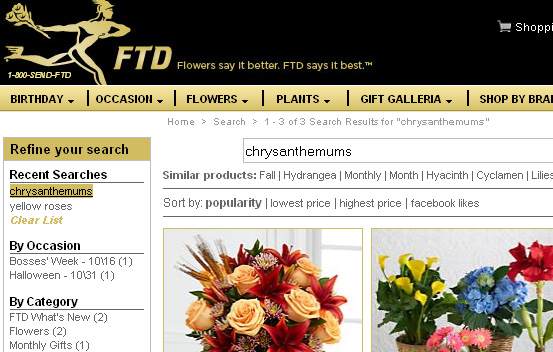
Here’s how the search history works one of our customers, FTD.com. If a shopper searches for “yellow roses,” then “chrysanthemums,” these search terms will appear in the Search History list at the top of the search refinement bar at left, even after they leave the site and then come back:

FTD


A nice feature to offer with search history is the option to “clear list,” as you can see in the FTD.com example above. Similarly, you can also allow visitors to select which terms to delete. Visitors may decide the list is out of date and they may want to delete it; or, if it’s a shared computer, they may not want someone in the same household to know what they’re buying for a birthday gift.

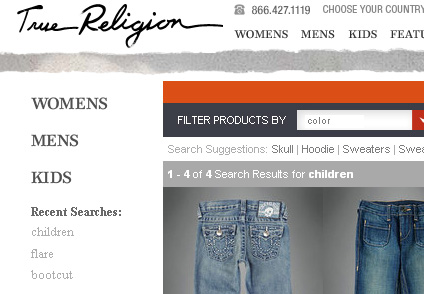
Like FTD.com, the website for True Religion jeans places the search history at top left, just above the list of refinement options:

True Religion

Search history is yet another tool for making your site a little easier to use and a little easier to buy from. If you’d like to add search history to your site, we can help – contact your SLI customer success manager.

Organize and display refinements to streamline the site search experience

Posted by Shaun RyanOctober 27, 2010Newsletter, Refinements, Site Search

In last month’s newsletter, we explained how to identify the most useful refinements for your site search, depending on your customers’ needs and the product mix. Figuring out which refinements to offer is the starting point, but there’s more work to be done: This month, we’ll tell you how to display these refinements so that your site visitors can make best use of them, and have a better search (and shopping) experience.

Place frequently used refinements at the top of the list. Make sure that the refinements most likely to be used can be easily accessed by visitors. Less frequently used refinements can be placed farther down on the list, or perhaps made visible only when the user has clicked on a certain category – in which case, they can select refinements that are part of a subcategory.

If you discover over time that visitors are not making use of certain refinements, then you can decide if you want to stop displaying them. This should be an ongoing evaluation process: You should continually look for ways to improve usability (and thereby conversions) by simplifying the site search process. Don’t feel compelled to display all possible refinements, which is confusing to users.

Show the number of results next to refinement options. Next to specific refinements, display the number of results that are available when that refinement is clicked on, so that visitors have a sense of how many results they’ll see. You can view this feature at work on the site for Lighting by Gregory, an SLI customer.

Show color refinements as a palette instead of text. Since colors are visual, site visitors will respond more quickly to a display of actual colors, rather than the names of the colors in text form. A color palette also takes up less space within search, so it helps reduce visual clutter.

For products available in several colors, consider retooling search results so that if a specific color refinement is selected, the product is displayed in that color. For instance, the main photo for a shirt available in red, green and blue may show the red shirt. If visitors select the blue color refinement, the image should change to the blue shirt.

When it comes to deciding how and where to display refinements, take the same approach that you would do with other aspects of your site design: Look at usage data, talk to your customers, and test options to see which refinements and placements work better. If you need advice on choosing and displaying refinements, contact your SLI Systems customer success manager.

Test placement of refinements. Depending on your audience and your site design, users may make more use of refinements depending on where they are placed – most commonly, they appear at the top of the page or in the left navigation pane. Try to avoid placing refinements at the bottom of the page, since visitors need to scroll down to view them. Test different positions to see which ones your visitors prefer.

Allow visitors to navigate between refinements on the same level. If a visitor clicks on a refinement but then decides they want to see a different refinement, don’t require them to click “back” to get to the original search results page first. They should be able to simply click a different refinement option from that page and easily see a new batch of results.

Don’t show refinement options that have no results. For instance, if there are no red products for a particular search, then there should be no link shown to restrict the results to red products.

Avoid drop-down boxes for refinements. Drop-down boxes make it harder for people to see the available refinement options, and they’ll be less likely to use them. If refinements are shown as a list of links, then they can select the refinement with a single click. However, if you have many refinements, or many options within a refinement, then showing them as links can take up too much screen real estate. In this case, drop-down boxes may be the best option.

Show a breadcrumb trail. A breadcrumb trail will show the search term and any refinements that have been made. It helps visitors understand where they’ve been on the site and how they arrived at the page they’re on. It also makes it easy to remove refinements, and helps them go back to a broader range of results if they choose. Breadcrumbs take up very little space, and are a standard navigational element.

Create refinements that make your site search more user-friendly, increase customer engagement

Posted by Shaun RyanAugust 25, 2010Newsletter, Refinements, Site Search2 comments

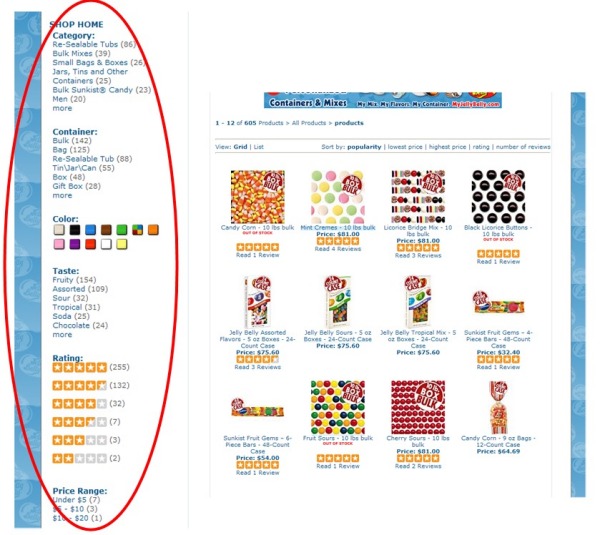
Refinements or facets, are one of the most important ways to address the myriad ways your online visitors can search your site. They allow visitors to narrow down search results based on certain product or content characteristics, so that searches can be completed in less time.

Refinements


But how do you choose which refinements to use? Do you mirror your product and catalogue structure, and run the risk of creating un-useful refinements? Or do you create refinements visitors are interested in? And in this case, which are they? By making a plan for determining which refinements to display and how to display them, you can find the happy medium – that is, the refinements that meet the needs of your customers, and that mirror your product and content choices. In this two-part series, we’ll cover best practices tips for both understanding what refinements to include, and how best to display them.

Which refinements to include?

The first step in choosing refinements is to examine the content that is indexed in your site search, and how this content is structured or broken down. For instance, your content might include product pages, blog posts, video, help-desk information, and social media content. Each type of content will have its own unique structure, which will dictate how you create refinements. For example, the structure for products could include price, category, brand, color, size, in-stock items, and so on – it all depends on your particular mix of products.

In some cases, structure can be inherited from other data. For example, products may have customer reviews, which in turn have ratings, and perhaps user-generated tags. Blogs may have structure such as author, date published, tags, and comments. These structures will provide you with a list of possible refinements to include in your site search.

Another way to uncover possible refinements is to examine popular keywords in your site search reports to see how many people are searching with refinement-related terms, like colors or gender (e.g. “men’s blue parka”). Another good source: SEO traffic reports from your analytics package, which give you an overview of what people are requesting from search engines.

Keep in mind that it’s not necessary to make every possible refinement available to your customers. Too many refinements will confuse the user, and some of the more obscure refinements will likely not get used very often. Have some conversations with your customers and ask them how they would like to be able to search and refine on your site. After these conversations, you may decide that some refinements will be displayed only after the visitor has selected another facet – for example, after people select a category, they’ll be able to select a subcategory.

In some cases, you may not have the data to provide the refinements. For example, customers of an online furniture store may want to be able to refine their search results by room. To add this facet, you need to add a “room” field to your product database. This can be an intensive process, so you should make sure such a facet adds value.

In next month’s newsletter, we’ll offer some advice on how to display refinements within site search results.

Load More

Stay up to date with SLI

Featured Posts

  • Maximize Revenue with Enhanced Product Impact Testing
  • Top Five Ways to Prepare for Peak Season
  • Facets, Facets, Who’s Got the Facets?
  • Personalization: It’s Kind of a Big Deal
  • M is the New E: Mobile Commerce Trends and Predictions

Categories

About SLI Systems

  • What We Do
  • Who We Are
  • Why SLI

Learn

  • Webinars
  • News Room
  • Events

Connect

© Copyright SLI Systems, 2018. All Rights Reserved | US: (866) 240-2812 | Legal