SLI home
User login

A BLOG FOR E-COMMERCE LEADERS

  • Blog
  • Resources
  • Webinars
  • Customer Experience Scorecard

SLI Blog

Posts in SEO Category

Magento Extensions – The 13 Best Magento Plugins to Increase Sales
Posted by Bob AngusJanuary 24, 2018Customer Experience, eCommerce, Resources, SEO, Site Search, Social Media, Testing, User Experience

Best Magento Extensions - Magento Marketplace

You’ve got the core functionality in place on your Magento store. Now you need to enhance your site to increase sales and optimize your customer experience. That’s where Magento extensions help.

But there are thousands of Magento extensions to choose from in the Magento Marketplace. You can easily spend too much time figuring out what’s the right extension across different business needs.

Here’s a helpful guide that gets you right to the best Magento extensions designed specifically to drive more online sales.

How to Find the Best Magento Extension for You

The Magento Marketplace makes it easy to browse and filter the many extensions. However, evaluating which extension is right for you can still be daunting.

It’s not as simple as looking at ratings. Even the most popular plugins typically only have a few reviews.

And just going with free extensions may not be the best way to save money.

Here are few criteria you can consider when choosing a Magento extension.

Free Extensions vs. Paid Extensions

It’s easy to jump toward a free extension. But most free extensions also require a subscription to that service. Calculate your total cost before choosing a solution, including the expense for the time it takes your developer to integrate and maintain that extension. Sometimes the higher priced solution up front is actually less expensive in the long run.

Look for Great Support

Help save your development time by choosing extensions that have excellent installation documentation and user guides. Better yet, check out their support information on the vendor’s website. Evaluate how responsive and helpful they are before making the purchase. That extra contact can help you avoid getting stuck later on.

Recent and Regular Updates

Magento is constantly improving as e-commerce continues to evolve. Your extension provider should be too. Partner with vendors that are committed to the Magento community. Look for extensions with recent or regular updates for new Magento releases and for additional features and bug fixes.

Now let’s look at the detailed list of Magento extensions that can help increase your sales.

Best Magento Extensions – The 2018 List

Winning more sales requires enhancements to each step of the customer experience:

  • Drive more traffic to your store
  • Increase conversion rates
  • Accelerate purchase with fast and easy checkout

We’ve curated a list of 13 top Magento extensions that can help you increase sales in 2018.

Let’s get started with the critical need to bring shoppers to your e-commerce site.

Drive More Traffic

More traffic means more shoppers. More shoppers lead to more sales. It’s that simple.

The challenge is winning shoppers who are ready to buy against competitors hungry for the same customers.

The following Magento extensions give you an edge and help drive more and better traffic to your store.

MageWorx SEO Suite UltimateSEO magento extension - mageworx seo suite ultimate
Magento helps your search engine optimization techniques with core functionality that Google and other search engines want.

The platform gives you the basics, like clean HTML, meta tags, simple URL structure, and automatic XML sitemap generator. These capabilities make your website easy to crawl. However, you’ll need to do more and at scale to win hyper-competitive search ranking.

Many extensions address a single element of good SEO. We recommend a single extension containing an entire SEO suite to really increase your organic search traffic.

MageWorx SEO Suite Ultimate is an all-in-one SEO toolkit that manages a wide array of onpage SEO features that includes:

  • identifying duplicate content
  • enhanced site indexing
  • canonical URLs
  • optimized meta data
  • auto-generated XML sitemaps
  • cross linking
  • SEO redirects
  • advanced rich snippets

Price: $299 for Community edition, $599 for Enterprise edition

Learn more about MageWorx SEO Suite Ultimate

Remarketing with adaploremarketing magento extension - adaplo

Remarketing is a proven advertising tactic to increase sales by bringing previous visitors back to your store. Product remarketing ads are displayed on Facebook and Google Display Network (GDN) that match what your shoppers have already viewed.

The challenge is automating your remarketing ads across all your visitors and for all your product SKUs. adaplo makes automated retargeting easier.

adaplo creates the retargeting campaigns on Facebook and GDN by launching dynamic product history. It can also expand your ads to more audiences and different ad types.

Price: Free, requires an adaplo subscription

Learn more about adaplo

Wyomind Simple Google ShoppingGoogle Shopping Magento Extension - wyomind simple google shopping

This extension is the M2 version of Wyomind’s highly rated Simple Google Shopping. You can easily sync your Magento store’s product feed with Google Shopping.

What sets Simple Google Shopping apart are features that help you synchronize accurately without spending a lot of time, including:

  • Map your product categories to Google categories
  • Schedule tasks to generate your data feed
  • Check that your data feed was generated error free
  • Verify your data feed generation stats (number of items, time and resource)

Price: $80 for Community edition, $120 for Enterprise edition

Learn more about Wyomind Simple Google Shopping

Email Marketing with Brontoemail marketing magento extension - Bronto

Email marketing remains a dominant marketing channel that drives more traffic and sales. Your e-commerce email marketing should be more than broadcasting your sales and discount offers.

That’s why Bronto is the perfect email platform for your Magento store. You can send targeted and personalized emails to your customers and newsletter list.

The Bronto Connector for Magento easily imports purchase information from the Magento platform into Bronto campaign manager. Using that full order history you can curate personalized email and cross-channel marketing campaigns at scale.

Price: Free, requires a Bronto subscription

Learn more about Bronto

AddThis Social Media SharingAddThis social media magento extension

Let your customers spread the word about your products. You get more already-enthusiastic visitors when your current shoppers share on social media.

AddThis is the easiest way to add sidebar share buttons to your Magento store. This social media extension can connect you with over 200 social networks for easy sharing … for free.

Plus, you have control of the style to match your store in both desktop and mobile browsers. And you can pre-populate the message being shared. As a result, your shoppers are more likely to share.

Price: Free

Learn more about AddThis

Increase Conversion Rates with Better Customer Experience

Now that you have help driving more shoppers to your online store, it’s time to turn those shoppers into buyers.

The best way to increase conversion rates is to provide your visitors with a great customer experience.

Customer experience trends show the most successful retailers are executing well at every step in the buying journey.

Here are some Magento extensions that can help you do the same.

Smart Site Search with Learning Search
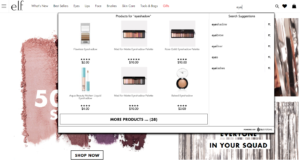
Visual Merchandising Autocomplete E-commerce Site Search - e.l.f. Screenshot

Customers who search for products have higher purchase intent than shoppers who are “just browsing.” You need to make sure you are delivering the search results that those must-win customers are most likely to buy right then. 

Go beyond simple keyword matching from your product feed. With SLI Learning Search, your e-commerce search box becomes an AI-powered tool designed to continuously improve query results and generate more revenue.

Further boost conversion rates with rich autocomplete functionality. Less clicks and browsing is what you want. Display specific product results while adding visual merchandising with appealing product images.

Better yet, you can leverage the same behavioral data to add AI-powered product recommendations to product pages, in your shopping cart, or anywhere on your site. Getting personalized recommendations along with higher converting search results can give you a big advantage over using separate plugins for recommendations and site search.

Price: Free, requires an SLI Systems subscription

Learn more about SLI Learning Search

Social Media Content with Pixlee social media magento extension - Pixlee

Social media content posted by you and shoppers on Instagram, Pinterest, Facebook, and other social channels can really improve engagement. In turn, that more personal social proof increases conversion rates.

Pixlee helps you identify and curate user-generated content so that you can display beautiful look books and social image galleries throughout your site. And those images are shoppable to make it easy to click “buy now.”

Pixlee also delivers the advanced social campaign features you’ll want in a single solution, including the ability to:

  • Launch social contests and promote engagement campaigns
  • Publish visual reviews and social posts on product and category pages
  • Personalize emails with relevant social proof
  • Track your social content’s conversion rate and engagement metrics

Price: Free, requires a Pixlee subscription

Learn more about Pixlee

Special Promotions Propromotions magento extension - amasty special promotions pro

Discount offers and promotions are proven to increase transactions. But managing all the different types of offers across all your SKUs can be incredibly time-consuming. Not to mention, ensuring you don’t kill your profits by discounting the wrong products or by displaying expired sales.

Amasty’s Special Promotions Pro extension reduces your headaches with a powerful promotion manager. The extension gives you access to 22 discount and offer rules for cost-effective promotions building in bulk or for individual products.

Additionally, you can automatically create personalized promotions using customer data. The extension builds one-to-one, hyper relevant deals for you using data like order history and birthdays. That level of personalization can really help drive repeat sales from loyal customers.

Price: $129

Learn more about Special Promotions Pro

Amasty A/B Testinga/b testing magento extension - amasty a/b testing
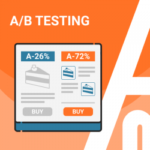
You should always be running experiments to discover the major and minor updates to your Magento store that can maximize sales. Amasty also provides a helpful A/B Testing extension that gives you everything you need.

You can run A/B split test and multivariate tests for particular products or product groups directly from your Magento admin panel. You can customize one or multiple tests at a time based on different goal metrics, products, and “winner” criteria.

What makes this testing extension even nicer for you is that you aren’t required to develop duplicate product pages with each test variation. No extra development time and site bloat helps you focus on improving your customer experience, not coordinating the tests.

Price: $179

Learn more about Amasty A/B Testing

Full Page Cache Warmer by Magewarespage cache magento extension - magewares full page cache warmer

Front-end site elements and promotions get a lot of attention when improving customer experience. But site speed and page performance is also a must-have consideration.

Page caching extensions like Full Page Cache Warmer are the simplest ways and most effective ways to make sure your Magento store loads fast for your visitors. Full Page Cache Warmer automatically crawls your store to find any uncached pages or newer versions of already cached pages.

Then the “warmer” part of this extension kicks in. This extension uses a special technique warms each page as if a real visitor is hitting on that page. The result is faster page deliver when a shopper does actually does land on your site. Pretty slick.

Price: $129 for Community edition, $379 for Enterprise edition

Learn more about Full Page Cache Warmer

Win More Sales with Frictionless Shopping Cart

So far we’ve covered Magento extensions that increase traffic and then help you improve your conversion rates. Now it’s time to focus on the most critical step – ensure your customer completes their purchase with a fast and easy checkout experience.

Smart One Step Checkoutecommerce shopping cart magento extension - aheadworks smart one step checkout

You’ve optimized your online store so that a customer clicks the “Add to Cart” button on your product. Don’t lose the sale by adding extra steps to completing the purchase after they’ve decided to buy.

Customers now expect a single page checkout process that they are familiar with from shopping on other online stores. Give it to them with Smart One Step Checkout.

Smart One Step Checkout offers all the functionality you need in a single extension, including:

  • Mobile responsive design
  • Customer login for one step purchase or guest checkout
  • Edit items in the cart
  • Apply discount codes and gift cards
  • Checkout behavior and abandonment reporting

Price: $299 for Community edition, $1,499 for Enterprise edition

Learn more about Smart One Step Checkout

Subscription And Recurring Paymentecommerce subscription magento extension - magenest subscriptions recurring payments
Subscription models have become a popular way for e-commerce businesses to sell their products. Keeping customers buying from you month-after-month can be incredibly profitable. However, subscription purchases require a different checkout and payment infrastructure.

Aheadwork’s extension adds subscription and recurring payment functionality you need. It can become your primary checkout experience for pure subscription businesses. Or you can create trial subscriptions or automatic product re-order options.

The recurring payments integrate with your merchant services provider. This makes regular billing easy for you and your customer. Plus, it helps reduce payment failures due to credit card expirations or cancellations.

Price: $249

Learn more about Aheadworks Subscription And Recurring Payment

SimiCart Mobile App Buildermobile app magento extension - simicart mobile app builder ios android

Most Magento themes already support mobile responsive design. So shoppers using a mobile browser usually have a good experience. But you may be missing a segment of customers who prefer to shop in your own branded app.

SimiCart helps you build your own iOS and Android mobile app to boost up your business through the Apple App Store or Google Play. SimiCart integrates directly with your Magento store infrastructure so that product feeds, ordering, and fulfillment are all synchronized.

You can then customize your mobile app’s design and features as you wish. Make it look like an app version of your mobile website. Or create a custom app experience with shopping features. You choose.

Price: Free, with SimiCart subscription starting at $49/month

Learn more about SimiCart Mobile App Builder

Magento Extensions that Improve Your Sales

These 13 Magento extensions are designed to increase your sales in different ways – driving more site traffic, improving conversion rates, and accelerating customers through checkout. Make sure to check out these extensions and see how you can take your sales to the next level.

MageWorx SEO Suite Ultimate

adaplo Remarketing

Wyomind Simple Google Shopping

Bronto Email Marketing

AddThis Social Media Sharing

SLI Learning Search

Pixlee Social Media Content

Amasty Special Promotions Pro

Amasty A/B Testing

Magewares Full Page Cache Warmer

Aheadworks Smart One Step Checkout

Magenest Subscription And Recurring Payment

SimiCart Mobile App Builder

Master 2015 Holiday Trends to Clinch 2016 Holiday Sales

Posted by Chris Brubaker, Chief Marketing OfficerSeptember 7, 2016eCommerce, Mobile/Tablets, SEO, Site Search, Site Search Tips, Uncategorized

tipsEvery year it seems like just as we start settling into the summer haze, holiday planning kicks into high gear! Since 31.5% of the $343 billion transacted online occurred in the fourth quarter last year (U.S Commerce Dept), smart retailers can’t afford to nap (for too long) in that beach chair. If those numbers don’t get you on your feet, take this in. During the 2015 holiday season:
  • Non-store sales (mostly online) grew 9%, compared to 1.9% in-store sales growth (NRF)
  • Sales from desktop surpassed $1 billion on 16 days during Holiday 2015 (Comscore)
  • The average transaction size via desktop was higher than mobile and in-store. More than half of consumers increased the amount of shopping they did online this year (NRF)

It’s no time to panic though. You’re right on time. Instead, let’s reflect on key trends from 2015 to ease back into and clinch holiday sales this year:

#1. Consumers actively shop online on Thanksgiving Day (and earlier that week).

This is no longer in question (or taboo). In 2015, online sales increased 21% over Thanksgiving 2014 (IBM). For perspective, this is 58% over the 2012 holiday. On Thanksgiving 2015, AOV was $123 (surprisingly on par with Cyber Monday) and estimated web sales were $1.73 billion (Adobe). Other top revenue days to keep in mind this season include (Custora):

  • Cyber Monday: 6.3% of holiday revenue, $3.07 billion in web sales
  • Black Friday:2% of holiday revenue, $2.74 billion in web sales
  • Sun, Nov 29 (3%), Sat, Nov 28 (2.8%), Tue, Nov 24 (2.7%) and Wed, Nov 25 (2.2%)

PRO TIP: Arm your site with strong promotions early in the holiday season. Last year, Amazon offered Black Friday deals an entire week early. Macys.com Black Friday deals started the day before Thanksgiving, and Walmart.com followed suit offering deals early on Thanksgiving Day. U.S. consumers made 47% of their online purchases by the end of Cyber Monday (Comscore).

#2. Consumers shop heavily on their mobile devices.

While we all know this at this point, the numbers really drive the message home. During the 2015 holiday season, U.S. mobile sales increased 59% to $12.65 billion, which is 18% of U.S. holiday e-commerce sales; and mobile traffic exceeded desktop traffic every day during the season (Comscore). What’s more, based on research from 8,000 brands and 35,000 e-commerce shops, IBM found 31% of Nov/Dec web sales occurred on mobile.

PRO TIP: If they can’t find it, they can’t buy it. Given the space and speed challenges of smartphones, a prominent search box can be the best gateway to quickly finding and buying products on mobile sites and apps. The most important site search feature is relevance. If you provide relevant and fast search results, visitors are more likely to find what they’re looking for and make a purchase (e.g. push the most popular results for a search term to the top of the list).

#3. Consumers are coming to and buying from your site via Search.

Search brought in 29% of retailers’ online sales during the 2015 holiday season, second only to Affiliates (Adobe). Other acquisition methods include Direct (22%), Email (15%) Display (2.5%) and Social (1.4%). What’s more, 56% of searches were conducted on a smartphone or tablet during the 2015 holidays (NRF). Fortunately, if your site meets the following five criteria, you have an excellent starting point to succeed with your search engine rankings:

  1. Your products and content are relevant to the search phrases shoppers actually use
  2. Your site is mobile-friendly
  3. Many highly credible sites link to yours
  4. Your page load times are sufficient
  5. You score well in engagement signals such as bounce rate, time on site, and pages visited per session

PRO TIP: It’s no secret that Amazon wins broad keyword searches. It’s imperative to understand the importance of more specific keyword searches, called long-tail terms. While 70% of search traffic is long tail, most retailers just focus on the top 10-20% of keywords. To find these valuable long-tail terms, review your top site search terms, map these keywords to the products you sell, and then create keyword-optimized landing pages. Shoppers who find your site via long-tail search terms are more likely to find and buy exactly what they want.

Now that you’ve eased back into holiday planning and mastered just three (of many!) takeaways from the 2015 season, here’s some more good news: there are two more shopping days this year between Thanksgiving and Christmas Eve. That’s 48 more hours of opportunities to provide your customers with amazing, personalized online customer experiences to clinch 2016 holiday sales. So recline (for a bit longer), start planning, and enjoy the last few days of summer!

For more tips, check out our guides to Site Search and the Mobile Experience and How to Get the SEO-Driven Revenue You’re Missing.

SLI Buyer Engine – The Heart of a Powerful E-commerce Suite

Posted by Chris Brennan, Chief Executive OfficerAugust 31, 2016About us, eCommerce, Merchandising, Mobile, Navigation, Recommendations, Rich Auto Complete, SEO, Site Search, SLI Buyer Engine, Uncategorized

BuyerEngineI have a confession. For more than a decade, SLI has been far too modest about our e-commerce innovations. Perhaps our engineering team has garnered so many patents that they haven’t stopped to reflect. It hit me when we learned of the latest SLI patent related to our auto complete algorithm. We began applying for site search technology patents back when Amazon’s home page was about as intuitive as a bibliography and relevancy wasn’t even a thought.
The fact is, SLI is a global team of e-commerce innovators and expert consultants with unparalleled experience. Since 2001, our team has pioneered apps designed to generate more traffic, convert shoppers into buyers, and maximize orders for B2B and B2C e-commerce leaders worldwide – whether selling 500 or 500,000 products, whether in English, Arabic or 18 other languages, or whether specializing in high fashion or high tech.

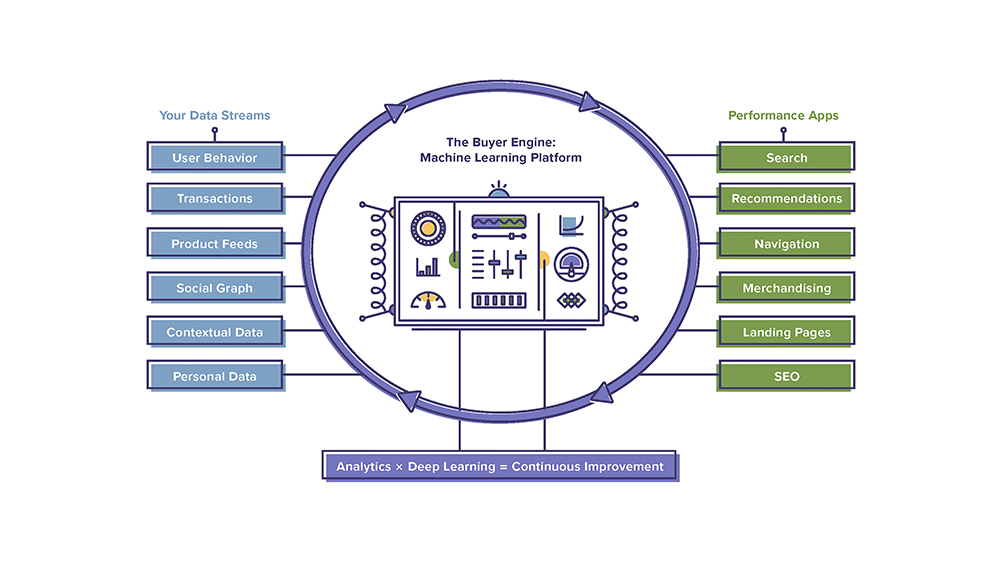
At the epicenter of SLI’s flexible and powerful e-commerce suite is machine learning technology, which – until today – remained nameless. The SLI Buyer Engine™ is a cloud-based, machine-learning platform that powers all SLI apps and answers the single most important question: “What is your shopper most likely to buy right now?”  

This means our customers’ bespoke search, navigation, recommendations, mobile experience, merchandising tools and user-generated SEO apps are driven by the same patented technology that makes really smart use of big data in real time.

Machine Learning in Action – A Virtuous Cycle

SLI Buyer Engine Virtuous Circle coreOur Buyer Engine continuously learns to improve the performance of all SLI apps and make their results more relevant, whether a shopper is a new user or frequent customer. It can consume in real time a vast array of data streams today, as well as those to come tomorrow.

  • Behavioral data (what someone is clicking on and not clicking on)
  • Transactional data (what someone is buying)
  • Product data
  • Non-product data (blogs, reviews, articles, videos, etc.)
  • Social data (including the shoppers own social graph, and what they have been up to)
  • Contextual data (where are they, local weather, device type being used)
  • Third-party data (e.g. FICO scores)

This is where big data meets personalization. The SLI Buyer Engine drives personalized shopping experiences for first-time visitors and loyal customers. It continuously learns from user behavior, improving the performance of all SLI apps over time by making their results more relevant. By accurately predicting which products to present shoppers through their buying journey, the Engine shortens the path to purchase and makes it easy to delight customers and increase revenues.

Performance-Driven Commerce

Gartner’s 2016 Hype Cycle for Emerging Technologies puts machine learning at the cycle peak, noting that “This Hype Cycle specifically focuses on the set of technologies that is showing promise in delivering a high degree of competitive advantage over the next five to 10 years.”

A recent InformationWeek article explains that machine learning is often used to make predictions through improving search results, anticipating movie or product selections, anticipating customer purchasing behavior, or even predicting new types of hacking techniques.

SLI provides clients with competitive advantage and clear results by addressing most of these use cases today. Search is indeed high-value. Our customers see 2.7x greater conversion rate when site visitors use search and those using the SLI Learning Recommendations™ app, which provides contextually relevant product suggestions while increasing upsell and cross-sell opportunities, see 5-15% average uplift in conversions.

So while the automotive industry awaits self-driving cars, companies in the retail sector that are using SLI machine learning technology are already seeing business impact.

Performance-driven commerce will remain the mission for SLI Systems as we strive to continuously deliver the most relevant solutions for customers, and the most relevant results to their buyers. We will continue to invest in machine learning and big data in order to support other emerging technologies that may be applied to e-commerce, such as conversational commerce, augmented or virtual reality, etc. This will help ensure clients are able to provide the best possible and most relevant experience within new shopping paradigms as well. And at the heart of incrementally better e-commerce performance will be the SLI Buyer Engine.

To learn more about results that B2B and B2C e-commerce companies have achieved with the SLI Buyer Engine, download the report detailing how 40 Retailers Have Transformed Their Online Business Using SLI.

Refining Your Site Navigation (Part 2)

Posted by Lauri LarjoJanuary 13, 2016Color, eCommerce, Merchandising, Navigation Tips, Refinements, SEO, User Experience

As we discussed last week, the purpose of refinements is to allow shoppers to find what they are looking for more quickly. By indicating specific characteristics to narrow down the number of options shown in a category, visitors don’t have to scroll through pages of products to find the right one.

There are some simple ways you can deliver an exceptional shopping experience through your refinements.

SLI Color PaletteConsider a Color Palette

Color palettes provide a visually appealing way to show color options for a particular product. Plus, it takes the guess work out of identifying colors with names like vermilion (a reddish orange) or verdigris (a yellowish green). Color palettes are often displayed on the left column with other refinements.

Show Products in the Right Color

Display products in the color shoppers requested. For example, if the default image for a shirt is red, but it is also offered in blue, show the blue shirt when shoppers refine the category to blue.

If your product is available in several colors, let visitors see the color options from the navigation page. One effective way of doing this is to allow visitors to hover over the color palettes directly under the picture of the product. The color of the product changes, while other products on the page remain unchanged.

Use Images

The human brain processes images faster than text. Consider using images to signal certain refinements, such as apparel type (dresses, shirts, pants), brands, ratings, colors and shapes. Of course, images won’t work for some refinements, so use your judgment. Make sure the images you use are clear and simple, so your customers won’t be left guessing.

SLI Navigational ImagesUse Easy-to-understand Navigational Images

If you use navigational images to identify subcategories, make sure they are easy to understand. You want to make sure shoppers don’t accidentally confuse the subcategory images for the product selection.

Provide the following visual cues:

  • Show products as well as subcategories
  • Include the number of results for each subcategory
  • Label the subcategory images clearly
  • Distinguish between the layout of your products and subcategories

Offer Multiple Ways to Unselect Refinements

Let visitors easily change and remove refinements. Customers may want to navigate to the top or up one or several levels within a category. Use a Show All link or a breadcrumb trail to enable a quick link back to a category page or higher navigation levels. Breadcrumb trails help visitors see
 exactly where they are on the site and what refinements have been used.

Another best practice is to use an X or checkmark beside the selected refinements. This allows visitors to easily remove a refinement selection without deleting all the selected refinements and gives shoppers the flexibility they need to find the item they’re looking for. A Clear All option offers a quick “back-to-the-top” navigation alternative.

For more tips on how to improve your site navigation, download our Big Book of Navigation Tips.

Refining Your Site Navigation (Part 1)

Posted by Lauri LarjoJanuary 6, 2016eCommerce, Merchandising, Navigation Tips, Refinements, SEO, User Experience

Refinements allow visitors to quickly narrow down their product selections as they travel through your site. This is one of the best ways (aside from using the search box) that visitors express to you exactly what they want.

The right use of refinements can make the shopping journey easy and intuitive. From broad category pages, you can break down choices into more specific subcategories. On a furniture site, for example, shoppers might start with the Living Room category then navigate to Sofa and Armchairs, Coffee and Side Tables or Living Room Lighting, depending on what they need.

In addition, providing refinements for brand, price, style and color can help shoppers pinpoint the products they had in mind. In my next two blog posts I will outline some practical ways refinements can help you improve your site navigation.

Don’t Show Too Many Refinements

Instead of showing every possible refinement (which can overwhelm shoppers), examine your analytics to see which refinements are used the most and which are hardly used at all. For example, do you really need the option to refine jeans by the number of pockets? If it is useful to your visitors, then show this option only when it’s relevant. A simple list of refinements versus a convoluted one increases your chances of improving your conversion rates.

Only Show Refinements with Results

Show relevant refinements for each category and make sure each refinement option contains results. You may be tempted to provide general refinements across your site for all category pages, but this can lead to a frustrating shopping experience. For example, you wouldn’t want to provide a refine-by-color option if an item is only available in one hue.

SurfStitch_SLIShow the Number of Products for Each Refinement

By indicating the number of products for each refinement, shoppers quickly understand how many results they can expect to find under each option. This guides them to consider other refinements if necessary and assures them they have seen all possible products.

Provide Different Ways of Ranking Products

Let visitors easily re-rank the criteria for how products are shown. Shoppers might want to view products by best sellers, highest rated, new arrivals, most expensive or least expensive. As a default, show products in order of most relevant or most popular. Once a visitor chooses a new order, remember the preference to spare him or her the hassle and frustration of re-ranking products on each category page.

For more tips on how to improve your site navigation, download our Big Book of Navigation Tips.

Consider the Power of User-generated Content

Posted by Helmut BerieOctober 14, 2015eCommerce, Ratings and Reviews, SEO

User-generated content in the form of ratings and reviews can deliver powerful SEO benefits to your e-commerce site. Many e-commerce platforms, including Magento, now have built-in ratings and reviews. Other platforms offer extensions in their marketplaces to support user-generated content. Regarding the importance of user-generated content, Search Engine Journal offers the article, Why Should UGC be a Part of Your SEO Strategy?

  1. Unique content for product detail pages: The language used by reviewers is different than the language used in product descriptions. When you include this unique “review language” in product detail pages, you create unique content. Your pages can no longer be considered duplicate to any other page on the internet.


  1. Rankings boost from unique terms used in reviews: Internet search engines understand the language used by reviewers is not the same as the language provided by manufacturers. Search engines use review language to reinforce the topic of the product detail page. As a result, pages might rank better for phrases they already ranked for and they might rank additionally for phrases introduced via reviews.


  1. Social proof: Favorable reviews and ratings act as social proof. Studies show that products are purchased more often when there is proof that other consumers liked those products as well.


Keep in mind that ratings and reviews only help your page rankings if they are part of the pages themselves. For maximum impact they must be visible as part of initial page loads, without use of iframes and without hiding the information behind tabbed or accordion-type controls.

We recommend showing rating and review information only after several reviews have been collected. Otherwise a low review count might negatively impact the perception of desirability for the products on your site.

Ratings & Reviews Partners of SLI include Feefo, Reevoo, Bazaarvoice, Power Reviews and TurnTo.

For more tips on improving your SEO, download our white paper “How to Get the SEO-Driven Revenue You’re Missing.”

Announcing Next-generation Learning Navigation

Posted by Lauri LarjoSeptember 24, 2015eCommerce, Merchandising, Navigation, SEO, User Experience

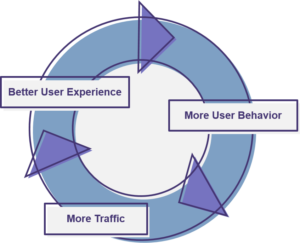
learning_navIn the drive to turn your visitors into buyers, navigation is a critical part of the shopping journey. More than 70% of site visitors navigate their way to the products they have in mind. But if your navigation is clumsy or confusing, those shoppers are more likely to bounce than buy.

Site Navigation as a Tool for Merchandisers, Content Marketers and SEO Pros

Originally we launched SLI Learning Navigation® in 2006 to provide a consistent experience across a site that also uses SLI Learning Search®. Learning Navigation® has always leveraged our patented learning technology to continually re-rank products based on user activity. Over the years, our navigation solution evolved based on customer feedback.

Today we are excited to introduce the next generation of SLI Learning Navigation – completely rebuilt for improved SEO and better merchandising. The newest version of Learning Navigation is designed to give you more control over your SEO while creating a better user experience based on industry best practices.

Our revamped navigation solution dynamically generates clean, search engine-friendly URLs, making it easier for shoppers to find your products during an organic search. Our new interface allows you to quickly edit URLs, titles, headings, meta tags and page descriptions, giving merchandisers and content marketers more direct control over factors that affect their SEO.

Learning Navigation also helps you avoid SEO issues with duplicate content by controlling which pages search engines index. The navigation pages provide refinement and filtering options for the whole product catalog.

Learning NavigationBring Your E-commerce to the Next Level

Adapting to the evolving e-commerce experience and expectations of our customers is at the core of SLI – to continuously enhance our offering, accelerate your sales and provide these improvements seamlessly via our SaaS platform. We are excited to help you bring your e-commerce to the next level with this newest version of Learning Navigation.

For new customers, we recommend signing up for Learning Search together with Learning Navigation to gain the maximum benefits of SLI learning technology. For existing SLI Learning Navigation customers, our SaaS platform allows us to easily upgrade your Navigation for no cost at your discretion.

To learn more about Learning Navigation, click here.

Increase Positive SEO Signals and Reduce Negative Signals

Posted by Helmut BerieAugust 20, 2015eCommerce, SEO, Site Search

My last blog outlined the main SEO tools that businesses need. Tools like Google Analytics and Webmaster Tools, when set up correctly, help you monitor both the positive and negative factors that affect your site’s SEO.

SEO E-commercePositive signals to watch and improve include:

Mobile friendliness – The degree to which your site is mobile friendly will affect your SEO. In April 2015, mobile friendliness became a significant ranking factor for Google in determining a page’s position on the SERPs for Google visitors on mobile devices. Use Webmaster Tools (WMTs) such as Google Search Console or Bing Webmaster Tools to monitor and improve your site’s mobile friendliness. As a separate tool, Google offers a quick test that reviews your URL and reports whether the page has a mobile-friendly design.

Keyword rankings – When your site contains relevant, quality content related to search phrases frequently used by visitors of Internet search engines, then these are positive signals for your SEO. Use WMTs to see which keywords and pages rank highest; use this information to determine which content on your site is most influential. Avoid the temptation to pack more of those high-ranking keywords into every page of your site – this could backfire and send out negative signals. Instead, use the keyword data to guide your content development and focus.

Links from other sites to yours – The links you naturally earn from sites with high domain authority (like when you’re mentioned in an e-commerce industry article) equate to positive signals that increase your rankings. However, resist the urge to outright ask publications or associations to add a link to your site – Google has mysterious ways to discern whether a link is simply requested or actually earned. Instead, create standout blogs and provide valuable industry news through social media and PR efforts. When you deliver information that others want to share, you truly earn links that boost your overall SEO efforts.

Structured Data – Structured data improves the bots’ understanding of the entities (products, organizations, blog posts, video objects, etc.) referenced on your site. You can improve the visibility of your pages by marking up the main entities and ensuring organizational markup is present on all pages. Check that structured data used on your side is understood correctly using the tools provided by Bing and Google. Keep in mind that incorrectly implementing structured data might do more harm than good.

Negative signals to watch and minimize include:

Crawl errors – A common crawl error that triggers a warning from WMT is a soft 404. If search engine bots pick up on pages that no longer exist and a no-results page is shown but not accompanied with a 404 http return code, this is a negative quality signal against the domain. To be clear, showing no-results pages is not a bad practice in itself – there are even possibilities to engage with visitors on them. However, they always need to be accompanied with a 404. On spotting soft 404s, you should immediately engage with your web designers to ensure the no-results page behaves as expected. Once the fix is in place, you might choose to “fetch” or “fetch and render” the no longer existing page to ensure it is returning the desired 404 response.

Large number of URLs on site – WMTs will send you warnings if you use too many URLs on your site, which could negatively affect your SEO. To correct this problem, you need to take a hard look at the pages that are already found. The WMT warning message will contain some example URLs; go through the list and confirm whether you want all of these URLs to be indexed. In addition, check for canonicalization issues. Ensure you have blocked access to your site search so that the bots cannot crawl your search. Even if someone links to a result page of your local site search, you don’t want Internet search engine bots crawling the page and adding it to their indexes.

Also think about indexation depth within your site navigation so you can avoid too many pages getting indexed. Generate an impressions/clicks report from the top pages to understand how much attention your deeper pages generate. Limit access to deep pages and consider not allowing all navigation refinements to be indexed.

HTML signals for missing, duplicate, too long or too short meta descriptions or title tags – Meta data still matters, and it’s easy to add any missing meta descriptions or title tags. WMT offers HTML improvement suggestions to show you any meta data that needs correcting. Simply add a description or title that is relevant to the topic and content of the page, within the provided character limits, and then you’ve resolved your problem.

If these tips were helpful, feel free to download our SEO Guidebook, “How to Get the SEO-Driven Revenue You’re Missing.”

SEO Tools E-commerce Businesses Need

Posted by Helmut BerieJuly 20, 2015eCommerce, SEO

SEO ToolsThere are hundreds of SEO tools to choose from, but every business should start with two basics: Google Analytics (GA) and Webmaster Tools (WMT).

For baseline measurement of your site traffic and SEO performance, not only should you have a GA account, along with Google and Bing WMT accounts, but you need to ensure they are set up correctly. They will provide valuable insight on your site’s performance and monitor the factors that affect your site’s SEO.

This blog covers offers tips on getting the most out of GA and WMT, as well as suggests third-party tools that are helpful to improve your SEO. This is part of our blog series on SEO.

Google Analytics

Google Analytics (GA) offers all the basic knowledge you need to track your site traffic and evaluate factors that affect your SEO. When set up properly, GA provides analytics on:

  • Search Traffic – amount and quality of traffic coming from search engines, including visitor demographics and how they found your site
  • Keyword Effectiveness – which keywords are driving traffic and conversions
  • Content Performance – which site pages and landing pages are driving the most traffic
  • Sales and Conversions – which search results and pages users click on that result in a sale
  • Engagement Metrics – which parts of your site have the best/worst engagement metrics
  • Rich Segmentation of Traffic – specific segmentation of metrics (e.g. segmenting metrics by device type)

To get the most out of your GA reports, Google offers a setup checklist that includes steps for installing a tracking code, identifying goals for what you want to track, linking to AdWords and/or AdSense, optimizing keywords, and tracking e-commerce performance against keywords and marketing campaigns.

There are a number of common mistakes made with GA setup that can significantly skew your results – and therefore, the quality of the data you’re using. For Google Analytics to be effective, you need to make sure you filter out fake traffic from botnets and avoid using too many profile filters. Also, it’s a good idea to use other analytics tools to double check your GA numbers. For more on common mistakes to avoid when setting up Google Analytics, watch this SLI recorded webinar.

Webmaster Tools

Webmaster Tools are both Google Search Console and Bing Webmaster Tools. Webmaster Tools (WMTs) provide you with important information needed to monitor factors that will influence your site’s SEO. WMTs go beyond Google Analytics to provide insight on how your site is viewed by search engines. It will notify you of broken links, crawl errors, HTML errors and other potential problems. You’ll most likely want to set up Google Search Console first. With recent changes to traffic distribution, however, Bing’s Webmaster Tools (showing data for both Bing and Yahoo!) should not be ignored.

To decide which WMT to focus on first, check your GA statistics for insight into which organic search sources drive the most traffic to your specific site. Then set up your WMT account. SEO expert Bruce Clay has a free online newsletter that goes through the WMT set up process in detail. Or you can get yourself started with Google at www.google.com/webmasters/tools.

Once your analytics, Webmaster Tools, site pages and URLs are properly set up, it’s time to monitor, tweak and repeat on a regular basis. Your Webmaster Tools will become your best friend, as they offer insight into how you can increase the positive signals and reduce the negative signals that will affect your site’s SEO

Third-party SEO Tools

There are hundreds of third-party tools available to further improve your SEO. Take a look at a few of these resources to see what might work well for you. Also, don’t forget to look at what third-party tools your direct competitors are using – if they’re more successful than your site in SEO, it’s a good idea to know what they’re doing to get there.

Here are a few third-party SEO tools that are popular:

  1. Moz, SEM Rush, Search Metrics: Several inexpensive, powerful tools that track your ranking of keywords over periods of time include Moz, SEM Rush and Search Metrics. These tools can also show you when a competitor started a campaign that targets your keywords.
  2. SpyFu: For between $79 and $1,000 per month, SpyFu shows you your competitors’ most profitable keywords and ads. This offers insight into their success so you can build a strategy to beat them at it!
  3. Screaming Frog: This low-cost tool crawls your site and provides an onsite SEO audit so you know where to improve SEO elements like URL, page title, meta description or duplicate page issues. Screaming Frog can also reveal issues with your site navigation and discoverability of content.The free version may be sufficient for spot checks. Make sure your site can sustain the load the tool might generate.
  4. Google Instant Search: For an incredibly simple, free tool for keyword discovery, start typing a keyword into a Google search box to see which suggested, common search phrases pop up first. As an example, when you type “pants for,” you’re shown different suggestions than when you type “jeans for.”
  5. Ubersuggest: Another easy-to-use tool for keyword generation, Ubersuggest.org is a free resource where you can plug in keywords, choose a language and source, and receive further keyword suggestions.


For more on improving your site’s SEO, please download our free white paper, “How to Get the SEO-driven Revenue You’re Missing.” Also take a look at SLI Systems’ solution for improving SEO, SLI Site Champion.


When #LoveWins, Smart Merchandisers Win

Posted by Tim CallanJuly 2, 2015eCommerce, Merchandising, No Results, SEO, Site Search, Site Search Tips, Social Media

FTD roseThe U.S. Supreme Court opened a new opportunity for merchandising on Friday, June 26. Whether or not you agree with the 5-4 decision making same-sex marriage legal in all 50 states, it’s undeniable that it’s a prime marketing opportunity for retailers. Earlier this week, Multichannel Merchant published more than 20 examples of “How E-commerce Responded to the Marriage Equality Decision.”

For e-commerce businesses wanting to capitalize on the surge of online shoppers looking for items related to gay pride and same-sex weddings, below are my recommendations:

  1. Watch and respond to top search terms: Pay attention to changes in shopper behavior over standard baseline behaviors prior to the Supreme Court ruling.  In particular, look at search keywords for new or increasingly popular terms.  For example, a jeweler may see a sudden spike in a phrase like “men’s engagement ring.”  Because the search box is the one place on your site where shoppers can articulate their shopping missions without being channeled by your site navigation, search terms are strong early indicators of changes in shopper intent.


  1. Consider which products are a fit. The types of products you offer will vary based on your industry segment.  The above example cites a change in jewelry preferences, but a florist may see an increase in desire for rainbow floral arrangements or a party supply retailer might sell more rainbow-colored decorations. You may decide that none of your products logically tie in to this current event, in which case you’ll want to wait until you have related products or skip this merchandising opportunity entirely. Shoppers are less likely to respond to a promotion that seems forced.


  1. Look at top search terms with poor click-through rates. Search terms with low click-through rates can identify recent demand that your site and inventory are not meeting.  Sometimes you can solve these shortcomings simply by adding synonyms to your database. Other times you can address them with special promotions or merchandising information.  In the long term, these terms may reveal new areas for inventory expansion.


  1. Create just-in-time merchandising campaigns. Create campaigns for products expected to be popular among supporters of gay marriage.  Use custom banners and landing pages or even tune search results and recommendations to more ably direct shoppers to the products they are likely to want in this area.  For example, a retailer may create a custom landing page around a phrase like “Pride party” with a themed banner and curated product results.


  1. Remember SEO/SEM. Keep your SEO/SEM team apprised of top trending terms to ensure your keyword strategy is up to date.


Among the SLI Systems customer base, we have noticed the word rainbow coming up as a term with poor results so far this week.  We advise appropriate retailers to examine the word rainbow specifically to see if it is a trending term that deserves one of the responses detailed above.

Current events, as well as holidays, seasons and trends, are great positioning points for retailers. If you keep an eye on what your shoppers are already searching for online, you’ll find an endless number of ways to merchandise your products.

For more merchandising strategies to drive your online revenue, download our white paper “Use Site Search Data to Improve Merchandising.” Also, take a look at this video to see what you can do with our latest merchandising solution, SLI Landing Page Creator.


Load More

Stay up to date with SLI

Featured Posts

  • Maximize Revenue with Enhanced Product Impact Testing
  • Top Five Ways to Prepare for Peak Season
  • Facets, Facets, Who’s Got the Facets?
  • Personalization: It’s Kind of a Big Deal
  • M is the New E: Mobile Commerce Trends and Predictions

Categories

About SLI Systems

  • What We Do
  • Who We Are
  • Why SLI

Learn

  • Webinars
  • News Room
  • Events

Connect

© Copyright SLI Systems, 2018. All Rights Reserved | US: (866) 240-2812 | Legal