SLI home
User login

A BLOG FOR E-COMMERCE LEADERS

  • Blog
  • Resources
  • Webinars
  • Customer Experience Scorecard

SLI Blog

Posts in Related Search Category

Amazon, You Don’t Know Me

Posted by Max BunagMarch 11, 2014Related Search, User Experience

I’m an avid online shopper. It’s convenient and simple, and best of all, I don’t have to deal with annoying store clerks. These are attributes that are absolutely necessary in my ideal shopping experience. Amazon.com is one of my shopping destinations of choice because of its wide selection of products. It’s like Walmart with a cooler name and actual customer service. The online juggernaut also gets into my head via typical big data fashion — it always tries to guess what I want. The keyword in that last statement, however,  is “tries.”

Amazon thinks it has me figured out as a shopper. The retail giant knows that if I click through to an item on a search query — an item like “Legend of Zelda” — even if I don’t ‘add to cart,’ I have shown interest in said item. Ideally for Amazon, the next time I visit, I would see, click, and buy one of these ‘recommended’ items related to “Legend of Zelda” that are scattered throughout my view as I browse the site. Although Amazon’s concept is spot on, it’s not quite right in execution.

I searched for “The Legend of Zelda,” and as we all know, “Zelda” and all its associated products are exclusively Nintendo products. Therefore, if I’m performing search queries for anything “Zelda” or “Mario” or “Metroid”-related, you’d think that Amazon would recommend Nintendo-specific products to me.

This isn’t the case with Amazon’s recommendations. On my Amazon homepage, I have an entire “recommended” section devoted to — you guessed it — Sony and PlayStation accessories and games. Not only is this a waste of valuable real estate, it’s a missed opportunity. If Amazon’s recommendation algorithms were effective, they would surmise my interest in Nintendo and show Nintendo accessories and games in my feed. PlayStation 3 games are absolutely no interest to me as a Wii U owner.

Now I was curious; would Amazon’s algorithms make similar incorrect assumptions outside the realm of the video game console wars? The conclusion was what I expected. I performed search queries for iPhone and Apple products, clearly showing Amazon that I have an interest in iPhones and Apple products. But, back on my homepage, I get a section dedicated exclusively to LG and Samsung phones. I have literally asked Amazon in all its infinite wisdom to show and bring me directly to iPhones, and the retailer shows me something it should know I don’t want. It’s no different than asking a sales associate where the iPhones are and that associate trying to up-sell LG and Samsung accessories — it does not make sense. In the brick-and-mortar retail world, this would be a lost customer.

There are countless instances of these faulty “product recommendations” not only on Amazon, but all over the e-commerce web space. In theory, product recommendations are a form of suggested selling. It’s the same as merchandising like-products next to each other on a store endcap. If you put too many random products near each other, or completely unrelated ones, you’ll confuse and lose that customer to the store with better merchandising. Need proof? Look at the in-store customer experience in T.J.Maxx and Marshalls versus the experience at Target or Best Buy.

Effective recommendations are a proven way to up-sell and increase conversion. To be effective, however, relevancy is absolutely necessary. SLI Systems recently announced the availability of a new product, SLI Learning Recommendations, which uses the power of SLI Learning Search data to provide contextually relevant recommendations. To learn more, take a look at our Learning Recommendations product page, or contact me at max.bunag@sli-systems.com.

Max Bunag, who clearly favors Nintendo over Sony, is an enterprise sales representative for SLI Systems. 

Optimize Your Search Merchandising for the Holidays

Posted by Shaun RyanSeptember 17, 2013Analytics, Merchandising, Newsletter, Related Search, SEO, Site Search

As an eCommerce professional, you’ve likely been preparing for the holiday shopping season for months – deciding which products to feature, planning orders and organizing marketing campaigns. Retailers predict an 11-20% rise in holiday spending for 2013, with eCommerce and mobile driving much of the growth (Retail TouchPoints, Aug. 12). While the opportunity is great, so is the challenge of making your products stand out. Here are some thoughts on how you can use search merchandising tactics to ensure your holiday campaigns are effective.

Get Insight from your Site Search Data

The first step in successful search merchandising is to look at your site search data for real-time insight into users’ behavior. Review the queries that shoppers type into your search box, along with your site analytics. Which searches are most popular? Do shoppers want a product you don’t have? Are they seeing “no results pages” because they search using different language than you use on your site? Do they move from your results pages to a purchase, or do they jump away from your site without buying?

If you gather such insights from your search data now, you’ll have time to make improvements well before Black Friday and Cyber Monday. If you don’t already have an advanced site search provider, engaging in such services now can give you the extra set of hands and tools you’ll need to be agile in response to holiday trends.

Use the Right Tools at the Right Time

The second step of a successful search merchandising plan is to know which tools can make the most impact, and how to use them. A couple of my favorite tools for holiday merchandising are landing pages and gift finders.

  • Landing Pages for Holiday Products: In most cases a relevant search results page is the best page to show your visitors when they type in a search term. However in some cases you want to have more control over their experience and a specialized landing page may be the right tool. For seasonal specials, simply create a web page with your top holiday merchandise and set the page to load when visitors type certain words like Holiday, Christmas or Hanukkah into the search box. Assign a dedicated URL to your holiday landing page, and then use it in holiday email campaigns and advertising. Not only does this promote your holiday specials, but it gives you a trackable link in your Google Analytics so you can gauge the success of the campaign.
  • Gift Finders: Gift Finders are another way to generate more sales revenue around the holidays. Set up refinements that allow someone to define a set of criteria for a gift – e.g. price, occasion, recipient type and gift type – then see a list of the products that match those criteria. Promote your gift finder on your home page or by using a landing page with a PPC link for email and ad campaigns. When done correctly, it can be a useful tool that increases users’ likelihood of buying from your site. Read more about gift finders in this blog from SLI Systems Co-Founder Geoff Brash.

Branding banners, ribbon overlays and integration of social media are other merchandising tools that can improve the odds of holiday shopper conversion. These and a dozen other tools are covered in the new white paper “Using Site Search Data to Improve Merchandising,” which is a free download from the SLI Systems website.

Lastly, be sure your site search provider offers proper merchandising controls for your site so you can quickly test and easily refine the presentation of promotional messages, products and content on your search and navigation pages. Such agility will help you compete for consumers’ spending money during the holidays and beyond.

Customer Success: Natural Wellbeing

Posted by JoeRSeptember 17, 2013Navigation, Newsletter, Refinements, Related Search, Rich Auto Complete, SEO, Site Search

Natural Wellbeing is a site rich with reports, reviews and expert advice about the holistic and natural wellness products they offer. Such quality content can really help move shoppers through purchase decisions – especially for a natural health products site, where first-time buyers can be skeptical. But in order to be useful, the content has to be easily searchable and relevant to the needs of each individual buyer.

When Natural Wellbeing signed with SLI Systems in 2009, I saw a great opportunity to help them bring their rich content into their site search capability. They had a blog, an active social media presence, and a wiki with well-written descriptions of every herbal ingredient that their certified therapists use. But none of these resources were tied to the search results page. We worked closely with them to implement a number of changes.

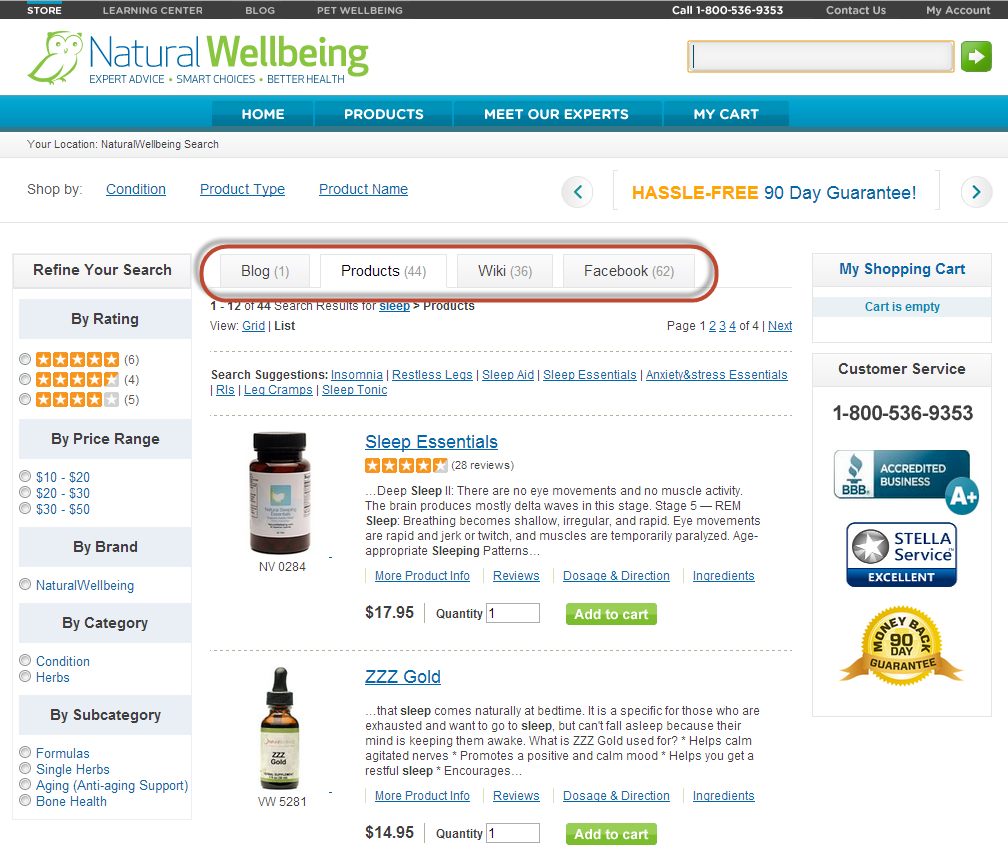
One change was to create a tabbed format to include relevant blogs, wiki content and Facebook content onto each search results page. In the below screen shot, you can see that a search for “sleep” now shows 44 related product results on the product tab, and there are additional tabs for accessing related blogs (1), wiki articles (36) and Facebook posts (62).

refinement_screenshot_11Sep13We also created a set of refinements for them (see the left column in the above screen shot), where users can narrow down the search results by rating, price range, brand, category or subcategory. For example, if a user wants to look at only formulas that contain blends of different herbs and doesn’t want to spend more than $20, they can click the $10 – $20 range in Price Range and Formulas in Subcategory. This narrows the number of product results from 44 to 25, as shown below. From that point, the user may want to look at ratings and read more about the products to decide which they want to purchase.

Since SLI’s site search continually learns and improves, the relevancy of search results improves over time. Natural Wellbeing realizes the benefit of letting SLI’s learning search do its work – it frees them from having to constantly tune results, allowing them to focus on other priorities in their business.

Both Natural Wellbeing and its sister site Pet Wellbeing also use SLI’s Site Champion product, which keeps improving SEO without any work on their part. Site Champion uses visitors’ site behavior to automatically create optimized landing pages that are indexed by Google and other Internet search engines.

In March of this year, I worked with them to add SLI’s Rich Auto Complete, which auto-displays product listings and images based on what users are typing in the search box. Since users can click on these products directly from the search box, the feature shortens the path from searching to buying, which creates a better user experience and improves conversions. Since adding Rich Auto Complete, the sites have received significantly higher page views, search users and search result clicks.

Now I’m working on ways we can help with their push for growth. I heard what they’re doing with email marketing, for example and showed them the types of custom templates and landing pages we can create for those campaigns. I’ve let them know what’s working well for others and have developed solutions that will help them achieve their current goals. It is through casual and interactive conversation that we come up with solutions that make a real impact.  Being an extension of our customers’ team is what I and all SLI Customer Success Managers strive for.

2013 eCommerce Resolutions Infographic

Posted by Kemberly GongJanuary 4, 2013eCommerce, Merchandising, Ratings and Reviews, Related Search, SEO, Site Search, Social Media

Here’s our infographic from our 2013 eCommerce survey results, showing top resolutions and goals for online retailers in the New Year. You can find the full results of our 2013 survey here.


CSM of the Month: Kish Maharaj on Monster Cable Products

Posted by Kish MaharajJune 27, 2012Newsletter, Refinements, Related Search, Site Search

I worked closely with MonsterCable.com to implement their latest site search, and it was great working with them. Personally, I enjoy playing with electronics and have brought some of their headphones and home theater products, so when I learned that they were a client I quickly raised my hand and volunteered to work on their site. Since Monster carries such a wide variety of products for different purposes, visitors need to be able to quickly find the right product that fits them. When implementing the site search, I discussed the best methods with the Monster team to find out how to make the left navigation most intuitive for visitors. For instance, if a person searches for “high performance”, one of the first things they should be able to pick is what category it belongs in. Therefore we put category as the top refinement in the left navigation. Then after the person selects a category such as headphones, they may want to see both in ear and on ear headphones in their search results, therefore I recommended to Monster that we install multi select check boxes so that the user is able to include different selections. Another example is that a user may want both 5 star and 4 star rated products in their search result and this is where multi select check boxes come in handy. This feature is very useful because no matter what the refinement is, the user is able to combine refinements on the fly to create a personal view.

Another important feature that I worked with Monster on, was Rich Auto Complete. Monster Products are aesthetically pleasing and come in an assortment of colors, which is why Rich Auto Complete is a vital feature when visitors first touch the search. When typing in the search query they can actually see products show up in real time through the Rich Auto Complete drop down. This helps drive conversions for Monster since customers can directly access the product page by clicking directly on the product descriptions and images inside the drop down.

I also suggested to Monster to put search suggestions and related searches inside their search results. Not everyone will know the exact type of product when searching for a product. They may discover that when they search for “video cable” that they actually need to look for a “composite video cable”. On the other hand if a visitor knows exactly what they want, they can directly type in the SKU number and it will directly jump to the product page. Even if a visitor only has part of a SKU number, the product(s) that contain those numbers will display properly, I personally love this feature.

Send me an email at info@sli-systems.com or call 1 (866) 240 -2812 if you would like to hear more about how I worked with Monster Products.

How to Get More Visitors to Use Site Search

Posted by GinaCMay 21, 2012eCommerce, Related Search, Site Search

Since visitors who use site search convert at a higher rate and spend more than those who don’t, it’s no surprise that retailers are inventing new ways to drive their visitors to search.

Our friends at Jelly Belly came up with the novel idea of including a search box in their floating shopping cart box.  When visitors add an item to their cart, they are presented with the option to check out or find another item.  This approach truly makes search an integral part of the shopping experience.  It also gives search even greater visibility to their most qualified visitors.

jellybelly-cart-search

Another approach for increasing the visibility of the site search box is to anchor the search box at the top of the page.  In this example from American Bridal, as visitors scroll down the page, the search bar sticks to the top of the page and rests above all other content.  You can read more about the tests and results that American Bridal received in this floating search box press release.

americanbridal-floating-search

To get shoppers searching, sometimes all they need is a suggestion of what to search for.  This is one of the primary benefits of placing “Related Searches” on a product landing page.  Visitors will often arrive at these pages from an external search engine like Google and related searches provides them with a quick and easy way to continue their search.  In this example of related search terms from NRS, these terms are placed at the bottom of the product detail page just below other related or alternate items.  Thus, if the visitor gets to this point and had not found what they want, the related search terms will guide them into the site search experience.

nrsweb-related-searches

Something else to keep in mind is that driving more site search usage doesn’t have to be limited to placements on your website.  Jewelry supply retailer Artbeads.com includes a link in the header of their email newsletter that drives search activity for their most popular term, beads.

artbeads-search-email

If you have other ideas for how to increase your visitor’s use of site search, please share those in the comments below.

Help interrupted users return to their previous session with Search History

Posted by Shaun RyanOctober 6, 2011Color, Newsletter, Refinements, Related Search, Rich Auto Complete, Site Search

In an ideal world visitors will come to your website, find what they want and make a purchase. In the real world only a small portion of users will follow this pattern. Many will get interrupted, distracted, or need more time to make a decision for whatever reason. The search history feature is a simple way to allow users to return to their previous session – and the items they were interested in.

An online storefront needs to make it easier for visitors to get directly to the products or information they want in order to improve the chances they’ll make a purchase and increase their engagement with your brand. Enhancing your site search facilitates this no-hassle experience, and there are many ways to do this – for instance, using Rich Auto Complete, offering related search suggestions, and adding refinements. Displaying a search history is another way to improve your site’s usability and drive sales.

As visitors are searching, you can record their queries and make it easy for them to perform these searches again when they come back to the site without having to re-enter keywords, or even remember what they searched for. Displaying the search history in a clearly labeled “Recent Searches” box can serve as a reminder of their previous session and give customers access to the items they’re interested in with just a click or two. You can add the search history list to your search results pages, as well as product pages and your home page, so that visitors can access this list from anywhere on your site.

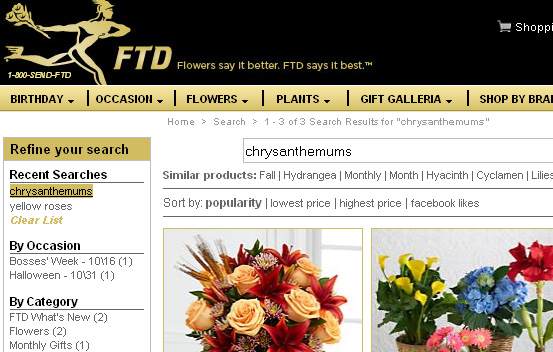
Here’s how the search history works one of our customers, FTD.com. If a shopper searches for “yellow roses,” then “chrysanthemums,” these search terms will appear in the Search History list at the top of the search refinement bar at left, even after they leave the site and then come back:

FTD


A nice feature to offer with search history is the option to “clear list,” as you can see in the FTD.com example above. Similarly, you can also allow visitors to select which terms to delete. Visitors may decide the list is out of date and they may want to delete it; or, if it’s a shared computer, they may not want someone in the same household to know what they’re buying for a birthday gift.

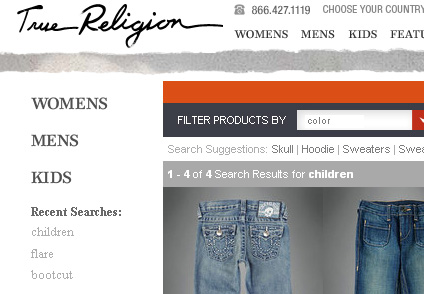
Like FTD.com, the website for True Religion jeans places the search history at top left, just above the list of refinement options:

True Religion

Search history is yet another tool for making your site a little easier to use and a little easier to buy from. If you’d like to add search history to your site, we can help – contact your SLI customer success manager.

Related search suggestions help visitors home in on products and content

Posted by Shaun RyanMay 25, 2011Newsletter, Related Search, Site Search1 comment

Your website visitors have high expectations of quickly finding the products or content they need. However, visitors often struggle to figure out exactly what terms they should use in the search box. Auto Complete, which we’ve talked about in the past, shows suggestions as you type into the search box. Another way to help visitors is to use related searches, which are search suggestions that are shown on the search results page. Related searches can help people find just the right search term, helping remove ambiguity in the query and adding a little serendipity.

For instance, on our customer’s site, Century Novelty, a visitor might search for “graduation favors.” That’s a big category, so the search results for this term would include several related search suggestions designed to narrow the search, or lead the visitor in a slightly different direction:

Related search suggestions encourage site visitors to browse products or content that they might not know about, which can lead to higher-value orders and greater customer satisfaction with your site. Our own research with customers using our Related Searches shows that about 25% of people that search will click on a related search suggestion. That tells us that people find these suggestions useful.

The data for related search suggestions comes directly from your site visitors’ own search behavior – the correlation between search terms entered by visitors, and the products or content they ultimately view. We suggest displaying related search suggestions at both the top and bottom of the search results page. By displaying them at the top, they can help visitors immediately after they’ve entered a query. At the bottom, they provide helpful alternatives if the user has scrolled through the page of results and not found what they want. You can see this placement example on the Century Novelty site by clicking here.

Related searches can also be shown with each search result. You can see an example of this at Green Mountain Coffee:

These same search suggestions can be shown on the product page itself, and used as a navigational aid to find related content. Here is an example from NRS, shown at the bottom of the product page for a dog life jacket.

Related search suggestions are also helpful on mobile commerce sites. Since space is at a premium on the mobile screen and network speeds can vary, you don’t want to force mobile users to scroll down a long list of results or click through on products or content that don’t match their needs. A prominent list of related search suggestions within mobile search results will shrink the time it takes for a mobile user to browse and buy.

SLI’s own patented Related Search is easy to add to your existing SLI search implementation. Contact your Customer Success Manager to find out more about adding value to site search with related suggestions.

Related Searches with Search Results

Posted by Shaun RyanAugust 1, 2008Related Search, Site Search, Web Search

Aaron Wall spotted Google showing Related Searches below search results. This is his image.

Google’s realted searches below search results

I really like these – we’ve been generating them for almost a decade. They made their first appearance on the original snap.com (which later became NBCi.com) using our GlobalBrain technology. We now show them on most of our customer’s site searches. Here they are on the Travel Channel:

Travel Channel Related Searches - Top 10 Vacation Spots

Barry Schwartz on Search Engine Land asks how Google generates these. I’m guessing that they are popular search terms used to find that particular URL. As Barry pointed out, if you search for one of the suggestions, get more links, you’ll see the URL from SEObook ranking top.

This type of related search is reasonably popular on the site searches we host for our customers. Typically we will see about 5-10% of people who search will click on one of these links.

Velingo

Posted by Shaun RyanJanuary 22, 2008Related Search

I came across a new search company today that I hadn’t heard of before: Velingo. It looks like they generate Related Searches to help improve the user experience. I’m a big fan of this and it’s an important and popular feature of our site search product.

It looks like Velingo is selling this as a service to web search companies. We sell our Related Searches to these companies as well- although it is a small part of our overall business. So although Velingo may be somewhat of a competitor to us I’m happy to highlight them. I hope their efforts bring more attention to, and increase demand for related searches. It’s such a useful feature.

Velingo

Load More

Stay up to date with SLI

Featured Posts

  • Maximize Revenue with Enhanced Product Impact Testing
  • Top Five Ways to Prepare for Peak Season
  • Facets, Facets, Who’s Got the Facets?
  • Personalization: It’s Kind of a Big Deal
  • M is the New E: Mobile Commerce Trends and Predictions

Categories

About SLI Systems

  • What We Do
  • Who We Are
  • Why SLI

Learn

  • Webinars
  • News Room
  • Events

Connect

© Copyright SLI Systems, 2018. All Rights Reserved | US: (866) 240-2812 | Legal