SLI home
User login

A BLOG FOR E-COMMERCE LEADERS

  • Blog
  • Resources
  • Webinars
  • Customer Experience Scorecard

SLI Blog

Can Facebook’s Graph Search Learn from E-commerce?

Posted by Terry CostaFebruary 4, 2013eCommerce, Social Media

There’s been a lot of talk the past couple of week’s about Facebook’s new Graph Search which most think is long overdue. While Graph Search – currently still in limited beta – has an interesting and perhaps compelling approach to search, we in the e-commerce search sphere got the end-user experience down a long time ago. You can even say that e-commerce search has been at the forefront of many of today’s search “revolutions” and is a key driver in developing trends around how people search the web.

In fact, a social-oriented search experience already exists on many e-commerce sites, where visitors can filter search results by user reviews to find products that are most highly rated by previous purchasers. SLI also applies this ‘wisdom of crowds’ approach to our own search by delivering results based on items that get clicked on the most for each keyword. Many sites also allow visitors to filter results by the number of Facebook “likes” or Pinterest “pins.” And when integrated with either of these sites, visitors can even see what items their social connections have given the thumbs-up to.

While Facebook users may start to flock to Graph Search to find photos, restaurants, music and other cultural events – and see what their friends have been posting on a given topic – Facebook can still enhance the experience quite a bit by adding features that are prevalent on many e-commerce sites.

The ability to refine searches by attributes like color (red dress or blue shirt), sizes, price, location, etc. is also critical. If a search returns hundreds or thousands of results (which would likely be the case with a Facebook search), people want mechanisms to narrow down those results and get closer to what they want. Mouse-over pop-ups, which provide all the detail of a specific result when the user rolls their cursor over the image, is also a great way to streamline the experience, as are Quick View Windows. 

The team here are all very excited to see Facebook taking search to the next level. It validates the importance of good search, no matter what type of site, and also helps people experience search in a new and innovative way. As search continues to evolve and advance in new directions, it’s intriguing to see how different types of search – web search, e-commerce search, social search – can all borrow from each other.

Read More

Tablet Browsing Made Easy

Posted by Kemberly GongJanuary 30, 2013eCommerce, Mobile/Tablets, Navigation, Site Search

Does it really come as a surprise that eCommerce purchases on tablets is outpacing smartphones? No, probably not. Though they share the same mobility and ease of use as smartphones, tablets are a natural fit for online browsing with larger screens and better displays that mimic the catalog experience but add much richer functionality. Going a step further, tablets are also starting to gain traction in home computing.

Many eCommerce sites are faced with the challenge of providing the best user experience based on the type of device their customers are visiting from. Smartphones require pages that are optimized for quick loading times on small screens, and links that are easily clickable for large fingers. Tablets, being larger in size, are just made to be used for browsing and shopping.

Tablets offer a catalog experience, amplified – a richer experience offering interactive displays with video, specifications and reviews, social sharing features and non-traditional page layouts, and still also have the opportunity to lead buyers to checkout. For example Boden’s outfit maker feature allows an outfit to be tried on using a tablet before being purchased, and is an engaging way to show clothes in an interactive way.

Boden's outfit maker

Other sites have interesting layouts that feature larger images or easy ways to navigate through to find products. It’s always important to keep in mind that shoppers using tablets don’t have a keyboard and mouse to help speed the browsing process. Designing the experience so it’s easy to find products with a few taps on a screen will please your customers and may inspire them to return to your site.

Practical Ecommerce just featured 15 excellent iPad-friendly sites, which you shouldn’t miss.

We believe we’ll start to see more tablet-optimized sites coming soon. Tablets – iPads specifically – took the lead in mobile holiday shopping in 2012, and offer an ideal platform to facilitate browsing, exploration and ultimately purchases.

Do you shop using a tablet? What features do you like most?


Read More

Powerful Merchandising in Three Quick Steps

Posted by Shaun RyanJanuary 28, 2013Newsletter, Site Search

In “brick and mortar” stores, we rely on product design and packaging, product placement such as shelf locations or end caps, and discount signs to help draw shoppers’ eyes to special deals or items we want them to see. In online shopping, we use different techniques and features to create an equivalent merchandising experience that helps visitors identify brands, sales or seasonal promotions and essentially, draws more eyes to products.

Online merchandising allows retailers to adjust the display of their inventory with the click of a button. There are many different ways to create powerful merchandising, and I would like to highlight three primary steps – tuning, merchandising banners and reports – which can add significant value to your eCommerce efforts.

In SLI’s merchandising console, we have created tuning rules that are designed to help promote or demote specific products as the merchandiser sees fit. This works in conjunction with our learning search and navigation, which naturally surfaces the most popular products over time. Learning search works remarkably well in increasing conversions because it adapts to what you visitors want. However sometimes you may want to override that. For example, a product may be new or you may want to promote it because of better margins, excess stock, or to coordinate with other promotional activity. In cases like this, merchandisers can create a “tuning rule” that places certain products at the top of the search results or navigation page. They can also push certain products, such as out-of-stock or seasonal products to the bottom of, or completely off of the results set.

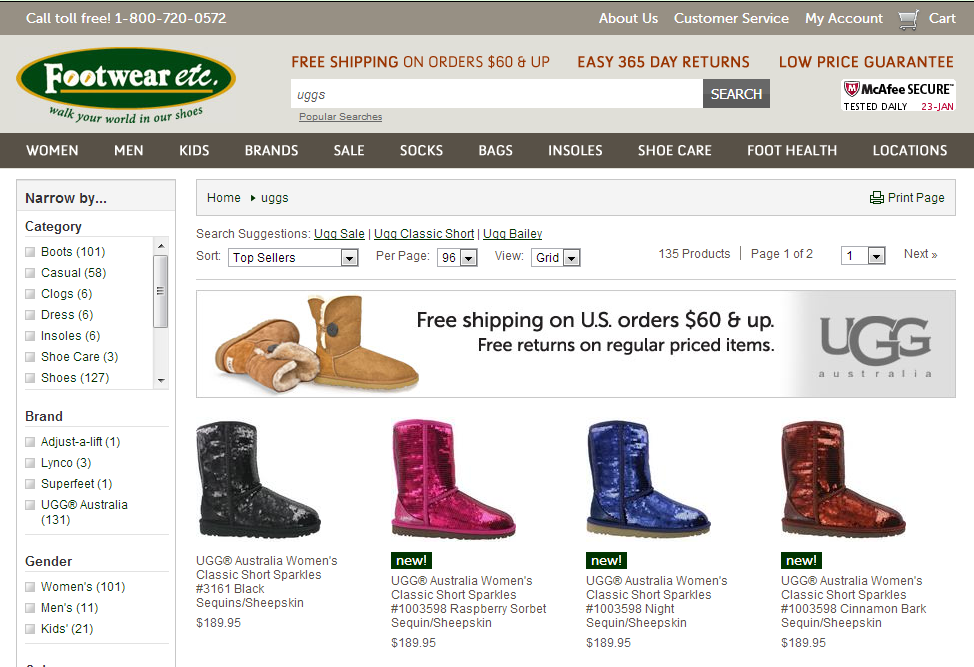
Another useful merchandising tool is the banner. Banners can be shown anywhere on the search or navigation page and can be triggered by a number of different rules. For example the banner could contain logos and other imagery associated with the keyword or facet. If someone searches for a TV or clicks on the TV category you could show a banner that displays a TV selection widget. Banners can be used when people search for products that you don’t carry, with the banner promoting alternative products.

Many of our customers use a combination of banners and tunings to create landing pages for advertising campaigns. They select a keyword that is unique to the campaign, write a rule to show a banner with graphics associated with campaign and then use tunings to select products to show on the page. This allows marketers to quickly and easily create arbitrary landing pages.

The screenshot below shows a simple merchandising banner promoting free shipping for all UGG boots that displays when searching for UGG boots.

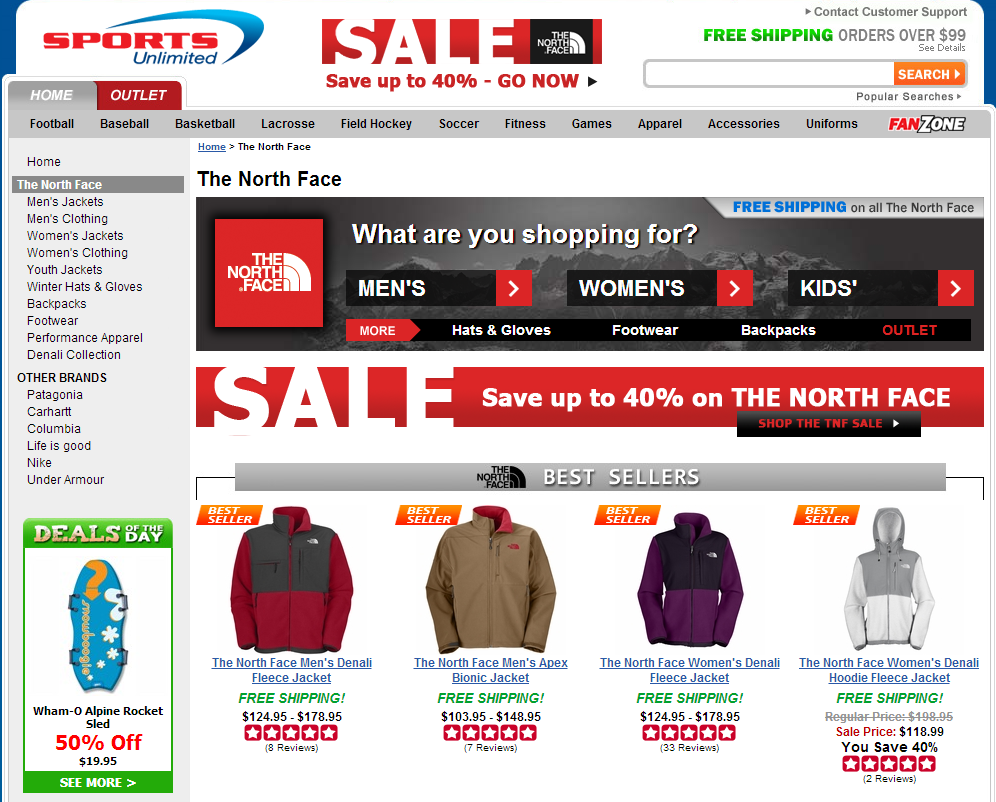
The screenshot below shows a merchandising banner on a search page that advertises North Face products, with clickable links to refine search pages by gender, age and more.


But what good are these tools if you don’t even know what your customers want? Our reporting allows merchandisers to easily access key data about customers’ search behavior. The Top Searches report can give useful insights about the most popular keyword searches, showing you the language that your customers use and identifying some possible candidates for fine tuning or adding banners. Conversely, merchandisers can view reports that show search phrases with poor results to identify phrases that are being searched but have low click-through rates. This may indicate that your customers are using different language to describe your products than you do, or it could give you clues about products that you don’t carry, that your visitors expect to find.

I’ve covered a few of the major aspects of merchandising, but there are a variety of other features and techniques that can be implemented to draw more attention to your products. To learn more about the ways SLI’s features can help aid your merchandising efforts, contact your Customer Success Manger or send us an email at: discovery@sli-systems.com

Read More

What Retailers Can Learn from Fashion Brands – Pt. 2

Posted by Kemberly GongJanuary 25, 2013eCommerce

In part 1 of this series, I discussed our new study of the fashion industry and how apparel, beauty and accessories brands are pushing the envelope on search and merchandising. Today I’ll show you a few specific examples that demonstrate how these brands are delivering a richer, more engaging experience online – and how you can do something similar.

Branding Banners – whether on search or navigation pages, fashion retailers are really good at merchandising their top brands through banners. Take the Sports Unlimited example to the left. This shows you the creative banner they use on the North Face search results page, which gives the user additional refinement options for Men’s, Women’s, or Kid’s items, as well as allows them to click on “Hats & Gloves,” “Footwear,” “Backpacks” and “Outlet.” They also promote their Free Shipping offer on all North Face items in the banner. This type of banner draws the shopper in and gives them easy options to get a better view of items of interest. Sports Unlimited has seen a steady increase in the number of people who click on the banners, and who then convert to buyers.

Rich Auto Complete – our retail clients consistently see a greater increase in conversions when they incorporate Rich Auto Complete into their site search, a feature that not only works well for fashion and apparel but for all retail sectors. By automatically offering suggested keywords and accompanying product images after the first keystroke or two entered into the search box, Rich Auto Complete streamlines the shopping experience and allows people to quickly click on something they want, rather than scroll through a page of results. In the example  from totes-ISOTONER’s site, you can see that in their Rich Auto Complete window they include a high-quality image, description of the product and price – making it super easy for interested buyers to make a purchase.


Color Swatches – showing all the different color options a product is available in is particularly useful on fashion and accessories sites, but can also be beneficial in other categories as well. Dooney & Bourke’s site is a beautifully-designed way to show all the different colors a purse is available in, and let the visitor click on the different colors – and see the image shade change – right in the search results page. I give this approach a double thumbs-up for ease of use as well as its visual appeal.


Index other Media – I’ve noticed that many fashion and beauty brands index other content in their search results to give shoppers a richer, more informative experience. For example, E.L.F. Cosmetics allows visitors to click on different tabs within search results for beauty blog articles, videos, social media buzz, and other types of media that can help them make a decision to purchase. By separating each type of content out by tabs, the results pages avoid being cluttered and give shoppers an easy way to see the breadth of content that’s available. This is yet another way to see conversion rates from search pages go up – and customer engagement as well.

For more examples of how fashion retailers are on the cutting-edge, download our complete study here.

Read More

Don’t Miss our Upcoming Apparel & eCommerce Webinars feat. Tea Collection and Caché!

Posted by Terry CostaJanuary 22, 2013eCommerce, Site Search, Webinar

The fashion and beauty industries lead the way in eCommerce with innovative features and web design that are fun, modern and most importantly, useful. The customer experience has been thoroughly considered as retailers seek to mimic the in-store experience. You’ll learn firsthand from two apparel retailers what it takes to create a dynamic site that engages users and drives clicks and conversions.

Tune in to the first webinar tomorrow, Wednesday 23rd, featuring Michael Stearns and Celine Teoh of Tea Collection. You’ll hear “Insider Tips for eCommerce Apparel Businesses” and learn the best practices that help guide shoppers to a purchase. You can register for the Tea Collection webinar here.

Next Thursday, Jan. 31, you’ll hear from Kevin Metz of Caché as he details which site features are crucial to improving conversions. Register for the webinar, “How Caché Turns Browsers into Buyers,” here.

Whether you’re growing your business or looking to take your brand to the next level, this is your opportunity to ask industry-related questions and hear from experts who’ve managed and grown these successful companies.

Do you have a strategy in place to grow your business?  Let us know what your priorities are for 2013.

Learn more about the strategies and features the fashion and beauty industries are using in our industry brief, available for download here.

Read More

What Online Retailers Can Learn from Fashion Brands

Posted by Kemberly GongJanuary 18, 2013eCommerce, Merchandising, Site Search2 comments

We just released the results of a recent study we conducted among several fashion, accessories, and beauty sites, about how they approach the online user experience (download it here). Understanding that fashion and apparel brands tend to be on the cutting-edge of merchandising their products and delivering a more high-touch experience on the web, we wanted to see what their best practices are when it comes to site search, navigation, and merchandising, that other retailers can emulate.

Fashion retailers strive to deliver a feature-rich web experience that comes as close as possible to shopping in a store where customers can see a product up close, try it on, feel the fabric, and more. They design their site with heavy use of graphics and images, and incorporate features like Quick View Windows, Mouse-over or Clickable Pop Ups, and rich color swatches, all of which lend to making it easier to see a product’s fine details. Other enhancements these sites rely on are Rich Auto Complete, where products and images appear after a few keystrokes to help shoppers get to their desired items more quickly. AJAX search, which speeds up the delivery of search results, and localized information, so online shoppers can see if items are available at nearby stores, also appear prominently. 

Merchandising banners on search results pages are used to engage customers and gain their interest in a particular brand or promotional offer. We also saw some sites incorporating other media and resources into their search results, in order to arm shoppers with information from blogs, news articles, video, and social networks to help them make an informed decision.

If you’d like to download a copy of our study, you can do so here. And in our next post, we’ll do a little deeper digging into who’s using these features and what impact they have.

Read More

Privacy and Retail in 2013: 4 Steps You Can Take

Posted by susanaJanuary 14, 2013eCommerce

Guest Post by Susan Aldrich of Patricia Seybold Group

Every few years, Internet privacy becomes a hot issue. It’s hot now, and many marketers are concerned that regulation or even legislation could ensue. Europe has new regulations on privacy and specifically cookies, which unsurprisingly were diluted in the implementation phase.  The specter of USA regulations haunts, but the court of public opinion is more threatening. Instagram’s humiliation over its new privacy policy retains top-of-mind for marketers, journalists and consumers.

And yet, collecting customer information is undeniably valuable. It helps you present great product recommendations to visitors, follow up with engaging emails, and chase your customers around the Internet with ads. There are also opportunities to monetize customer information, via third party ad exchanges.

I think retailers can postpone privacy panic: you aren’t Facebook or Instragram. But I do recommend taking four small steps. 2013 is the year to learn how to ask for and use customer permission, because customers currently pay little attention to the issue of privacy on retail sites. Here are the 4 things that belong on your privacy to-do list:

1. Set a privacy policy, and track compliance vigorously. I say track, not enforce. Over the course of a few quarters, estimate the impact on your business of adhering to your policy – what circumstances made you violate your policy, what opportunities do you forgo to adhere to it, what costs do you incur? Understanding the impacts of your privacy policy, you can adjust it to meet your business needs while customers are still mostly ignoring it.

2. Plan your technology strategy for collecting and tracking not only customer data, but customer permission to collect and use that data. What approach to balancing privacy, permissions and monetization is budget-appropriate?

3. Start collecting customer permission. Your customers each trust you in certain ways.  Ask them to be explicit about their trust. Try out various programs to get their permission to use their data for various purposes. Your goal is to find out what customers deem acceptable, and what you need to offer in return.

4. Establish tools and skills for testing different approaches to asking permission, to describing how you use customer information, and for different approaches to using the information.

So, you definitely want the freedom to collect customer data, and you definitely want to avoid the gaffes that could make your brand a Twitter #fail phenomenon. You can avoid Instagram-style notoriety by making a deal with your customers about their privacy, and not changing the terms after the fact. The four steps will help you understand what your privacy policy actually means to your company, and what you must do to implement it.

Susan Aldrich is a leading authority on optimizing the methods that help customers find what they need to make buying decisions and/or to solve problems. Her research and consulting address the technologies and practices that help marketers get the most useful content in front of customers at the right moment: personalization, recommendations, search, discovery, targeted marketing, and web content management. Her blog, at www.susanealdrich.com, aims to fill the need for Personalization for Dummies and Experts.

Read More

Boost Views and Repeat Visits with High-Engagement Content – Part 2

Posted by Shaun RyanJanuary 9, 2013eCommerce, Social Media


In my last blog, I mentioned that creating content that drives high user engagement is essential to compete in the new online commerce landscape. Online shopping is more social than ever before. I’m not just talking about “Like” or “Pin It” buttons for easy sharing (though they definitely help), but also features that create an impact for customers by providing relevant information and second opinions to ease decision making.

First, online retailers are encouraging users to upload their own video reviews and testimonials to their website through online video sharing sites like YouTube. Folica does this extraordinarily well, harnessing the opinions of thousands of customers who buy, test and share video reviews and tutorials of products on their site, even though they’re not getting paid to do so.
 

Second, eCommerce sites are creating their own videos and allowing them to be shared via social media and indexed alongside product content. Bulk Reef Supply creates their own educational videos to help those new to building saltwater reefs. These videos can garner more than 40,000 views, proving that content is just as valuable as the products they sell, since they help customers find the exact part or item they need. They have even enabled users to have the ability to grade the helpfulness of the content to increase engagement.


Third, social media interactions, blogs and other media mentions can be indexed into search results, like e.l.f. cosmetics has done. Search for eyeshadow, and you’ll find the most recent magazines that have featured e.l.f. eyeshadows, facebook and twitter mentions, and blog content. When you’re unsure if it’s the right product, seeing other reviews or mentions can help solidify your decision.

Fourth, online retailers are making sure their products can be shared on social media sites – for example, ‘Liked’ on Facebook or “Pinned” on Pinterest. This is a simple addition to any site and quickly becoming a standard feature that customers expect. Village Hat Shop does this well, including a “Like” and “Pin It” button on their search results page.


And lastly, online retailers are the ability creating the ability to shop on their social media pages. Motorcycle Superstore and Boden have both created gateways to their online stores through their Facebook pages.

How else have you seen social media and eCommerce integrated?

Read More

Boost Views and Repeat Visits with High-Engagement Content – Part 1

Posted by Shaun RyanJanuary 7, 2013eCommerce, Ratings and Reviews1 comment

The online shopping experience is more helpful for consumers than ever before. That’s because for any retailer, the question now isn’t whether they’re online, but how easy it is for customers to find what they want and make an informed decision. We’re continuing to see growth of video and other high engagement content such as better product images and gift finders being used to attract and retain customers.

This is of paramount importance for apparel and accessory retailers, since shopping for apparel, accessories and beauty products is a highly-personal activity. Ensuring correct fit or style, testing makeup colors, or seeing how a backpack or bag fits the wearer’s frame all are major influencers in deciding on whether a purchase is right.

For technical gear, users want to know if it’s made well and durable, easy to assemble and what its specifications are. User videos, company-generated videos and images showing the various features are clear ways to give users have a clearer understanding. Other reference points, like product images from multiple angles or with a model can help inform users of scale and fit.

It’s even more helpful to take video integration one step further by embedding videos in search results, so customers don’t need to click onto product detail pages to find video content. Easy access to the right products will help drive clicks and conversions.

A Gift Finder feature is also really useful in helping those shopping for others find the best products by narrowing down possibilities by feature or personality. Bestbuyeyeglasses.com helps users refine their styles by gender, age, and color. Features like these that aid shoppers in finding products and add concrete value will help drive repeat visits.

There are also a variety of ways to integrate social media content in the form of videos, reviews, blogs that I’ll talk about in my next blog post.

What are your favorite sites that feature video or other content that is meant to engage users?

Read More

2013 eCommerce Resolutions Infographic

Posted by Kemberly GongJanuary 4, 2013eCommerce, Merchandising, Ratings and Reviews, Related Search, SEO, Site Search, Social Media

Here’s our infographic from our 2013 eCommerce survey results, showing top resolutions and goals for online retailers in the New Year. You can find the full results of our 2013 survey here.


Read More

Posts pagination

< 1 … 20 21 22 23 24 25 26 … 64 >

Stay up to date with SLI

Featured Posts

  • Maximize Revenue with Enhanced Product Impact Testing
  • Top Five Ways to Prepare for Peak Season
  • Facets, Facets, Who’s Got the Facets?
  • Personalization: It’s Kind of a Big Deal
  • M is the New E: Mobile Commerce Trends and Predictions

Categories

About SLI Systems

  • What We Do
  • Who We Are
  • Why SLI

Learn

  • Webinars
  • News Room
  • Events

Connect

© Copyright SLI Systems, 2018. All Rights Reserved | US: (866) 240-2812 | Legal