SLI home
User login

A BLOG FOR E-COMMERCE LEADERS

  • Blog
  • Resources
  • Webinars
  • Customer Experience Scorecard

SLI Blog

SLI at the Search Marketing Expo!

Posted by Kemberly GongMarch 12, 2013Conferences, eCommerce, SEO

Terry Costa, VP of Marketing at SLI Systems, spoke last night at the Search Marketing Expo (SMX) in San Jose, Calif., on how to improve your eCommerce site’s search engine optimization (SEO). In addition to using techniques like User-Generated SEO, he also highlighted the importance of improving the user experience of landing pages.

According to Costa, most consumers use similar keywords when searching the Internet for an eCommerce site that offers the product they want. When searching for a product on a retail site itself, they tend to vary their search phrases more. He also mentioned that the search box on an eCommerce site is one of rare places where visitors actually tell a retailer what their intent is. Matching those keywords with products they actually click-on and capturing this data is very important in improving not only your conversion rates, but also your SEO efforts.

motorcycle superstore - MBOS1

motorcycle superstore - MBOS

Costa also talked about how imperative it is that you help customers find what they’re looking for quickly once they land on your site. Focusing on the user experience by showing visitors more sorting options, refinements, similar products, merchandising information like “3 left” or “free shipping”, is important to help reduce abandonment.

It’s also helpful to show users other recommended products when they enter your site through a link from an Internet search engine. Let’s say a customer searches google for “scorpion exo 900” and clicks on the first link with that title. It will take them to a Motorcycle Superstore product detail page.

However, if that exact helmet isn’t what they want, Motorcycle Superstore uses that search term to recommend other relevant items that match the phrase, to ensure that customers see other possible items they might like.

Surveys by SLI Systems have shown that 73% of visitors will leave a site within two minutes if they are unable to find what they are searching for. By giving them other options, you’re increasing the chance they’ll stay on the site and make a purchase.

To learn more about improving your site’s SEO, email us at discovery@sli-systems.com

Read More

Don’t Miss our Re-platforming Webinar Tomorrow

Posted by Terry CostaMarch 6, 2013eCommerce

Many eCommerce companies just starting out may not have the budget or need for a large, full-service platform. Because of this, they may choose an eCommerce platform that works for them at the time. But as companies grow, the original platform they started with may not fit the needs of the company they may consider changing platforms or moving to on-demand solutions for more flexibility, reliability and cost savings. This is otherwise known as re-platforming.

There are obvious benefits to re-platforming – upgraded technology, better features or reporting may all fit the company’s current needs and help address major pain points. However, switching platforms should be carefully considered before a big decision is made.

Re-platforming requires a huge commitment not only in dollars but in time, project management, dedicated project team, staff training and overall learning curve. Additionally, a new platform may still not have all of the features that your site needs. For companies that cannot afford or choose not to re-platform, there are alternatives that can help delay or avoid it altogether.

So is it right for you? Join our webinar tomorrow, Thursday, March 7th with Fit for Commerce to learn more about their findings that they published in their recent white paper on the subject. You’ll also hear how from Brandon Finch, Director of eBusiness for Jelly Belly, how they augmented their existing platform and avoided re-platforming altogether.

Download the Fit for Commerce white paper “Site Search vs. Re-platforming: How focusing on site search can eliminate the need to re-platform your eCommerce website” here.


Read More

Replatforming: Is It Right For You?

Posted by Kemberly GongMarch 4, 2013eCommerce, Site Search1 comment

Are you stuck between a rock and a hard spot when it comes to your eCommerce system? Does it have some features that you still like, but is missing crucial others that can make or break your business?

It could be time to change to a new platform. Or maybe, it’s time to explore ways to enhance your existing site with additional site search and merchandising features that will meet your current need while giving you breathing room to look for new solutions. In some cases, eCommerce sites have been able to completely avoid expensive, time-consuming re-platforming entirely by using site search to fill in the gaps that their platforms were not adequately providing.

If you’re at a crossroads about the best way to move forward to grow your site’s functionality efficiently and cost-effectively, you shouldn’t miss our upcoming webinar this Thursday, March 7, on Site Search vs. Re-platforming. You’ll hear from Fit For Commerce about the considerations around re-platforming, and can find out from Brandon Finch, Director of eBusiness for Jelly Belly, about the challenges Jelly Belly faced and the solution that has helped their site grow.

Enhancing the most fundamental abilities of your site’s search and navigation can help remove the pressure to re-platform immediately or entirely, because customers can still complete the most fundamental, revenue-driving actions of searching and finding a product to purchase.

When you are considering re-platforming, it’s best to ask yourself these questions:

  1. Am I completely unhappy with everything about my existing platform?
  2. Do I have 3+ months to devote to changing and implementing a new platform?
  3. Do I have a dedicated cross-functional team that can handle the change in platforms?
  4. Are the goals of all departments met by re-platforming?

If you answered “no” to any of the above, you won’t want to miss our webinar to learn more about the best available options for you. Every company’s business and growth plan is unique, and a one-size-fits-all solution is not the only option.

Also, download the Fit For Commerce white paper on Site Search vs. Re-platforming.

Read More

Non-Product Content for a Full User Experience

Posted by Shaun RyanFebruary 27, 2013Newsletter, Site Search

For many, the process of shopping is social. While social media and online shopping continue to evolve, the essential act of gathering information or sharing our experiences with others is deeply embedded in our shopping behavior. Whether we’re telling our friends about how we like the new car we just bought, getting a recommendation on a particularly comfortable pair of shoes, or hearing about a sales clerk that was a little less than helpful, we enjoy informing others and getting their feedback.

At SLI we understand that, and have created many ways for online shoppers to gather information and share their experiences. We offer shoppers the ability to search non-product content, including reviews, video tutorials and video reviews, blogs, and social media mentions. Having the ability to see products from different angles, get a sense of scale or mechanics through videos, or read reviews builds credibility not only for the product, but for your site.

Making this non-product content available is important because it gives buyers access to information without having to do outside research, thus reducing risk and building confidence in their decision, all without leaving your site.

It’s not always easy to implement, however. Basic search functionality – like what we’ve seen with Google Commerce and some eCommerce platforms – may not allow for easy implementation of non-product content. More advanced site search solutions have this capability and allow you to expand your service offering.

Teaming up with a full-service site search provider can allow you to access a full range of tools to help your customers. It’s important to look for a knowledgeable support team that keeps you updated with data-driven insights about how your customers interact with your site.

I’d like to share with you a few of the ways we can help you improve your site with non-product content.

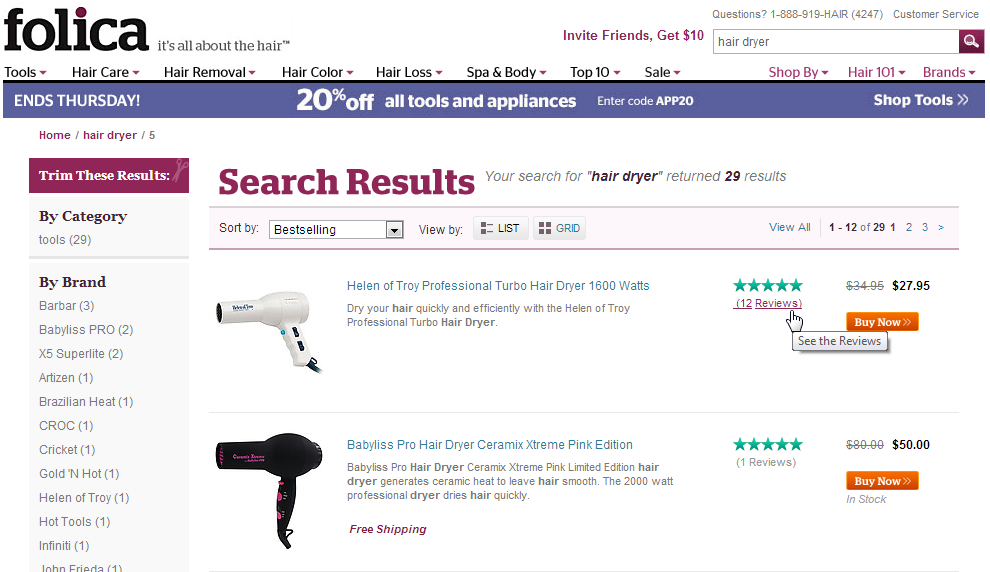
folica - user reviews2

Indexing Reviews

In the age of the Internet, we’ve become accustomed to easily-available reviews. For many purchases with high dollar values, it almost seems crazy not to read reviews before making a decision. Why not make reviews searchable, so that your users can find the products that are ranked most highly? Folica has done this well, so that within a search for “hair dryer”, products can be refined to show the highest-ranked hair dryers first.

Indexing Social Media, Images and Videos

In that same vein, why not show your customers other content that will help them make decisions? This can be videos that show reviews, tutorials or other helpful content. Here are three examples of very different SLI customers who are using these tools to great effect.

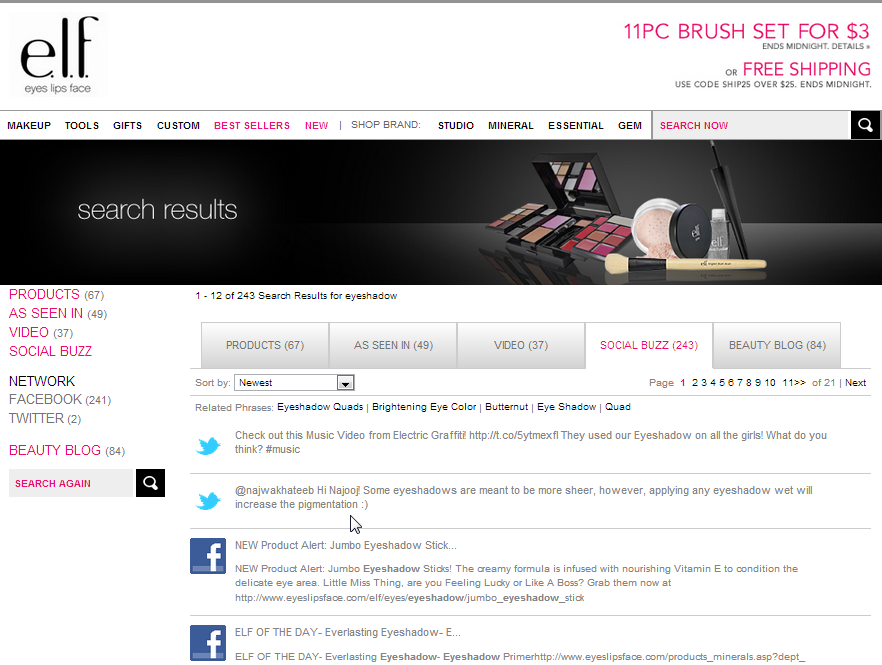
eyeslipsface- social indexEyeslipsface.com allows all social media mentions of their makeup and beauty products to be searchable, as well as an “As Seen In” tab showing the latest fashion magazines to have featured their products. Keyword queries will also turn up blogs with those keywords in them

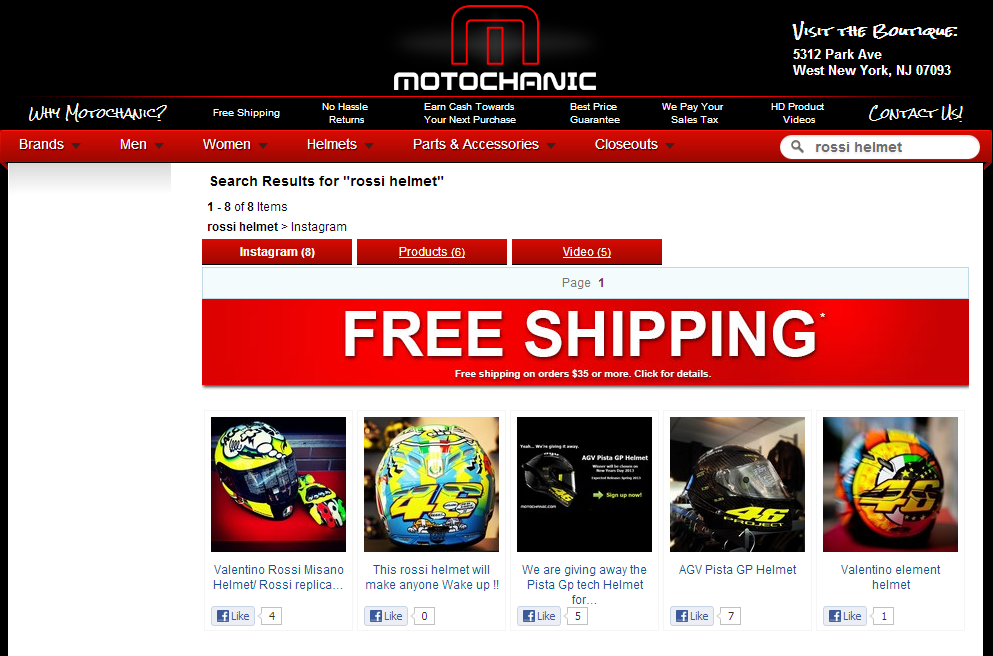
motochanic - rossi helmet - instagram


Motochanic.com has led the pack with indexing Instagram photos on their search results pages. Now, searches for “Rossi helmet” will not only return all available helmets of that brand, but all Instagram photos with the same tag, and related videos tagged with the same keywords. There’s also a “Like” button for each product, to share across Facebook.

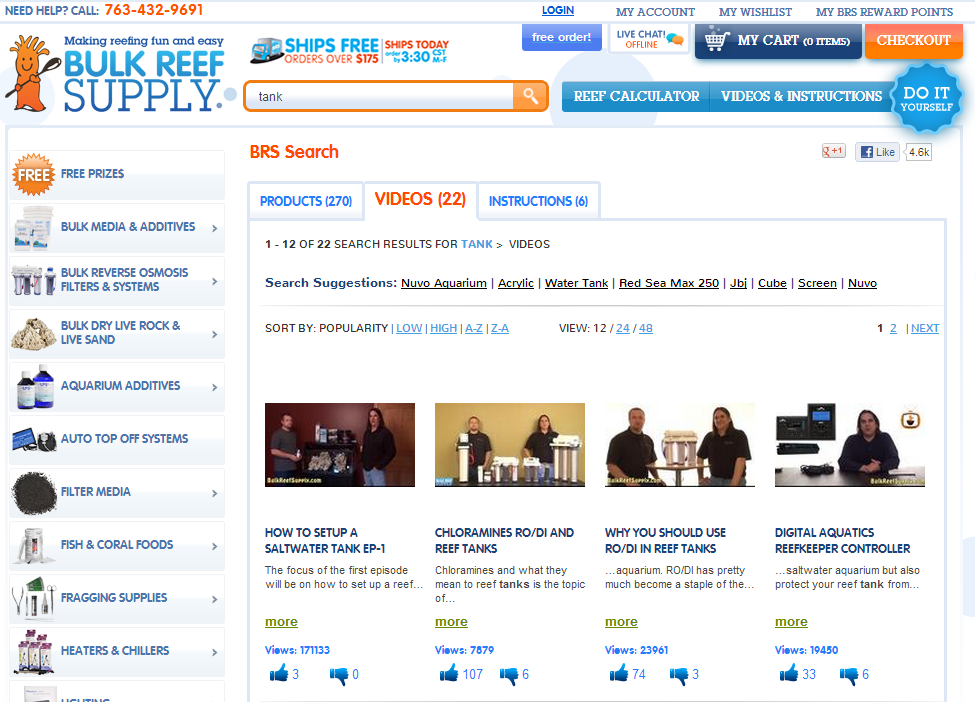
bulk reef supply - videos

BulkReefSupply.com also indexes their videos alongside product content. Customers interested in building a saltwater aquarium can find informational videos through search, thus establishing Bulk Reef Supply not only as a helpful site for buying products, but an educational resource.


Social Sharing on Search Pages

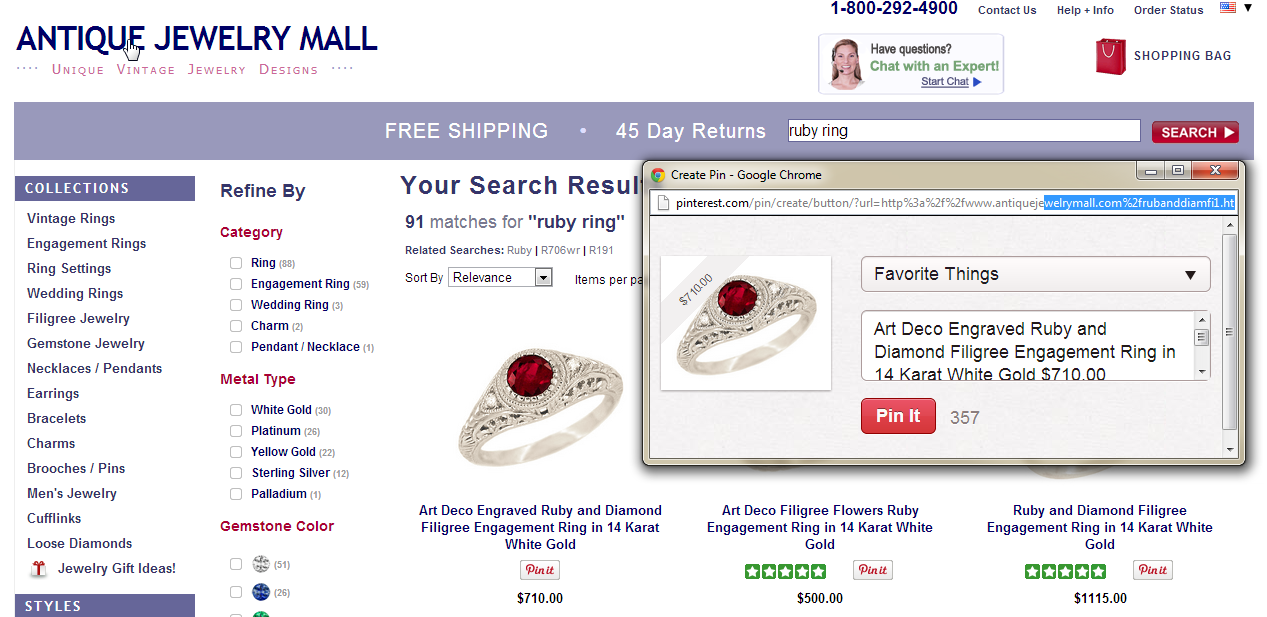
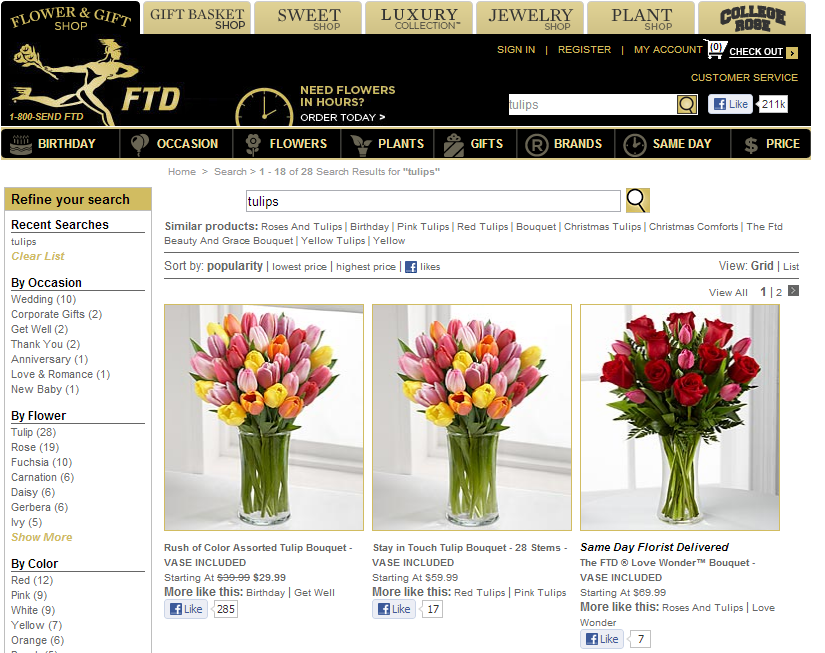
Of course, social sharing features are also important, as we’ve seen the ability to “Like”, “Pin It” and “Tweet” results on most sites. We add that same functionality to your search pages. On AntiqueJewelryMall.com, you can pin your favorite pieces on your Pinterest board. And on FTD.com, you can “Like” the bouquets and flower arrangements and give your friends (or your significant other) a clear hint about what you like.

antique jewelry mall - pinterest

FTD social media


Search on Social Media Pages

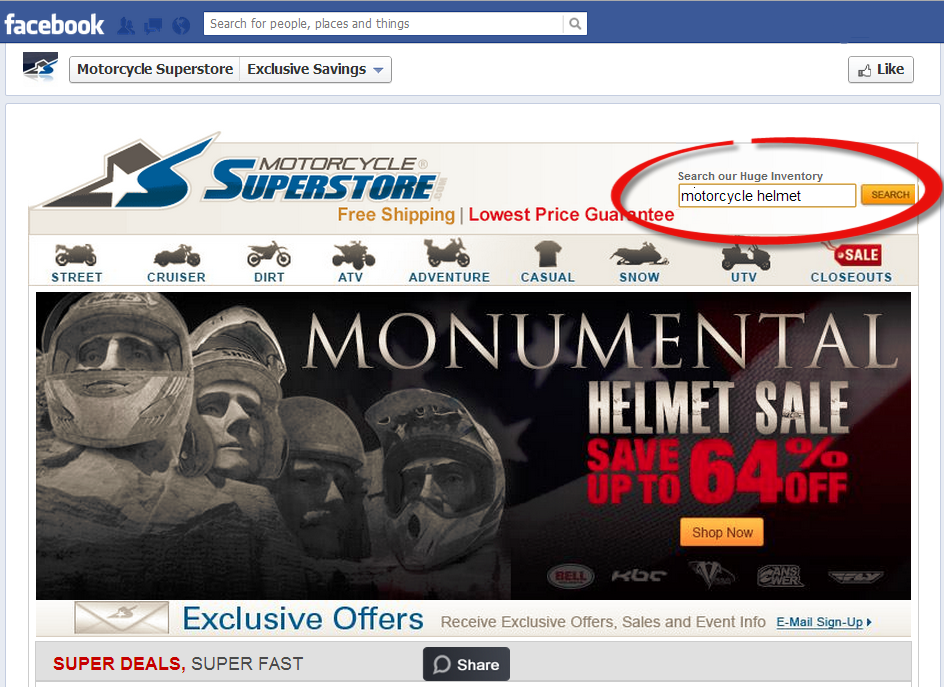
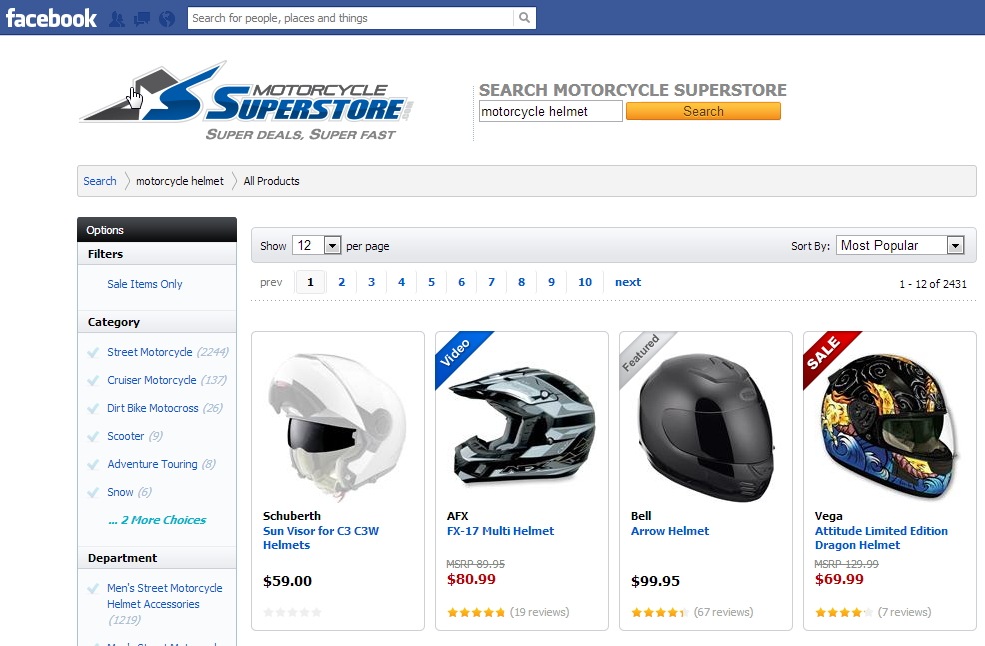
Lastly, some sites use their Facebook pages to drive customer traffic and transactions. Motorcycle Superstore is one that allows visitors to their Facebook page to search products directly, which takes them to a Facebook-specific search results page.

motorcycle superstore - FB2

motorcycle superstore FB2.1

Videos, reviews and other non-product content are all helpful tools that can be used to help customers find what they need and get enough information to make a purchase. Finding the right balance is different for every site. To find the right balance for your site, contact your Customer Success Manager or, email us at: discovery@sli-systems.com.

Read More

3 Ecommerce Navigation Errors to Avoid

Posted by Sasha ButkovichFebruary 26, 2013eCommerce, Navigation, Navigation Tips

Guest Post by Sasha Butkovich of Ecommerce Outtakes

There are plenty of potential errors to be made in ecommerce navigation, and you’ve probably seen them all at one point or another in your own online shopping experiences. But what are the biggest “Don’ts” when it comes to navigation? Here, we’re taking a look at the top 3 mistakes we commonly come across in ecommerce sites. Avoiding these errors is a key step toward creating a great experience for online shoppers.

1. Confusing or insufficient filters and refinements

Some shoppers come to a site knowing exactly what they want, while others come to browse. Every ecommerce site should be able to cater to both shopping styles. One huge factor that can really help (or hurt) in this area is the filtering or refinement options. Making sure there are enough clear and relevant options to help customer narrow down their results is key! Unfortunately, this is a feature that’s very common for ecommerce sites to get wrong.

Take a look at this example from Capezio, a well-known brand in dance shoes and apparel. Throughout the pages of this ecommerce store, there’s a huge lack of filters. For instance, here’s the ballet shoes page. The seasoned dancer will likely come to this page knowing what they need, but for a new dance mom or dancer, this would be a frustrating experience. There aren’t any filtering or sorting menus anywhere! You can’t filter out child or adult, men’s or women’s, size, or even price. Also, many of these shoes are available in several colors, but you can’t tell from this page. Having those filters and refinements would definitely help in an instance when a parent might need to find black ballet shoes for their child’s recital, for example. Without filtering options, shoppers may become overwhelmed and leave the site.

capezio


2. Non-intuitive design

It goes without saying that nobody wants a boring website, and that ecommerce sites should be unique expressions of the brand. That’s definitely a good thing, as long as it doesn’t come at the expense of complicating the navigation. Site design should be intuitive for the shopper. It should be easy, almost instinctive, for them to figure out how to get around and find what they’re looking for. Many sites adhere to a basic format (category tabs along the top, filters and refinements on the left, etc.) which has become habitual for online shoppers. This doesn’t mean you can’t deviate from the formula, but bear in mind the impact it can have on the user experience!

Here’s the website for a German shoe company called Trippen. Right from the home page, it’s hard to see where you’re supposed to go. In fact, if I hadn’t already known that this was an ecommerce site, I might not have even figured out that I can purchase things here. I happened to hover my mouse over the little “Welcome!” link in the upper right corner, and then I could see the menu of shopping options. It’s not a great idea to keep your store hidden if you want people to buy things! Make it easy and intuitive.

trippen


3. Inaccurate search function

Browsing is one thing, but a helpful site search is just as, if not more, important. When shoppers come to your ecommerce site with a product in mind, the search should help them get to it as quickly as possible. Using Rich Auto Complete within the search function is a great feature. By offering up suggestions for keywords and products, a search like this can definitely increase the speed and accuracy of the search process. Some ecommerce sites however are still not there yet, and it’s a shame.

Take for example clothing retailer Forever 21. Although the search function on this site does suggest keywords as you type, the results aren’t very clear. Here, I searched for “red jeans,” and the first 10 results that appeared weren’t even red. Many of them might have a red color option on the product page, but it might be confusing for a shopper not to see the image of the item in the color they’re searching for. It takes more time to click through each product to find out if they come in red, and some people may not want to invest that time. Even providing swatches of the other available colors on this results page would be a step in the right direction. If the search function provided more accurate results, Forever 21 might generate more sales.

forever 21

These three errors are some of the most common mistakes in ecommerce, but you can avoid them. Keep filters and refinement options relevant, feature a design that’s intuitive and simple, and make the search function as accurate as possible. If you have that, your ecommerce site is well on its way to great, user-friendly navigation.

Sasha Butkovich is a contributor to the Ecommerce Outtakes blog, which aims to improve usability and the ecommerce experience one blog post at a time. To read ecommerce tips and news, and to submit your own site for a free review, visit EcommerceOuttakes.com.

Read More

Customer Profile: Steve Elkins from WEBS

Posted by Kemberly GongFebruary 25, 2013Conferences, eCommerce3 comments

While we love talking with our clients about site search and navigation, it’s also a nice break to see our clients in action. Last week, I caught up with Steve Elkins, Co-Owner with his wife Kathy, of WEBS, one of the largest independent retailers of yarn in the country.

photo 5

Elkins was attending Stitches West 2013, one of the largest yarn and crochet shows that features classes and sessions as well as a market for knitting and crochet enthusiasts to buy skeins of yarn in thousands of colors, weights and varieties.

WEBS is a family-owned business that Elkins’ mother started in their basement in 1974. Since then, it has grown to be the largest brick and mortar yarn retailer in the United States. When Elkins took over the business in 2002, he began working to improve the web business. In 2007, WEBS brought on SLI Systems to manage the search for their eCommerce site, www.yarn.com.

For knitters that live in the Northeast, making pilgrimages to their 16,000 square foot store in Northampton, MA is not uncommon. “Some people will go two, maybe three hours out of their way to visit the store,” said Elkins, who said the store has been likened as a Mecca for knitters.

photo 3

But for customers throughout the country who don’t have access to such a wide variety of products, they can access the huge inventory and wide selection that WEBS offers through www.yarn.com. They have a separate, larger warehouse to handle all shipping for the eCommerce business.

Elkins estimated that WEBS stocks roughly 400,000 units of yarn at any given time. With huge varieties, weights and colors to stock and sell, sorting through those products can be confusing for customers. SLI’s search and refinements have figured strongly in helping customers search a product or material, such as angora, and then refine the large selection down by brand, fiber, weight or price range.

“We tend to carry products you won’t find in the larger chain stores,” he said, such as hand-dyed yarns, a larger selection of wool yarns, discontinued and close out items and their own line of products.

photo 7

They’re continuing to develop their online business, starting with redesigning their site with responsive web design, to ensure that the site works well across a variety of mobile devices. He said they are also looking at smaller tweaks to improve the overall usability and site features.

Additionally, Elkins added, SLI’s reports help him stay up-to-date such as trending keywords to indicate popular products and other important analytics. SLI’s customer service team keeps him informed about new features that he can implement to continually improve the online shopping experience. As a longtime customer, he said the personalized service SLI has given through the years and the effectiveness of the search has made the choice easy.

“We have stayed with SLI for so long because it works,” he said. “It’s as simple as that.”


Read More

How Site Search Helped One Company Launch a New Product Line

Posted by Kemberly GongFebruary 22, 2013eCommerce, Reporting and Analytics, Site Search

lovehoney - 50 shades

We talk a lot on this blog about how site search can help retailers improve conversions, merchandise products better and increase average order value. Some retailers have also launched new successful product lines using site search. Because of keywords that kept popping up, that were different from what visitors normally search for, our online retail client Lovehoney, based in the UK, was able to launch a new product line branded for the soon-to-be popular “Fifty Shakes of Grey” phenomenon – before anyone else knew it was a big deal.

Lovehoney, the UK’s largest retailer of adult toys, figured out that its customers were big fans of the 50 Shades of Grey book series, long before the books were heavily covered in the media. Matt Curry, the head of e-commerce for Lovehoney, and his colleagues, looked at keyword search data from Learning Search, and noticed that customers were searching for the name of the books as well as some of adult products mentioned within – terms they had never seen or heard of before.

Sensing demand for 50 Shades-themed products, Lovehoney quickly reached out to its buyers to stock up on relevant items, and also did a partnership deal with the books’ author to become the exclusive distributor for a line of 50 Shades of Grey merchandise. On top of that e-commerce breakthrough, Lovehoney is also reaping the benefits of Learning Search – the conversion rate for site search users is four times that of non-site search users, and average revenue per visit is 15% higher for site search users as well.

Lovehoney has a great story to tell about its ongoing success, and we’re happy to have played a part. You can listen to their recent webinar and hear more about how site search has helped their business grow.

Read More

Cache’s Kevin Metz and SLI’s Shaun Ryan on the Power of Refinements

Posted by Kemberly GongFebruary 12, 2013eCommerce, Navigation, Navigation Tips1 comment

If there is one key takeaway from the Internet Retailer Web Design and Usability Conference, it’s that eCommerce sites must be responsive to the increased sophistication of customers by offering better user journeys, more helpful features and creating safe, more satisfying experiences that meet or exceed customers’ expectations.

Kevin Metz, VP of e-commerce for Caché and SLI Systems CEO Shaun Ryan launched into an exciting discussion at IRWD 2013 about how faceted navigation does just that by allowing customers to find and refine large groups of products by helpful parameters. This in turn can lead to increased conversions and average order value.

In their discussion, “Take search beyond words: Develop a multi-faceted refinement strategy to deliver more sales”, Metz said Caché uses several refinements, such as color swatches, material, level of embellishment and occasion that allow shoppers to narrow down selections to the most applicable group. Through the use of these refinements, their search usage has increased by 42 percent, and they’ve seen an 88 percent increase in conversion rates from those who use search.

He also said that because they design and manufacture their own products, their specifications and attributes allow a richer browsing experience.

“Our merchants take great care in defining attributes and characteristics,” said Metz. “We were able to mine that data and integrate it and serve it up to the consumer,” offering richer search criteria for customers to search.

Ryan also discussed other common SLI-powered faceted navigation features, such as selection sliders, images on facets and effective improvements in the logic of bread crumb trails, which all help create a unique and streamlined browsing experience. Facet sliders let users manually change variables they are searching for, such as price or size ranges, dimensions or ratings. Facet images can help give a visual break to a page full of text and improving the logic of breadcrumb trails can help users travel throughout a site more easily.

These and other navigation features can help give greater leverage in putting top categories front and center for customers and add richness to the way we search and browse for products.

Read More

5 (More) Ways to Enhance Your Site for a Better Tablet Experience

Posted by Kemberly GongFebruary 11, 2013eCommerce, Mobile, Mobile/Tablets, Site Search Tips

Practical Ecommerce magazine recently listed five ways to enhance your site for a smoother, more optimized tablet experience. They tackled many issues to optimize page load times, such as using “lightweight, beautiful images,” replacing graphics with CSS where appropriate, and optimizing the site for faster loading times. They also suggest using techniques to improve viewing and interacting with the site, such as using responsive design templates and making sure navigation is finger-friendly. (Another great article,  The Pursuit of Tappiness, is here.)

Those are all great steps to take to improve the speed and navigability of your site. Additionally, we believe there are other details that should also be addressed when making modifications to your site.

Conduct Regular Usability Testing

We recommend conducting regular usability testing to continually review and understand how users interact with your site and where their pain points exist. Your customers may not know exactly the best way to design it but you’ll start to see trends in what they like and don’t like. As customers become more accustomed to online shopping and experience new and innovative features on other sites, both through laptops and mobile devices, they will come to expect these same or better features on yours. Additionally, search data can provide valuable user insights. Data from search reports can help illuminate product trends and indicate whether users can find what they’re looking for on your site. Usability testing makes sure you have your finger on the pulse of consumer behavior.

Direct to Product Pages Quickly

Take users to the product detail page as quickly as possible. Optimizing your mobile site’s search reduces the number of clicks needed to find a product and will make it easier for shoppers to quickly find and purchase an item. Remember that most users aren’t using their tablet in conjunction with a keyboard or mouse, so it must be easy to find products with fewer taps. Having a site search that returns the best results increases their chances of finding what they want.

Improve Navigation for Easier Browsing

Guide shoppers that are browsing to what they want… quickly. Many shoppers who use tablets to browse may enter a site without knowing exactly what they want. Being able to sort and refine large groups of products through the navigation can help whittle down your products to a manageable selection.

Save Information for Faster Transactions

Allow users to save important personal information on your site so they don’t need to type in a lot of basic content every time they make a purchase. Giving the user the ability to save mailing addresses and payment information, but also the ability to store items in a wish or shopping list can help speed the checkout process. Amazon does an excellent job at this with its “1-Click” ordering option. Additionally, showing “recently browsed” products can quickly show customers something they might be interested in seeing again.

Use High-Quality Content and Photos

Include better product content and many, high-quality images, to clearly display and describe the product. A common complaint among online shoppers is not having enough information to make an informed decision. By showing the product from a variety of angles and giving users the ability to zoom in and out, and clearly conveying product information, shoppers will have less reason to abandon their shopping session.

The eCommerce experience is continually changing, and customers will continue to push for faster sites with better usability. Taking a deeper look at these site search and display details, and conducting routine usability testing to assess and fix pain points are good habits that will keep your business on the cutting edge.

Read More

Come See Us at IRWD 2013

Posted by Terry CostaFebruary 8, 2013Conferences, eCommerce, Press

Join us at the Internet Retailer Web Design & Usability Conference next week in Orlando. We’re talking usability and web design next week. Ryan Hennig from Miles Kimball is doing a presentation on Feb 12 at 9:00 am on the Top 10 Usabilty Challenges. Shaun Ryan, SLI Systems CEO and Kevin Metz VP of e-commerce at Caché will be presenting also Feb 12 at 1:30pm.

You won’t want to miss their presentation, “Take search beyond words: Develop a multi-faceted refinement strategy to deliver more sales”. Learn their best-practices for improving the online shopping experience through refinements and search facets, and hear new ideas for future innovation and improvement.

We will be holding an event on Monday evening from 7:15 pm – 8:15 pm in the Ballroom Commons, just outside from the Expo and Session halls. All attendees can try to ride a YikeBike! Never heard of a YikeBike? Well come see for yourself. There will be food and beverages provided.

Don’t forget to stop by our booth and learn how you can easily increase your site conversions with optimized site search and navigation. We’ll be at Booth #301.

See you there!

Read More

Posts pagination

< 1 … 19 20 21 22 23 24 25 … 64 >

Stay up to date with SLI

Featured Posts

  • Maximize Revenue with Enhanced Product Impact Testing
  • Top Five Ways to Prepare for Peak Season
  • Facets, Facets, Who’s Got the Facets?
  • Personalization: It’s Kind of a Big Deal
  • M is the New E: Mobile Commerce Trends and Predictions

Categories

About SLI Systems

  • What We Do
  • Who We Are
  • Why SLI

Learn

  • Webinars
  • News Room
  • Events

Connect

© Copyright SLI Systems, 2018. All Rights Reserved | US: (866) 240-2812 | Legal