




Infographic: The Biggest Missed Opportunities for eCommerce Marketers
This new infographic highlights some of the results from the SLI Systems Global eCommerce Site Search Survey. Click here to download a full report of survey findings.

This new infographic highlights some of the results from the SLI Systems Global eCommerce Site Search Survey. Click here to download a full report of survey findings.

With the holiday shopping season upon us, eTailers everywhere are spending time to make sure site visitors have the best experience possible when browsing their sites. Positive shopping experiences result in more conversions, higher AOV (average order values) and return customers. With much of the focus still placed on desktop sites, many online retailers are missing the opportunity to concentrate on tablet and mobile optimized web sites – especially when more than 55% of all U.S. consumers have a smartphone and at least 35% own a tablet, according to Pew Research. As shopping on these devices increases in popularity, eTailers should consider investing more time and effort to improve their site usability, search and navigation to accommodate this shift.
Sales are Soaring
According to eMarketer, retail sales are expected to increase 68 percent from 2013 – 2017, with mobile commerce sales increasing a whopping 125 percent. Combine both smartphone and tablet, and mCommerce sales are expected to rise 38 percent next year. Looking at these numbers, it’s clear that mobile and tablet sites should be regularly looked at and updated along with the desktop version of your site.
Spontaneity leads to more than 80 percent of mobile purchases, and according to Brad Frost, mobile users will do anything and everything desktop users will do, considering ease of use and convenience. More than a quarter of all mobile users will abandon a transaction if a site is not optimized for mobile, with users believing that mobile transactions should be easier than online or in store transactions. Frost also reports that time spent on a mobile device is expected to overtake time spent on desktop this year, and Internet Retailer agrees that mobile devices now surpass desktops in eCommerce.
Tablets are Making Their Presence Known
Here’s some more interesting data from a recent study by Adobe: tablet users are three times more likely to make a purchase over mobile phone users. They also spend 50 percent more than PC/MAC users, which makes this group worth targeting. Initially, smartphones had the lead over tablets in eCommerce sales, but tablets are estimated to account for more sales this year and will continue to rise at a rapid rate.
Make it Easy for your Customers
Mobile sites should be optimized in a way that puts what the user is looking for right in their hands as quickly and painlessly as possible. Mobile site design should not be too busy or crowded; the layout should be simple and products should be merchandised in a way so that they are quick and easy to find. Similarly, checkout should be secure and require minimal effort as users do not want to spend time filling out information on such small screens. Overall, mobile should cater to your target audience. For examples and best practices, see our previous blog post on giving your mobile shoppers what they want.
Tablet approach should be different than mobile. Tablet users are known to spend more time on sites interacting and engaging with content and media. In addition to design and layout changes, online retailers should consider including product videos and any other features that users can interact with, as studies show that tablet users will spend more time playing with these features before making a purchase.
eTailers have just a small window of opportunity to compel the user to make a purchase. Because of this, site search becomes even more important. Your site search bar should always be prominently displayed (no matter which interface the user is viewing your site from) and should contain an auto-complete feature for faster searching.
Once your site is all set up, consider letting your users do the merchandising for you with SLI’s patented advanced search technology, Learning Search for Mobile. Learning Search watches your website’s user behavior, and automatically re-ranks your products based on user click-through rates. The faster a user can find what they are looking for, the more likely they’ll be checking out with gifts for loved ones this holiday season.
Jeff Holt is a Customer Success Manager for SLI Systems. For further product insight contact him at jeff.holt@sli-systems.com.


What do you get when you combine dark sunglasses, a fake moustache, and a bald cap wig? The principal ingredients for what is sure to be one of the most addictive costumes this season: Walter White from A&E’s hit show “Breaking Bad.”
Come Halloween night, you’ll be sure to see an eclectic mix of DIY and store-bought costumes of the main character. How do I know this? Because “Walter White” is one of the top search phrases for costume supplier Party Supplies Delivered!
With only a couple of days left until the scariest holiday of the year, Party Supplies Delivered gave us a sneak peek at some of its most popular costume searches this season.

And while top keyword searches are a fun way to predict what costumes you’ll see at some Halloween parties this year, for merchandisers, top keyword phrases, such as “sailor hat,” “pirate,” and “Alice in Wonderland,” are crucial to maximizing their merchandising, promotions and SEO efforts.
Use On-Site Search Data to Improve Click-Through Rates
Ian MacDonald, VP of eCommerce and Marketing for Party Supplies Delivered, explained why his site’s top keyword searches provide valuable data for merchandising.
“With SLI’s Learning Search and Navigation, items that are moved to the front of results or are top performers generally have a strong click through rate,” MacDonald said. “If the items are performing well on our website, we want to drive more customers who are looking for that merchandise to our site. So we make sure that top searches on our site have a strong presence in our Google Ads.”

The search for ghastly Halloween costumes starts a couple of months before visiting haunted houses, going to parties and trick or treating. MacDonald notes that keeping an eye on top searched keywords during those early search stages is a great way to keep up with Halloween demand trends. This allows companies like Party Supplies Delivered to tailor their site search and navigation appropriately.
Poor Performing Search Terms Are Also Useful
While tracking top search terms is paramount for eTailers in creating their merchandising strategy, poor-performing search keywords can also illuminate ways to improve. Party Supplies Delivered has kept an eye on search terms that don’t deliver relevant results.
“We often find the need to add new synonyms, and we occasionally reorder search results by promoting, demoting, or suppressing certain products,” said MacDonald. This allows them to always offer the most relevant product results to customer search queries.
As detailed in this case study, Party Supplies Delivered put its search function and site navigation into the full-service care of SLI Systems in 2011. As their customers began to find more relevant search results, the bounce rate dropped 40 percent, page views increased by 132 percent and conversions went up by 203 percent. Features like focused category pages, Rich Auto Complete and user-generated SEO are among the changes that are delivering remarkable results.
“Now when customers drill into a subcategory, they really browse around; pages per visit are up 111 percent. This increases their average order too,” said MacDonald.
It doesn’t take a rocket scientist – or a rogue high school chemistry teacher, for that matter – to figure out that using an effective search solution and search data will help tremendously in your merchandising efforts. Don’t wait until darkness falls and the midnight hour of Halloween strikes before using these tips to improve your search merchandising!

Sasha Butkovich is Senior Writer for Ecommerce Outtakes and a guest blogger for SLI’s Site Search Today.
In case you haven’t noticed, I’ll say the obvious: mobile eCommerce is growing like crazy. Mobile and tablet sales continue to increase as a proportion of total online sales, surpassing desktop according to reports. But retailers looking to get in on the mobile action shouldn’t dive in blindly. As I mentioned in my last post on this blog, there are plenty of mistakes to avoid in a mobile strategy. Now, it’s time to take a look at the flip side of the coin and focus on the “dos” instead of the “don’ts.” Here are examples of three mobile sites that offer a great user experience. What do these retailers all have in common? They know their audience. Take a look.
Amazon: Personalization
 As the reigning king of eCommerce sites, it should come as no surprise that Amazon has their mobile act together. Of course, Amazon also knows their customers want access to their account wherever they go. Once a shopper is logged in to their Amazon account, the mobile site becomes more personalized, much like the desktop site. Customers will see product recommendations on the homepage that are based on their purchase and browsing histories. On top of that, users can manage their entire account, including wish lists, payment options, and more. All the perks of the desktop site, all the convenience of mobile, none of the mess. It’s a beautiful thing.
If users arrive on the homepage without logging in, they’ll see some of the popular Amazon products featured, like Amazon MP3 and the Kindle line. For a site that sells pretty much everything, it’s important to put that brand recognition front and center. Notice also that the homepage doesn’t waste precious space on a small mobile screen with the lesser-shopped departments. It only features the most popular categories to start people off with what they’re more likely to want.
Folica: Emphasis on Offers & Ratings

 There’s something sleek about the Folica mobile site. The homepage doesn’t bother to feature any particular products, but instead places the focus on the special offers. It’s nice for users to see the promotions up front so they know they will be getting a good deal from this retailer. Mobile users are on the go, and won’t want to waste their time on a site that won’t offer them a good value, so this is a great way to make a happy customer.
Below the special offers banner, shoppers will find many specific categories to help them choose the avenue that will help them get to the items they want. One especially cool category is Top 10. Opening this tab, users will see a whole list of Top 10 categories, like Top 10 Hair Dryers, Top 10 Shampoos, and Top 10 Gifts. This is such a nice way to shop, because it combines product type with highest customer ratings in one simple list. Putting such a high emphasis on customer reviews shows how much this retailer values the shopper. This is especially nice for mobile shoppers because it eliminates the lower-rated items, helping the user get to the good stuff quickly.
Gap.com: Customer Service & Geolocation
 Gap is an example of a retailer with both a strong eCommerce presence and strong brick-and-mortar sales. This retailer understands how to connect the two in their mobile site to provide the best experience for their customers. People shopping on their phone might be looking to make that purchase in a store, so the Find In Store option on this site is a perfect addition. Right from a product page, users can select their size and color, then click the Find In Store button. The site uses geo-location to show the closest stores, and displays the availability of the item in each location.
Putting customer service at the forefront is an awesome strategy, too. Free Shipping and Free Returns offers are displayed right on the homepage. When clicked on, the details are shown in a lightbox, eliminating the need for the user to navigate away from this page. Another great element is the easy access to the company’s other brands, as many of Gap’s customers also shop at Banana Republic and Old Navy. On this mobile site, it’s all easily connected by a simple drop-down menu at the top of the homepage.
At the end of the day, offering a great mobile experience is all about considering a site’s specific audience. Knowing who is using the mobile site and what they’re using it for will go a long way to inform the design and navigation. Offering customers any personalization, reviews, special offers, and geo-location they’re looking for will keep them returning to the site for future purchases!

If site search is one of your upcoming high priority projects, then you know that 43% of visitors on a website conduct a search (Marketing Sherpa). If search is not one of your projects, then you should know that you are missing out on that percentage of your visitors who are three times more likely to convert than those who browse by navigation, rather than search.
Here are the top three things we hear from prospects on why search is not something they are currently optimizing:
“Search is not our main concern; we want to grow our brick-and-mortar presence”
That’s great! But as a consumer, how will I know your brick-and-mortar store will carry what I want, if I can’t first search for it online? As shoppers become more informed and more tech-savvy, the search for the perfect dress to wear for that first date usually starts on a laptop or tablet. But there is another reason why site search is important, even if the eCommerce model is not your primary business concern: mobile search. More than 70% of U.S. consumers use their smartphones to make shopping decisions, so it’s important for your shoppers to know whether your brick-and-mortar store carries the nude heels you saw online.
“Only a small percentage of our visitors search”
But how much do they account for your revenue? That’s the first question to ask. The next has to do with how much your visitors actually trust your search, and how willing they are to go through the obstacle course of navigation. Does your search for men’s pants give you women’s dresses? Does the search for a red top actually pull the right color image for your visual shoppers? With an optimized and relevant search experience you are pushing the visitor to the path of purchase, even if they are not ready to buy at the time of search. (Read more in the report: “If you Build it Correctly, They Will Buy,” MCM July 2013).
And my favorite:
“We are busy with other initiatives”
Which begs the question, how much revenue are you losing because of a poor search experience? If you’re trying to keep up with an eCommerce model by trying to balance your marketing initiatives, website redesigns, re-platforming, merchandising, and ultimately having that customer purchase, you’ll want to start with something you can improve right away and that has a great ROI. A SaaS model for site search not only allows you to improve your site search and capitalize on that higher converting market, but also gives you the space to focus on your other projects and keep up with the market’s best practices.
And if you still have some doubts as to whether site search is worth bumping up in priority among your other initiatives, here’s one last point: think about the 73% of your customers who will abandon a site because a poor search experience.
Now, show me that red dress!

(Thanks, Boden!)
Boden is a customer of SLI Systems. Learn how they improved conversions by 177% and increased order values by 215% in their case study.
Laura Santamaria is a Market Development Representative for SLI Systems. For further product insight contact her at laura.santamaria@sli-systems.com.
As consumers, it seems the more technology-savvy we become, the more impatient we also become. Once we catch a glimpse of what it’s like to have an amazing customer experience, we expect other sites to rapidly adopt the latest technology and best practices to meet the latest standard of excellence.
This is certainly the case in eCommerce. When searching for a particular product, I expect to see highly relevant results the first time I type in a search phrase. Whether I’m using my smartphone, tablet or laptop, if I ask for “women’s wool blazer,” then that’s exactly what I want to see – nothing more or less – especially if I’m on my iPhone and don’t have enough screen space to browse 50 items. I find that if a retailer gives me irrelevant results, I’ll just move on to another site that I’ve had a good experience with in the past.
I’m not alone in my impatience, said Harris Interactive in a 2013 study, which found that 30 percent of mobile shoppers who hit a snag will abandon their online cart and never return to that site again. (See Mobile Shoppers Rarely Give Second Chances). An SLI Survey showed that 73% of customers will leave a site in less than two minutes if they can’t find what they’re looking for. Personally, I think two minutes is generous – I can tell you I won’t give a site that long if I only have five minutes between appointments to get something ordered!
 Boden understands the importance of relevance in delivering a great customer experience. In my search for women’s wool blazer, they showed me the three wool blazers they have, and nothing else. Since their site is optimized for mobile use, I could easily view the images and product details on my iPhone and gather just enough information to quickly browse the items and make a decision. This is the kind of experience that will keep me coming back to shop on their site. And it’s probably why Boden has seen a 177% increase in average conversions since implementing advanced site search solutions.
Another site search feature that streamlines the user experience is Rich Auto Complete. I love sites where I can start typing the first few letters of a word and within seconds see the name, image and short description of the exact product I’m looking for. NaturalWellbeing.com uses this feature, and it makes it so easy to shop. Wanting to try melatonin for sleep, I start typing in mela- and before I finish the word or click the search button, I’m shown the two melatonin products they offer along with the price. They both look good, so I click one and it takes me straight to checkout – I’m done and on to other things.
 You can bet the next time I try shopping on a site that doesn’t have Rich Auto Complete, I’m going to experience some of that technology-induced impatience I mentioned earlier.
Usability experts such a Jakob Nielsen confirm that such impatience is common. “Today’s consumers aren’t satisfied with sites that simply make it possible to shop; the experience must also be pleasant,” he said. In his eCommerce Usability study, Nielsen found that users’ first in-site query is successful only 64% of the time. And if users don’t find what they are looking for on your site, they’ll often assume you don’t have the product and will leave, rather than changing their search query. Yep, I’ve done that.
To achieve the kind of relevancy that keeps impatient shoppers like me on your site, you should learn which products are most clicked on for each search term and all its variations, and then rearrange each associated results page accordingly. Doing this manually would be beyond tedious, so it’s important to use a site search engine that automatically learns and ranks the most relevant products in search results.
Search that Learns and Improves
Such a capability goes beyond the default search that comes with your platform. But SLI’s Learning Search is effective because it determines relevancy based on site search activity – then continues to learn and improve based on which products are most clicked on after a particular search query. This ensures that the best results are always shown first.
It’s important to remember that today’s tech-savvy eCommerce customers are also sophisticated searchers. We know the type of search experience we can get from a good search engine, and we’ll expect that experience on your eCommerce site as well. By ensuring the highest relevance, you’ll meet or even exceed our expectations for an easy shopping experience.
There are several ways you can start improving your site search relevance today. Download SLI’s Big Book of Site Search Tips to read dozens of best practices. Or sign up for a free site critique to receive personalized recommendations on how to improve your site search relevancy. You can also request a demo to learn how SLI Systems can help you turn more site visitors into buyers. Whichever you choose, you’ll find that improving your customer experience with your site search will inevitably improve your conversions and profitability as well.
Want your voice to be heard? It’s survey time again, when SLI Systems asks our network of online retailers and other eCommerce experts to weigh in on their current experiences with site search and their plans for the coming year. The annual eCommerce survey provides the industry with benchmarks on how businesses are attracting customers to their site, improving usability and increasing conversions.
If you haven’t yet completed the survey, please take 5 minutes to do so now at now at http://www.surveymonkey.com/s/8QL7DJB. Every participant will receive a full report of the results. Plus, we’ll enter your name in a drawing to receive one of nine prizes: eight Apple gift cards and one Grand Prize of a new Amazon Kindle Fire HD tablet.
Last year, our 2013 eCommerce Survey of more than 450 eCommerce professional revealed that more than 40 percent of online merchants were making improvements to their SEO and merchandising in order to drive additional holiday shopping traffic. When asked about plans for 2013, retailers around the world identified international expansion as a major priority. Other top priorities were improving conversions (63%) and attracting more customers (61%).
For the 2014 eCommerce Survey now underway, questions are designed for learning how online retailers are using site search to improve the effectiveness of their marketing campaigns. We also ask about holiday plans and the year ahead. The results should be interesting – watch for them in early November.
This survey will be live only through next Tuesday, October 1, so please don’t hesitate. Please be sure to include your contact information at the end of the questionnaire for entry into the drawing. We’ll announce prize winners in October.
Thank you for your thoughtful insights, which always make our survey results valuable.
In my last blog regarding usability, I detailed some of the design features and functionality that make eCommerce user-friendly for an older demographic. The important features to optimize site search and navigation for the 65 and older user contrasts considerably with today’s youngest set of shoppers. These digital natives, ages 12-17 years old, are comfortable with evolving technologies, new features, and shopping concepts that take shopping online to a whole new level.
Investment firm Piper Jaffray, in its 25th semi-annual study, found that 79 percent of teen females and 76 percent of males shopped online, with 70 percent of those teens shopping online at their favorite stores. Creating an engaging and valuable website is crucial in capturing the attention of young shoppers, who have never experienced a time in their lives without technology.
Important Features for the Young Online Shopper
Jakob Nielsen, a pioneer in the user experience field, has researched the usability features most important for the teen online shopper in his article, “Teenage Usability: Designing Teen-Targeted Websites.” Nielsen says sites geared toward the teen market should use less text and adhere to standard design layouts. Examples of such sites are HotTopic.com, KidRobot.com, and SpencersOnline.com. Nielsen points out some specific design features that are important for teens: use of bright color, high quality images, integrated media such as videos and music, interactive games, and links to social media.
The Influence of Social Media
Social media has become an integral part of the teen market online shopping experience. The 2013 Piper Jaffray survey confirms that Facebook and YouTube are still the favorite social media sites for teens, with 53 percent of females and 52 of males indicating that social media influences their purchases (especially Facebook).
Other non-conventional social media platforms such as Pinterest and Polyvore have created innovative ways for teenagers to connect with their friends, see what their friends are interested in, and link them directly to eCommerce sites where purchases can be made.
Polyvore, for instance, is a community-driven social commerce site where members pick and choose from a variety of clothing, shoes and accessories to create fashion collages. Users can see other community members’ and friends’ fashion boards. Below these completed fashion boards are links to external retail websites, where users can complete any online transactions.
Pinterest, like Polyvore, is community-powered and allows members to follow friends’ and like-minded individuals’ pinboards. Pinterest users can re-pin rich images of home design, nature, fashion, food and beverages, and an assortment of other items for their followers to see. Each image or “pin” links directly to an online retailer’s site, essentially sharing that link with a huge network of followers.
Surprising Findings on Usability for Teens
Compared to other demographics, the teen market is actually less affected by poor usability features such as errors (their own or at the fault of the site). In the case of negative usability, such as slower loading time, the teen market has been shown to forgive and forget more easily than the senior market. Longer load times can still be frustrating for any user demographic, and may seem even more so for a group that craves instant gratification. However, patience is something that the youth market has practiced because of all types of technology mishaps they experience on a daily basis. This is unlike the senior market, which isn’t completely absorbed by the tech craze of smartphones, tablets and laptops.
Why the Teen Market Matters
Although some will argue that tailoring eCommerce sites to attract the teen market isn’t as valuable because teens don’t have direct buying power when it comes to online shopping, they are extremely influential when it comes to the consumption levels of their parents. According to the 2012 Harris Poll YouthPulse, teen-influenced purchases account for over $211 billion worth of purchasing power! With 23 million teens in the U.S. alone, teens are making a huge impact to the economy and their parents’ wallets.
When considering the teen demographic in their site design and usability, internet retailers should implement those site search tips listed above as a starting point to capture their target market. Including non-product content such as social media links and interactive content such as Instagram, Pinterest, and Polyvore is a way to stay relevant and exciting to this young group. The key to engaging these Gen Z consumers is to keep it simple, avoid boring content, and consider using responsive website designs for multiple interfaces to keep your site fresh and fun.
Contact SLI Systems for a free site critique to learn how you can optimize your eCommerce site for this emerging youth market and other key market segments.

As an eCommerce professional, you’ve likely been preparing for the holiday shopping season for months – deciding which products to feature, planning orders and organizing marketing campaigns. Retailers predict an 11-20% rise in holiday spending for 2013, with eCommerce and mobile driving much of the growth (Retail TouchPoints, Aug. 12). While the opportunity is great, so is the challenge of making your products stand out. Here are some thoughts on how you can use search merchandising tactics to ensure your holiday campaigns are effective.
Get Insight from your Site Search Data
The first step in successful search merchandising is to look at your site search data for real-time insight into users’ behavior. Review the queries that shoppers type into your search box, along with your site analytics. Which searches are most popular? Do shoppers want a product you don’t have? Are they seeing “no results pages” because they search using different language than you use on your site? Do they move from your results pages to a purchase, or do they jump away from your site without buying?
If you gather such insights from your search data now, you’ll have time to make improvements well before Black Friday and Cyber Monday. If you don’t already have an advanced site search provider, engaging in such services now can give you the extra set of hands and tools you’ll need to be agile in response to holiday trends.
Use the Right Tools at the Right Time
The second step of a successful search merchandising plan is to know which tools can make the most impact, and how to use them. A couple of my favorite tools for holiday merchandising are landing pages and gift finders.
Branding banners, ribbon overlays and integration of social media are other merchandising tools that can improve the odds of holiday shopper conversion. These and a dozen other tools are covered in the new white paper “Using Site Search Data to Improve Merchandising,” which is a free download from the SLI Systems website.
Lastly, be sure your site search provider offers proper merchandising controls for your site so you can quickly test and easily refine the presentation of promotional messages, products and content on your search and navigation pages. Such agility will help you compete for consumers’ spending money during the holidays and beyond.

Natural Wellbeing is a site rich with reports, reviews and expert advice about the holistic and natural wellness products they offer. Such quality content can really help move shoppers through purchase decisions – especially for a natural health products site, where first-time buyers can be skeptical. But in order to be useful, the content has to be easily searchable and relevant to the needs of each individual buyer.
When Natural Wellbeing signed with SLI Systems in 2009, I saw a great opportunity to help them bring their rich content into their site search capability. They had a blog, an active social media presence, and a wiki with well-written descriptions of every herbal ingredient that their certified therapists use. But none of these resources were tied to the search results page. We worked closely with them to implement a number of changes.
One change was to create a tabbed format to include relevant blogs, wiki content and Facebook content onto each search results page. In the below screen shot, you can see that a search for “sleep” now shows 44 related product results on the product tab, and there are additional tabs for accessing related blogs (1), wiki articles (36) and Facebook posts (62).
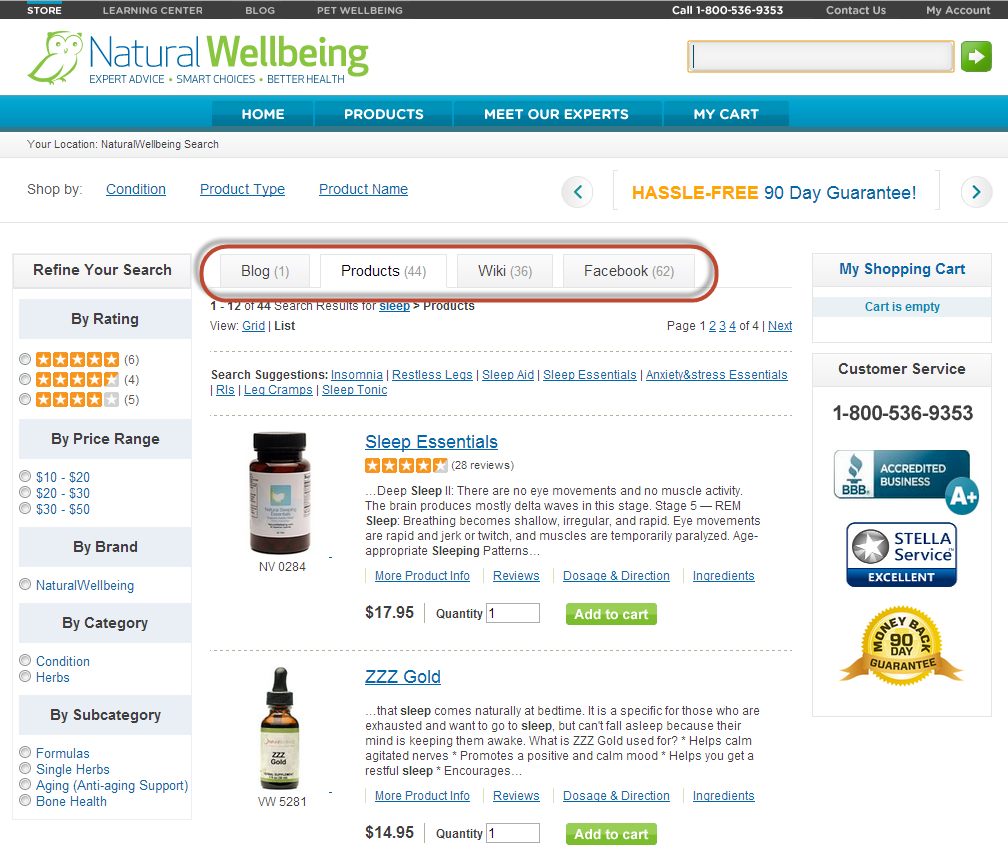 We also created a set of refinements for them (see the left column in the above screen shot), where users can narrow down the search results by rating, price range, brand, category or subcategory. For example, if a user wants to look at only formulas that contain blends of different herbs and doesn’t want to spend more than $20, they can click the $10 – $20 range in Price Range and Formulas in Subcategory. This narrows the number of product results from 44 to 25, as shown below. From that point, the user may want to look at ratings and read more about the products to decide which they want to purchase.
Since SLI’s site search continually learns and improves, the relevancy of search results improves over time. Natural Wellbeing realizes the benefit of letting SLI’s learning search do its work – it frees them from having to constantly tune results, allowing them to focus on other priorities in their business.
Both Natural Wellbeing and its sister site Pet Wellbeing also use SLI’s Site Champion product, which keeps improving SEO without any work on their part. Site Champion uses visitors’ site behavior to automatically create optimized landing pages that are indexed by Google and other Internet search engines.
In March of this year, I worked with them to add SLI’s Rich Auto Complete, which auto-displays product listings and images based on what users are typing in the search box. Since users can click on these products directly from the search box, the feature shortens the path from searching to buying, which creates a better user experience and improves conversions. Since adding Rich Auto Complete, the sites have received significantly higher page views, search users and search result clicks.
Now I’m working on ways we can help with their push for growth. I heard what they’re doing with email marketing, for example and showed them the types of custom templates and landing pages we can create for those campaigns. I’ve let them know what’s working well for others and have developed solutions that will help them achieve their current goals. It is through casual and interactive conversation that we come up with solutions that make a real impact. Being an extension of our customers’ team is what I and all SLI Customer Success Managers strive for.
