
SLI home
User login

A BLOG FOR E-COMMERCE LEADERS

  • Blog
  • Resources
  • Webinars
  • Customer Experience Scorecard

SLI Blog

Posts in Merchandising Category

Is Your Merchandising Working?

Posted by Kemberly GongJuly 30, 2015Merchandising, Site Search, Webinar

As important as it is in brick-and-mortar stores, the need to design your online store to sell most effectively can’t be overstated. Building online merchandising equivalents of in-store experiences promises that shoppers will not only find what they came to your site to find, but will discover products they didn’t even know they wanted, until you showed them.

Good brick-and-mortar merchandising can:

  • increase traffic by offering attractive visual experiences
  • increase sales by featuring products through promotions and displays
  • build loyalty through appealing, easy-to-access settings

Likewise, good online merchandising can increase traffic, increase sales and build loyalty with the same techniques, but with slightly different implementation. As you build out the merchandising functionality on your site, keep these best practices in mind.

Let Your Data Drive Programs

Knowing what your shoppers are interested in helps you respond to current trends and anticipate future promotional opportunities. When customers search, they’re telling you exactly what they want. Leverage data from search keywords and browsing behavior to power your email and advertising campaigns to get the most traction for your time and money.

Use shoppers’ behavioral data Pet360.com Rankings for the top-searched or top-purchased products rise to the top of results, and it is easy to spot any unusually high results. With Landing Page Creator™, we can easily create campaigns and pages that target specific customers with specific deals.


Make Discovery Easy

Isn’t it helpful when you enter a store and a sales associate helps you find the exact item you’re looking for? Make the same true for online experiences. Again, it all begins with data. Track your shoppers’ search terms and browsing behavior to discover which products are most popular for top search terms on your site. Then, when customers search for those terms, display the most popular products in the first couple of rows. You’ll be more likely to show shoppers exactly what they want right away, which means fewer clicks, higher sales, and repeat customers.

Go above and beyond your shoppers expectations by tailoring search results to your shopper’s personal preferences. For example, implement tools that learn from individual shoppers’ behavior to automatically refine search and navigation results based on gender, size, or brand preference.

Since personalizing search and navigation results to individual shoppers, Footwear, etc. saw a 10% increase in revenue per visitor. They also saw a 5% increase in conversion rate and average order value (AOV).


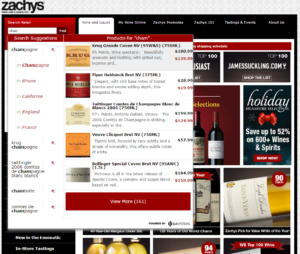
You’ll give shoppers the feeling ofSecond, show the most relevant products visually as the search query is entered, through rich autocomplete. And third, tie the most popular keywords to promotions that you feature on your home page.

Zachy’s Wine and Liquor provides an enhanced customer experience using patented Rich Auto Complete™ technology from SLI Systems. As shoppers begin typing into the search box they are immediately presented with pictures, descriptions and pricing of relevant, popular products displayed right alongside the search suggestions. Since implementation, Everlast’s revenue from search grew from 1% to 10% of total revenue.
zachys

Merchandise Across Channels

Don’t forget the mobile experience! A streamlined mobile experience that works around the physical constraints of a mobile device will make it easier for shoppers to find (and buy!) what they want. For instance, keeping your search box front and center on every page is critical to keeping shoppers on your site so they don’t waste time navigating an entire site. Additionally, adding refinements in large, tap-friendly dropdowns lets shoppers narrow down to the most applicable results.

Management and Analytics

Sound like a lot of work? It doesn’t have to be. Thanks to the power of machine learning, you can automate all the best practices mentioned above, freeing up your time for other strategic projects. And with little to no intervention required from your IT department.

These ideas just scratch the surface of making your site a super-powered merchandising machine. We recently spoke with Sri PV, E-Commerce Internal Marketing Manager at Dressbarn, about how he puts these online merchandising fundamentals (and many more) into practice every day. You can hear the full discussion here.

Christmas in July? The More (Sales) the Merrier!

Posted by Christina StublerJuly 14, 2015eCommerce, Merchandising

^F4DAD660483473260EA5D4FE26EE12DA0E23D897E35805D695^pimgpsh_thumbnail_win_distrLike many, I wasn’t planning on a shopping spree this week, but now I feel it’s unavoidable. I started making a mental wish list as soon as I heard Amazon’s Prime Day described as “more deals than Black Friday.”

Now with Walmart and others joining the frenzy, Wednesday will be a must-not-miss shopping day. Just like that, the power of the words “Black Friday” have magically created a shopping holiday on a normal weekday in the middle of the year surrounded by no real shopping occasion.

Of course, Christmas in July sales aren’t new, and there’s a reason they work. We aren’t feeling the pain from last year’s holiday purchases and we aren’t yet concerned about saving for the upcoming holiday season, either. In fact, it’s the perfect time to buy something you’ve been eying for yourself.

While many retailers have mid-summer sales, the idea of many retailers having them at the same time creates an event – and compels shoppers to buy. (Think of the original Black Friday and Boxing Day.)

But why should Amazon and Walmart have all the fun? It’s not too late to ride the tide of Prime Day with your own better-than-Black-Friday sale. The beauty of online retailing is merchandising can be changed quickly based on what’s trending. In this case, it’s a mid-summer sale, and I say, the more the merrier.

For more merchandising strategies, check out this blog post or download our white paper “Use Site Search Data to Improve Merchandising.”

Advice for Amazon: Be Honest with Search Results

Posted by Dawn MortensenJuly 8, 2015eCommerce, Merchandising, No Results, Site Search, Site Search Tips

Amazon’s practice of misleading customers with search results is again on trial, after the 9th Circuit U.S. Court of Appeals overturned a lower court ruling on a trademark infringement suit by Multi Time Machine, Inc. (MTM).

Amazon trademark lawsuit by MTMMTM charged Amazon with infringing on its trademark by creating “a likelihood of confusion” when customers search Amazon for “MTM Special Ops Watch,” which is the name of a military-style watch sold by MTM. Amazon uses the MTM Special Ops name multiple times on search results pages, even though they do not sell MTM watches.

Now MTM is entitled to a new trial, or Amazon may try to settle. Either way, it’s time for Amazon to stop fooling its shoppers. Whether they win or lose the case, Amazon should think more about site search best practices that will win loyal customers.

Here’s some advice on how Amazon and other retailers can expertly handle searches that turn up zero results:

  1. Be honest. Search results should never be tricky. The search box is the one area of your site where customers get to tell you exactly what they want. Smart retailers either give customers what they ask for or apologize for not having it. If you mislead customers into looking at other items, they’ll soon realize that you aren’t showing what they want. They’ll feel fooled and will leave frustrated.
  1. Think of the customer experience first. Online businesses depend on repeat customers. You’re not a temporary pop-up shop trying to get quick impulse buys without the concern of having buyers return to your store. When you show customers that you understand what they’re requesting and you’re doing your best to help them find it, it builds lasting respect.
  1. Be smart about merchandising on no-results pages. When you don’t have the specific product or brand that a customer requests, you can still offer alternate items without insulting his or her intelligence. There are a number of possible responses, like “We’re sorry we don’t carry items from that brand, but the following brands are popular with our customers.” In the case of MTM watches, Amazon should state up-front: “We don’t sell MTM watches, but here are similar products you might like.”Sports Authority SLI Systems Site Search
  1. Give suggestions for better search results. Sports Authority handles the no-results page by offering a “Did you mean _____” suggestion, along with the text: “You may have typed your word incorrectly or are being too specific. Try using a broader search phrase or try one of our most popular search phrases,” followed by a word cloud of popular searches.
  1. Reduce the number of no-results pages. Be sure your site search provider includes synonyms and alternate spellings in your search to reduce the number of “no result” searches. After implementing this practice with SLI Systems Learning Search®, Sports Authority saw a 300% reduction in no-results searches.
  1. Study the search terms that end in no results. In its Big Book of Site Search Tips, SLI encourages clients to review their Top No-results Search Report regularly to see what customers look for that does not come up in search results. Paying attention to no-results searches often uncovers opportunities for new items to add to the inventory. It also allows businesses to craft creative responses to a specific no-results result.

Maternity no-results page exampleUK clothing retailer Oasis handles a search for maternity clothes with the message: “Whoops, we’re sorry we don’t cover bumps – shop our accessories instead.”

Beyond potential legal ramifications, Amazon should change the language on its search results pages for the sake of delivering what customers want. Other retailers can follow best practices from the start, and not have to worry about trademark infringement.

When #LoveWins, Smart Merchandisers Win

Posted by Tim CallanJuly 2, 2015eCommerce, Merchandising, No Results, SEO, Site Search, Site Search Tips, Social Media

FTD roseThe U.S. Supreme Court opened a new opportunity for merchandising on Friday, June 26. Whether or not you agree with the 5-4 decision making same-sex marriage legal in all 50 states, it’s undeniable that it’s a prime marketing opportunity for retailers. Earlier this week, Multichannel Merchant published more than 20 examples of “How E-commerce Responded to the Marriage Equality Decision.”

For e-commerce businesses wanting to capitalize on the surge of online shoppers looking for items related to gay pride and same-sex weddings, below are my recommendations:

  1. Watch and respond to top search terms: Pay attention to changes in shopper behavior over standard baseline behaviors prior to the Supreme Court ruling.  In particular, look at search keywords for new or increasingly popular terms.  For example, a jeweler may see a sudden spike in a phrase like “men’s engagement ring.”  Because the search box is the one place on your site where shoppers can articulate their shopping missions without being channeled by your site navigation, search terms are strong early indicators of changes in shopper intent.


  1. Consider which products are a fit. The types of products you offer will vary based on your industry segment.  The above example cites a change in jewelry preferences, but a florist may see an increase in desire for rainbow floral arrangements or a party supply retailer might sell more rainbow-colored decorations. You may decide that none of your products logically tie in to this current event, in which case you’ll want to wait until you have related products or skip this merchandising opportunity entirely. Shoppers are less likely to respond to a promotion that seems forced.


  1. Look at top search terms with poor click-through rates. Search terms with low click-through rates can identify recent demand that your site and inventory are not meeting.  Sometimes you can solve these shortcomings simply by adding synonyms to your database. Other times you can address them with special promotions or merchandising information.  In the long term, these terms may reveal new areas for inventory expansion.


  1. Create just-in-time merchandising campaigns. Create campaigns for products expected to be popular among supporters of gay marriage.  Use custom banners and landing pages or even tune search results and recommendations to more ably direct shoppers to the products they are likely to want in this area.  For example, a retailer may create a custom landing page around a phrase like “Pride party” with a themed banner and curated product results.


  1. Remember SEO/SEM. Keep your SEO/SEM team apprised of top trending terms to ensure your keyword strategy is up to date.


Among the SLI Systems customer base, we have noticed the word rainbow coming up as a term with poor results so far this week.  We advise appropriate retailers to examine the word rainbow specifically to see if it is a trending term that deserves one of the responses detailed above.

Current events, as well as holidays, seasons and trends, are great positioning points for retailers. If you keep an eye on what your shoppers are already searching for online, you’ll find an endless number of ways to merchandise your products.

For more merchandising strategies to drive your online revenue, download our white paper “Use Site Search Data to Improve Merchandising.” Also, take a look at this video to see what you can do with our latest merchandising solution, SLI Landing Page Creator.


How Online Bathing Suit Shopping Could Save Summer

Posted by Christina StublerJune 23, 2015Merchandising, Site Search, User Experience

Summer is officially here. But before your shoppers can splash in the pool or lounge on the beach, there is one necessary item of attire that must be purchased – a bathing suit.

Is there anything quite like bathing suit shopping? Or should I say, is there anything quite like purchasing undergarments to wear in public in front of friends, their husbands and their children?

Traditionally, beachgoers could look forward to the following shopping experience:

1. Drive to the store.
2. Locate the ever-disorganized bathing suit selection.
3. Find a print and pattern that isn’t revolting.
4. Rifle through racks for the correct size.
5. Head to the fluorescent-lit dressing room walled with multiple, full-length mirrors.
6. Try it on. Hate it and deeply regret not sticking to those lose-weight-get-in-shape New Year’s resolutions.
7. Exhaust all options at that store.
8. Repeat the entire process, losing hours (and a good portion of self-esteem) in the black hole of bathing suit shopping.

Could someone please bring me a mai tai? I’m having anxiety just thinking about this.

Luckily, we live in the era of online shopping. Smart and thoughtful online retailers have the opportunity to transform the bathing suit buying experience into something that feels like a vacation. Here’s how:

1. Showcase your summer selections with editorial-style landing pages. You can create an entire poolside look – hat, sunglasses, bag, skirt, sandals and bathing suit – and drive potential shoppers directly to the tailored landing page by using dedicated URLs in email campaigns, social media posts or pay-per-click advertising.

2. Guide visitors to the perfect suit with a product finder that feels like a personal shopper. By asking a series of questions, you can lead shoppers to a great selection based on budget, style and even body type. For instance, one shopper might want a bikini under $80 to show off her athletic frame while another might want a one piece that will make her look 10 pounds slimmer regardless of the cost. Either way, your shoppers will appreciate your expert guidance.

Screenshot 2015-06-22 09.11.31

3. One swimsuit definitely does not fit all. Make sizing simple and boost buying confidence by including measurement guidelines. Taking Shape does this right with an easy-to-understand sizing chart on its website tsplus14.com.au.

4. At a minimum, visitors should be able to search by style, color and size. But make sure they can also easily see what’s in stock along with ratings and reviews. No point in falling in love with a suit that’s not available in your size, and a rave review (“I look so good in this thing it’s all I wear!”) can help seal the deal.Screenshot 2015-06-22 09.29.16

5. Save the day with in-store pick up. As an online retailer with brick-and-mortar locations, giving shoppers the ability to shop online and find the item at the nearest location is a serious convenience, especially for those who may have delayed shopping until the day before the big swim party.

Let your shoppers save the mai tais for the beach by giving them a bathing suit buying experience that’s truly relaxing!

Announcing SLI Landing Page Creator

Posted by Kemberly GongJune 3, 2015Merchandising

We’re excited to announce the launch of SLI Landing Page Creator™, which offers new enhancements for merchandisers to speed the path to purchase through targeted landing pages. Landing Page Creator completes the SLI Merchandising suite with the ability to build and customize content to include handpicked products and integrated banners or visual, editorial-style pages.

Home Sale LPWe built SLI Landing Page Creator with merchandisers in mind: it’s simple to create, schedule and deploy custom landing pages that power your omnichannel marketing – through social media, email, pay-per-click ad campaigns and in-store applications. Additionally, merchandisers can create clean URLs and fine tune SEO with custom keywords, page descriptions and social media meta data, all within a simple drag-and-drop interface.

We’re also excited to let you know that landing pages utilize SLI’s Learning Search technology to include product lists that automatically update to reflect real-time changes in pricing, availability and product attributes.

You can offer shoppers unique, curated product sets that will appeal to their interests, new trends or other promotions and ensure that they are accessible to the way they shop – from mobile, social and email. Empower your merchandising team to make quick merchandising decisions and track the success of campaigns with real-time reporting and analytics.

If you’d like to learn more about SLI Landing Page Creator, click here.

Amplify Omnichannel Marketing with Geospatial Search Results

Posted by Kemberly GongFebruary 11, 2015Merchandising, Site Search

Does your retail operation manage both online and brick and mortar shopping experiences? If so, you understand the importance of showing shoppers a wide variety of products online, while also giving them the option to find their desired product locally where they can see it, try it in person and perhaps pick it up the same day.

A popular way to provide these options to shoppers is to use geospatial information to localize the online shopping experience. By allowing geospatial queries, retailers can offer location-based searching and navigation so that shoppers can:

Filter and Order Search Results by Distance

Retailers can allow customers to see the availability of products within a geographic range, narrowing results by the distance they’re willing to travel for the item. Additionally, retailers can order results by distance so that products located closer to the specified area are listed first in search results.

Shop by Store Location

AndersenThis feature lets customers view results for products that are available at a particular store location. This can come in handy if customers are more interested in seeing products at the location closest to them. Some retailers carry different inventory in various stores or have a wider inventory online. Allowing shoppers to search by store location provides a specific, localized and convenient online shopping experience.

Andersen Windows, the largest manufacturer of windows and doors in the U.S., uses a store locator map on their site to show the closest stores where their products are sold.

Show Search Results in Map View

The easiest way to convey information about location is through a map. Showing shoppers where product inventory is located and giving them the ability to see more or less based on geographic perimeters provides a richer and very intuitive search experience.

Show Available Inventory on Product Detail Pages

When shoppers view a product detail page, retailers can provide additional information about the closest local stores where the inventory is located. This is especially helpful for shoppers who want to examine the item in person before a purchase or for those that need it quickly. It can also be helpful for products that are difficult to ship due to size or weight.

Giving shoppers a localized shopping experience streamlines their ability to find and buy products in a way that is most convenient for their needs. It’s an easy way to add tremendous value to shoppers by showing information that is directly relevant to them – it also improves the chance for a sale.

SLI supports geospatial queries in the ways listed above to help retailers create a stronger omnichannel connection between their physical and online stores.

Major Corporations Endorse SLI

Posted by SLI SystemsDecember 9, 2014Merchandising, Navigation, Newsletter, Reviews, Rich Auto Complete, SEO, Site Search

Hear in a recent video testimonial how U.S. gourmet food and gifting company Harry & David saw a US$437,000 increase in 2014 sales after implementing SLI’s Site Champion™. Other recent video testimonials include the U.K.’s largest mail order seed company Thompson & Morgan and the U.K.’s number one winter sports apparel and equipment retailer Snow + Rock.

Cameron Gabriel
E-commerce Manager
Harry & David


Clare Dixey
E-commerce Manager
Thompson & Morgan


David Kohn
Head of Multichannel
Snow+Rock

Subscribe_button

Why You Don’t Need to Brush Your Hair When You Buy Cosmetics

Posted by SLI SystemsJuly 21, 2014eCommerce, Merchandising, Navigation, Ratings and Reviews, Site Search, Site Search Tips, User Experience, Web Search

Are you addicted to cosmetics? Hoarding makeup is not uncommon. If you own multiples of eye shadows, lipsticks, blushes and brushes (as I do…), then you’re not alone. Indeed, it’s globally pandemic: according to research by Feel Unique, there are millions of women on the planet who hoard cosmetics. The same research also found women spend more than US$170,000 on makeup in their lifetime — and would rather ditch their man than go without cosmetics. Really! (Can’t say I share that sentiment!)

Pore-refining, firming, lifting, tightening, toning, brightening, whitening, collagen, retinol, vitamin A, vitamin C, aloe vera, lactic acid, glycolic acid, grapefruit seed extract… sound familiar? Of course, all of these processes and ingredients promise women the one thing we’re so desperate to hold on to … eternal youth.

Traditionally, women have bought beauty products offline, visiting their aesthetician at a department store cosmetics counter, pharmacy or specialised cosmetics boutique. Some still do, to get the informed opinion of someone they possibly know and certainly trust.

But that’s changed. Nowadays, consumers can access this information from the comfort of their own home (where, they’re probably wearing a snail slime mask — yes it really exists, I’ve tried it). They can even browse for cosmetics on the go via their tablet or mobile device.

With online beauty e-tailers such as Sephora, e.l.f. Cosmetics, Adore Beauty and Strawberrynet, women can feed their insatiable beauty-beast desire in a matter of minutes. Online beauty retailers are not only price competitive and stock the latest and most coveted beauty products — they also provide a wealth of information in the form of blogs and forums. So instead of talking to one person, who no doubt has some degree of vested interest in the sale (which may, or may not change their view of a product’s suitability), women can get the honest feedback from as many people as reviews they want to read. And often it’s those comments that shape purchasing decisions.

Buying online is also fast.

Beauty e-tailer e.l.f. Cosmetics (which stands for “eyes lips face”), has an intuitive search solution that instantly connects users with the products they’re looking for; in fact, the search “learns” from past site search behaviour by tracking visitors’ aggregate search queries and clickthroughs. What does this mean? That digital shoppers are being presented with the most popular and relevant search results. (So no plugging in “eye shadow” to annoyingly receive results for “mascara”.)

Beauty e-tailer, e.l.f. Cosmetics, “learns” from every visitor’s search. The result is a search function that helps users find exactly what they’re looking for in a matter of seconds.

Beauty e-tailer, e.l.f. Cosmetics, “learns” from every visitor’s search. The result is a search function that helps users find exactly what they’re looking for in a matter of seconds.


Don’t know exactly what you’re looking for? No need for a breakout. In addition to the user product reviews and popular and relevant searches, online beauty retailers make the shopping process even more stress-free by offering best-sellers, how-to’s, celebrity-inspired looks and video makeup tutorials… as well as a list of all the products required to achieve those looks. Did a new blush colour catch your eye in a magazine, but you can’t recall the product’s name? Not a problem. Sticking with our savvy beauty e-tailer e.l.f. Cosmetics (and yes, I do own quite a few of their products!) allows you to search for the product type, e.g. “blush,” to reveal “as seen in,” which displays cosmetics and skincare that has received press mentions.

Reviews written by people who’ve previously bought the product help visitors decide what to buy.

Reviews written by people who’ve previously bought the product help visitors decide what to buy.


I also like e.l.f. Cosmetics’ intuitive product-recommendations engine; this optimises suggested products based on recommendation logic and data learned from past customer behaviour. For example, when a visitor lands on a product details page for a lipstick, they’ll be presented with other products typically bought with that lipstick, such as a lip exfoliator.

Australia’s Adore Beauty uses video demonstrations to help guide shoppers’ decisions.

Australia’s Adore Beauty uses video demonstrations to help guide shoppers’ decisions.


Australian-based cosmetics e-tailer Adore Beauty allows visitors to navigate its site by skin type, catering for dry, oily, problem or blemish-prone skin. Shoppers can also search for products by ratings and reviews; this will be important if they only want to consider top-rated products to buy.

Onsite videos demonstrating how to use products also help to humanise the whole digital experience. While it’s not the same as asking the assistant at the counter for tricks in using shaded tones to make your eyes appear larger, you can sit, to your heart’s content, and learn how to apply products you may never have seen before, or products you felt too silly to ask about. You get the benefit of experts, and no one will know — until, of course, they see how well you can shade your eyelids!

So to fellow beauty addicts who haven’t yet tried the online shopping experience, give it a go: chances are, you’ll find exactly what you’re looking for!

Do More Selling Within Search: Start Merchandising

Posted by Kemberly GongApril 3, 2014eCommerce, Merchandising, Site Search, Site Search Tips

When I’m shopping for clothes, beautiful, colorful displays tend to catch my attention, as do big “sale” signs. But if I’m shopping for something less personal, like housewares or gardening items, I need signage that makes it clear where I need to go to find what I want. But that’s just me. Other consumers have different preferences – which makes it challenging for merchandisers to figure out how best to compel shoppers to make a purchase.

E-commerce marketers face similar challenges, as they have to understand how best to highlight promotions – on what pages, in what format and with what messages. Search results pages are a prime location for online merchandising, as we explain in the latest edition of the Big Book of Site Search Tips for 2014, available for free download. Once visitors have conducted a search on your site, they’re in the mood to make a purchase, provided they find what they’re seeking and you make it easy to browse through product options. For more effective merchandising, consider bringing these ideas into search:

Override search results (sparingly): While too many overrides can negatively impact the relevancy of search results, it can make sense to do an override when you want to place relevant promotional items at the top of the list – like sales or seasonal items. Online shoppers pay the most attention to the first several results above the fold, after which there’s a steep drop-off in engagement. Take advantage of where their attention is focused. Of course, the products that you push to the top of search results still need to be highly relevant to the search term.

Avoid presenting unrelated cross-sell or up-sell products: Shoppers will distrust search results if they are wildly off-base from their search terms. From their point of view, they’ve used the search box to tell you exactly what they want, and it’s your job to supply it. If you want to promote products that aren’t truly connected to searches, you should do so on other pages such as cart or checkout pages.

Show related searches on content pages: Even if visitors don’t find what they’re looking for within the first several results for their search, they may be encouraged to keep on looking if you offer related searches on content or product detail pages – or they may decide to start a new search. It’s best to create related searches based on keywords or phrases other visitors have used in the past when searching for the same items. Since they’re based on the language of your visitors, they’re a great way to promote related content or products and may also provide SEO benefits.

Create banners related to specific keywords: Keyword-driven banners on search results pages send your visitors the message that they’re seeing the right results for the right products. A banner can also highlight a promotion that’s related to the search, which can either move along the decision to make a purchase (like an extra discount or free-shipping deal), or propel the visitor into related searching (like a banner about products from the same brand).

For more ideas about selling through search, download the 2014 edition of the Big Book of Site Search Tips today.

Load More

Stay up to date with SLI

Featured Posts

  • Maximize Revenue with Enhanced Product Impact Testing
  • Top Five Ways to Prepare for Peak Season
  • Facets, Facets, Who’s Got the Facets?
  • Personalization: It’s Kind of a Big Deal
  • M is the New E: Mobile Commerce Trends and Predictions

Categories

About SLI Systems

  • What We Do
  • Who We Are
  • Why SLI

Learn

  • Webinars
  • News Room
  • Events

Connect

© Copyright SLI Systems, 2018. All Rights Reserved | US: (866) 240-2812 | Legal
