SLI home
User login

A BLOG FOR E-COMMERCE LEADERS

  • Blog
  • Resources
  • Webinars
  • Customer Experience Scorecard

SLI Blog

Posts with eCommerce Tag

Win Parent Shoppers with a Baby-Friendly Site

Posted by Christina StublerMarch 9, 2016eCommerce, Mobile, Site Search

What once was considered a niche market is now a booming billion-dollar industry. Savvy parents are ready to spend a pretty penny to give their bundles of joy the best start in life. Despite declining birth rates in many countries, the global baby care market is growing at a CAGR of 7% and is expected to reach $66.8 billion by 2017, according to Transparency Research (2014).

surfstitchYou don’t have to have a dedicated site for baby products to win these valuable customers. Many health and pharmacy retailers are catering more to the “parent and baby” demographic. Even lifestyle and outdoor retailers are adding infant and toddler items to their product offerings.

Here are a few ways that any online retailer with baby or toddler products can gain a greater share of parents’ and grandparents’ spending.

Focus on Mobile

Browsing the Internet with both hands free is considered a luxury for new parents. Swaying back and forth with a tiny infant in arms and a smartphone in hand is a much more common scene. Consider your site new-parent ready if the desperately sleep deprived can find what they are looking for while only using their thumbs. You’ll want to enhance the real estate of smaller screens while delivering relevant results with speed.

bodenIn addition, think about how best to streamline the purchase process for mobile shoppers. The fewer clicks, the better. Make sure shoppers have the option to save payment and shipping information so they only have to enter it once.

Make the Experience Highly Personal

A few months make a world of difference when it comes to what a baby needs and what parents want to buy. For example, moms and dads of newborns are searching for the perfect swaddle while parents of 6-month-olds are introducing solid foods and encouraging their babies to sit on their own.

When parents sign up to receive emails, gather the dates of birth, sex and names of their children. Tailor email campaigns and curate landing pages with products that match the baby’s age and each exciting developmental stage. In other words, send emails specific to celebrating a baby’s first birthday when the child turns 1, but avoid cluttering up your customers’ inboxes with irrelevant messages about newborns when their baby is already a toddler.

Your clickthrough rate on emails will be higher when parents know you are giving them valuable information specific to their kids. Also, keep in mind that parents will open a majority of those emails on a smartphone or tablet, so make sure both the email and the landing pages are tailored for the mobile experience.

Is it a Binky, Paci, Dummy, Soother or Comforter?

Does your site speak Baby? The pacifier alone has more than 100 pet names. Learning your customers’ language means they will more likely find the products they had in mind. Alternatively, ignoring synonyms, misspellings and popular pet names could lead to search queries ending in a “no results” page by mistake.

In-Store or Curbside Pick Up

Out of diapers and wipes? Need a humidifier for baby’s first cold? Sometimes even overnight delivery isn’t fast enough. If you are a retailer with brick-and-mortar locations, consider allowing customers to complete their purchases online and pick up products the same day at the store. Or even better, deliver their orders curbside to their cars. This will save parents time and keep them from having to wake a sleeping baby.

Chemist Direct Mother & Baby ExampleCater to Moms

Babies aren’t the only ones who need special care. Retailers can gain brand loyalty before the little one even arrives by helping moms-to-be navigate fertility issues, morning sickness, stretch marks and postpartum preparation. These categories are often labeled “conception,” “pregnancy” and “maternity.”

For more tips on delivering an exceptional online shopping experience that will win over parents and grandparents shopping for baby and toddler items, take a look at our E-commerce Baby Boom industry brief.

Get Ready for Bunnies & Blooming E-commerce

Posted by Christina StublerFebruary 18, 2016eCommerce, Merchandising, Ratings and Reviews, Rich Auto Complete, Site Search

Boden SpringLove was so last Sunday. Now spring is in the merchandising air.

Never mind the polar vortex hitting the East and Midwest. Easter and its Bunny are arriving Sunday, March 27 – a full three weeks earlier than last year when it hopped onto the scene April 20.

With this year’s abbreviated shopping season, every merchandising day matters. Whether your shoppers celebrate Easter or just long for spring, this is the time to remind them that warmer weather is on the horizon.

Easter is historically the fifth largest spending holiday of the year (after Valentine’s Day but before Father’s Day, Super Bowl, Halloween and St. Patrick’s Day), according to the National Retail Federation.

Candy WarehouseEven if you’re boasting the most beautiful in-store displays, there’s good reason to focus your attention on winning online spring shoppers. Last year, online Easter shoppers planned to spend an average $221.39 – a whopping 58 percent more than brick-and-mortar Easter shoppers, according to the National Retail Federation.

What will shoppers put in their baskets? Food, clothing, gifts, candy and flowers are the top five spending categories for Easter. But don’t make your visitors hunt for what they want.

Boden dressesRead their minds. If shoppers type “Easter” in your site’s search box, make sure your site returns relevant results right away. Candy Warehouse is crushing this by instantly showing search suggestions and product results.

Curate a collection. Boden is using a banner to prompt shoppers to “Make room for new-season dresses.” But the merchandising doesn’t stop there. Clicking on the banner takes shoppers to a collection of spring dresses.

H&D EasterShow the love. Harry & David’s search results not only showcase the most relevant products, but shoppers can quickly see which items have the best and most reviews. This is a great to give browsers the social proof they need to make a buying decision.

For more tips on improving your e-commerce merchandising, download our free white paper Use Site Search Data to Improve Merchandising.

Help Cupids Find the Perfect Valentine’s Day Gift

Posted by Christina StublerFebruary 10, 2016eCommerce, Infographic, Merchandising, Site Search

Cupids (disguised as last-minute shoppers) are aiming their arrows at the hearts of their beloveds. Guide them to the perfect gifts with insight from last year’s Valentine’s Day e-commerce trends, as well as by following these 5 tips to help online shoppers find what they’re looking for this Valentine’s Day.

Another way you can give love a nudge and fuel romance is to follow the tips and tricks in the infographic below from The Shelf. (Hint: If you aren’t marketing to men between 25 and 34 years old, you are missing the mark.)

download-(27)_edv3

Navigate Mobile Shoppers Toward Sales

Posted by Christina StublerNovember 5, 2015eCommerce, Mobile/Tablets, Navigation

NEW hands-coffee-smartphone-technologyMore than half of all time spent shopping online is done via smartphones and tablets, propelling mobile commerce to grow three times faster than overall e-commerce. In addition to site search, site navigation is one of the most important aspects of the mobile experience.

Here are some tips to help make sure your site navigation is ready for the mobile-and-tablet holiday rush.


Mobile Navigation

The limited space on smartphones and tablets magnifies the importance of intuitive navigation.

To best orient users and guide them through a mobile site (without cluttering the screen), use a simple design. Here are some main best practices:

  • Use drop-down menus with buttons or simple text so you can offer as many drill-down levels as needed while freeing up valuable real estate.
  • Use subpages to expand using familiar icons such as +, – and >. This allows shoppers to easily navigate through categories to exactly the products they are looking for.
  • Give category pages a look and feel similar to search results pages. This gives users a consistent experience across search and navigation.
  • Include a thumbnail image, product title, brief description, price and additional information such as ratings and discounts.

Include Refinements

Just as on your desktop site, refinements make navigation easier for mobile visitors. Since mobile devices have a lot less space for navigation, using a drop-down menu can be a good design choice. Presenting refinements this way saves screen space by hiding them when they are not in use. This helps reduce visual clutter on the mobile site and allows visitors to view more products and content without needing to scroll down.

Offer Infinite Scrolling

You may find that shoppers spend more time on your mobile site if you provide infinite scrolling.

Instead of requiring shoppers to click to the next page, infinite scrolling automatically loads more search results as the user nears the bottom of the page.

Make Links and Buttons Touch-friendly

When designing for touch-enabled devices, keep in mind the size of the human finger and thumb. The touch target for an index finger is 57 pixels and for a thumb it is 72 pixels. Making touch targets smaller than that can lead to user frustration and incorrect clicks. Moreover, don’t require users to pinch and zoom in order to navigate pages as these actions also lead to a negative user experience.

Direct Mobile Users to Mobile Pages

If you have a separate mobile site with a different URL, make sure to automatically send your mobile users to the correct site. You also need to direct search engines to this alternate site in order for your mobile pages to rank well in mobile search results. If you’re using responsive design, this shouldn’t be an issue.

Don’t Assume Desktop Features Will Work on Mobile Devices

A common mistake in mobile development is attempting to port desktop features directly to a mobile device. With a touch-enabled device, the user is not navigating the page with a mouse cursor so functions like hover don’t translate into a positive customer experience. At best, the user will attempt to click the item multiple times to activate the link; at worst, the user will be unable to click through at all and may abandon the site in frustration. Instead, optimize your development for the unique features and uses of each device type. Smartphone users and tablet users may use your site differently so consider both types of users.

For more tips on how to improve your site navigation, download our Big Book of Navigation Tips.


Is Your Merchandising Working?

Posted by Kemberly GongJuly 30, 2015Merchandising, Site Search, Webinar

As important as it is in brick-and-mortar stores, the need to design your online store to sell most effectively can’t be overstated. Building online merchandising equivalents of in-store experiences promises that shoppers will not only find what they came to your site to find, but will discover products they didn’t even know they wanted, until you showed them.

Good brick-and-mortar merchandising can:

  • increase traffic by offering attractive visual experiences
  • increase sales by featuring products through promotions and displays
  • build loyalty through appealing, easy-to-access settings

Likewise, good online merchandising can increase traffic, increase sales and build loyalty with the same techniques, but with slightly different implementation. As you build out the merchandising functionality on your site, keep these best practices in mind.

Let Your Data Drive Programs

Knowing what your shoppers are interested in helps you respond to current trends and anticipate future promotional opportunities. When customers search, they’re telling you exactly what they want. Leverage data from search keywords and browsing behavior to power your email and advertising campaigns to get the most traction for your time and money.

Use shoppers’ behavioral data Pet360.com Rankings for the top-searched or top-purchased products rise to the top of results, and it is easy to spot any unusually high results. With Landing Page Creator™, we can easily create campaigns and pages that target specific customers with specific deals.


Make Discovery Easy

Isn’t it helpful when you enter a store and a sales associate helps you find the exact item you’re looking for? Make the same true for online experiences. Again, it all begins with data. Track your shoppers’ search terms and browsing behavior to discover which products are most popular for top search terms on your site. Then, when customers search for those terms, display the most popular products in the first couple of rows. You’ll be more likely to show shoppers exactly what they want right away, which means fewer clicks, higher sales, and repeat customers.

Go above and beyond your shoppers expectations by tailoring search results to your shopper’s personal preferences. For example, implement tools that learn from individual shoppers’ behavior to automatically refine search and navigation results based on gender, size, or brand preference.

Since personalizing search and navigation results to individual shoppers, Footwear, etc. saw a 10% increase in revenue per visitor. They also saw a 5% increase in conversion rate and average order value (AOV).


You’ll give shoppers the feeling ofSecond, show the most relevant products visually as the search query is entered, through rich autocomplete. And third, tie the most popular keywords to promotions that you feature on your home page.

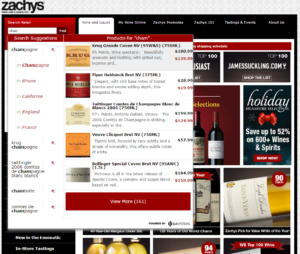
Zachy’s Wine and Liquor provides an enhanced customer experience using patented Rich Auto Complete™ technology from SLI Systems. As shoppers begin typing into the search box they are immediately presented with pictures, descriptions and pricing of relevant, popular products displayed right alongside the search suggestions. Since implementation, Everlast’s revenue from search grew from 1% to 10% of total revenue.

zachys

Merchandise Across Channels

Don’t forget the mobile experience! A streamlined mobile experience that works around the physical constraints of a mobile device will make it easier for shoppers to find (and buy!) what they want. For instance, keeping your search box front and center on every page is critical to keeping shoppers on your site so they don’t waste time navigating an entire site. Additionally, adding refinements in large, tap-friendly dropdowns lets shoppers narrow down to the most applicable results.

Management and Analytics

Sound like a lot of work? It doesn’t have to be. Thanks to the power of machine learning, you can automate all the best practices mentioned above, freeing up your time for other strategic projects. And with little to no intervention required from your IT department.

These ideas just scratch the surface of making your site a super-powered merchandising machine. We recently spoke with Sri PV, E-Commerce Internal Marketing Manager at Dressbarn, about how he puts these online merchandising fundamentals (and many more) into practice every day. You can hear the full discussion here.

How Online Bathing Suit Shopping Could Save Summer

Posted by Christina StublerJune 23, 2015Merchandising, Site Search, User Experience

Summer is officially here. But before your shoppers can splash in the pool or lounge on the beach, there is one necessary item of attire that must be purchased – a bathing suit.

Is there anything quite like bathing suit shopping? Or should I say, is there anything quite like purchasing undergarments to wear in public in front of friends, their husbands and their children?

Traditionally, beachgoers could look forward to the following shopping experience:

1. Drive to the store.
2. Locate the ever-disorganized bathing suit selection.
3. Find a print and pattern that isn’t revolting.
4. Rifle through racks for the correct size.
5. Head to the fluorescent-lit dressing room walled with multiple, full-length mirrors.
6. Try it on. Hate it and deeply regret not sticking to those lose-weight-get-in-shape New Year’s resolutions.
7. Exhaust all options at that store.
8. Repeat the entire process, losing hours (and a good portion of self-esteem) in the black hole of bathing suit shopping.

Could someone please bring me a mai tai? I’m having anxiety just thinking about this.

Luckily, we live in the era of online shopping. Smart and thoughtful online retailers have the opportunity to transform the bathing suit buying experience into something that feels like a vacation. Here’s how:

1. Showcase your summer selections with editorial-style landing pages. You can create an entire poolside look – hat, sunglasses, bag, skirt, sandals and bathing suit – and drive potential shoppers directly to the tailored landing page by using dedicated URLs in email campaigns, social media posts or pay-per-click advertising.

2. Guide visitors to the perfect suit with a product finder that feels like a personal shopper. By asking a series of questions, you can lead shoppers to a great selection based on budget, style and even body type. For instance, one shopper might want a bikini under $80 to show off her athletic frame while another might want a one piece that will make her look 10 pounds slimmer regardless of the cost. Either way, your shoppers will appreciate your expert guidance.

Screenshot 2015-06-22 09.11.31

3. One swimsuit definitely does not fit all. Make sizing simple and boost buying confidence by including measurement guidelines. Taking Shape does this right with an easy-to-understand sizing chart on its website tsplus14.com.au.

4. At a minimum, visitors should be able to search by style, color and size. But make sure they can also easily see what’s in stock along with ratings and reviews. No point in falling in love with a suit that’s not available in your size, and a rave review (“I look so good in this thing it’s all I wear!”) can help seal the deal.Screenshot 2015-06-22 09.29.16

5. Save the day with in-store pick up. As an online retailer with brick-and-mortar locations, giving shoppers the ability to shop online and find the item at the nearest location is a serious convenience, especially for those who may have delayed shopping until the day before the big swim party.

Let your shoppers save the mai tais for the beach by giving them a bathing suit buying experience that’s truly relaxing!

B2B, It’s Time to Step Up Your Game

Posted by Christina StublerMay 11, 2015eCommerce, Site Search Tips, User Experience

b2b_blue_600x600 You found your niche in the lucrative (albeit lackluster) world of B2B e-commerce. It’s been great. Your clients don’t need anything fancy, you say. You can hum along with a website that walked right out of 2008 and it doesn’t matter. Because really, your customers aren’t here to shop (not in the traditional, show-me-something-pretty way). They just want to buy what they need and get back to work.

But here’s the thing: If you aren’t making it lightning fast and super simple for your customers to find and buy what they want, somebody else will. Somebody named Amazon. As Amazon launches “Amazon Business,” B2B sites would be wise to step up their game. Here’s how to get started:

  1. Start with search. Compared to non-searchers, searchers have an 11% higher average order value and a 2.7 times greater conversion rate, so it’s important and revenue-boosting to listen to what they say. Site search is key. If people quickly move from search to navigation or leave your site altogether, your site search isn’t doing its job. Good site search delivers relevant results fast.


  1. Showcase your expertise. You’ve created a virtual library of case studies, blogs, consumer guides and videos – all with the hope of educating and converting your prospects into customers. But can they find any of it? Andersen Windows is a good example of how to deliver search results with a wow factor. Type “French doors” in the search box, and you’ll get products along with support information, technical documents, photos and videos. Using SLI Learning SearchTM, Andersen Windows makes all of its non-product information incredibly easy to find.


  1. Be open to possibilities. At Spectrum Chemical, the search box invites users to input “Product Name, Catalog Number, Manufacturer, CAS #” – a confidence-boosting move that makes users feel they can’t go wrong. Smart search will allow you to create appropriate synonyms and tune your results so that visitors find what they are looking for, even if they type it in slightly different ways. Technical specifications and measurements are a great example. For instance, if someone typed 2.5, 2 ½ or 2-1/2, you’d want them to get the right results. In addition, features like SLI Rich Auto CompleteTM help people know they are on the right track by showing results as soon as they begin typing.


Remember, your search box is where your customers tell you exactly what they want in their own words. Advanced site search will give you the ability to easily pull reports and spot trends, like your site’s top search phrases and those ending in “no results.” Use this data to tailor your merchandising efforts and make it easier for visitors to find what they want to buy. Because being B2B is no longer an excuse for not delivering the very best to your customers.

Infographic: Top E-commerce Searches for Valentine’s Day 2015

Posted by Dawn MortensenFebruary 12, 2015eCommerce, Infographic, Site Search

valentines_infographic_2015


Besides the obvious first-place choices of diamonds and roses, see which gem stones, flowers, food gifts and types of jewelry online shoppers have searched for most prior to Valentine’s Day 2015. Design by Rosann Yip, Sr. Designer, SLI Systems


Meet Neil Thomas, SLI’s New Chief Revenue Officer, President North America

Posted by SLI SystemsDecember 9, 2014Newsletter, Reviews, SEO, Site Search

Neil_Thomas_headshot-low

Neil Thomas knows what it takes to grow a world-leading Software as a Service (SaaS) company. In his previous role as Senior Vice President of Worldwide Sales of cloud-based business analytics firm Adaptive Insights, Thomas grew the company’s sales team from five to 150 and its customer base from launch to thousands of enterprises in 80+ countries. This success followed a near twenty-year track record for establishing, developing and continuously improving global sales teams.

The UK-born Thomas says, “SLI’s success in expanding beyond its home market of New Zealand, recruiting world-leading brands as customers and growing around the world, particularly in the UK and the United States, is no mean feat.

“This says to me that SLI has a product that is attractive, wanted and needed. It also shows that we have an organisation that is able to deliver solutions successfully in different economic and cultural environments. I think the secret of this achievement has been the commitment of the SLI team to customer success and delivering excellent service.”

“SLI is well positioned to ride the next wave in e-commerce. Retailers and business-to-business websites worldwide are increasingly looking for solutions that ensure their websites serve up the products and services consumers are seeking in a timely, efficient and appealing way.”

SLI CEO Shaun Ryan says, “Neil has led a sales organization through the type of growth that we intend to achieve over the next few years. This expertise and experience will further accelerate SLI’s growth. We are delighted to have him on board.

Subscribe_button

Major Corporations Endorse SLI

Posted by SLI SystemsDecember 9, 2014Merchandising, Navigation, Newsletter, Reviews, Rich Auto Complete, SEO, Site Search

Hear in a recent video testimonial how U.S. gourmet food and gifting company Harry & David saw a US$437,000 increase in 2014 sales after implementing SLI’s Site Champion™. Other recent video testimonials include the U.K.’s largest mail order seed company Thompson & Morgan and the U.K.’s number one winter sports apparel and equipment retailer Snow + Rock.

Cameron Gabriel
E-commerce Manager
Harry & David


Clare Dixey
E-commerce Manager
Thompson & Morgan


David Kohn
Head of Multichannel
Snow+Rock

Subscribe_button

Load More

Stay up to date with SLI

Featured Posts

  • Maximize Revenue with Enhanced Product Impact Testing
  • Top Five Ways to Prepare for Peak Season
  • Facets, Facets, Who’s Got the Facets?
  • Personalization: It’s Kind of a Big Deal
  • M is the New E: Mobile Commerce Trends and Predictions

Categories

About SLI Systems

  • What We Do
  • Who We Are
  • Why SLI

Learn

  • Webinars
  • News Room
  • Events

Connect

© Copyright SLI Systems, 2018. All Rights Reserved | US: (866) 240-2812 | Legal