SLI home
User login

A BLOG FOR E-COMMERCE LEADERS

  • Blog
  • Resources
  • Webinars
  • Customer Experience Scorecard

SLI Blog

Posts with imported Tag

Year in Review: Mobile and Social Media Shake Up Search

Posted by Shaun RyanDecember 28, 2010Newsletter, Site Search

It’s hard to believe another year is coming to a close. In 2010, site search continued to evolve into an important merchandising technology that positively impacts online businesses. As we’ve done in previous years, we’d like to take this opportunity to share with you popular news items, blog posts, and podcasts from the past year. Check them out if you didn’t get to read or listen the first time around.

In 2010, the two biggest developments in online retail were mobile and social media. As more and more website visitors turned to their smartphones and mobile devices to search for content and products, e-tailers quickly built mobile versions of their websites.

Our whitepaper, Site Search and the Mobile Commerce Revolution was a popular document for e-tailers to read as they looked for best practices and tips on incorporating search into their mobile websites. E-tailers also included social media content into site search results in 2010 to deliver a richer, more informed experience for site visitors.

Here are some additional news highlights from 2010:

Using AJAX to improve the speed of delivery of site search results
From Internet Retailer: AJAX loads only necessary data, making searching faster and easier.

Searchable user reviews boost Wine Enthusiast’s traffic 5%
From Internet Retailer: Wine Enthusiast makes user reviews searchable.

Dilbert.com Uses Custom Search to Increase Revenue
From ClickZ: Famed workplace comic strip improves site search usability.

And here are some of our more popular newsletter articles from 2010:

The Big Book: Chock Full of Site Search Tips!
Our customers have shown a growing appetite for practical advice and tips on getting the most value out of site search. The Big Book of Site Search Tips has helped many site owners better merchandise via search and improve the look and feel of their website.
Read more about and download the Big Book of Site Search Tips.

Pain-Free Testing Optimizes Search and Navigation
Setting up and running tests can be difficult and time-consuming. Many e-tailers found better ways of taking the hard work out of performing tests on their websites.
Read more about pain-free testing.

Mobile Site Search Needs to Be Fast, Streamlined and Relevant
With effective mobile site search, people don’t need to rely on navigation – so it’s a space-effective way of getting people to the information they want to find on your site.
Read more about mobile site search.

From our blog, these are the 2010 posts deemed most useful by our readers:

Rich Auto Complete looks good
E-tailers found Rich Auto Complete to be a great way to help visitors find the products they need faster, while adding a “wow” effect to search.
Read more about Rich Auto Complete.

Improve the Way People Find What They Seek on Your Site
Tips on how to drive more people to use the search box and browse your company’s website.
Read more about improving the site search experience.

Some Tips about Page Layout
Why you need clear and specific content titles, as well as consistent image sizes.
Read more about making the most of site search layout.

We’ve worked hard to bring you an informative lineup of guests on our Ecommerce Podcast – here are just a few from the past year:

Linda Bustos
Director of ecommerce research at Elastic Path

Alan Trzuskoski
Ecommerce manager for Abe’s of Maine

Dave Baird
VP of marketing and co-owner at MagnetStreet

If you haven’t had the chance to listen to these podcasts, download them now and put them on your iPod before you hit the airport for your holiday travel.

We expect 2011 to offer up more opportunities to deliver new ideas for improving the value of search – in next month’s newsletter, we’ll give you our predictions for the hottest site search trends, and how you can work them to your advantage.
Launch Your M-Commerce Website with SLI Mobile

Posted by Shaun RyanNovember 18, 2010Mobile, Newsletter, Site Search

Have you ever shopped for clothing, books, or sporting supplies on your mobile device? If so, was it an easy process, or was it cumbersome and time-consuming? While the numbers vary a bit from report to report, most experts predict that consumers will soon launch themselves into the mobile commerce revolution – possibly even during the holidays. You need to make sure your online business is ready for these shoppers.

If you’re ready to take the mobile plunge, we have some tools and services that can help you do so quickly and cost-effectively. We recently introduced SLI Mobile, which helps you create a mobile version of your e-commerce website, complete with search and navigation features. Our solution takes into account the special challenges of conducting e-commerce on a device with a small screen and varying data speeds, so we offer several tools to make searching easier, such as refinements and smaller images.

And just like the service we provide for regular e-commerce sites, we allow you to integrate your product pages with ratings and review solutions, as well as social media content. We can create mobile sites that work on all major devices and platforms, including iPhones, BlackBerrys, and Android phones. If you already have a mobile site, we can simply provide you with search and navigation functionality – or, we can provide you with search, navigation, and product pages and integrate them with your shopping cart.

For our existing customers, launching the mobile site is a fast and painless process – we already have all the data and can set up the mobile site with almost no effort from the customer. Our customer Century Novelty, whose mobile site is now live, found out just how painless and cost-effective SLI Mobile is: “SLI Systems did all of the heavy lifting to create the site, and at one-third of the cost estimates we received from other mobile vendors—and the entire process took just a few hours of my time,” explains Ian MacDonald, vice president and general manager of Century Novelty.

If you’d like to study up on mobile commerce, download our new white paper, Site Search and the Mobile Commerce Revolution. It’s free, and inside you’ll get fresh ideas on developing a mobile strategy, and making your mobile commerce site as user-friendly as possible. Click here to download the guide – and to find out more about SLI Mobile, contact your Customer Success Manager or our sales team at sales@sli-systems.com.

Organize and display refinements to streamline the site search experience

Posted by Shaun RyanOctober 27, 2010Newsletter, Refinements, Site Search

In last month’s newsletter, we explained how to identify the most useful refinements for your site search, depending on your customers’ needs and the product mix. Figuring out which refinements to offer is the starting point, but there’s more work to be done: This month, we’ll tell you how to display these refinements so that your site visitors can make best use of them, and have a better search (and shopping) experience.

Place frequently used refinements at the top of the list. Make sure that the refinements most likely to be used can be easily accessed by visitors. Less frequently used refinements can be placed farther down on the list, or perhaps made visible only when the user has clicked on a certain category – in which case, they can select refinements that are part of a subcategory.

If you discover over time that visitors are not making use of certain refinements, then you can decide if you want to stop displaying them. This should be an ongoing evaluation process: You should continually look for ways to improve usability (and thereby conversions) by simplifying the site search process. Don’t feel compelled to display all possible refinements, which is confusing to users.

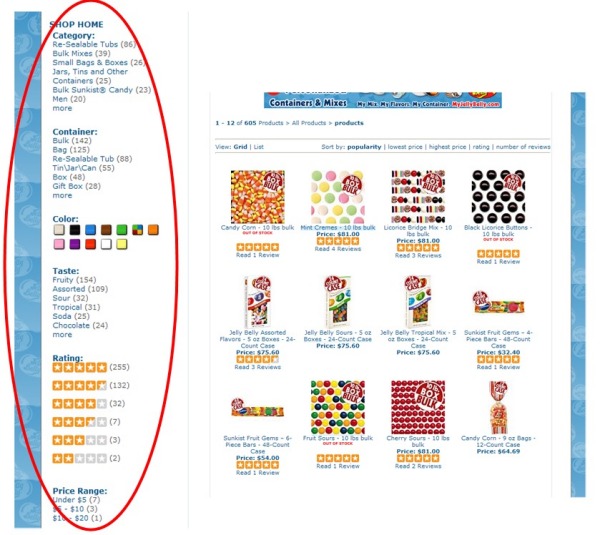
Show the number of results next to refinement options. Next to specific refinements, display the number of results that are available when that refinement is clicked on, so that visitors have a sense of how many results they’ll see. You can view this feature at work on the site for Lighting by Gregory, an SLI customer.

Show color refinements as a palette instead of text. Since colors are visual, site visitors will respond more quickly to a display of actual colors, rather than the names of the colors in text form. A color palette also takes up less space within search, so it helps reduce visual clutter.

For products available in several colors, consider retooling search results so that if a specific color refinement is selected, the product is displayed in that color. For instance, the main photo for a shirt available in red, green and blue may show the red shirt. If visitors select the blue color refinement, the image should change to the blue shirt.

When it comes to deciding how and where to display refinements, take the same approach that you would do with other aspects of your site design: Look at usage data, talk to your customers, and test options to see which refinements and placements work better. If you need advice on choosing and displaying refinements, contact your SLI Systems customer success manager.

Test placement of refinements. Depending on your audience and your site design, users may make more use of refinements depending on where they are placed – most commonly, they appear at the top of the page or in the left navigation pane. Try to avoid placing refinements at the bottom of the page, since visitors need to scroll down to view them. Test different positions to see which ones your visitors prefer.

Allow visitors to navigate between refinements on the same level. If a visitor clicks on a refinement but then decides they want to see a different refinement, don’t require them to click “back” to get to the original search results page first. They should be able to simply click a different refinement option from that page and easily see a new batch of results.

Don’t show refinement options that have no results. For instance, if there are no red products for a particular search, then there should be no link shown to restrict the results to red products.

Avoid drop-down boxes for refinements. Drop-down boxes make it harder for people to see the available refinement options, and they’ll be less likely to use them. If refinements are shown as a list of links, then they can select the refinement with a single click. However, if you have many refinements, or many options within a refinement, then showing them as links can take up too much screen real estate. In this case, drop-down boxes may be the best option.

Show a breadcrumb trail. A breadcrumb trail will show the search term and any refinements that have been made. It helps visitors understand where they’ve been on the site and how they arrived at the page they’re on. It also makes it easy to remove refinements, and helps them go back to a broader range of results if they choose. Breadcrumbs take up very little space, and are a standard navigational element.

Business Continuity Planning and Holiday Preparedness

Posted by Shaun RyanSeptember 20, 2010Newsletter, Site Search

Disaster planning and business continuity are an important part of any hosted service offering – and in particular, with the holidays coming up, retailers need a search solution that won’t fail when they need it most. We have had firsthand experience with this and the 7.1 earthquake that hit our offices in Christchurch, New Zealand this week. This event has proven what we already knew – that retailers using SLI Systems for their site search can be assured of always-on availability, and readiness in the busiest of times and even in the face of disasters.

In the aftermath of Saturday’s severe earthquake, and subsequent powerful aftershocks, many local businesses are slowly recovering. Meanwhile, SLI Systems’ clients realized their businesses were unaffected by this event. In particular, our core search services have remained uninterrupted, thanks in large part to the redundant servers we’ve implemented in multiple data centers around the world to ensure business continuity during events like these. We experienced a short email, reporting and merchandising console outage due to a loss of power in our Christchurch, New Zealand facility. While our customers experienced no service interruptions, we’re continuing our systems upgrade process to build the same resiliency into these internal systems that you’ve come to rely on with our core services.

We also made our U.S. and European teams available over the weekend to answer any questions or respond to any client needs, providing an added level of emergency support.

The New Zealand staff are all safe and well, and most of them are back working. After this event, we feel more comfortable than ever that our customers are ready for the holiday rush, with top-of-the-line search solutions that won’t fail in busy or disastrous times.

Thank you for your continued support.

Shaun Ryan
CEO SLI Systems

Create refinements that make your site search more user-friendly, increase customer engagement

Posted by Shaun RyanAugust 25, 2010Newsletter, Refinements, Site Search2 comments

Refinements or facets, are one of the most important ways to address the myriad ways your online visitors can search your site. They allow visitors to narrow down search results based on certain product or content characteristics, so that searches can be completed in less time.

Refinements


But how do you choose which refinements to use? Do you mirror your product and catalogue structure, and run the risk of creating un-useful refinements? Or do you create refinements visitors are interested in? And in this case, which are they? By making a plan for determining which refinements to display and how to display them, you can find the happy medium – that is, the refinements that meet the needs of your customers, and that mirror your product and content choices. In this two-part series, we’ll cover best practices tips for both understanding what refinements to include, and how best to display them.

Which refinements to include?

The first step in choosing refinements is to examine the content that is indexed in your site search, and how this content is structured or broken down. For instance, your content might include product pages, blog posts, video, help-desk information, and social media content. Each type of content will have its own unique structure, which will dictate how you create refinements. For example, the structure for products could include price, category, brand, color, size, in-stock items, and so on – it all depends on your particular mix of products.

In some cases, structure can be inherited from other data. For example, products may have customer reviews, which in turn have ratings, and perhaps user-generated tags. Blogs may have structure such as author, date published, tags, and comments. These structures will provide you with a list of possible refinements to include in your site search.

Another way to uncover possible refinements is to examine popular keywords in your site search reports to see how many people are searching with refinement-related terms, like colors or gender (e.g. “men’s blue parka”). Another good source: SEO traffic reports from your analytics package, which give you an overview of what people are requesting from search engines.

Keep in mind that it’s not necessary to make every possible refinement available to your customers. Too many refinements will confuse the user, and some of the more obscure refinements will likely not get used very often. Have some conversations with your customers and ask them how they would like to be able to search and refine on your site. After these conversations, you may decide that some refinements will be displayed only after the visitor has selected another facet – for example, after people select a category, they’ll be able to select a subcategory.

In some cases, you may not have the data to provide the refinements. For example, customers of an online furniture store may want to be able to refine their search results by room. To add this facet, you need to add a “room” field to your product database. This can be an intensive process, so you should make sure such a facet adds value.

In next month’s newsletter, we’ll offer some advice on how to display refinements within site search results.

Bring Social Media Content into Site Search Results to Increase Visibility

Posted by Shaun RyanJuly 28, 2010Newsletter, Site Search, Social Media1 comment

If you’re like most online businesses, by now you’ve probably taken the plunge into social media marketing. Maybe you have a company blog, or you’ve created a Facebook page and/or a Twitter feed to help build community – or perhaps you’ve created a YouTube channel for your company and product videos. But once you do all the hard work of creating this social media content, how do you attract an audience? There are many techniques to make site visitors aware of your social media initiatives. Here’s one that you may not have thought of.

Adding social media content to site search results is a great way to bring attention to your efforts in this area. Visitors who are searching for specific content on your site will see relevant social media posts within your search results, and will be encouraged to click through to your various pages – and hopefully, become fans and followers. Additionally, the added content can further help them in their purchasing decisions, and engage them with your company.

The addition of social media content provides a richer searching experience for your visitors and provides more opportunities to direct them to information to learn more about your products and services. Some of our customers have started doing this, so that when visitors enter their search terms in the search box, the search results will include links to posts on Twitter, Facebook and other sites.

Many ecommerce sites make the mistake of only providing site search for their products. We recommend that you add all of your content to site search – both content on your site (products, videos, blogs, helpdesk information, etc.) and off your site (Twitter, Facebook, YouTube, etc.)

When you’re ready to add social media content to your site search, we have good advice to offer. If you’d like to find out more about social networking and site search, contact us.

With Rich Auto Complete, pictures help tell the story and convert customers

Posted by Shaun RyanJune 30, 2010Newsletter, Rich Auto Complete, Site Search3 comments

Visitors to your website should always be offered easy ways to navigate your site, shortening the time it takes from the beginning of their search to their discovery of just the right product or content. A couple of years ago, we introduced Auto Complete, which makes searching faster by providing suggestions for keyword terms as visitors type. It helps site visitors formulate their queries and reduce spelling errors, speeding up the experience and adding a little serendipity.

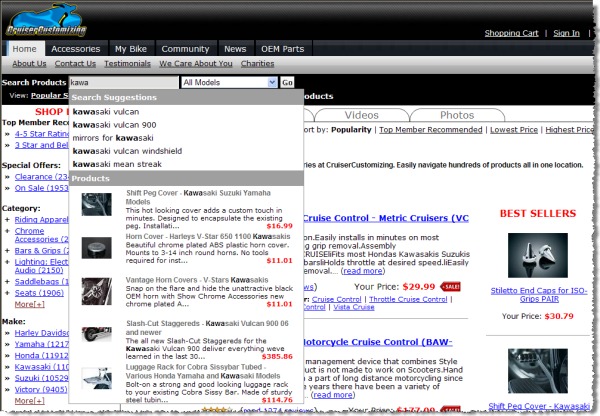
We’ve now gone a step further with our latest search enhancement, Rich Auto Complete. The new twist is that in addition to seeing suggested keyword terms as they type, site visitors will also see product images and product descriptions connected to those keyword terms. This allows visitors to access the content they are looking for without even viewing a site search page.

You can see how this works on our customer’s site, Cruiser Customizing. If you’re on the site’s home page and you begin typing the search term “kawa,” you’ll be given several completed search terms, such as “kawasaki vulcan.” In addition, you’ll see a list of  kawasaki-related products with accompanying thumbnail images. As you continue to type your search term, the suggested products and accompanying images will change based on the characters you’ve entered:

Rich Auto Complete

We’re confident that Rich Auto Complete will become a popular site search feature for our customers – we’re already seeing heavy usage of it, and we think it will become standard on leading e-commerce sites. It’s clear that Rich Auto Complete, in combination with an intuitive site search, can help site visitors find what they need and complete their purchases. If you’d like to try out Rich Auto Complete to see what impact it can have on your conversions and orders, contact us.

Site Search and Web Analytics Put a Wealth of Data at Your Fingertips

Posted by Shaun RyanMay 25, 2010Analytics, Newsletter, Site Search1 comment

Most likely, you already know that with web analytics, you can uncover valuable information about how and where your visitors use your site to purchase products or download information. Did you also know that when you integrate analytics (like Google Analytics) with site search you can gain great insights into how your visitors think, how they navigate your site, and why they buy (or don’t buy)?

In fact, analytics packages show differences in how site search and non-site search users interact with your site. Typically, site search users are more engaged with the site – they spend more time browsing, view more pages, and convert at a much higher rate.

Specifically, analytics packages track and analyze site search data to give you a better understanding of which keywords convert well, and which keywords perform poorly. For example, site visitors might spell a keyword differently (a common problem for complex product names), or simply use a search term for a product you haven’t accounted for (e.g., “iPods” instead of “MP3 players”).

If the keywords don’t match, then valid products may not appear for that search term – resulting in poor conversions and/or click-throughs. Analytics can help you detect such keyword challenges early on, and allow you to modify product descriptions and other content and ideally capture more sales or requests to download information.

Integrating analytics with site search can also tip you off to seasonal trends so you can modify product copy or even add products as visitors’ search habits change. For example, you may discover through keyword analysis that shoppers are looking for back-to-school products earlier than you anticipated, or that they’re actively searching for a product you don’t carry that you might want to stock.

Analytics can also help improve your success rate when using site search results pages for pay-per-click campaigns. You can easily use site search results pages as PPC landing pages, giving you more time to spend on developing ad copy and bidding on keywords. Analytics will identify the ad variants that perform well, so you can optimize landing pages for campaigns with the best click-throughs.

Remember, when you’re using site search pages as PPC landing pages, the traffic patterns are going to be very different from when the pages are accessed from the site search box. In order to properly evaluate the site search effectiveness, as well as the effectiveness of the landing pages, they should be tracked separately in the web analytics tools.

While there’s a wealth of data to dig into when you connect analytics to site search, it can be overwhelming to sort through all the numbers. If you’re curious (or confused) about any information that you’ve gleaned from web analytics in relation to site search, contact your SLI customer success manager, and we’ll help you interpret the data.

Mobile site search needs to be fast, streamlined and relevant

Posted by Shaun RyanApril 22, 2010Mobile, Newsletter, Site Search

Given the rapid adoption of smartphones, everyone in ecommerce knows the importance of developing a mobile version of their web site. What’s perhaps even more important is creating a mobile version of your site search.

Why is mobile site search so important? It’s a vital part of the web-browsing experience when you’re on a mobile device. Limited screen real estate provides little room for navigating from page to page or product to product. With effective mobile site search, people don’t need to rely on navigation – so it’s a space-effective way of getting people to the information they want to find on your site.

When you develop mobile site search, you need to take into account the unique challenges of browsing the web via these devices. Obviously, the small screen size will constrict the search choices you can offer to mobile device users. For instance, it’s very difficult to show options for refining search results. In addition, variable download speeds will limit how long these users are willing to wait for the search results to load.

These factors make site search even more crucial to a mobile website since it’s more difficult to navigate through a website via a mobile device. Therefore, you should consider giving site search prominent placement on your mobile site. Amazon does this with its own mobile site – as you can see when you visit the site, search dominates the screen.

Relevance of search results is particularly key for mobile site search, since it’s difficult to show facets to refine results – you want to make every effort to ensure the results are relevant after typing in a keyword. Users can’t or won’t scroll through pages of results to find what they need. It’s also important to keep the site search feature light in terms of images – any pictures should be small so as not to slow down page loads. On the other hand, you may want to include easy access to product reviews – people tend to use mobile devices when they are shopping, and they may want to access reviews on the spot.

We’re happy to offer advice on the best practices for mobile site search that’s fast and effective. If you’re an existing SLI customer and would like to develop a mobile version of your site search, contact your Customer Success Manager.

Pain-Free Testing Optimizes Search and Navigation

Posted by Shaun RyanMarch 17, 2010Newsletter, Site Search, Testing

If you’ve invested time and energy in an effective, relevant results-oriented site search solution, you’ve probably seen an impact on your web site – higher conversions for people who use the search box, perhaps even a larger average order size for people who search. But have you wondered if your site search is delivering all that it can to your bottom line, and if it could be further improved to generate even greater results?

A smart way of optimizing the value you get from your search and navigation is to conduct  testing to objectively decide which design options to use. However, our customers often admit that they don’t test as much as they should because it’s difficult and time-consuming to set up and run tests, and it’s also difficult to decide what they should be testing.

In the absence of testing, many website operators will resort to industry best practices. However, these best practices don’t always make sense for your business – whether for site search or another area of online marketing, as was recently pointed out in a MarketingProfs article about breaking the rules of email marketing.

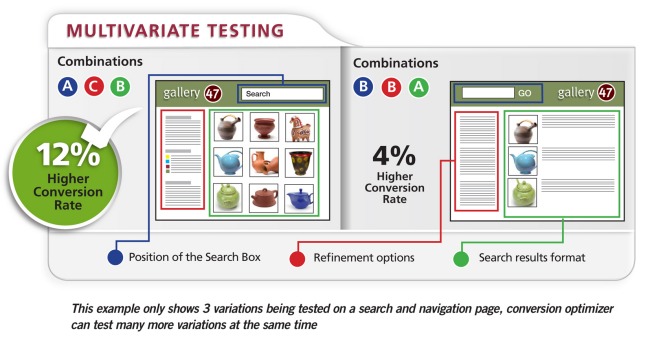
To solve this problem for our customers, we’ve introduced the Conversion Optimizer, a service for conducting testing. Essentially, we’ve taken all the hard work out of performing tests – you work with your SLI Customer Success Manager to establish the tests, and then you control and watch the tests being performed in real time, via your SLI Merchandising and Administration Console. (You can even stop the test if the results are poor.) And most important, you get results right away, and you can share them with your colleagues.

At SLI, we’re big fans of this testing. It’s the only way to truly understand how variations in your search and navigation features – such as changing the position of the site search box, using a grid view instead of a list view, or tweaking your ranking algorithm – can improve your business. However, thorough testing takes a lot of time and effort, and if it’s not done right, results can be ambiguous or misleading.

We’re making the beta version of Conversion Optimizer tool available to select customers – if you’d like to try it out, contact your Customer Success Manager. And tell us what you think of the new tool. We’d love to hear about the positive changes you’ve made to your site based on test results.

MVTdiagram
Load More

Stay up to date with SLI

Featured Posts

  • Maximize Revenue with Enhanced Product Impact Testing
  • Top Five Ways to Prepare for Peak Season
  • Facets, Facets, Who’s Got the Facets?
  • Personalization: It’s Kind of a Big Deal
  • M is the New E: Mobile Commerce Trends and Predictions

Categories

About SLI Systems

  • What We Do
  • Who We Are
  • Why SLI

Learn

  • Webinars
  • News Room
  • Events

Connect

© Copyright SLI Systems, 2018. All Rights Reserved | US: (866) 240-2812 | Legal