
SLI home
User login

A BLOG FOR E-COMMERCE LEADERS

  • Blog
  • Resources
  • Webinars
  • Customer Experience Scorecard

SLI Blog

Posts with online shopping Tag

Retail Executive Brief: Customer Experience Trends for 2018

Posted by Bob AngusNovember 30, 2017Analytics, Artificial Intelligence, Customer Experience, E-commerce Research, eCommerce, Merchandising, Mobile, Mobile/Tablets, Personalization, Reporting and Analytics, User Experience

Customer Experience - Convert Buyers with a Great Customer Experience

The pressure is on for retail businesses to deliver on big sales growth expectations. That’s in the face of slow consumer spending growth combined with the tectonic shift in traditional retail channels.

You need to turn more shoppers into buyers. You can’t afford for your investment to bring more shoppers in the door or onto your e-commerce store that leave with an empty cart.

That’s why optimizing your customer experience is more important than ever.

This retail executive brief helps you better understand:

  • How customer experience strategies are evolving
  • What customer experience metrics to track and analyze
  • How to improve your customer experience using top trends in 2018

Let’s first dig into how customer experience is changing.

What is Customer Experience Today?

In the past, customer experience strategies focused on the discrete interactions shoppers had in the sales process. These touchpoints took on even greater importance with online retail channels simply because it was easier to track and optimize each webpage leading up to a sale.

However, this touchpoint-focused approach to improving customer experience can easily miss one critical element… the customer journey.

The journey is the customer experience.

The overall journey can still disappoint customers, even if your online store design, in-store layout and staffing are executed well on individual touchpoints.

Understand the customer journey in your shoppers’ terms. Customer journeys include many things that happen before, during, and after the actual purchase experience.

The journeys can be quite long, though the purchase decision can be extremely fast. Consider the multiple channels, devices, and, yes, direct interactions that may occur over days or even weeks.

Put yourself in their shoes. You buy products for yourself all the time. Think about your entire experience and why you made a purchase or didn’t.

Ask questions like:

  • Where and when did you first learn about a store?
  • What was your first impression of the brand?
  • What triggered you going in the store or to the website?
  • How easy was it to find what you wanted?
  • How did you feel about the product price and value? Product quality? Selection for you?
  • How did you feel about the shopping environment in-store or online?
  • What sales help, customer service or employee interactions did you have?
  • How did the purchase transaction go? Was it fast and easy?
  • How did you get your product? Was shipping fast? Did you need to exchange or return?

Always be asking how you can improve that journey.

Next you need to figure out if you’re on the right path to improvement.

Customer Experience Measurements for Success

How do you know you are improving your customer experience? You’ll want to look at the numbers.

It’s very tempting to dive right into the weeds. Retailers now have so many powerful analytics tools. And data collection is getting easier.

However, direct contribution to macro financial metrics and sales trends can be difficult. Remember, your customer experience is a holistic journey. So your best customer experience metrics are more macro. They are not necessarily analyzing and optimizing discrete touchpoints.

Start by measuring key customer experience outcomes, customer feedback, and employee feedback.

Financial Metrics

The most common outcome metrics are financial. Let’s assume you are already tracking total revenue, profit, and transaction volume. Great financial indicators of your customer experience is Revenue per Customer and Average Transaction Value.

Make sure to also track Revenue per Visit (RPV) for your online channel or if you are a pure e-commerce business. This metric estimates the incremental value of each visitor to your online store. Simply divide your total online revenue by the total number of unique visitors to your website.

Customer Satisfaction

You also need to measure your Net Promoter Score (NPS) to capture how customers feel about you. NPS is a fantastic customer satisfaction metric to track over time. Customer experience and customer satisfaction are closely correlated.

But the most actionable customer experience metric in your NPS comes from the answer to the follow-up question – “Why did you give that rating?”

Categorizing the results of this open-ended “Why” question helps you measure the impact on different factors in the customer journey in your customers’ terms. For example, you may group results by broad areas like customer service, products, or pricing. Or you can go more granular into the touchpoints like checkout experience, shipping, or return policies.

Learn more by further breaking down your NPS by customer segments. You can segment by geography, gender or age demographics, order revenue, or purchase frequency or recency.

Employee Satisfaction

Lastly, you should also measure your Employee NPS. Employee satisfaction is also highly correlated with customer experience. Happier employees lead to better customer experiences.

After all, your employees are most responsible for delivering a great customer experience. All your employees contribute. Even someone behind the scenes in HR, the warehouse, or web development have an impact that trickles into the experience.

Here again, look closely at the “why” to measure and track the drivers that influence your employees’ feelings. Those feelings result in behaviors and actions that directly and indirectly impact your customer experience. Listen to what they say and recommend.

Track these financial and satisfaction metrics consistently. That’s how you will know your customer experience is on the right path.They are your “North Star” numbers.

Once you’ve established those customer experience measurements, you can then go deeper into specific success metrics for operational improvement initiatives. Use Google Analytics and e-commerce platform results for your online channel.

Now let’s look at the latest trends you can leverage to boost your customer experience metrics and sales.

3 Technology Trends that Help You Improve Your Customer Experience in 2018

Retailers continue to leverage technology to improve customer experiences. Much of the change comes from consumer technology use as a pulling factor. For the first time ever, more people say they plan to shop online (59%) than in big box stores during the 2017 holiday season, according to the NRF.

Here are three technology trends that help brands connect better with customers and improve their overall customer experience.

1. Rapid Growth of Mobile Shopping
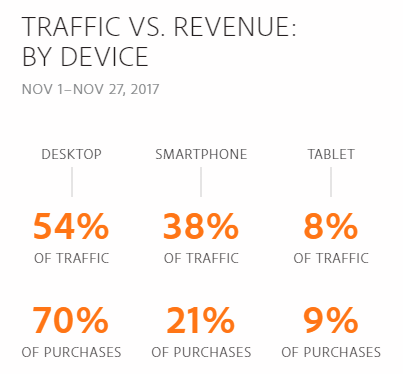
Mobile Traffic and Sales Statistics - Black Friday 2017 Cyber Monday 2017

The continued rapid growth of smartphone use is undeniably impacting retail sales. Similar to how e-commerce is the growth engine of overall retail, mobile sales are powering e-commerce.

The rising tide is driving much of that growth. Mobile traffic from smartphones and tablets peaked on Black Friday and Small Business Saturday (56% of traffic). Then leveled out to 46% of traffic, almost equivalent to desktop traffic (54%), through Cyber Monday 2017, according to Adobe Digital Insights.

However, the mobile shopping experience is a challenge for retailers. Smartphones and tablets earned a lower percentage of overall sales (30% versus 70% for desktop) and lower conversion rates through Cyber Monday.

Retailers can close more sales with mobile shoppers by continuing to improve their mobile customer experience. Shoppers now find mobile as an easy way to check emails (hopefully your emails), find store locations and hours, get product information, snap and share photos, and compare prices.

Optimizing mobile product discovery and mobile payments are the biggest opportunities for retailers to improve the mobile customer experience.

2. Personalized Merchandising with Artificial Intelligence

Customers want a personalized shopping experience. Sales people help shoppers in the store. Now application of artificial intelligence are helping online stores create a similar personal customer experience.

Online stores have massive amounts of behavioral and transactional data now. The challenge is to harness that data to power real-time merchandising decisions.

That’s where artificial intelligence excels.

Fifty-four percent of e-commerce sites have already implemented or plan to add AI in the future, according research from the Q3 2017 E-commerce Performance Indicators and Confidence Report. And 20% expect to add AI within the next 12 months.

The top application is personalized product recommendations. Eighteen percent of online retailers report they are already using artificial intelligence in their product recommendations strategies. But that number will swell dramatically in 2018 with 38% planning to implement within the next 12 months.
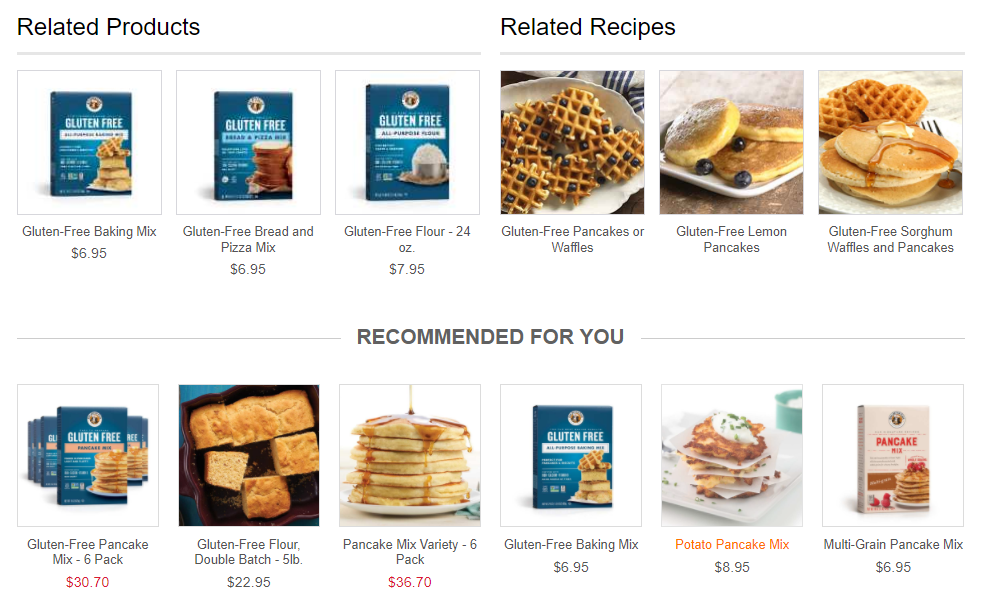
Personalized Product Recommendations Engine - King Arthur Flour

Artificial intelligence can parse user activity, preferences, and sales trends. The result is smart and timely product recommendations that are personal. For example, this type of contextual personalization can be tuned to gender, clothing size, brand preference, or shopper’s location.

Even better for online retailers, this personalization can be experienced by first-time visitors just as well as returning shoppers. So the shopper does not have to take any additional actions to receive the customer experience benefits.

3. Always on Customer Service with Chatbots

Chatbots were introduced as a new technology on the horizon for retailers in our 2017 e-commerce trend webinar. In 2018, chatbots are a must-have element of your online customer experience.

Ecommerce Chatbots - Retail live chat is always on

Think of chatbots like your online version of a sales associate or employee. Except they are always on 24/7/365.

A chatbot is an enhancement from the online chat communication channel. The old chat program still required a human sitting there typing in replies. Those employees had regular shifts. So sometimes customers weren’t getting their questions answered.

Now a chatbot is an always-on program that simulates the conversations your customers have with you. It answers questions, handles specific requests, helps shoppers choose the right product, and executes customer service procedures.

Your customer experience impact is shoppers have better and faster access to what they want when they want it. That’s a huge win. And you win more sales.

Customer adoption, and the resulting better experience and sales, is the biggest reason why chatbots are growing in e-commerce. Additionally two technology drivers are accelerating the deployment of chatbots – smartphones (again) and artificial intelligence (again).

Smartphone use is leading to speaking with a chatbot. Talking is easier than typing. Just say what you need and the chatbot tells you back. Siri, Alexa, and Google Assistant are all voice-enabled chatbots that are quickly growing is use.

Artificial intelligence is helping chatbots be more effective. The chatbot can repeat existing information easily and can be taught to mimic decision-making patterns. But artificial intelligence makes a difference by helping chatbots to actually learn. So your customer experience is continuously improving.

Design Your Customer Experience to Win More Sales

Planning and executing your customer experience strategies is a process of continuous improvement. Deeply understanding your customer’s journey sets you on the right path.

Take advantage of the key trends and technologies. Then test your innovations, measure, and optimize for the satisfaction of your customers and for the results that matter to you.

Ultimately, you can achieve what creative executive Loie Maxwell calls “designed serendipity”. Orchestrate the experiences that produce a customer journey that gives them a winning feeling. Your customers will love it. And you will win more sales.

Is Your Customer Experience Leaking Sales?

Most businesses are leaking online sales in at least 7 critical elements of their customer experience.

The Customer Experience Scorecard grades your e-commerce site using a 42-point checklist proven to increase sales, including:

  • Quickly finding products shoppers are most likely to buy
  • Personalized product recommendations
  • Mobile path to purchase

Want to find your leaks? Find out your quick-win opportunities to take your conversion rates to the next level.


Harness the Power of Mobile for Higher Holiday Sales

Posted by Amy LindseyNovember 1, 2016eCommerce, Merchandising, Mobile, Mobile/Tablets, Navigation, Personalization, Recommendations, Uncategorized

Portrait of a girl shopping online.

Evidence from 2015 suggests that record-breaking numbers of holiday shoppers will make their 2016 purchases online. (Click here to Master 2015 Holiday Trends to Clinch 2016 Holiday Sales.)

Trends show a steady shift from the majority of online purchases being made from a desktop to more purchases being made on mobile devices. While computers still brought the highest average transaction size at $114 (over $89 for tablet and $70 for smartphone), for six of the days leading up to Christmas last year, traffic from smartphones surpassed that of desktops.

Savvy online retailers are preparing to harness the “runaway power of mobile” (NRF) to close more sales than ever during the holiday 2016 buying season.

Here are four strategies to optimize the mobile experience and drive higher sales this holiday and beyond.

Drive Conversions with Interactive Content

Four times as many consumers would now rather watch a video about a product than read about it (NRF). Further, one in four consumers will lose interest in a company if it doesn’t have video. This is great news for retailers who want to capitalize on the rise of mobile for holiday shoppers. Since mobile users are turned off by lengthy text, videos create a clean and attractive design that enhances the user experience. Videos and other interactive content, such as blogs and reviews, can be embedded right into the search results to increase the likelihood that busy holiday shoppers will convert.

Create a Personalized Search and Navigation Experience

Personalization is the next big thing. Customers are increasingly coming to expect a personalized online shopping experience. Nowhere is personalization more important than mobile sites. With long lists of family and friends to buy for and limited time to do it, mobile shoppers this season will want relevant products served up fast, which is a challenge for retailers, given the limited real estate of small screens.

Mobile search and navigation results will win higher conversions when they are automatically fine-tuned on critical facets personal to each shopper, such as gender or size. (See how SLI Systems is personalizing the entire shopping experience.)

Help Searchers Find Your Site

While mobile has yet to surpass desktop for actual purchases, the majority of search is now mobile. Fifty-six percent of searches that resulted in a click to a top retail site during November and December 2015 were conducted on either a smartphone or tablet (NRF).

Mobile users, even more than desktop users, are unlikely to scroll through the first couple of results. While you may not be able to compete with Amazon or other giant online retailers’ rankings for the most commonly used search terms, you can win by capturing long-tail search terms from your shoppers and using them to create dedicated landing pages that are crawlable by search engines. Then, when searchers type those long-tail terms into Google, your landing page will pop right up where mobile shoppers are likely to click.

Use Creative Omnichannel Strategies:

The retail store is not dead. It remains a mecca of holiday spending. Innovative retailers are using the capabilities of mobile to enhance the in-store experience, and vice versa.

To be successful, go beyond what shoppers expect (such as seeing in-store availability for products they see online) and delight them with the unexpected. Offer Wi-Fi during the holidays to make it easier for shoppers to make comparisons and read ratings and reviews on their smartphones. Allow mobile shoppers to set up in-store appointments for services (great for busy holiday shoppers). Or take it another leap forward to create a virtual shopping experience as described in the Forbes article: Virtual Reality Coming Soon to a Clothing Store Near You.

Harnessing the power of mobile for higher holiday sales is all about tailoring the entire shopping experience, from search to purchase, to the wishes of your shoppers. After all, happy holiday shoppers purchase more, and that will make your days merry and bright!


Why Do Online Valentine’s Day Shoppers Spend More?

Posted by Dawn MortensenFebruary 10, 2014eCommerce, Site Search, Success Stories

Online Valentine’s Day shoppers will spend 31% more than those who purchase items related to Valentine’s Day in a physical store, says the National Retail Federation. Broken down to amount spent per shopper, the average person will spend $133.91, but the average online shopper will spend $175.80.

There are many potential reasons for this; online shoppers may be more likely to buy multiple gifts that are shipped to different addresses, or they simply tend to choose more expensive gifts. Shipping and gift wrapping services would account for part of the more than $40 difference.

Search and You Shall Spend

Another possible reason for the extra money online shoppers spend is that they’re more likely to find and buy the gifts they’re looking for if they’re shopping on sites with a good search function. Rather than wandering through aisles of pink and red stuffed animals and cardboard heart boxes of chocolates, online Valentine’s Day shoppers can go to their favorite gift sites, type in search terms, then refine the results until they find the gifts they want to buy.

FTD, Interflora, Samuels Jewelers, The Diamond Store, Lovehoney, Harry and David, Gourmet GiftBaskets and Vermont Teddy Bear are all sites that have Valentine’s Day related gift items. And all are powered by SLI search, which means the search results are incredibly relevant because of SLI’s advanced learning technology. You type a word or two into the search box, you see relevant items, you click the one you want, you go through checkout and you’re done. On these sites, most customers find what they want within the first five search results provided.

It’s not surprising that a great user experience leads to more money spent at that site. Lovehoney saw 16% higher average order values (AOVs) after improving their site search. PartySuppliesDelivered.com saw 18% higher AOVs with SLI search. Boden had a dramatic increase of 215% in revenue per visit, and other SLI customers have seen similar results, like a doubling in the conversion rate for customers searching for recipes and products at KingArthurFlour.com.

Great search makes for a great shopping experience when looking online for a gift on Valentine’s Day – or any day.

What Do Young Consumers Want from eCommerce?

Posted by Erika StasiSeptember 23, 2013eCommerce, Navigation, Navigation Tips, Site Search, Site Search Tips, Social Media, User Experience

In my last blog regarding usability, I detailed some of the design features and functionality that make eCommerce user-friendly for an older demographic. The important features to optimize site search and navigation for the 65 and older user contrasts considerably with today’s youngest set of shoppers. These digital natives, ages 12-17 years old, are comfortable with evolving technologies, new features, and shopping concepts that take shopping online to a whole new level.

Investment firm Piper Jaffray, in its 25th semi-annual study, found that 79 percent of teen females and 76 percent of males shopped online, with 70 percent of those teens shopping online at their favorite stores. Creating an engaging and valuable website is crucial in capturing the attention of young shoppers, who have never experienced a time in their lives without technology.

Important Features for the Young Online Shopper

Jakob Nielsen, a pioneer in the user experience field, has researched the usability features most important for the teen online shopper in his article, “Teenage Usability: Designing Teen-Targeted Websites.” Nielsen says sites geared toward the teen market should use less text and adhere to standard design layouts. Examples of such sites are HotTopic.com, KidRobot.com, and SpencersOnline.com. Nielsen points out some specific design features that are important for teens: use of bright color, high quality images, integrated media such as videos and music, interactive games, and links to social media.

The Influence of Social Media

Social media has become an integral part of the teen market online shopping experience. The 2013 Piper Jaffray survey confirms that Facebook and YouTube are still the favorite social media sites for teens, with 53 percent of females and 52 of males indicating that social media influences their purchases (especially Facebook).

Other non-conventional social media platforms such as Pinterest and Polyvore have created innovative ways for teenagers to connect with their friends, see what their friends are interested in, and link them directly to eCommerce sites where purchases can be made.

Polyvore, for instance, is a community-driven social commerce site where members pick and choose from a variety of clothing, shoes and accessories to create fashion collages. Users can see other community members’ and friends’ fashion boards. Below these completed fashion boards are links to external retail websites, where users can complete any online transactions.

Pinterest, like Polyvore, is community-powered and allows members to follow friends’ and like-minded individuals’ pinboards. Pinterest users can re-pin rich images of home design, nature, fashion, food and beverages, and an assortment of other items for their followers to see. Each image or “pin” links directly to an online retailer’s site, essentially sharing that link with a huge network of followers.

Surprising Findings on Usability for Teens

Compared to other demographics, the teen market is actually less affected by poor usability features such as errors (their own or at the fault of the site). In the case of negative usability, such as slower loading time, the teen market has been shown to forgive and forget more easily than the senior market. Longer load times can still be frustrating for any user demographic, and may seem even more so for a group that craves instant gratification. However, patience is something that the youth market has practiced because of all types of technology mishaps they experience on a daily basis. This is unlike the senior market, which isn’t completely absorbed by the tech craze of smartphones, tablets and laptops.

Why the Teen Market Matters

Although some will argue that tailoring eCommerce sites to attract the teen market isn’t as valuable because teens don’t have direct buying power when it comes to online shopping, they are extremely influential when it comes to the consumption levels of their parents. According to the 2012 Harris Poll YouthPulse, teen-influenced purchases account for over $211 billion worth of purchasing power! With 23 million teens in the U.S. alone, teens are making a huge impact to the economy and their parents’ wallets.

When considering the teen demographic in their site design and usability, internet retailers should implement those site search tips listed above as a starting point to capture their target market.  Including non-product content such as social media links and interactive content such as Instagram, Pinterest, and Polyvore is a way to stay relevant and exciting to this young group. The key to engaging these Gen Z consumers is to keep it simple, avoid boring content, and consider using responsive website designs for multiple interfaces to keep your site fresh and fun.

Contact SLI Systems for a free site critique to learn how you can optimize your eCommerce site for this emerging youth market and other key market segments.

Best Practices for DIY and Home Goods eCommerce

Posted by geoffbAugust 19, 2013eCommerce, Navigation Tips, Site Search Tips1 comment

Is there anything people won’t buy online these days? Sofas and even major appliances now have their place in the e-commerce universe, which raises the bar for online businesses that need to serve the special requirements of these shoppers. Unlike browsing for shoes or books, shopping for DIY or home repair products like lighting or power saws needs precise navigating and searching capabilities.

The DIY/home goods space is now big business online: Online hardware and tool sales are a $6 billion market, which has grown an average of 7.8 percent a year since 2007, according to IBISWorld Market Research. To keep the growth at a steady pace, online businesses that sell home and DIY goods need to understand that these products are shopped for in different ways. For example, the expertise level of shoppers varies widely – from skilled craftspeople to someone doing their first home-painting project. Also, some products, like appliances and home décor items, are shopped for based on criteria like appearance, features, and price – whereas products like hardware and tools need to match specific shopper requirements for part number, size or dimension.

The first step in attracting (and keeping) DIY shoppers is to return relevant results for searches. Shoppers, especially the ones smack in the middle of a project, will expect to see results that match their keywords within the first page – otherwise, they’ll leave the site quickly (no doubt to visit the competition). Consider adding useful tools like Auto Complete, which offers search suggestions after the visitor types in the first few letters of a keyword. Thumbnail images within search results are also very helpful, since they provide a visual cue for shoppers trying to decide if they’ve found the products they want.

Since measurements can play an important part of DIY shopping, you should offer the option to search for products using either metric or imperial measurements – especially on a U.S. website, since both systems can be in use. Manufacturers may also use different systems of measurements (e.g. “counter depth” or “standard depth” for refrigerators), so this option can help shoppers avoid an unnecessary “no results” page or confusing results.

The same goes for searches by SKU or part number. If you’ve ever shopped online for a new knob for an oven, or hardware for a set of window blinds, you know how helpful a SKU search can be – you’ll know you have the correct item if it pops up in search results. Make sure your site search can match full or partial SKUs.

If you have store locations whose inventory mirrors what you sell online, you can turn on geolocation services that allow shoppers to see if a product is available locally.

Educating shoppers about best practices for DIY projects is another good way to encourage them to click on the “buy” button. If they’re confident about a project, they’ll want to purchase the products they need to get the job done. For instance, you can add how-to guides, technical specifications, videos, and blog posts to your site, and make this information available via search. It’s especially helpful to separate out these search results by type so that visitors will find it easy to navigate to the content type they want.

Product ratings and reviews can also help boost shopper confidence in an upcoming DIY project. These ratings and reviews should show up in search results, placing them at shopper’s fingertips while they’re looking at product options.

Whether it’s driven by homeowners trying to save money post-recession, or the plethora of home-improvement programs on cable TV channels, DIY has many enthusiastic followers. Make it fast and efficient for these consumers to complete their projects by shopping on your website.

For more research and commentary on eCommerce trends in the DIY category, download this paper: Hardware, Appliances & Tools Industry Brief.

Note: This blog was originally published by JXT Group on July 19, 2013.

Usability Features for the 65+ Online Shopper

Posted by Erika StasiAugust 12, 2013eCommerce, Site Search, Site Search Tips1 comment

Many of us know someone over 65 who is hesitant to shop online, or even use a computer or smartphone. This leads to the common perception that users 65 and over are resistant to adapt to changing technology. However, some studies show that more than half of the senior market has integrated itself in the eCommerce experience and is continually embracing this “new” way to shop.

As of 2012, 19 million American seniors are avid Internet users, and this number has been growing 16 percent per year for the last decade. According to a recent Pew Research Center study, that’s more than half of the senior population, approximately 55 percent!

As shopping online becomes as routine and easy as checking one’s email, it’s no wonder why the majority of the senior market has really embraced this shift toward online browsing and purchasing. And for some seniors with limited mobility or fixed incomes – or those just looking for a convenient way to quickly browse a number of stores – the benefits of online shopping are becoming even more apparent. The conveniences of shopping at home, combined with the opportunity to compare prices online, are driving this market to push the boundaries of their normal shopping habits.

Online retailers have recognized this shift toward online shopping for the over 65 demographic, and are making a stronger effort to cater to this market that was initially slower to adopt. Sites such as Hoveround.com, Jaystrongwater.com and AARP demonstrate the implementation of certain necessary and important design features for seniors.

Jakob Nielsen, in his article “Seniors as Web Users” observed that companies who redesign their website to give seniors a similar user experience quality as younger users can obtain 35% more business from them. Site usability is the most important aspect of any retailer’s site, as recognized by Nielsen in his research. According to the study, there are five main components that lead to successful site usability:

  1. Learnability: How easy it is for users to complete basic tasks on a first-time site visit.
  2. Efficiency: How quickly users can perform tasks on the site such as searching, ordering and checkout.
  3. Memorability: How quickly users can re-establish proficiency with search and navigation after a period of not using the site.
  4. Errors: How many errors users make, how severe those errors are and if the user can recover from these errors (such as content errors, spelling mistakes and the like).
  5. Satisfaction: What users get out of the site design aesthetically, which is imperative for effective site usability.
    .

For the senior market, the most important usability features are the ease of accomplishing basic tasks on a first time encounter, how much they remember about the site’s design after not accessing the site for a long period of time and whether they can recover after making search errors.  Users aged 65 and older are 43% slower at using websites than users aged 21–55. And when they had site search problems, seniors blamed themselves 90% of the time, compared to 58% of younger users. This is where a carefully planned user interface and site design is paramount in successfully capturing the senior market to shop on their sites and increase loyalty and retention among eCustomers.

Some design features necessary in developing senior-friendly websites include a large, distinct search bar, clear and bold navigation buttons, easily-readable text and prominence of the most important information above the fold. Other very helpful features are a Frequently Asked Questions (FAQ) page and multiple areas for contact information.

Research by MarketingSherpa suggests that visitors spend about 8 seconds before deciding whether to remain on a site or to search elsewhere. Having a clearly marked search box that returns highly-relevant results is a key component in lowering abandonment rates and increasing conversions to any age demographic – but even more so with this particular market. Online retailers who want to keep seniors coming back to their sites should consider working with search and navigation experts that can help them implement these key design features and ensure than search results are always relevant.

Looking toward the future, we can expect that the 65 and over market will be savvier when it comes to online shopping. Eventually, shopping online will be the norm and the senior market will have completely immersed itself into the experience.

Contact SLI Systems for a free site critique to learn how you can optimize your eCommerce site for 65+ buyers and other key market segments.


Surprise! Older Shoppers are More Likely to Purchase Online

Posted by Kemberly GongNovember 9, 2012eCommerce, Merchandising, Navigation, Site Search

A surprising fact was just reported: older consumers are most likely to make holidays purchases online this year.

The study, conducted by Velaro, highlighted some interesting facts that online retailers should keep in mind this holiday season when running promotions and thinking about their target audiences.

The study found that 20 percent of shoppers ages 55-64 and will do some portion of their holiday shopping online, which was the highest percentage from any age group surveyed, followed closely by shoppers age 45-54 (19 percent).

Comparatively, shoppers aged 18-24 were least likely to do holiday shopping online. This is an interesting statistic because it’s often assumed that younger shoppers are more technologically savvy and have a higher tolerance for complicated sites to complete transactions.

So, what does that mean for online retailers? When considering an older audience, it’s important to keep in mind that excellent usability and ease of finding products and navigating through your site will be essential to helping your users make purchases. It’s also helpful to make sure your merchandising shows customers the hottest products and special promotions, such as free shipping and free returns, in a variety of ways such like merchandising banners, ribbon overlays and highly-visual pages full of product images.

Additionally, if you are selling electronics, gaming, apparel and other products aimed at the 18-24-year-old demographic, it might helpful to modify your online marketing strategy and aim promotions at parents, not young adults.

Excellent site usability is necessary for all sites – those targeted toward younger demographics may actually have older shoppers accessing them.

Overall, the trends look good for online retailers; 53 percent of respondents said they intended to do at least 25 percent of their holiday shopping online, and some studies are predicting that holiday shopping this season will be up 15 percent overall from last year.

What are your thoughts on the holiday shopping season so far? Please leave your comments below.


eCommerce Merchandising Made Easy

Posted by Kemberly GongOctober 17, 2012eCommerce, Merchandising, Site Search

In contrast to the brick and mortar stores where we all grew up shopping, online shopping offers a variety of ways to put the right items in front of your customers. Instead of sorting through racks or shelves of products that we don’t want in order to find the few items we do want, merchandising on an eCommerce site allows you to easily put front and center the items your customers want most.

Like a personal shopper, let your customers lead you to their favorite items and then suggest other similar pieces, tell them about special promotions and don’t lead them away from their desired item. With successful eCommerce merchandising, you can automate these various incentives to drive your customers to the shopping cart.

Here are a couple tips to improve your merchandising; you’ll find the complete list and more in our Big Book of Site Search Tips. Download it today to learn the most innovative, yet practical ways to improve your site’s usability.

1. Override Search Results

Online shoppers pay the most attention to the first several results “above the fold”, or rather, what is shown initially on screen without scrolling. If you have relevant promotional, sale or seasonal items you’d like to showcase, you might consider overriding search results to place them at the top of the list.

2. Don’t Present Unrelated Cross-sell or Up-sell Products

When your customer enters a search term, it’s a clear signal about what they are looking to find. Keep the products that you recommend focused on the initial search keyword. Shoppers will distrust the value of your search function if it habitually returns irrelevant promotional results.

3. Show Search Results on Product Pages

When someone searches a specific keyword on the web and clicks an organic listing that leads to one of your product detail pages, you can increase conversions and reduce bounce rates of those visits by including other search results for that  keyword. In our Big Book of Site Search Tips, we show an example  from Motorcycle Superstore.

For instance, if a customer searches Google for “Bell Helmet Rally” and clicks a link to Motorcycle Superstore’s detail page they’ll see a banner on the page containing other Bell motorcycle helmets. This surfaces a broader range of products than they would have otherwise seen, which is useful if the original product is out of stock or is not a best seller.

These are just a few tips for increasing clicks and reducing bounce rates on your eCommerce site with effective merchandising. You’ll find even more strategies in our Big Book of Site Search Tips. It’s full of useful guidelines to help make site-wide enhancements on your eCommerce site to create an intuitive site that leads customers to the most relevant and popular items they desire.


Stay up to date with SLI

Featured Posts

  • Maximize Revenue with Enhanced Product Impact Testing
  • Top Five Ways to Prepare for Peak Season
  • Facets, Facets, Who’s Got the Facets?
  • Personalization: It’s Kind of a Big Deal
  • M is the New E: Mobile Commerce Trends and Predictions

Categories

About SLI Systems

  • What We Do
  • Who We Are
  • Why SLI

Learn

  • Webinars
  • News Room
  • Events

Connect

© Copyright SLI Systems, 2018. All Rights Reserved | US: (866) 240-2812 | Legal