SLI home
User login

A BLOG FOR E-COMMERCE LEADERS

  • Blog
  • Resources
  • Webinars
  • Customer Experience Scorecard

SLI Blog

Site Search Helps Fill Cienas B2B Sales Lead Pipeline

Posted by geoffbJune 22, 2010eCommerce, Site Search

No matter if you’re selling products, services or information online, to be successful, site visitors must be able to quickly and easily find what they came for – or they will leave, often never to return.

Our customer Ciena, a leader in network infrastructure is a good example. The company relies on its website for lead generation, and thus offers a great deal of educational materials on its site – i.e. whitepapers, product data sheets, videos and webinars – all designed to capture the interest of potential clients.

Ciena’s previous site search solution wasn’t resulting in the leads the company needed. They didn’t have visibility into how their visitors were moving through the site after conducting a search and weren’t confident visitors were finding useful information to download. Adding to the problem was the inability for their previous site search solution to integrate with any type of web analytics solution, like Omniture. And the Ciena web marketing team had to spend a great deal of time on special coding whenever there were any changes in the product pages to make sure the site search picked them up.

Ciena turned to us.

SLI worked with Ciena to implement both our Learning Search and Site Champion solutions to improve relevance of search results, as well as create pages optimized for search engines. Our services also easy integrate with analytics platforms like Omniture (and Google Analytics) to provide greater insight into visitor’s web behavior.

Ciena immediately saw results and a marked improvement in online visitor engagement. According to data from their Omniture analytics, in the second half of 2009, 18.5 percent of online visitors who used site search went on to download one or more files, compared to just 4 percent of visitors who entered the site via the home page, and who did not use site search.

In addition, Ciena’s site search results pages have become the number one entryway to the Ciena site. The company has tied 7,000 downloads and 800 registrations directly to these pages. And those registrations go straight into their sales lead funnel. You can read more about their deployment in the recent issue of Target Marketing magazine or via the case study on our site.

On the Internet, great customer service goes a long way toward increasing sales. A useable, easily searchable site is a key component. We are hard at work with our customers daily helping them ensure their site visitors become paying customers and not their competitor’s customers. Please contacts us if you would like to find out more.

Read More

Its Time to Prepare for Mobile Commerce

Posted by geoffbJune 8, 2010eCommerce, Site Search, Web Search4 comments

We recently conducted a survey of more than 400 e-commerce companies about their plans and activities in mobile commerce (m-commerce). The feedback was intriguing, to say the least. We found that while recent reports are pointing to significant growth in mobile subscriber numbers and an uptick in m-commerce, the majority of online retailers (80%) do not currently have a mobile commerce strategy in place. Yet, 83% of survey takers say between 1-10% of visitors come to their sites from mobile browsers and 12% cite that 11-20% get to their sites through the mobile web. As those numbers are expected to grow rapidly, we believe this represents a significant opportunity, and those of you that are preparing now for the influx of new business the mobile web represents stand to benefit.

The good news is, while many online retailers may be slow to adopt m-commerce, most recognize the opportunity and plan to address it in the near future. Fifty-six percent (56%) believe a mobile commerce strategy is very important or important to their overall business and 38% say it is important for driving sales. The majority (70%) plan to embark on an m-commerce strategy within the next two years. Only 38% believe m-commerce will be important or somewhat important to this year’s holiday campaigns, while 62% say it will not be important. It will be interesting to see the outcome this holiday season.

According to a recent post from Tim Parry of Chief Marketer, those that have yet to embark on a full-fledged m-commerce strategy may consider launching a mobile site now for research instead of focusing all of their efforts on sales. The thinking behind this is that it might help retailers determine the mobile usage patterns of their customers, so specific needs can be met as m-commerce strategies are expanded.

Other SLI m-commerce survey highlights include:

  • Seventy-nine percent (79%) say site search is important to a mobile website strategy and 61% are confident site search capabilities on a mobile site will generate additional conversions.
  • The top four features online retailers cite as the most important to enhancing the m-commerce experience are navigation (73%), site search (59%), product pages (54%) and product reviews (40%).
  • Of companies looking to build their m-commerce sites, 31% will utilize in-house resources, 28% will outsource the work to a third party developer, 36% will use a combination of both in-house and outsourced resources and the remainder are unsure.
  • Fifty-one percent (51%) of e-commerce companies do not consider the iPad to be a mobile device (they say iPad users can utilize their current website); yet 31% will direct iPad to their mobile site.
  • Only 22% of e-commerce organizations have developed shopping apps for platforms including iPhone, Android, iPad and BlackBerry, while 49% are planning on creating apps, but don’t currently have one; and 29% are not planning on creating apps at all.

Thanks to all who participated in our survey. The full results will be made available on our site in the next few weeks. It will be interesting over the coming months to see how retailers respond to the growing m-commerce demand. We are already working with a number of you on adopting a successful m-commerce strategy, and look forward to helping others increase sales through the mobile web in the near future.

Read More

Visit us at IRCE – Booth #301

Posted by geoffbJune 7, 2010Conferences, eCommerce
We’ve all been busy this week getting ready for IRCE which starts tomorrow in Chicago – and it looks like this year’s event is going to be one of the best yet. Several of our customers and ecommerce technology partners will be there, and we’re looking forward to all that’s in store. 

If you’re a retailer, be sure to stop by our booth #301 — we’ll be providing complimentary Site Search Evaluations where our team will look at your site and offer suggestions for how you can improve the site search to create a better user experience (and capture more conversions!).

IRCE2010

We’re also holding a drawing for a Samsung 3D TV and 3D Blu-Ray Player – so be sure to drop by our booth and enter to win.

If you haven’t already registered for IRCE, we’re offering a $100 discount on registration fees. To receive the discount simply click here and enter discount code EC02220 and Booth #301.

We hope to see you there.

Read More

Congratulations to CenturyNovelty on 2nd Multichannel Merchant Award

Posted by geoffbMay 30, 2010eCommerce

We want to give a shout-out to our customer CenturyNovelty on picking up another Multichannel Merchant magazine award – marking its second year of winning in a row!

The MCM Awards are the top honors for B2B and B2C marketers; they recognize superior print catalogs and websites from around the globe. Gold and silver awards are given for quality in both print and Web, and the Cross Channel Award honors multichannel merchants for synergy across print and Web channels. The winners were selected from 51 print channel finalists and 21 Web channel finalists.

Some of the top brands in the country, like LL Bean (Catalog of the Year & Cross-channel Merchant of the Year), Orvis and Crutchfield were all winners. You can see the complete list here http://multichannelmerchant.com/news/ll-bean-musicians-friend-2010-mcm-awards/?cid=nl_mcm_weekly.

Congratulations to the CenturyNovelty team for their hard work and an award well-deserved!

Century
Read More

Site Search and Web Analytics Put a Wealth of Data at Your Fingertips

Posted by Shaun RyanMay 25, 2010Analytics, Newsletter, Site Search1 comment

Most likely, you already know that with web analytics, you can uncover valuable information about how and where your visitors use your site to purchase products or download information. Did you also know that when you integrate analytics (like Google Analytics) with site search you can gain great insights into how your visitors think, how they navigate your site, and why they buy (or don’t buy)?

In fact, analytics packages show differences in how site search and non-site search users interact with your site. Typically, site search users are more engaged with the site – they spend more time browsing, view more pages, and convert at a much higher rate.

Specifically, analytics packages track and analyze site search data to give you a better understanding of which keywords convert well, and which keywords perform poorly. For example, site visitors might spell a keyword differently (a common problem for complex product names), or simply use a search term for a product you haven’t accounted for (e.g., “iPods” instead of “MP3 players”).

If the keywords don’t match, then valid products may not appear for that search term – resulting in poor conversions and/or click-throughs. Analytics can help you detect such keyword challenges early on, and allow you to modify product descriptions and other content and ideally capture more sales or requests to download information.

Integrating analytics with site search can also tip you off to seasonal trends so you can modify product copy or even add products as visitors’ search habits change. For example, you may discover through keyword analysis that shoppers are looking for back-to-school products earlier than you anticipated, or that they’re actively searching for a product you don’t carry that you might want to stock.

Analytics can also help improve your success rate when using site search results pages for pay-per-click campaigns. You can easily use site search results pages as PPC landing pages, giving you more time to spend on developing ad copy and bidding on keywords. Analytics will identify the ad variants that perform well, so you can optimize landing pages for campaigns with the best click-throughs.

Remember, when you’re using site search pages as PPC landing pages, the traffic patterns are going to be very different from when the pages are accessed from the site search box. In order to properly evaluate the site search effectiveness, as well as the effectiveness of the landing pages, they should be tracked separately in the web analytics tools.

While there’s a wealth of data to dig into when you connect analytics to site search, it can be overwhelming to sort through all the numbers. If you’re curious (or confused) about any information that you’ve gleaned from web analytics in relation to site search, contact your SLI customer success manager, and we’ll help you interpret the data.

Read More

Final Chapter on Site Search Tips

Posted by geoffbMay 24, 2010eCommerce, Site Search, Site Search Tips

This week we complete the series of site search tips taken from our “Big Book” free whitepaper (which you can still download at https://blog.sli-systems.com/whitepaper/bigbook). As we close out the series, we focus on “Search Page Format & Lay-out” with the following tips. If you’ve tried these or any tips we’ve shared over the past several weeks, please post a comment below and let us know what improvements in your site search performance you might have seen as a result.

  • Consider showing larger images when visitors mouse over a thumbnail image in the search results – This is particularly suitable for product searches. Normally on the product page there are large images that allow visitors to see the product detail closely. However, search results pages usually display smaller thumbnail images that are hard to see. By having a large image pop up when your customers mouse over the product listing, they can easily examine the detailed images for all the products shown on the results page without having to click into the product page repeatedly.
 MouseOver
  • Show search suggestions on the search results page – These are search terms that are related to the term that has been entered and can give people additional ideas for what to search for. We normally counsel our clients to show search suggestions at the top of the page and the bottom of the page, and below each search result. According to our own research, about 25% of site visitors will click on a search suggestion.


  • Show video in your search results – More and more sites contain some video content. This content should easily be found in site search results and potentially played directly from the search results page. For example, onlinegolf.co.uk found that visitors who watch video are 85% more likely to buy. When they made the videos available in their site search, video viewership doubled.
 Video
  • Consider using AJAX to display your search page – By using AJAX, you avoid the need to do a page refresh after each refinement, reordering, view change, next page or subsequent search. A request is sent to the server in the background, and only the data that is required is sent to the browser. This results in a faster, snappier search experience.


Download the Big Book of Site Search Tips

Read More

Take our Mobile Commerce Survey

Posted by geoffbMay 20, 2010eCommerce, Site Search

If you’re involved in e-commerce, we’d like to invite you to participate in our latest survey pertaining to trends in mobile commerce. Even if you don’t have a mobile commerce site, or even plans for one, your feedback is valuable. We think the mobile platform will be a key area of focus for online retailers in the coming months – and in particular, we see mobile site search playing a crucial role. Everyone’s talking about mobile, but who’s really doing it?

We’re eager to see how many retailers have either embarked on – or plan to embark on – a mobile commerce strategy in the foreseeable future. Your information will remain confidential – and by taking the survey you’ll be entered to win a Flip video camera. To be entered in the drawing after you’ve taken the survey or to request the survey results, please email us at marketing@sli-systems.com.

The survey is about 10 questions and should take less than 5 minutes to complete. You can access it here: http://www.zoomerang.com/Survey/WEB22ANCZJG3Q9.

Thanks for your help and participation!

Read More

Boost search engine findability by watching site search behavior

Posted by EdHoffmanMay 18, 2010Conferences, eCommerce, Site Search

Your website may have the hottest products on the market, and the most engaging content – but if the site doesn’t have “findability,” potential customers won’t even know you exist. They’ll go to Google or Bing (or other search engines) and search for products or information, and your site won’t turn up on the first page of results.

But if your findability has been fixed, your site will rank high in search, and conversion rates for visitors will improve. Today I’ll be talking more about the keys to findability at the Gilbane Content Management conference in San Francisco. I’ll be taking part in a panel discussion titled “Findability – Crafting Your Site to Drive Traffic and Improve Conversions” with Sam Mefford of Avalon Consulting and Richard Zwicky of Enquisite, moderated by Hadley Reynolds of IDC.

One key to improving your site’s findability via organic and paid search is to take a close look at how your current site visitors search on the site, and the language they use. You can use their searching language to adapt your site content (such as product descriptions and keywords) to the way your customers interact. For instance, do people commonly misspell an important search term? If so, that misspelling needs to be built into your site search and your content. Do they often use a generic category term rather than the actual product name (e.g. “MP3 player” vs. “iPod”)? If yes, then you need to incorporate that generic term into your site content. Your customers’ search language can also be useful in identifying the keywords to utilize in SEO and paid search efforts.

Improving findability ties in with site visitors’ increasingly short attention spans when it comes to finding what they need. They spend their days browsing search engines and social networking sites and they have high expectations for being able to quickly track down what they need – and they’ll easily desert any site that doesn’t meet this requirement.

If you’re at the Gilbane conference today, please come check out our discussion – we’ll be speaking at 1:30pm as part of the Customers & Engagement track. And if you’re at the conference this Thursday, I’ll be speaking again as part of a panel discussion on “Smarter e-Commerce – Raising the Bar for the User Experience.”

Read More

Convincing Customers to Purchase, No Matter Where They Are in the Buying Cycle

Posted by EdHoffmanMay 18, 2010eCommerce, User Experience

The race is on for websites to offer as engaging a customer experience as possible – through fast and relevant site search, multimedia content, customer reviews and other tactics designed to keep visitors on the site longer. Along with raising the bar on the customer experience comes the need to serve visitors early in the shopping process and keep their attention until they turn into serious shoppers who’ll actually buy.

Today, I’ll be taking part in a panel discussion on “Smarter e-Commerce” with Paul Sondregger of Endeca at the Gilbane Content Management Conference in San Francisco (Hadley Reynolds of IDC will be moderating). We’ll be discussing, among other things, how to engage buyers who have different intentions in terms of making a purchase on your site, depending on where they are in the buying cycle. For instance, someone who’s merely trying to gather information – if they’re shopping for an expensive product and need to know more before they commit to the purchase – needs to be impressed by the quality of information, and great customer service. This will encourage them to return when they’re ready to buy.

On the other hand, if visitors are ready to buy today, they’re much more likely to use site search, which means your site search feature needs to be fast and relevant if you want to convert that customer. And since we know that people convert at a higher rate when they use site search, it’s especially important that your site is designed in such a way that site search is rich and engaging and readily accessible.

If you’re attending the Gilbane conference, please stop by our session and discover more about what it takes to turn browsers into buyers. The session, “Smarter e-Commerce,” takes place at 3:30pm today as part of the Customers & Engagement track.

Read More

More on Refinements

Posted by geoffbMay 17, 2010eCommerce, Site Search, Site Search Tips

This week’s site search tips re-visit the topic of refinements. Refinements are an important aspect of site search because they make it significantly easier for visitors to sort through results to find what they’re looking for. We have many more tips on refinements (and other topics) in our free “Big Book of Site Search Tips” that can help you improve performance of your site search and deliver a better customer experience.

Next week will be our final post on the site search tips topic, so please be sure to download our free “Big Book” if you haven’t already!

  • Consider storing some facet choices for users so they don’t have to make them each time – For example, on a shoe website, if someone selects women’s shoes and size 5, this information could be stored in a cookie and automatically selected next time they do a search. This is implicitly remembering their preferences; you could also let them explicitly state these preferences. If you’re not sure, try asking your customers.


  • Consider having an advanced search page that allows the visitor to enter a keyword and preselect refinement options before they see results – Optionally, this can be configured as a gift finder. Consider configuring search so a visitor can only select combinations that actually return results. For example, you offer the option to refine products by color and by category. You offer a red iPod but no red TVs. So if visitors select the TV category, then the ability to restrict the search to red products should no longer be available.


  • Offer the ability to refine by price for a product search – Price is an important part of a buying decision. Normally price refinements are shown as a list of ranges. One nice option to consider is a price slider, which allows you to set a bottom price and a top price easily. This is a nice presentation option because it takes less screen real estate than a list of price ranges and it offers more flexibility than fixed price ranges. It does, however, require more clicks.
 PriceRefinement

Download the Big Book of Site Search Tips

Read More

Small Steps Can Have a Big Impact on your Visitors’ Search Experience

Posted by geoffbMay 10, 2010eCommerce, Site Search, Site Search Tips

We’re nearing the end of our weekly Site Search Tips series, with just two more weeks to go. However, you can always download our free Big Book of Site Search Tips to see all 80 suggestions for how to get the most out of your site search, for a bigger impact on your bottom line.

Now, for this week’s tips – which address a few simple steps you can take to improve your visitors’ experience on your site and also get their feedback on the search. Not only can these actions give your customers a better, more engaging interaction on your site but they can also help your site stand out from your competitors, so your visitors will be more inclined to be repeat customers. If you have any questions about how best to implement these ideas, or feedback about your own experiences, please let us know by posting a comment below. Thanks for reading!

  • Allow people to search by hitting the “Enter” key so you don’t force visitors to click the “Search” button – When people are typing in the search box, their hands are on the keyboard. It’s faster for them to simply hit the “Enter” key, rather than moving their hand to the mouse and clicking the search button.


  • Ask your visitors for their input and feedback – Your visitors sometimes have ideas about how you can make it easier for them to find what they’re looking for. Conduct user testing by watching people use your site search and other areas of your site, or survey them using tools such as SLI’s free feedback tool.
SearchFeedback


  • Consider storing recent searches and presenting these to visitors – Being able to easily redo a recent search can help people that are returning to your site. Recent searches can be stored in a cookie and displayed anywhere on your site. It’s a simple way of providing personalization. If you do offer this feature, add simple controls so the visitor can delete the recent searches.


Download the Big Book of Site Search Tips

Read More

Site Search Reporting Offers a Goldmine of Data

Posted by geoffbMay 3, 2010eCommerce, Site Search, Site Search Tips2 comments

If you’ve put forth the effort to have a highly intuitive, impactful site search but you’re not looking at your site search reports, you could be missing out on more opportunities to improve the customer experience. In our “Big Book of Site Search Tips” (available for free download at https://blog.sli-systems.com/whitepaper/bigbook), we discuss the ways to leverage your site search reports to improve your online marketing efforts and ensure you’re delivering the best search experience possible for your visitors.

  • Regularly check the top search terms on your site – They can be good indicators of new items your clients are looking for, or product lines that are performing well. For example, SLI customer Jelly Belly used to offer only a 10-pound bulk case of its Champagne Bubbles jelly beans. Using information gleaned from site search, the company discovered that Champagne Bubbles candy was the third most-requested search. They decided to offer a one-pound container, and it’s now one of the company’s biggest sellers with wedding planners.


  • Review the searches with poor or no results – A poor result is one that has a low clickthrough rate. These terms either relate to content that people are searching for that you don’t have or, more often, are examples of your visitors using different language to describe your content than you do. Both of these pieces of information are extremely valuable. If visitors are searching for content that you don’t offer, then you know that there is demand for that content and may indicate products that you should be stocking on your ecommerce site. If visitors are searching for products that you are not able to or don’t intend to carry, then you can address this by showing keyword-specific banners suggesting similar products.

    If your visitors are using a different language to describe your content or products, you can either start using this language on your site (which will help with your search engine optimization as well), or you can add synonyms to your search so your visitors will find the items they’re looking for.

  • Review your site search quality metrics to ensure your site search relevancy is improving over time – A good site search solution “learns” by tracking visitors’ aggregate search queries and click-throughs to deliver results based on criteria such as popularity. This means that, over time, searchers on your site are presented with the most relevant search results and can find what they’re looking for more quickly and easily. Improved searches result in more satisfied customers and greater sales.


Download the Big Book of Site Search Tips

Read More

Mixing up the Big Book Tips

Posted by geoffbApril 26, 2010eCommerce, Site Search, Site Search Tips

If you’ve been following our series of site search tips, you know that each week we reveal a few tips from our latest “Big Book of Site Search Tips” whitepaper (available for free download at usblogsli.wpengine.com/whitepaper/bigbook) in various categories like General, Refinements, Relevance, Reporting, and others. This week we offer a couple tips below related to Merchandising, and one tip from the Search Page Format & Lay-out category. As always, if you have any tips to share or feedback on what’s worked well on your site, please post a comment on our blog – we’d love to hear from you.

  • Consider overriding search results to place relevant promotional items at the top of the list – Search provides a powerful venue for showcasing products that you would like to highlight, such as sale or seasonal items. Online shoppers pay the most attention to the first several results, or those on the first page.
  • Don’t present unrelated cross-sell or up-sell products at the top of the search results if they are not connected to the site visitor’s search term – Shoppers expect to see relevant results, and will distrust the value of your search function if it habitually returns search results that are promotional and irrelevant.
  • Offer grid and list view options, if applicable – A grid view is typically suitable for a product search. Depending on the size of the images you can display three, four or five across the page, and as a result, you’re able to show many more products above the fold. In a list view, you can provide a more in-depth description of the product along with other information such as category, shipping, ratings, number of reviews, etc. Conduct testing on your site to determine which view generates the best return, but it’s always good to offer your visitors the option to see results in both formats. Some people simply respond better to a list format, whereas others might like to see things in a grid. Let your customers choose how they want to see the results, and you have a better likelihood of converting them.
GridListView

Download the Big Book of Site Search Tips

Read More

Mobile site search needs to be fast, streamlined and relevant

Posted by Shaun RyanApril 22, 2010Mobile, Newsletter, Site Search

Given the rapid adoption of smartphones, everyone in ecommerce knows the importance of developing a mobile version of their web site. What’s perhaps even more important is creating a mobile version of your site search.

Why is mobile site search so important? It’s a vital part of the web-browsing experience when you’re on a mobile device. Limited screen real estate provides little room for navigating from page to page or product to product. With effective mobile site search, people don’t need to rely on navigation – so it’s a space-effective way of getting people to the information they want to find on your site.

When you develop mobile site search, you need to take into account the unique challenges of browsing the web via these devices. Obviously, the small screen size will constrict the search choices you can offer to mobile device users. For instance, it’s very difficult to show options for refining search results. In addition, variable download speeds will limit how long these users are willing to wait for the search results to load.

These factors make site search even more crucial to a mobile website since it’s more difficult to navigate through a website via a mobile device. Therefore, you should consider giving site search prominent placement on your mobile site. Amazon does this with its own mobile site – as you can see when you visit the site, search dominates the screen.

Relevance of search results is particularly key for mobile site search, since it’s difficult to show facets to refine results – you want to make every effort to ensure the results are relevant after typing in a keyword. Users can’t or won’t scroll through pages of results to find what they need. It’s also important to keep the site search feature light in terms of images – any pictures should be small so as not to slow down page loads. On the other hand, you may want to include easy access to product reviews – people tend to use mobile devices when they are shopping, and they may want to access reviews on the spot.

We’re happy to offer advice on the best practices for mobile site search that’s fast and effective. If you’re an existing SLI customer and would like to develop a mobile version of your site search, contact your Customer Success Manager.

Read More

New Whitepaper: Improve the Way People Buy Online with Better Site Search

Posted by geoffbApril 22, 2010eCommerce, Site Search

Fast on the heels of our “Big Book of Site Search Tips,” we’ve published another whitepaper about e-commerce site search and how companies can leverage it to improve the way people buy online.

This newest paper discusses how site search should act on an e-commerce site much in the same way store clerks guide customers to products in brick and mortar stores. In other words, if a customer walks in the door – or visits your site – and you don’t carry the shoes she wants in her size, or you don’t have the particular color pants he’s looking for, would you simply let them walk out the door without offering other alternatives, or at least offering to order the particular item for them? Probably not – and your site search shouldn’t either.

Likewise, if a customer finds an item in your offline store that they wish to purchase, wouldn’t you take that opportunity to suggest other items they might also be interested in – or point out items on sale? Your site search should do this too. It’s called ‘searchandising’ and it’s a way to guide customers to other products that might be of interest when they’re searching your site.

Research shows that people who use the search box on an online retail site convert at three times the rate of those who don’t, so search is obviously an important function that deserves great attention. But don’t just think of your site search as a search box and results, and nothing more. You can actually leverage visitors’ search activities to promote products through additional search suggestions and banner ads on results pages, as well as through SEO and paid search placements. Additionally, you want to make sure results are relevant and contain the right information that will help your customers more easily make a purchase – like price, availability, images and video (if available), and user ratings/reviews (if available).

Download our free white paper here and learn how your site search can be improved so that more people make purchases on your site. Simple enhancements can result in big conversion increases when implemented properly.

US_Whitepaper_Blog
Read More

More Tips to Help Improve the Presentation of Site Search Results

Posted by geoffbApril 19, 2010eCommerce, Site Search, Site Search Tips

This week we return to the topic of site search tips, and provide a few more tips below from our “Big Book of Site Search Tips” which is available for free download at https://blog.sli-systems.com/whitepaper/bigbook. The tips below focus on Search Page Format & Layout and offer simple ways for you to structure your site search pages to generate more click-throughs, and ultimately more sales/conversions/downloads, etc. Feel free to post a comment below about your own experiences, or if you have additional tips to share.

  • Incorporate images into search results – A picture is worth a thousand words. Showing images in results helps visitors find what they’re looking for faster and with fewer clicks, improving the overall site experience. Images are especially useful if your products are available in several variations, such as different colors or configurations. Images can even be helpful as a visual clue on content type, such as an article, video, PDF, etc.


  • Offer as many search results above the fold as possible – Site visitors generally don’t like to scroll down to read long pages of search results. They expect to find relevant results above the fold, very high up on the page. This is another reason to make sure you only include pertinent details in the search results so you have more space for more results.


  • Show ratings and reviews in search results – Site visitors place high value on the opinions and feedback of other people who’ve shopped for similar products or services, and showing the average rating in search results helps them better determine what they want to click on. You should allow visitors to further refine or reorder their search results based on ratings. You should also show, in the search results, the number of reviews that a product has.
 Ratings
  • Show a breadcrumb trail – A breadcrumb trail will show the search term and any refinements that have been made. It helps visitors understand where they’ve been previously on the site and how they arrived at the page they’re on. It also makes it easy for them to remove refinements and helps them go back to a broader range of results if they choose. Breadcrumbs take up very little space, and are a standard navigational element.
Breadcrumb

Download the Big Book of Site Search Tips

Read More

Don’t Forget Refinements!

Posted by geoffbApril 6, 2010eCommerce, Site Search, Site Search Tips

This week, our tips are about using Refinements in your site search to improve your visitors’ experience and help them more quickly and easily find what they’re looking for. Refinements are especially useful if there are several pages of search results for a particular keyword, and are a good way to allow searchers to sort results by various criteria, like price range, color, brand, sale items, etc. Some standard out-of-the-box site search offerings don’t allow you to do much in the way of refinements, but we believe good refinements are an important aspect of any effective site search. Below are some tips that might be helpful – and of course, if you want more useful suggestions you can download the full “Big Book of Site Search Tips” for free from our web site.

  • Show the number of results next to individual refinement options (include image from whitepaper) – In other words, where you show the available refinements, also show the number of results from the master list that fall under that refinement, so visitors have an idea of how many results are available to them. A good example is SLI customer Lighting by Gregory. They provide a good assortment of refinements, and next to each refinement is the number of items in that category, which further streamlines the search experience.
  • Show color refinements as a palette (include image from whitepaper) – Colors by their very nature are visual, so rather than showing the colors in text as a refinement option, show the actual colors in a palette. This makes it easy to select multiple colors and it takes up less screen real estate.

Showing the number of results in the refinements

Number of Results in Refinements

Color palettes in refinements

ColorRefinements

Download the Big Book of Site Search Tips

Read More

Congratulations to our winners!

Posted by geoffbApril 6, 2010Conferences

SLI has started out the year with exhibiting at two great conferences – Internet Retailer Web Design and eTail. We had a wonderful time and hope all of you who attended have gained valuable knowledge from the speakers and networking with your peers.

At both conferences we had some great prizes we were giving away. We wanted to take a moment to say congratulations to John Du Cane from Dragon Door Publications who won a iPod Nano, John Parrish from Kellyco who won a Flip camera, Christopher Lailey from CanadaFlowers.ca who won a Zune HD, Rob Williams from Printglobe who won a PSP, Debbie Truitt from Professional Supplement Center who won a iPhone and Jeff Stone from Bikesomewhere.com who won a Netbook. We hope you all are enjoying your prizes.

We’d love to see you at future events. Keep your eye on our events page to see where we will be exhibiting next and make sure you stop by and visit our team at the SLI booth.

Read More

The Importance of Being Relevant

Posted by geoffbMarch 30, 2010eCommerce, Site Search, Site Search Tips

This week our site search tips focus on relevance. In a nutshell, if your site search results aren’t relevant – and what’s relevant will vary from person to person – your visitors may very well abandon your site. Find our full list of tips (nearly 80 in all) in our “Big Book of Site Search Tips” – which you can download here.

  • Exercise caution when using global factors – such as margin, price, and best sellers – to influence result rankings — For instance, you can ‘searchandise’ results by placing sale or promotional items at the top of search results to attract attention. A robust search solution should allow you to reorder search results as needed to promote products.


  • Pay attention to no result pages — Arguably it’s better to show something that might be relevant than nothing at all. One approach is to show results for some of the words being searched if there are no results for all the words entered. If you do this, you should show a message saying something like, “There were no results that contained all of your words, but here are some results that contain some of your words.” Other approaches are to show a list of the most popular search terms, or show results for similar terms (e.g. other train sets if the search term is “Thomas the Train” and you don’t sell Thomas the Train items).
NoResults

Download the Big Book of Site Search Tips

Read More

Back to Some General Site Search Tips

Posted by geoffbMarch 23, 2010eCommerce, Site Search, Site Search Tips

This week we return to basics with some general tips for how to improve performance of your site search. Both of the tips below are very simple to implement and can increase usage of your site’s search box, which can result in higher conversions, click-throughs and/or content downloads – which is great for lead generation. For the complete list of tips, just click here to download our “Big Book of Site Search Tips” which offers close to 80 tips for how to improve performance of your site search to help your bottom line.

While we’re on the topic of site search tips, do you have any tips you’d like to share? If so, feel free to post them here as a comment and we’ll consider adding them to our ongoing discussion.

  • If you have the text “enter search here” in the search box, use JavaScript so that the term disappears as soon as people click in the box and begin typing – Avoid forcing the site visitor to delete the text prior to typing in their own search term—sometimes people start typing before deleting the text and unconsciously enter jumbled letters, causing problems for the search results they’ll see.


  • Don’t confuse visitors by having the search box placed near other boxes, such as newsletter subscribe sign-up forms — Make sure the search box is distinctive and easy to find. Given that site visitors expect to find their way to the search box—and given that they may abandon your site if they can’t find the search box—it makes sense to keep the search box prominently highlighted by itself on a webpage. For example, in the newsletter-subscribe box you may want to put the text first.last@youremail.com, which indicates that this box is expecting an email address, not a search term.
SearchBoxes

Download the Big Book of Site Search Tips

Read More

Pain-Free Testing Optimizes Search and Navigation

Posted by Shaun RyanMarch 17, 2010Newsletter, Site Search, Testing

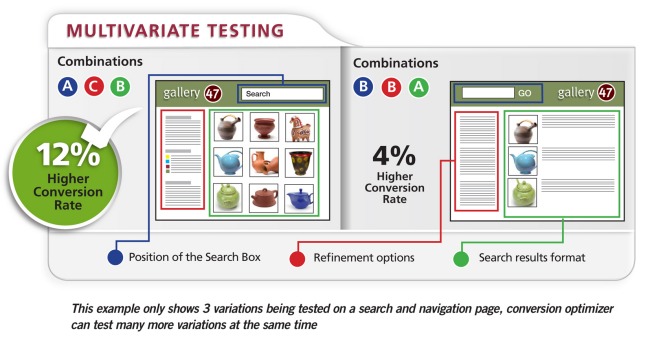
If you’ve invested time and energy in an effective, relevant results-oriented site search solution, you’ve probably seen an impact on your web site – higher conversions for people who use the search box, perhaps even a larger average order size for people who search. But have you wondered if your site search is delivering all that it can to your bottom line, and if it could be further improved to generate even greater results?

A smart way of optimizing the value you get from your search and navigation is to conduct  testing to objectively decide which design options to use. However, our customers often admit that they don’t test as much as they should because it’s difficult and time-consuming to set up and run tests, and it’s also difficult to decide what they should be testing.

In the absence of testing, many website operators will resort to industry best practices. However, these best practices don’t always make sense for your business – whether for site search or another area of online marketing, as was recently pointed out in a MarketingProfs article about breaking the rules of email marketing.

To solve this problem for our customers, we’ve introduced the Conversion Optimizer, a service for conducting testing. Essentially, we’ve taken all the hard work out of performing tests – you work with your SLI Customer Success Manager to establish the tests, and then you control and watch the tests being performed in real time, via your SLI Merchandising and Administration Console. (You can even stop the test if the results are poor.) And most important, you get results right away, and you can share them with your colleagues.

At SLI, we’re big fans of this testing. It’s the only way to truly understand how variations in your search and navigation features – such as changing the position of the site search box, using a grid view instead of a list view, or tweaking your ranking algorithm – can improve your business. However, thorough testing takes a lot of time and effort, and if it’s not done right, results can be ambiguous or misleading.

We’re making the beta version of Conversion Optimizer tool available to select customers – if you’d like to try it out, contact your Customer Success Manager. And tell us what you think of the new tool. We’d love to hear about the positive changes you’ve made to your site based on test results.

MVTdiagram
Read More

How to Merchandise Your Site Search Results

Posted by geoffbMarch 16, 2010eCommerce, Site Search, Site Search Tips

When people search your site, it’s not enough to just provide a page of results – no matter how relevant the results are (although admittedly, relevance in results does count for a lot). Customers often need added incentive to click a result and make a purchase, and merchandising your site search results pages is a great way to do just that.

Below are a few tips on “Merchandising” taken from our “Big Book of Site Search Tips” which we’ve been discussing the past few weeks. This is a very small sample from a collection of nearly 80 tips – all of which are compiled in a free, downloadable white paper. If you want to see the whole batch of tips, just click here.

And now for this week’s tips…

  • Do create banners relating to specific keywords — Make it obvious to the visitor that they’ve arrived at a search results page displaying the correct product category. When customers search for a brand name or product that you may have a special sale on, you can include a keyword-driven banner at the top of the search results page to highlight that promotion. For example, someone searching for “Merrell” on a shoe retailer site might see a banner on the search results page that says “Free shipping on U.S. orders over $60.” When they click on the banner, they are taken to the site page for that offer.
Banners
  • Use banners to promote free shipping, or shipping discounts — Site visitors are focused on buying once they’ve searched for a particular product. By placing shipping offers within banners on search results page, you provide an additional incentive for shoppers to complete a purchase.
  • Use synonyms to offer more results — For instance, if a site visitor searches for iPods, and your site offers other MP3 players, connect these and other similar items so that they appear together in search results. This provides shoppers with more alternatives, encouraging them to browse similar products.

Download the Big Book of Site Search Tips

Read More

More on Site Search Reporting

Posted by geoffbMarch 8, 2010Site Search, Site Search Tips

Site search and site search reporting are critical parts of your online business success. If you’re not doing so already, you should review your site search reports regularly to make sure your visitors are finding what they seek – AND that you’re using the language of your customers on your site. Did you also know your site search reports offer other useful information as well? Here are a couple tips from our Big Book of Site Search Tips with valuable ways you can use your site search reports to see more ROI from your on-site search solution.

  • Review site search terms for SEO and PPC campaigns – This is a great source for keyword research because it shows the language your visitors are using – and chances are, if they’re using it on your site, they’re also using it on the web.
  • Review your site search quality metrics to ensure your site search relevancy is improving over time – A good site search solution “learns” by tracking visitors’ aggregate search queries and click-throughs to deliver results based on criteria such as popularity. This means that, over time, searchers on your site are presented with the most relevant search results and can find what they’re looking for more quickly and easily. Improved searches result in more satisfied customers and greater sales.

Download the Big Book of Site Search Tips

Read More

Relevance and Reporting

Posted by geoffbMarch 1, 2010eCommerce, Site Search, Site Search Tips

This week we’re offering a couple tips on how to improve relevance of your site search, and also how to leverage data in your site search reports to make improvements. Our own research shows that if people can’t find what they’re looking for on your site within the first few minutes, they’re likely to leave and possibly never return. In other words, if results aren’t relevant – and relevance can alter depending on who’s doing the searching – then your site search hasn’t done its job. Reporting can help you in this area as well.

  • Don’t place search results in alphabetical order – While this might offer a logical way for site visitors to scan results, alphabetical ordering usually has no relation to the relevance of the results. Sometimes it makes sense to offer this as a sort option.
  • Use “landing pages” when visitors type in specific product numbers, or when there is only one result for the search term – For instance, if a customer types in an SKU or product number, they should be taken directly to the page for that product. Another example: If a customer searches for “returns” you may want to take them straight to the page that describes your returns policy. This streamlines the searching process for customers who know exactly what they are looking for.
  • Review your site search quality metrics to ensure your site search relevancy is improving over time – A good site search solution “learns” by tracking visitors’ aggregate search queries and click-throughs to deliver results based on criteria such as popularity. This means that, over time, searchers on your site are presented with the most relevant search results and can find what they’re looking for more quickly and easily. Improved searches result in more satisfied customers and greater sales.


Download the Big Book of Site Search Tips

Read More

Lets Talk Refinements

Posted by geoffbFebruary 23, 2010eCommerce, Refinements, Site Search, Site Search Tips1 comment

This week’s tips – taken from nearly 80 tips in our “The Big Book of Site Search Tips” – focus on refinements in site search. Refinements refer to the filters or categories you create that allow site visitors to narrow the results of a search, so they only see products that fit certain criteria (e.g. price range, 4-star reviews, gender-specific, etc.). Here are some tips to consider when using refinements in your site search (these can also apply to navigational refinements):

  • Don’t show too many refinement options when displaying them as links – Instead, show the most popular and have a “more” option to see the rest. Providing too many refinement options can be distracting. If the site visitor is interested, a “more” option will make it quick and easy to drill down into your site while maintaining the real estate to promote other items.


  • Test the placement of refinements – Businesses provide refinements in different places on their sites, often at the top of pages or in the left navigation pane. The bottom of the page is probably not the best position for refinement options, since visitors have to scroll down the page to view them. Any of these options may work for you and your site visitors, but it is important to test different positions.
 Test the placement of refinements
  • Allow people to navigate between refinements on the same level – In other words, if a visitor clicks on a refinement but then decides they want to see a different refinement, don’t make them click “back” to get to the original search results page first. They should be able to simply click a different refinement option from that page and easily see a new batch of results.

Download the Big Book of Site Search Tips

Read More

The Big Book: Chock Full of Site Search Tips!

Posted by Shaun RyanFebruary 17, 2010Newsletter, Site Search

Download the Big Book of Site Search Tips

Improving the look and feel—and usability—of your site’s search feature usually requires more than one change. Many small changes and enhancements can add up to a major impact on site search, speeding up the search process for site visitors and boosting the likelihood that they’ll make a purchase or find the information they seek. Evidence shows that search has become the key method for navigating through websites, and there’s never been a better time to make small but crucial changes.

To help you in these efforts, we’ve just released a new whitepaper called the “Big Book of Site Search Tips,” available now for free download on our website. We’ve collected nearly 80 tips for making your site search more effective and easy to use. The good news is that many of the tips don’t require large changes to your site – small changes can make a big difference!

For instance, place the search box “above the fold,” high on the webpage, to make sure that site visitors don’t miss it. You can also add a search box to every page of your site, improving the chances that visitors use the search feature. Other tips advise highlighting sale or promotional items within search results, and also indicating whether products are in stock or out of stock on search results pages.

Let us know what you think of these tips, and what results you’ve achieved if you put any tips into practice. If you’d like to suggest any tips for the next edition of the “Big Book,” send them along to newsletter@sli-systems.com or post a comment on our blog, where we’ll reveal a couple of tips each week over the next few months.

Download the Big Book of Site Search Tips

Download the Big Book of Site Search Tips

Read More

Some Tips about Page Lay-out

Posted by geoffbFebruary 16, 2010eCommerce, Site Search, Site Search Tips

Today we’ll share a few more tips from our new white paper “The Big Book of Site Search Tips” (available for free download). As we mentioned last week, the full paper includes nearly 80 tips and suggestions for ways to make small improvements to your web site search to see big results. Here are a few tips related to page lay-out and format we hope you’ll find helpful:

  • Have clear and specific product and content titles in the search results – Titles should be accurate and descriptive about the content your visitors will see when they click on the results. If titles are not accurate, your visitors may not click on a result that is otherwise relevant, or they may click on it only to find that it didn’t contain what they were looking for. If this happens too often, they’re likely to abandon the search, as well as your site.


  • Have consistent image sizes – Search results will look cleaner, and be more readable and easy to scan if the text is not disrupted by images of different sizes. If search results are shown in a grid view, consistently sized images will produce a regular pattern and a better looking page.


ConsistentSizedImage
  • Show the total number of results so visitors know how many are available – This helps them determine how far into the results they want to click. Additionally, if the search term yields a large number of results it may signal to them that they need to narrow their search – or click a refinement option.


  • Have a mobile version of your search results – The mobile version of Amazon.com is not much more than a search page. The number of people accessing the web via mobile devices is growing. On the small window of a mobile device you don’t have room to offer the navigational and promotional options that you have on your normal site. A mobile search is a vital part of any mobile site and will have fewer refinements, sorting and viewing options. In this case, it’s extremely important to offer highly relevant results.


Download the Big Book of Site Search Tips

Read More

Innovative use of social media

Posted by Shaun RyanFebruary 15, 2010eCommerce

Coastal contacts

We recently posted an interview with Braden Hoeppneer from Coastal Contacts. One of the coolest things I found out from Braden is way they’re using social media to sell glasses (a relatively new product line for them). They have a virtual mirror application that lets you up upload a photo and see what the glasses will look like on you. You can then share the images and get feedback from your friends on the glasses. In some ways this is actually an improvement to the in-store shopping experience because you can get input from friends who aren’t shopping with you. Additionally, each time someone shares the virtual mirror images it acts as an ad for coastal contacts, drawing more people to the site. Very cool! Braden shares plenty of other experiences in the interview. I’m sure you’ll find it interesting.

Read More

A Few Basic Tips to Get us Started

Posted by geoffbFebruary 10, 2010eCommerce, Site Search, Site Search Tips

As mentioned in our earlier post, we’re starting a new series of tips here on our blog for improving your site search, as part of our new whitepaper “The Big Book of Site Search Tips” that’s now available. Here is the first batch of tips for you to consider. We’ll be back with another batch of tips next Tuesday…

  • Offer a search box, not a search link – Search boxes are easier to find and use. They make it easier for people to search with fewer clicks. The search box has become iconic, thanks to the popularity of Google, so the presence of a box telegraphs the availability of search easily and quickly.
BFD_SearchBox
  • Make sure your search box is large enough to contain long search phrases – Design the size of your search box to meet the needs of your site visitors. For instance, if visitors on your site use long keywords to search, make sure the box can display the entire term so they can easily see what they typed. Short or small search boxes make it hard to read a long search term, which will increase the likelihood that site visitors will spell it incorrectly.
  • Test different positions for the search box, and note which positions generate the most search traffic – SLI Systems customer Black Forest Décor took this approach, moving its search box from the right-hand upper corner of its site to the center. The online home décor retailer made other changes at the same time, including increasing the size of the search box. The company found that site search revenue per customer increased 84% and the conversion rate increased 34%.


Download the Big Book of Site Search Tips here.

Read More

Site Search Tips: Improve the Way People Find What They Seek on Your Site

Posted by geoffbFebruary 9, 2010eCommerce, Site Search, Site Search Tips1 comment

Today we’re kicking off a new series of blog posts with tips for improving your on-site search. The series is part of a new SLI Systems whitepaper called the “Big Book of Site Search Tips”. The whitepaper contains nearly 80 tips for how companies can improve the look and feel and the relevance of search results pages; as well as how to use search for merchandising and how to get the most out of site search data.

It’s no secret that site search is an ever-more critical part of the online customer experience, and our new paper – and forthcoming series of blog posts – are intended to help companies take care of fairly simple aspects of the search function on their sites to make sure customers find what they’re looking for quickly and easily. The tips will also provide guidance on how to drive more people to use the search box to browse your company’s web site, as research shows that people who use site search convert at 2-3 times the rate of those who don’t.

A 2009 report by Forrester Research for Shop.org shows that retailers rank “improving site search results pages” as the third most important area of focus in 2010;, the report also says 71% of retailers surveyed will make site search/browse results a priority in the months ahead. We want to help retailers (and other content-rich sites) as they take a closer look at their own site search and give them ideas for simple things they can do that can have a tremendous impact – things like making sure the search box appears on every page of a web site, and ensuring that the search box is prominently placed where visitors can easily find it – e.g., not next to another similar looking box, which might be used for newsletter sign-ups.

We’ll get into more tips here on our blog (see our next post), and every Tuesday for the next several weeks we’ll present more tips from the whitepaper. We’re also creating a #SiteSearchTues hashtag on Twitter which we’ll use to post the tips – so feel free to use the same hashtag as you provide feedback or post tips of your own.

The “Big Book of Site Search Tips” is now available for FREE download (registration required) from our web site. We look forward to sharing the tips with you, and hope to hear from you about what’s helped you improve your own site search.

Download the Big Book of Site Search Tips

Download the Big Book of Site Search Tips

Read More

Posts pagination

< 1 … 11 12 13 14 15 16 17 … 22 >
Facebook
Twitter
LinkedIn
YouTube
Flickr

Stay up to date with SLI

Featured Posts

  • Maximize Revenue with Enhanced Product Impact Testing
  • Top Five Ways to Prepare for Peak Season
  • Facets, Facets, Who’s Got the Facets?
  • Personalization: It’s Kind of a Big Deal
  • M is the New E: Mobile Commerce Trends and Predictions

Categories

About SLI Systems

  • What We Do
  • Who We Are
  • Why SLI

Learn

  • Webinars
  • News Room
  • Events

Connect

© Copyright SLI Systems, 2018. All Rights Reserved | US: (866) 240-2812 | Legal