SLI home
User login

A BLOG FOR E-COMMERCE LEADERS

  • Blog
  • Resources
  • Webinars
  • Customer Experience Scorecard

SLI Blog

Site Search Box Best Practices Part 1 – Placement

Posted by stevegMarch 13, 2012Site Search, Site Search Tips3 comments

Last week I began a series of discussions on the Site Search and the User Experience LinkedIn group that focused on the site search box.  I asked questions of the group to identify some best practices for where to place the site search box, the size of the search box and what if any search box default help text should be used.  Based on the lack of responses, it appears that the search box is an area of site usability that is seriously lacking any clear direction or consensus.

In an effort to bring some clarity on the subject I decided to conduct a review of the top 50 retailers on the IR 500.  My analysis included capturing the size of the overall search box area, the size of the input field, location on page, default help text, and what the submit button looked like.  I figured that the top 50 internet retailers would certainly have sought the advice of the world’s best site designers and usability experts. I assumed most would have done some usability testing and determined the optimal search box experience.  As a result of all this effort, I expected to find a fair amount of consistency in how the site search box was implemented.

My analysis however showed little consensus in any of these areas.  About the only thing that I could be certain of is that the site search box should be located in the site header.  The data however is interesting and worthy of review.  Today, I’ll start with the location of the site search box.  For simplicity, I only evaluated if the box was located on the left, center or right side of the header.  Here’s what I found:

16% Left (8 retailers)
30% Center (15 retailers)
54% Right (27 retailers)

So, the right side wins with slightly better than 50%.  As I looked at the distribution of the placements among the top 50, it appeared fairly mixed.  For instance, among the top 10, three had left placements, three right and four were in the center. Shocking, I know.

Here’s a small sample of the site headers from among the top internet retailers to provide you with a closer look of where their site search box is located.

Left

officedepot-header-590

officemax-header-590

Center

amazon-header-590

walmart-header-590

sears-header-590

Right

dell-header-590

cdw-header-590

In our next blog post I’ll reveal what the analysis shows about the size of the site search box.

Read More

Faster Pinterest Pinning Through Site Search

Posted by stevegMarch 6, 2012Site Search, Site Search Tips, Social Media2 comments

With the skyrocketing growth of Pinterest I’ve been on the hunt to identify all of the ways online retailers can use Pinterest to grow their business.  I found countless articles and blogs with dozens of great tips.  As I thought about why people use Pinterest, the idea of Speed Pinning came to me.

For those who don’t yet know about Pinterest, it’s a social sharing service that gives you the ability to create virtual bulletin boards or “pinboards” of the things you are interested in.  These boards are made up of images and videos that you have “pinned” and can include your comments.  As an added benefit, the images link back to the site where the content was found.

As I looked at this from the retailers perspective, I felt that getting customers to pin my products to their pinboards would be one of my first objectives.  Pinterest does help you do this by providing an easy way to generate Pinterest button code for your site.  The thought then occurred to me that customers might like a way to pin their favorite products even more quickly than they could by visiting every product page.

The tool that seemed best suited for this task was site search.  By incorporating a Pin it button with every product on the site search results page, customers would be able to quickly assemble highly refined pinboards.  To my knowledge, nobody has incorporate Pin it buttons into site search yet.

Since crafters and hobbyists were among the early Pinterest adopters, I reached out to Artbeads.com and suggested the idea to them.  Their CEO, Devin Kimura had this to say, “When Steve called to suggest we put Pinterest buttons on our site search pages, I jumped at the opportunity. This is a great idea to get more of our items curated onto Pin boards, and leverages the work we have done to boost Artbeads brand awareness among Pinterest users, particularly those with an interest in beaded jewelry and fashion.”  With Devin’s go ahead, the SLI site search engineers went to work and in about 24-hours they had the Pin it buttons up and completely functional on the Artbeads.com site search development environment.

artbeads-pinit-phase1
With Pin it buttons working, the next question to address is what is the best place for them to live.  Since “pinning” is a popular activity for Artbeads.com customers, the best place may be up front just under the info buttons as shown above.  Other retailers may want to place these in a more subtle location such as on an overlay when customers mouse over a product image.

Mockup showing Pin it buttons on mouse over

Mockup showing Pin it buttons on mouse over

Another location for Pin it buttons would be to incorporate them into a Quick Look window as in this example below.

Mockup with Pin it buttons in a quick look window.

Mockup with Pin it buttons in a quick look window.

Artbeads.com will be making their final decision on the location of the Pin it buttons and expects to launch this new functionality to their customers in the next few days.

Read More

Differences between B2B and B2C e-commerce

Posted by Shaun RyanFebruary 29, 2012Conferences, eCommerce1 comment

It has been a couple of weeks since I returned from the Internet Retailer Web Design show in Orlando. It’s a nice show – it’s a lot smaller than the main IRCE show in June – with only one stream – so it’s easy to see all the great presentations without missing any. I love the opportunity to educate myself on what’s happening in the industry and to spend time talking to the people that are making ecommerce happen.

Chatting to Doug Cadmus from GMCR at IRWD 2012

Chatting to Doug Cadmus from GMCR at IRWD 2012. Photo by @tim_ash

One thing I noticed at this show is that there seemed to be a lot of businesses attending that sell to businesses rather than consumers. One of the keynotes was from Paul Miller, VP of E-Commerce at Grainger who provide products to facilities. It’s a serious business: $6B of revenue, $2B of that on line. Many of the other attendees were also B2B companies. One of them that I was chatting to said that the presentation he had just seen that was talking about selling underwear wasn’t that relevant to his business. That got me thinking about the difference between B2B and B2C ecommerce.

Different prices for different customers
One thing we’ve seen with our B2B customers is they will often have different prices for different customers based on their login. Larger customers often negotiate lower prices based on buying commitments for example. When this happens the online retailer needs to work out what price they should show, if any, to people that aren’t logged in. We are exposed to this, because we need to make sure that if we’re showing prices in the search and navigation that they match those that are shown on the rest of the site – so this involves a more complex integration.

Different purchasing process
The purchasing process on a B2C site is comparatively straightforward: the consumer puts in their credit card and other details and the sale is complete. On a B2B site the purchasing process may be more complex – the person who decides what they want may be different from the person who makes the purchase – there may be a procurement department that actually does the buying. The payment may be done through an account which is invoiced to the customer at a later date, particularly for large purchases. Paul described that Grainger customers have an account manager who approves the purchase orders when they come through. They have developed an iPhone app so the account managers can approve these easily when they’re away from their desk.

Lower traffic and larger AOV
B2B customers often make relatively large orders – so a B2B site that value of sales as a B2C site may have much less traffic. The lower traffic can mean it’s more difficult for multivariate tests to reach statistically significant decisions.

These are just a few differences between B2B and B2C ecommerce that I’ve come up with. What others are you aware of?

Read More

Sunshine, Great Content, and New iPads Forecast for eTail West

Posted by Terry CostaFebruary 22, 2012Conferences, eCommerce

Next week’s eTail West will be a great event on many fronts. Aside from the warm weather and sunny skies in Palm Springs, there are a lot of interesting discussions on topics that are timely and relevant to e-commerce brands. AND, if you stop by SLI’s booth (#9), you’ll have a chance to win a new iPad.

Steve Groenier, our resident guest blogger and former VP of marketing for ArtBeads.com, will be giving two talks on the first day, Monday, 2/27 – at 12:15 he’s participating in a panel on “10 Ways To Increase Customer Engagement In Today’s Digital World;” and at 2:25 he’ll present on “The New Content Kings: How Retailers Are Using Content To Create Loyal Lifetime Customers.” Additionally, our customer, Michael Burgess, EVP of FTD.com’s consumer division, is taking part in an Executive C-level Panel at 9:25 a.m. on Tues., 2/28 on “Maximizing Your Resources And Gaining Revenues In Today’s Retail Environment.” Another customer, Jason Miller, CTO of Motorcycle Superstore, is also participating in an Executive C-level Panel at 9:15 on Thurs., 3/1 – the topic is “A 360-Degree Comprehensive Plan To Increase Sales From Your Mobile Strategy.”

If you’re heading to Southern California next week to attend eTail West, be sure to stop by our booth – #9 – to say hi and see a demo of our learning-based search and navigation solutions. And don’t forget to enter our iPad drawing!

Read More

Site Navigation Gone Wild? How To Get it Under Control

Posted by Terry CostaFebruary 15, 2012Navigation, Navigation Tips

One of the most effective paths to growth for an online retailer is expanding the product line.  The bigger your catalog, the better chance you’ll be able to attract customers to your store.  But, as your catalog grows, so must your store’s navigation.  New products need a home and often times that means another line item somewhere in your site’s navigation. That may be in the form of an entirely new top level category, a new sub-category, or even a new brand category.

Visitors don’t just shop by product type, they want to shop by brand, gender, age, style, or price.  And let’s not forget about the special sections you need for clearance, sales, or seasonal items. Bit by bit your category list grows until one day you realize that you’ve got over 50 links in your site’s navigation and it’s taking your customers two to three screens just to scroll through them all.  Your site navigation has gone wild! How do you make it easy for our customers to find your products?

The solution for many retailers has been to enhance or replace their site’s static navigation with Dynamic Site Navigation.  With Dynamic Site Navigation, retailers are able to drive their navigation from product attributes contained in their catalog’s data feed.  Sections and sub-sections are built automatically and change dynamically as the catalog changes.  And, as customers dive into product sections, the list of sub-categories or refinements they see will only be those that are relevant to those products.

In the Abe’s Of Maine example below, users are offered different refinement options depending on their search: cameras or flat screen.

Screen shot 2012-02-15 at 12.29.38 PM

Furthermore, with Dynamic Site Navigation solutions that use learning technology such as SLI’s, retailers are able to improve the customer experience by automatically presenting facets in order of popularity.  This allows the most clicked on brands or styles to be presented higher on the list. In the Abe’s Of Maine example above, the categories are presented in order of popularity.

One of the key things to keep in mind is to provide the same site experience for those who use the site’s search box and those who navigate using Dynamic Site Navigation. In the example below, Jelly Belly ensures a consistent experience between navigation and search using Dynamic Site Navigation whether a user searches for sports beans or navigates to Sports Beans through the Candy category.

Screen shot 2012-02-15 at 12.36.19 PM

Screen shot 2012-02-15 at 12.39.52 PM

With Dynamic Site Navigation, retailers can save a significant amount of time from eliminating the tedious task of managing categories and sub-categories. Do you have Dynamic Site Navigation examples to share? Let us know!

Read More

This Week it’s all About Usability at IRWD

Posted by Terry CostaFebruary 13, 2012Conferences

This week is the week of usability at the annual IRWD conference in Orlando, FL, and  we’ll be there carousing with other vendors. In addition to all the fun we’ll be having at our booth (see us in booth #300), our CEO, Shaun Ryan, is giving a talk alongside our customer U.S. Toy, about how to over-come multi-brand usability challenges through cross-linking of results in site search. The presentation, taking place at 4:00 p.m. EST on Tues., 2/14, highlights U.S. Toy’s success in this area (the company has a B2B site called Constructive Playthings and a B2C site called U.S. Toy). Shaun and Seth Freiden, U.S. Toy CEO, will demonstrate how the toy retailer captured more sales and improved the user-experience by showcasing products on sister sites in each site’s search results.

Be sure to stop by our booth at the show to see our learning-based search and navigation solutions in action, and learn first-hand how seriously we take the “full-service” aspect of our business. And while you’re there, you may just win a brand new iPad.

Hope to see you there!

Read More

How Well Are You Merchandising Your Content?

Posted by Terry CostaFebruary 8, 2012eCommerce, Site Search4 comments

Online retailers are going to great lengths to create content that informs, educates, inspires, and entertains their customers. They are producing fantastic articles about how to use their products, in-depth product buying guides and blogs about the experiences you can have with their products.  This content is a critical component to creating a superior customer experience, helping retailers attract and retain their customers.

But, this non-product content often gets little more than a link buried in their header or footer pointing to an index of the content. When you think about the journey a customer takes to discover your products and make a purchase decision, looking for a link to “articles” is probably not on the list. So I ask, what good is all this great content if your customers can’t find it?

The key to merchandising your content is to put yourself into your customers shoes.  With any piece of content it is important to try to think about all of the places where users might find this information helpful.  Think about which stage of the buying process this information belongs.  Also think about the actions visitors might take on your retail website to find the products they are looking for, and how to make their search experience a pleasant one.

Since site search is completely dependent on what your customers are looking for, it should provide access to all of your content that is relevant to your customer’s search keywords. Some SLI customers are already including related content insections within the main body of the search results and segmenting the different type of content in tabs within the search results pages.

In the example below from Artbeads.com, a search for “rhinestones” will reveal the top 20 products followed by the top eight learning center articles, eight community results and the top videos.

ab-search-1ab-search-2ab-search-3ab-search-4

In another example from Doctors Foster and Smith, a search for “dog grooming” reveals 17 related articles that are accessible by customers who click on the articles tab.

doctors foster and smith dog grooming

Another great way to merchandise content within your site search is through the use of merchandising banners.  Since the banners can include both HTML and images, the possibilities or presenting your content are endless.  And, using the Merchandising Console, you can target these banners to very specific keywords for an engaging and personalized experience.

As you consider how to use search to merchandise your content, keep in mind that the way you display your content is completely customizable.  In this example from 24 Hour Fitness, a search for “classes” reveals 82 related videos that the user can display as a grid or list.

24hr-fitness-classes-video

These examples illustrate just some of the ways you can merchandise your content on your store’s website.  If you have examples you would like to share, please do so by adding a comment to this post.

Read More

Facebook Announces IPO! Learn How Retailers Are Cashing In On Facebook’s Success

Posted by stevegFebruary 6, 2012Site Search, Site Search Tips, Social Media1 comment

The web was buzzing last week with news of the Facebook IPO. Much of the news seemed to focus around Mark Zuckerberg’s net worth and the new crop of millionaires that will be made out of Facebook employees.  Silicon Valley exotic car dealers and real estate agents have probably been lined up outside Facebook HQ handing out business cards. With Facebook’s estimated valuation now a staggering $75 to $100 billion you may be wondering how on earth a company with revenues of $3.7 billion could be with that much.  I certainly am.

When you look at the stats surrounding Facebook, you realize that their potential to grow revenue is equally as staggering.  For instance, Facebook now has 845 million active users which represents a 45 percent increase since 2010.  More than half of their users return to the site each day.  And these users have produced an average of 2.7 billion “likes” and comments each day in the last three months of 2011. Now, when you consider the wealth of information Facebook has about it’s users and how they enable advertisers to target based on this, you begin to see the potential for a much greater share of advertising dollars. I think it’s only a matter of time before brand advertisers and businesses discover this and start fighting over the ad inventory as they now do on Google.

But what about retailers?  How can they cash in on Facebook’s success?  To start with, retailers need to have a presence on Facebook by building a page. I know this is obvious and hard to imagine that any retailer has not yet claimed their brand on Facebook but I still come across retailers who have not.  Having a page on Facebook enables their massive audience to “Like” your brand and start sharing what they think of you with their friends.

The ability to post comments about your store on Facebook has become a powerful tool for retailers to generate content from their customers. For example, asking a question on your Facebook wall to find out what your fans like most about a particular product is a great way to generate positive feedback and endorsement for that product.  Then, what makes this even more powerful is when you have your site search technology crawl these Facebook posts and make them available in your site search results. Retailers can now instantly reach out to their most engaged brand advocates and ask them all sorts of questions.  Questions like how they are using products, what advice they have for others for selecting the best product for a particular solution, what tips they have for using your products, and on and on.  All of this fantastic content can them be made available to new visitors through site search.

Facebook Like Button

To encourage more sharing, retailers have begun placing Facebook like buttons on the product pages. This practice has exploded in the past year to the point where it feels hard to find retailers who don’t include a Like button.  Generating likes for your products shows an even deeper engagement from your customers and is a much more powerful way to drive sales.  The challenge is to actually get your customers to click the like button.  It seems consumer adoption of this has been relatively low.

One thing retailers like FTD.com have done to grow their product like activity is incorporate the Like button directly into their site search results.  This gives it much more visibility and from a usability perspective is much easier for people to click like as they browse products in search results.  There’s even a added usability benefit as retailers have incorporated the ability to sort search results by the number of likes.  I expect that the desire to sort by likes might actually become more popular than sorting by product star ratings. And, this added functionality will encourage that many more consumers to cast their vote for a product by clicking the like button.

FTD.com Search Inlcudes Facebook Likes

FTD.com Search Includes Facebook Likes

The final tip I would have for cashing in on Facebook’s popularity is to enable those who visit your page on Facebook to initiate a search of your product catalog easily right from within your page.  This can be done by adding a tab on your page that includes a search box and incorporating the search functionality into your other custom tabs such as your Facebook default page.  Here’s an example from Chaparral Motorsports.

Chaparral Motorsports Enables Search on Facebook

Chaparral Motorsports Enables Search on Facebook

Read More

What’s On the Radar for 2012: Social, Tablets, Personalization, and Video

Posted by Shaun RyanFebruary 4, 2012Newsletter, Site Search

What’s On the Radar for 2012: Social, Tablets, Personalization, and Video

We’ve noticed several trends percolating over the past several months, which we believe will become more mainstream in the coming year. There are lots of ways to create compelling marketing strategies around these popular trends, and you don’t want to overlook site search and navigation as an important way to connect with your customers. Each article below offers insights and tips to help you do just that.

Socialized shopping

Shoppers are turning to their social networks to get ideas for products to buy, and they’re looking to online retailers to add social information into search results. One way to capitalize on this trend is to add a search box to your Facebook page, which will allow shoppers to look for products without leaving their Facebook friends. Make Me Heal has done this, adding a search application its Facebook page, which has helped drive traffic from Facebook to its site. Also, you can add the number of Facebook “likes” (or Google “+1s”) a product has received to site search results, and allow visitors to rank results by which items have received the most.

Another great idea is to bring social media content into search results, like Artbeads.com does, adding in user-generated content like videos and blog posts into search results. A “Community” tab within search results direct shoppers to this content.

Tablets gain steam in e-commerce

One of the biggest trends in the mobile space is the growing popularity of tablets. The good news is that tablet shoppers are showing a willingness to use these devices for online shopping. According to IBM Benchmark, 2011 holiday sales from smartphones and tablets accounted for 11% of total online sales, up from just 5.5% in December 2010. Data also points to tablet shoppers converting at a similar rate as traditional e-commerce shoppers, and spending more on average per visit. The challenge for online retailers is to take tablets’ advantages and disadvantages into account when figuring out how to display search results and navigation elements.

For example, you need to configure lists of refinements so that choices are not too close together, since finger-tap navigation might mean that users select the wrong choice. You also need to make sure that the shopping experience across channels – including tablets, smartphones, PCs and print catalogs – remains consistent.

Personalizing the shopping experience

Site visitors increasingly expect a more personalized, engaging experience – and site search is a great way to do that, since you can deliver search results tailored to their needs based on what they’ve searched for before, where they’re located, and what products they prefer. Consider adding a “Recent Searches” or “Search History” list to your site search results, which will help shoppers remember names and types of products they looked for previously. You can see how this works on FTD.com’s website – in the example here, the “Recent Searches” box shows “chrysanthemums” and “yellow roses” as previous searches.

It’s also easy to add a feature like Personal Preference Memory, which stores a shopper’s product preferences and then delivers search results and navigation options based on these preferences (see how motorcycle products site Cruiser Customizing does this). Localization can also help feed shoppers’ need for personalized search results – for example, you can ask for a visitor’s zip code as soon as they land on your website, like Tractor Supply does, and deliver product availability and pricing information based on location. Multichannel retailers can also include information about the closest store for in-store pick-up.

Video brings products to life

In 2012, shoppers will continue to show greater appetite for videos, especially ones that make it easier to understand a complex product or process. Videos not only encourage purchases, but they can also boost your SEO rankings when you include videos on product pages.

Make sure to highlight the availability of your videos within site search results. For example, you can place video icons on site search results pages next to items with related video content, as you can see on the Etrailer.com website. Also, make the most of your videos by using them for merchandising. When visitors search for popular products that have an accompanying video, push these video-related results up higher; in addition, you can display banners highlighting video content when visitors search using specific keywords.

Read More

Guerrilla Marketing with Site Search

Posted by stevegFebruary 2, 2012Site Search

With all of the retargeting options available to online retailers now, the creation of banner ads has become a regular task for creative teams. Coming up with fresh creative can be a challenge but knowing that our audience visited our site can make it a little easier. Better yet, if we know that they visited a specific category of product and we are able to target just those visitors, we have an even better chance of creating something that will attract their attention. The more we know about our audience, the better able we are to design an advertisement for them.

This retargeting technology is amazing but what if we could know exactly what someone was looking for at the moment in time that we were able to deliver them a banner ad. Imagine how we could surprise or delight them with a creative that speaks to what they are thinking at that moment. A banner that can read your mind.

Believe it or not, this mind-reading banner delivery technology actually exists. And, it’s available through the SLI Systems Merchandising Console. Now, you might be thinking oh yes, we already use that. You may for instance be using it to deliver a branded header banner for your specific branded search terms. And that is a fantastic use. But, what else could you do? What ways might you surprise and delight your customers with a graphical message that really speaks to what they are looking for?

I challenge you to put on your guerrilla marketing hat and create a banner campaign that’s unique, engaging and thought-provoking. For fun, I grabbed my guerrilla marketing cap and came up with these ideas in about 30 minutes. While these may not be the most thought-provoking, imagine what your creative team could to with more time.

For this exercise I thought about the creative from the perspective of a person searching for “rubber ducks” on the Century Novelty website. All of these ideas could be interchangeable with other products. Think of each idea as if you were going to create 50 or more individually targeted banners based on high volume search terms. The key here is to think like a guerrilla and create a campaign that is at a large enough scale to impact a significant number of your searches. This way, you’ll have a better chance of generating some buzz and a much better idea on how well it influences sales.

Duck Love – Feature a photo of a staff member of your company holding their favorite type of rubber duck and include a quote about what they love about this duck. Be sure to include the person’s name and position at your company. This will send the message about how passionate your entire company is about the products you sell and coincidentally the products your customer happens to be searching for.

Duck Deals – Surprise your customers with a “Surprise Search Coupon” for extra savings on rubber ducks. of some larger than usual percentage off rubber ducks. For added customization make the coupon code the exact term you are targeting.

Grade A Ducks – When your value proposition is based on having the highest quality products, create a series of ads that feature these products with a message like “Highest Quality Rubber Ducks Money Can Buy.”

Duck Duck Goose – Identify the most complimentary product to a rubber duck and feature it as a cross-sell item. A message like, “Shopping for a Rubber Duck? Well, don’t forget the Goose to go with it” could help drive additional sales and increase your site’s AOV.

Duck Calls – Give your customer service team a compliment and create an ad that promotes how knowledgeable your call center staff is about rubber ducks. Include your phone number and encourage your customers to talk with a rubber duck expert now. This will give your shoppers confidence that they have found product experts for exactly why they are looking for.

Duck TV – Create a short product video about your best selling, top rated, most liked, etc. rubber duck and promote that video in the banner. The video would give you an opportunity to show your rubber duck expertise and provide a more personal experience.

5-Star Ducks – Find your top rated rubber ducks and feature a compelling quote from an actual rubber duck review. Include an image of the rubber duck reviewed along with the 5-star rating.

Sea of Ducks – If you stock a wide variety of rubber ducks as Century Novelty certainly does, trumpet your great selection in the banner with a specific message of exactly how many varieties of rubber ducks you have to choose from.

Disappearing Ducks – Create urgency to buy with a banner that features a rubber duck that is in short supply or in high demand and stress how a very limited quantity of these special rubber ducks are left.

I hope that this inspires you to get your own guerrilla marketing brainstorm session going and launch an even more engaging keyword-targeted banner campaign with the SLI Merchandising Console.  When you do, be sure to share your ideas and success with others here by posting a comment below.

Read More

Get More Mileage from your Facebook Content with Site Search

Posted by stevegJanuary 30, 2012Site Search Tips, Social Media4 comments

Retailers are collecting an amazing amount of priceless content from their customers comments on social networking sites like Facebook.  Unfortunately, much of this great content only reaches a limited audience because of how social media works.  For the most part, people only see what others are talking about right now.  It is a fast flowing stream that is nearly impossible to keep up with.  Without some way to pause the flow of content and capture it for later use, the value that this content can provide your business is dramatically reduced.

Although this situation sounds bleak, SLI Systems is providing a solution for many retailers that extends the life of their Facebook and social media content by allowing it to be discovered through their site’s search results.  I think the best way to illustrate the benefits of this is to provide some use case examples.

Let’s start with an example from 24 Hour Fitness.  If you are looking for a fun way to shed a few extra holiday pounds you might be searching for “exercise class ideas.”  As a 24 Hour Fitness member, or someone who just happens to come across their site, if you searched for that phrase you would find a wide assortment of results including pages, videos, products, social networks, and their blog and forum.  With a social networks tab showing 78 results that would be a good place to start for find unbiased advice.

24HR fitness exercise class search results

The top result is from a Facebook post that asks, “What Group Exercise class best compliments your personal training routine and why?” Clicking this takes you a 24 Hour Fitness Facebook page showing the 50 most recent comments out of a total of 169 that they received.  The comments provide an incredible list of recommendations and endorsements from existing customers about all types of exercise classes such as Body Pump, Turbo Kick, Yoga and Zumba.  What’s great about this is that all of this content was created after 24 Hour Fitness posted the question back on November 18th of 2011 and now it’s all easily accessible everyday to customers searching their site for this information.

24hr Fitness class comments

In another example, let’s say you just saw a TV commercial for the new Smart Touch gloves from Totes Isotoner and you want to find out what their people are saying about these gloves.  A good place to start would be the Totes Isotoner site with a search for “Smart Touch Gloves.”  This search would present you with a Social Media tab that had six results. 

Totes search result

Under the Social Media tab, you would learn about the gloves being featured on the Today Show and discover this great product endorsement posted as a comment on their Facebook wall back on January 10th.

Totes smart gloves quote

Finally, if you are an aspiring fashion jewelry designer, one of your biggest challenges is coming up with a color scheme for your next jewelry design.  At Artbeads.com, if you searched for “color scheme” you would find five results under their community tab.

Artbeads.com color scheme search result

The top result from Facebook calls your attention to a free online tool called the Color Scheme Designer. Click the link and you’ll see a screen shot of the designer posted on January 2nd. You’ll also be able to read the many comments from other jewelry designers expressing their challenges about picking colors. Seeing this sort of content from people just like you will help you feel more a part of the community and give you a good reason to “Like” Artbeads.com on Facebook.

Artbeads color designer

With the ability to include content from your Facebook wall and other social media sites in site search results, retailers can get much more mileage from their social media content. And, more importantly, they will be better able to harness the power of their customers for creating content. One way to do this is to look through your sites search phrases for questions customers are asking. Then, turn these questions into Facebook posts and let your community provide the answers. This strategy would be especially useful if your site was lacking content in these areas.

What other ideas do you have for Facebook posts that would engage your customers and inspire them to create quality content for your store? Post your ideas in the comments below.

Read More

Retailers Expand Video Content with Help from Manufacturers

Posted by stevegJanuary 26, 2012eCommerce

Video has been proven to be a powerful driver of customer engagement and sales for online retailers. It is so important that retailers have gone beyond simple product videos and are now producing a wider variety of non-product video content.  They are also going to great lengths to make sure their customers can easily find these videos on their retail sites.  Many SLI customers have improved their search capabilities to include non-product content, and are now including graphic flags on products in search results for those that include video. And some are creating entire sections dedicated to video on their search results pages.

With all of this demand for video, the challenge many retailers now face is coming up with ideas for new videos and then finding someone to step in front of the camera.  If this is something you struggle with, the help you need may lie with your manufacturers and suppliers. Here are a variety of ideas for how you can tap into this resource to expand your store’s video library.

Manufacturer’s Videos
One of the easiest and fastest ways to add product videos to your site is to get them from the manufacturer. The quality of these videos is typically very high as manufacturers can justify big budgets for producing them. These videos can often be found with a simple search on YouTube or on the manufacturers web site.  When the video is on YouTube you can simply grab the code to embed it on your related product pages.

Motorcycle Superstore has made good use of this manufacturer’s video of the GoPro HD Hero2 camera by including it on their product page. The video is beautifully shot and features amazing action from those using the camera while they jump from airplanes, pull off extreme freestyle skiing tricks, dive with sharks, and free fall along cliffs in a wingsuit. And with over 8 million views, this is the sort of video that will not only engage your customers but also attract them to your site.

[youtube]GUEZCxBcM78[/youtube]

Manufacturer’s Rep Videos
The next time a manufacturer’s rep stops by to show off their new products, get out your video camera.  Since they have a deep knowledge of the products and are well practiced at presenting them, the manufacturer’s rep is one of the best people to put behind the camera.  This is also a good opportunity for someone in your business to jump in and ask questions.  The dialog between you and the rep makes for a more engaging video and shows your customers how well connected you are with those who produce the products you sell.

Here’s an example from Cruiser Customizing where the supplier and retailer work together to provide a nice overview of the types of motorcycle tool kits they sell.

[youtube]JcNTiy8tfDE[/youtube]

How-To Videos
How to videos are a great way to create demand for your products.  When you teach someone how to do something new, you can expand the range of products they might buy and give them the confidence that they will be successful using those products.  An example from Northwest River Supplies (NRS), a manufacturer of paddling equipment, shows kayaking enthusiasts how to dress for fall touring.  The video showcases a variety of products that one would need, educates about product features and benefits, gives tips for how to use and also provides safety tips.  Since the presenter is an NRS employee who is an avid kayaker he is able to include some personal endorsement of the products.

[youtube]Ugpn8tMMVgE[/youtube]

Trade Show Videos
When you make that trek to your next industry trade show be sure to bring a video camera along.  You’ll find a large number of manufacturers eager to show off their products and answer your questions.  In just a few hours you’ll be able to capture enough video to keep your content pipeline full for months.  Video of the latest products and innovations makes for great Facebook posts and Tweets. These videos are also a great source of material to build a blog post around.

In this example a writer from Rockler Woodworking’s magazine Woodworker’s Journal pays a visit to the JET Powermatic booth at the AWFS show to learn about new changes to their products.

[youtube]Vt0UchGAw0Y[/youtube]

Instructional Videos
For more complex products manufacturers will often create instructional videos and may even include an instructional DVD with their product. In this example, Footwear Etc. has taken an  instructional DVD video included with their MBT Shoes and placed it on YouTube with a slight modification to include their brand name and contact info.  Footwear Etc. then links to the video from all of their MBT Shoes product pages.  Note, if you go this route be sure to get approval from the manufacturer before modifying their video.

[youtube]zrg8W8wwgZg[/youtube]

As you can see from these examples, your manufactures and suppliers can have a big impact on your ability to deliver a steady flow of engaging video content.  As you put these ideas to use and publish exciting new video, don’t forget your responsibility for making sure your videos are easy to find.   Be sure to take advantage of the tools that your search solution provides to promote your videos in your site search results.

If you have other ideas for how manufacturers and suppliers can help retailers create video content and make it easier to find, please post them in the comments below.

Read More

How To Keep Customers Engaged

Posted by Terry CostaJanuary 23, 2012Site Search2 comments

As I discussed in my last post, “2012: The Year of the Tablet”, what’s hot in online retail this year seems to be trends that began bubbling up over the past several months.

We already discussed ways to address the social and table crazes. Other popular trends this year include personalization and video. Here are some tips for how to showcase these in search:

Make it Personal

When your site looks like it remembers people – their brand preferences, purchasing history, location – it goes a long way towards creating a personalized experience. For example, a “Recent Searches” box shows people the keywords they used previously, in case they want to search for something similar again. You can see this on FTD.com’s website, where the “Recent Searches” box shows “chrysanthemums” and “yellow roses” as previous searches. You can also localize results based on a visitor’s zip code, like Tractor Supply does, and deliver product availability and pricing information based on location. Multichannel retailers can also include information about the closest store for in-store pick-up.

Use video to bring products to life

The benefit of having product videos on your site goes beyond increasing engagement and conversions, they can also boost your SEO rankings. Extend the value of your videos by including them in site search results – put video icons next to items with related video content, as you can see on the Etrailer.com website. Also, you can rank the items with video higher on the search results page, and you can also display banners highlighting video content when visitors search using specific keywords.

While you’re coming up with creative ways to incorporate these trends into your marketing strategies, don’t forget to include search and navigation in your plans, given these pages are often the highest converting on your site.

Read More

2012: The Year of the Tablet (and Continuation of Social)

Posted by Terry CostaJanuary 19, 2012eCommerce, Enterprise Search, Mobile/Tablets, Navigation, Site Search, Social Media

How about sharing your thoughts on what 2012 will bring?

I’ll start – While 2011 could be called the year eRetailers got interested in mobile and social media, 2012 will likely be the year of the tablet, and … more social media.

As retailers begin to understand how people search, shop, and consume content on mobile devices, the soaring popularity of the iPad (one of the must-have items on people’s holiday wish lists this year), presents new challenges for retailers, as well as for those of us who provide products and services to them, in delivering a compelling shopping experience on the new “fourth screen.”

For tablets like the iPad and Kindle Fire, the requirements for creating user-friendly search and navigation experiences are different than those for the mobile screen. We have more screen real estate to work with when it comes to tablets, which means a better display of product images and an easier-to-use touchscreen. On the other hand, “t-commerce” or “couch-commerce” will require a different experience than what is displayed on a personal computer or mobile screen. Site owners (and companies like ours) need to brainstorm ways to take advantage of the benefits of tablets (like brilliant displays of photos and videos), while keeping navigation streamlined.

For instance, tapping the screen is the standard method of navigation for tablets. However, small text menus – for instance, which you might find in lists of refinements – are hard to tap on without hitting another menu item by mistake. The same goes for buttons that are too close together, or pagination numbers: easy to click on with a mouse, tough to click on with a finger. In addition, as GetElastic reports, tablets are making it possible for website visitors to interact with content in new ways: people can “touch” content, swiping and zooming to choose how they view text and images. This tactile interaction may cause us to discover new ways to present information, new ways to display navigation, and new possibilities for innovative merchandising and SEO.

Users spend lots of time on Facebook, Twitter, YouTube, Google+ and now Pinterest. We can expect that the merging of e-commerce and social media will gain even more prominence in the months ahead. As we’ve discussed before in this blog, site owners have realized that if people are spending more and more time with their friends on social networks, the website search and shopping experience needs to come to the social setting – instead of trying to lure people away from their social networks.

Now, your turn. What are your predictions for 2012?

Read More

Mobile Commerce Consumers Have a Split Personality

Posted by stevegJanuary 16, 2012eCommerce, Mobile/Tablets, Navigation, Site Search

The use of smartphones and tablets for shopping this holiday was featured among the NRF’s list of the Top 10 trends for 2011. They predicted that half of Americans with smartphones and 70 percent of tablet owners would be using their devices to assist with their shopping.

Now that the majority of holiday shopping has been completed more reports are surfacing about actual usage.  According to IBM’s Black Friday and Cyber Monday Reports, sales from mobile devices were basically three times higher this year than last.  This data, which comes directly from the web analytics of top retailers, shows mobile devices driving from 10 to 14 percent of all web traffic and from 6.6 to 9.8 percent of all sales.

Mobile commerce has clearly arrived. The question retailers now need to be asking is how well are they meeting the needs of this new mobile consumer and what can they do to improve in 2012?

According to Tealeaf’s 2011 Mobile Shopping Experience Report, retailers have plenty of room to improve.  Their analysis of social conversations around mobile shopping found that 41 percent of the chatter voiced frustrations.  These frustrations were most often related to an inability to complete the purchase and problems searching for products.  A negative mobile experience could create even bigger problems for retailers as a Harris Interactive study points out with the finding that 63% of consumers who experience a problem conducting a mobile transaction say they would be less likely to buy from that company via other purchase channels. Ouch!

As you take a closer look at your mobile commerce strategy and initiatives one of the first steps I recommend is to separate smartphones from tablets.  Based on the data around usage and responses to surveys these devices are entirely two different beasts.  Some have even asked the question if tablets should even be considered mobile commerce. Others are coining new names for their use such as Tablet Commerce or T-Commerce.

Smartphones are being used to help shoppers find store locations and check hours.  And once these shoppers get to the store they put their smartphones to work to research products, read reviews, compare prices and fetch coupons.  Tablets on the other hand are primarily used for shopping at home on the couch or in bed.  In addition, tablet shoppers are about twice as likely to complete a purchase than those with smartphone based on the findings in the survey of online shoppers conducted by Equation Research for rich media merchandising company Zmags which produced a nice infographic summary of the results.

How people feel when using these devices also appears to be quite different.  The Zmags survey found that tablet owners felt happy and more excited to shop than those without tablets.  This was a stark contrast to tabletless smartphone and laptop owners who felt impatient, stressed or overwhelmed about shopping.  Further evidence of this impatience is illustrated in this infographic about disappointment of mobile customers created from another Equation Research survey.  A key finding was that 74 percent of mobile users would abandon a site if it didn’t load in five seconds or less.

With this in mind, here are some questions to think about:

1. How will you adjust you mobile commerce strategy to address the needs of these two types of customers?

2. How will this influence the designs of your mobile experiences on smartphones and tablets?

3. What unique content will you create and provide on these different devices?

Let us know your thoughts about these questions and any other comments or questions you have about the split personality of mobile commerce.

Read More

Steve Groenier Joins Blogging Team at SLI Systems

Posted by Terry CostaJanuary 13, 2012eCommerce

I am excited to introduce Steve Groenier as a new guest blogger at SLI Systems. Steve has a long history in e-commerce and online marketing, serving the past three years as VP of Marketing and eCommerce for IR500-ranked Artbeads.com.  He will be writing about the latest news and innovations in online marketing while supplying his perspective as an online retailer focused on driving growth.  This includes diving into the details and analyzing the numbers. His aim is to filter out the hype and identify the real opportunities for retailers to produce measurable and meaningful results.

Steve is passionate about finding innovative ways to drive growth for online retailers and has a track record for producing results.  His early adoption of new advertising channels such as Amazon Product Ads and Google Remarketing have been featured in industry publications and Google case studies.  At Artbeads.com Steve launched numerous initiatives to improve the customer experience, increase conversion rates and build a customer community.  SLI Systems Learning Search, Merchandising and Site Champion where among these initiatives.

In his own words, Steve says, “I believe online retailers must deliver quality content, engaging and personalized experiences, and community interaction in order to attract customers and build lifetime loyalty.”  He has shared his views with retailers while speaking at the 2011 Online Retailer Conference in Sydney, Australia and recently in an SLI Systems webinar titled, “How to Build Better Brand Loyalty By Adding Social Content To Your Site Search.”

While Steve would say that the creative work in online marketing is his first love he would be quick to point out, “it’s the science of online marketing that I find the most interesting and potentially game changing.”  Steve believes in tracking everything, rigorous testing and making data-driven decisions.  As such, with every blog post, you can expect Steve will have something to say about the numbers.

We look forward to having Steve blog for SLI Systems.

Read More

Looking Back on the 2011 Holiday Season, Part2:

Posted by Terry CostaJanuary 11, 2012eCommerce, Mobile/Tablets, Social Media

Did Mobile Commerce Really Drive the Growth in eCommerce Holiday Sales?

Like I said in my previous blog: This Holiday season was great. According to IBM, who produces two benchmark reports tracking online sales for Black Friday and Cyber Monday, sales increased 33% over 2010 says. And it would seem that we all skipped the nap after our Thanksgiving meals to get a head start on shopping.  Thanksgiving day sales grew by the largest amount, up 39.3 percent with Black Friday up by 24.3 percent and Cyber Monday up 33 percent.

Home goods and department stores saw the greatest gains on Cyber Monday with increases from 2010 of 68 percent and 60 percent respectively.  Looking a little deeper at the data it was interesting to see that both of these categories showed significant gains in their conversion rates.  Home goods retailers were up over 22 percent and department stores saw conversion rate increases of over 16 percent.

Improving conversion rates is a major initiative for every ecommerce exec so the big question on my mind was how did they achieve such strong gains.  Did they offer better deals than last year?  Had they redesign their site to improve usability?  Or, did this increase in conversion have something to do with the surge in mobile commerce activity?

On Cyber Monday, IBM reported that traffic from mobile devices was up 161 percent and mobiles share of total sales had grown by almost 200 percent.  The data from Black Friday showed similar gains and indicated that mobile was responsible for nearly 10 percent of total sales. Conversion rates from mobile were up as well with Cyber Monday showing an increase of 26 percent and Black Friday up by 32 percent.  Mobile commerce clearly had a hand in these conversion rate improvements and since this data was in aggregate, it could have had an even bigger impact on the home goods and department store categories.

These retailers have definitely been making significant investments in mobile initiatives this year.  Just about every major department store has launched new mobile websites and apps for iPhone, iPad and Android.  The improvements were focused on building features to make shopping easier.  For instance, search functionality was enhanced to include refinements and sorting.  The new apps for the most part included the ability to create shopping lists and some like those from Sears, Macy’s, Kohl’s and Target even added the ability to scan QR and barcodes so finding product information was even easier.

Department stores are also at the head of the pack in terms of their mobile site performance.  Sears, J.C. Penny and Walmart are consistently ranked at the top of the weekly Keynote Mobile Commerce Performance Index.  To speed up access, Macy’s and Bloomingdale’s have gone even further by adding free Wi-Fi service this year in most stores.

Aside from the mobile initiatives, I think Free Shipping promotions were another factor that likely led to the conversion rate improvements.  At the end of August, Nordstrom began offering Free Shipping for the majority of items. On Cyber Monday, Macy’s dropped their minimum order value to qualify for free shipping from $99 to $75 and Kohls.com completely eliminated their $50 minimum purchase requirement.

I’m sure an interview with the heads of ecommerce at these major department stores would reveal many more actions they took to improve conversion rates.  Until then, I would love to hear what changes you have made to drive higher conversion rates and find out how that is working out.  Share you thoughts in the comments box below.

Read More

Looking Back on the 2011 Holiday Season

Posted by Terry CostaJanuary 9, 2012eCommerce, Site Search

Welcome back everybody and Happy New year! This Holiday season was great, by most measures, which has prompted me to write about it.

While the news for brick-and-mortar stores was good overall, it’s the online retailers who saw some of the biggest gifts from Santa this season.  Physical stores on average grew same stores sales of 3.4 percent year-over-year and some such as Macy’s did much better with a growth of 6.6 percent.  But for Macy’s the real excitement was at their online stores with both macys.com  and Bloomingdales.com producing gains of 36 percent in December.  The story was similar with other online retailers, which according to comScore, Inc. grew sales by 15 percent year-over-year to rake in a record $37.2 billion this holiday season.

Some online retailers such as eBags announced gains of 32 percent over last year along with even stronger numbers on Cyber Monday, which broke their largest single day record by 46%.  So what drove this incredible growth?  eBags gave the credit in part to their optimization efforts which focused on site speed, site search, and their product pages.  Another bright spot for eBags was with sales from mobile devices, which grew 187 percent and accounted for 9 percent of eBags.com total sales.

In the coming days I will be diving deeper into these metrics to uncover what moved the needle for online retailers this holiday. I’ll explore which stores saw the greatest growth and reveal clues we found that could be what made the difference.  We’ll also take a closer look at the impact mobile devices and social media had for retailers this year and tell you which retailers are in the lead with these initiatives.

If you have a comment or burning question on your mind about what worked well for you this Holiday season, or how to improve your customer experience this year, leave a comment below.

Read More

Record Cyber Monday Sales Offer Promising Start to Holiday e-Retail Season

Posted by Terry CostaDecember 20, 2011Newsletter, Site Search

The 2011 online holiday shopping season had a strong start, with record Cyber Monday sales of $1.251 billion and a significant jump over last year. Depending on whose numbers you believe, this year’s Cyber Monday sales numbers were anywhere from 15% to 33% higher than in 2010. Department stores and home goods retailers saw the highest sales volumes; department stores had a 60% increase over last year, while home goods retailers saw a 68% increase.

Additionally, the average order rose 2.6 percent over last year to $193.24. A record number of purchases were made on mobile devices, with nearly three times as many online shoppers purchasing via smartphone — 6.6% of shoppers used a mobile device compared to just 2.3% in 2010.  Reports also showed that 7.37% of sales were made on mobile devices as compared to 2.25% in 2010.

Now a couple weeks into the holiday shopping season, the higher sales numbers continue and point to a much healthier season this year than in recent years. With the recession seemingly over, consumers are in more of a spending mood. In fact, one study says that holiday shoppers will spend a little extra this year on gifts for themselves – 36% of consumers compared to 29% last year, and they’ll spend 16% more on items for themselves.

With the proliferation of mobile devices, and consumers’ comfort with shopping from their home PCs, it seems clear that online and mobile sales will continue to capture a greater proportion of overall retail sales. And while free shipping promotions and other special offers will certainly have an impact on where people buy, e-retail sites designed with ease of use and a streamlined search and navigation experience should also fare well as consumers open their wallets.

Read More

Year in Review: The March Toward Mobile, and Focus on Usability

Posted by Terry CostaDecember 20, 2011Newsletter, Site Search

Since our last year in review, the march toward mobile has continued to revolutionize the way we look at site search and navigation. Of course, the spread of mobile devices, and consumers’ interest in browsing websites from wherever they happen to be, drove the other big trend in site search and navigation this year: continued focus on improving usability and streamlining the online shopping experience.

Site owners are constantly on the hunt for new ways to improve searching and browsing for products and content, in a bid to move the needle on conversions. This past year, we saw sites working harder to include social media content, such as Facebook posts and tweets, in search; adding related searches and “most recently searched” lists to their sites, making it easier for visitors to find relevant content and products; and integrating the online and offline shopping experience. For instance, multi-channel retailers have been getting smart about showing “where to buy” information in search results, so that site visitors can find products in stock nearby.

Here are other stories that made news in 2011:

As Holidays Approach, Fine-Tune Navigation for Conversion Boost: September 2011

From Multichannel Merchant: How to optimize navigation before the holiday rush begins.

Motorcycle Superstore’s site search drives up its conversion rates: July 2011

From Internet Retailer: how the motorcycle retailer uncovers keyword search terms.

B2B E-commerce: Revamped online branding and cross-linked site search drives 17% of B2B revenue: July 2011

From MarketingSherpa: how U.S. Toy Company solved online branding issues by cross-linking site searches.

5 Must-Have Features For Today’s Online Retail: March 2011

From Retail Touchpoints: meeting the needs of site visitors via site search.

These articles from our own newsletter “Telescope” proved popular with readers over the past year:

5 Quick Ideas for Holiday Merchandising in Search and Navigation

Even incremental changes to site search and navigation can encourage customers to spend more time on your site, which means greater potential for conversions.

Check out these last-minute merchandising ideas.

Use Site Search Data to Capture a Nice Conversion Lift from Search Engine Traffic

Here’s how to create a tailored product banner for people who land on your product pages from search engines.

Click here for more on search data banners.

The Must-Have Online Commerce Features for 2011 – and Beyond

How to make site search even better – for instance, by bringing ratings and reviews into site search.

Read more about “must-have” features for site search.

Here’s what our blog readers found most interesting in 2011:

Different prices in different countries: Adidas All Black jersey mess up

The “scandal” over New Zealand rugby jersey pricing – and why online retailers need to closely manage international pricing.

Find out more about global pricing issues.

4 Stages of a Great Shopping Experience

Guest blogger Steve Warren from Fifth Gear explains how to impress customers during every stage of the retail transaction.

Learn more about improving the quality of the transaction experience.

Top 10 2011 MCM Awards Puts Spotlight on Great Site Search & Navigation

The top 10 retail sites with the best search and navigation, according to Multichannel Merchant.

Read more about the winners.

Out of this year’s lineup of guests for our regular Ecommerce Podcast, here are the most popular interviews from the past year:

Tim Parry

Senior writer at Multichannel Merchant

Steve Groenier

Former VP of sales and marketing at Artbeads.com

Matt Konkle

President of Fifth Gear

And finally, here are the most viewed among our “Site Search Video Tips” for the past 12 months:

Rich Auto Complete

How Rich Auto Complete improves the site search experience.

How to Get the Most from Site Search

Creating a user-friendly site search box.

Open Search

How Open Search allows your site visitors to search your site search from their browser’s search box.
Search Suggestions

The benefits of search suggestions for search, navigation, and product pages.

In 2012, we look forward to bringing you more useful tips and strategies on everything from merchandising products to weaving social media into the shopping experience. In next month’s newsletter, we’ll offer up our 2012 predictions for search and navigation trends, and how they’ll impact your business.

Read More

Cool search box

Posted by Shaun RyanDecember 4, 2011Site Search, Site Search Tips1 comment

Ed Hoffman just pointed out an interesting search box on the LA times site. When you click on the search box it pops up to a larger box and includes a link to their advanced search.
Before you click
LA times box
After you click
LA times big box

As part of our site search tips – we recommend making the search box large enough to handle most of your queries. If you’re just not able to afford the real estate then this is a nice compromise. Note: There are other benefits to having a large search box – the most important being a large search box is easier to find. You want it to be easier to find to encourage people to search because typically people who search will convert 2-3 times better than people who don’t.

I think search is less important on a news site than, say an ecommerce site. I think the LA times approach of having a small search box that gets larger when you click on it is sensible. Nice work LA times!

Read More

5 Quick Ideas for Holiday Merchandising in Search and Navigation

Posted by Shaun RyanNovember 14, 2011Mobile, Navigation, Newsletter, Site Search, Social Media

The process of prepping your online storefront for holiday shoppers begins earlier every year – but there’s still time for last-minute “quick hits” that can help boost conversions and encourage shoppers to browse (and shop) longer on your site. Along with FitForCommerce, we’re presenting several of these quick-hit ideas in a free webinar on Wednesday, November 16 – read on for a sneak peek:

#1: Optimize holiday search terms: Review your shoppers’ most popular search terms from last year, and make sure you’ve matched these terms to the best products. Also, optimize searches that include general holiday-related keywords (like “gift” or “dad present”) to make sure results are relevant.

#2: Use site search as “your ears to the floor”: Site search gives you a real-time picture of what your customers want from your site. Review site search keywords and adjust landing pages and home pages as needed.

#3: Merchandise search and landing pages: Don’t miss out on opportunities to highlight products and special offers when visitors come to search results or landing pages. Create a gift finder that can help shoppers find gifts based on recipient and price, or add a special holiday product category that’s powered by search.

#4: Add holiday messages to navigation and search: Allow shoppers to reorder search results based on holiday-related categories like “top holiday picks” or “best-selling gifts.” Also, promote special holiday deals using banners or other messages within search – such as deals on shipping or free gift-wrapping.

#5: Incorporate mobile and social into the holiday shopping experience: More and more shoppers expect to do some of their holiday gift-buying from their mobile devices, and they want to research products via their social networks. Add social content into search results, and make mobile search and navigation as user-friendly as possible.

Looking for more ideas as you ramp up for holiday shoppers? Register for the November 16 webinar.

Read More

When it Comes to Navigation, Always Find Ways to Improve

Posted by Terry CostaNovember 3, 2011eCommerce, Navigation, Navigation Tips

Over the past several weeks we’ve shared with you some of the advice provided in our downloadable “Big Book of Navigation Tips.” Perhaps one of the key take-aways in the Big Book is that your job of enhancing navigation is never done – there are always more improvements that can be made. Product catalogues, buying trends, and customer behaviors all change, and a good retail site is one that keeps up with these shifts – whether seasonal or otherwise.

In the last section of the book, we provide some tips for how you can keep up with the trends and continuously improve your site’s navigation to engage visitors and convert them into happy customers. Below are a couple tips to get you started. You can find the complete set of these and other tips in the “Big Book of Navigation Tips“.

1. Run multivariate tests to continue improving your navigation — As you go through the process of updating your site navigation, you will need to test, test more, and test again. It’s a good idea to test different layout options, refinements, categories, and results orders to make sure you’re providing your visitors an optimal user experience and improving your chances to convert them into customers.

2. Examine your search logs for site navigation option cues — If you’re having trouble deciding what categories you should select for site navigation, looking at what people are searching for on your site is a great place to start. The search terms visitors are using in the search box is a good indication of how they may want to navigate on your site. For example, if there are a lot of queries with manufacturers’ names then manufacturer (or brand) should probably be a navigation option. If people are searching for waterproof products, consider adding this as a navigation option. Your analytics or site search software should be able to provide this information. It’s also important to look at your analytics on a regular basis, as new trends may dictate the need for new categories.

Read More

Help interrupted users return to their previous session with Search History

Posted by Shaun RyanOctober 6, 2011Color, Newsletter, Refinements, Related Search, Rich Auto Complete, Site Search

In an ideal world visitors will come to your website, find what they want and make a purchase. In the real world only a small portion of users will follow this pattern. Many will get interrupted, distracted, or need more time to make a decision for whatever reason. The search history feature is a simple way to allow users to return to their previous session – and the items they were interested in.

An online storefront needs to make it easier for visitors to get directly to the products or information they want in order to improve the chances they’ll make a purchase and increase their engagement with your brand. Enhancing your site search facilitates this no-hassle experience, and there are many ways to do this – for instance, using Rich Auto Complete, offering related search suggestions, and adding refinements. Displaying a search history is another way to improve your site’s usability and drive sales.

As visitors are searching, you can record their queries and make it easy for them to perform these searches again when they come back to the site without having to re-enter keywords, or even remember what they searched for. Displaying the search history in a clearly labeled “Recent Searches” box can serve as a reminder of their previous session and give customers access to the items they’re interested in with just a click or two. You can add the search history list to your search results pages, as well as product pages and your home page, so that visitors can access this list from anywhere on your site.

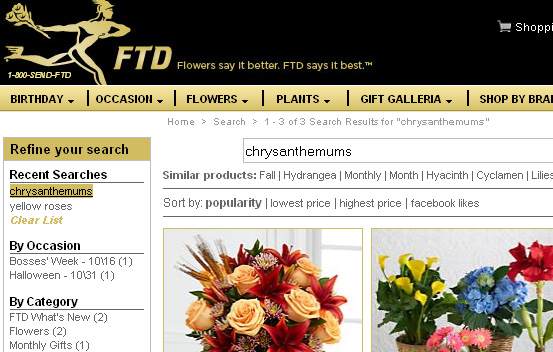
Here’s how the search history works one of our customers, FTD.com. If a shopper searches for “yellow roses,” then “chrysanthemums,” these search terms will appear in the Search History list at the top of the search refinement bar at left, even after they leave the site and then come back:

FTD


A nice feature to offer with search history is the option to “clear list,” as you can see in the FTD.com example above. Similarly, you can also allow visitors to select which terms to delete. Visitors may decide the list is out of date and they may want to delete it; or, if it’s a shared computer, they may not want someone in the same household to know what they’re buying for a birthday gift.

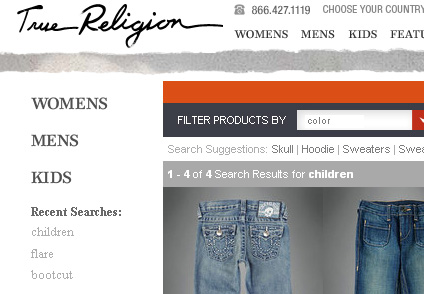
Like FTD.com, the website for True Religion jeans places the search history at top left, just above the list of refinement options:

True Religion

Search history is yet another tool for making your site a little easier to use and a little easier to buy from. If you’d like to add search history to your site, we can help – contact your SLI customer success manager.

Read More

Navigation Tips for Mobile Devices

Posted by Terry CostaOctober 4, 2011Navigation Tips

Most likely there is an increase in the percentage of visitors who access your site from a mobile device – whether to research products they may buy later (on their PC or in the store), or to make a purchase on the spot. Navigation is one of the most important aspects of your mobile site, and navigation links – along with the search box – should get prominent placement on your homepage. Navigation on your regular ecommerce site won’t just transfer over to the mobile platform; you need to keep mobile navigation extremely simple and easy to follow so your visitors remain engaged. The more streamlined your navigation, the faster visitors can find what they’re looking for, which can mean more sales (and less abandonment) for you.

Below are a couple tips to get you started. You can find the complete set of mobile navigation tips and more in the Big Book of Navigation Tips. Next week will be our final post on the topic as we wind down this series – but don’t worry, the “Big Book” will continue to be available on our site.

1. Add a search box to the bottom of the page — When visitors scroll to the bottom of the page and cannot find what they’re looking for on the page. You can add a search box and some navigation links to the bottom of the page. This gives visitors an option to easily continue exploring on your site without having to scroll up to the top.

2. Make links large enough to use on touch screen devices — Most mobile devices have touch screens, so make sure your links are big enough for your visitors to click on without accidentally clicking on a different link. Visitors will be frustrated by this if they have to try several times to reach the page they want. If you don’t correct this, they will give up and abandon the site completely.

Read More

Merchandise Navigation Pages for More Click-Throughs

Posted by Terry CostaSeptember 21, 2011eCommerce, Navigation, Navigation Tips, Site Search

Just like in a physical store, it’s important to merchandise your navigation pages with information about what products are on sale, the promotions you’re running, what items are marked for clearance, and any other specials that you’re offering. There are a few ways to showcase this information – refinements, banners, and specialized landing pages are a few examples. Below are a couple tips to get you started.

1. Have merchandising-specific refinements — Refinements don’t have to be limited to product details. Visitors want to know what sales items, special offers, bundles and clearance items, you’re offering. Allowing them to refine by these factors is a great way to improve the usability of your site, and guide visitors to items you are promoting, while improving conversion potential.

2. Rank the products in a way that makes sense for your business — Many companies choose to order their products by popularity. This minimizes the amount of clicks people will typically make to get to the products they’re looking for. Consider also showing your highest margin products first, or the ones you have excess stock for.

You can separate the results into “items on special promotion” and “most popular items” for example, or show all items in the same results list, but with the top 5 items in excess stock first followed by the most popular items. We occasionally encounter websites that rank their products alphabetically by default. This is almost always a non-optimal way to rank your products, although it is sometimes a useful sort option.

For more tips, download the full ebook – Big Book of Navigation Tips.

Read More

Improve SEO with Simple Tweaks in Navigation

Posted by Terry CostaSeptember 12, 2011eCommerce, Navigation, Navigation Tips, Site Search

When approaching navigation it’s important to remember that search engine spiders are a key audience. Google, Bing and other search engines analyze site navigation structures as they crawl your site to understand what’s important. For example, if a product page is only two clicks away from the home page it will be considered more important than one that is four or five clicks away. Not only should the pages be able to be crawled, but in many cases they should also be indexed. So be sure to follow SEO best practices when designing navigation pages so they rank well in natural search results.

Below are some tips to help you in this regard. You can find the complete set of SEO tips by downloading the complete “Big Book of Navigation Tips,” available from our website. Next week we’ll provide some tips related to online merchandising in navigation so be sure to check back.

1. Ensure your navigation pages can be crawled by Internet search engines. To ensure your navigation pages can be crawled by Internet search engines, use short URLs that include useful keywords to your navigation pages (e.g., category or subcategories) with very little parameters. Avoid using javascript-produced links because the spiders may have trouble interpreting these. Also ensure that navigation pages are not excluded in your robots.txt file.

2. Include title and <h1> tags on your navigation pages. Customize your title and <h1> tags to include the category title of each category page. These are both located at the top of category pages and are factors that search engines consider when ranking a page. The text in the title tag appears in the search engine results – so it should be accurate, unique and compelling. You may also want to include subcategories within the title tag to help rank for those more specific keywords.

3. When making any changes to your navigation, consider what to do with your old navigation links. The main issue is the old navigation links may have generated great SEO results. You will likely want your new navigation pages to benefit from your old navigation pages’ popularity. The recommended way of handling this is to use a 301 redirect. This will redirect the old navigation links to any equivalent new navigation link. By doing this, the value of the old page will be linked to the new page, minimizing the negative impact on your SEO.

Read More

Got Questions about Navigation? Download Our “Big Book of Navigation Tips”!

Posted by Shaun RyanAugust 30, 2011Navigation, Newsletter, Site Search

When you’re trying to find something on a poorly designed or overly cluttered website, it can feel like you’re in one of those computer games where you’re trapped in a dark hallway and don’t know which room to choose. Will clicking on a given tab help get you where you want to go, or will you end up in a website “black hole”? Will navigation refinements help you locate the item you need – or will you remain adrift in a sea of products?

When done right, navigation can have a huge impact on your online conversion rate and brand reputation. Likewise, poor navigation can destroy your brand’s credibility and make it hard to attract loyal customers.

While navigation is more an art than a science, there are guidelines you can follow that will create a positive shopping experience for your customers. Based upon our years of providing expert advice and tips in this area, we were able to compile a bunch of best practices. Our initial “Big Book” on site search tips, the “Big Book of Site Search Tips” was so well received that we decided to create a new downloadable “Big Book” around the topic of site navigation called the “Big Book of Navigation Tips” –to help ensure that your visitors don’t get lost trying to navigate through your site. The 50-plus tips – on everything from navigation design to integrating reviews to mobile navigation – can help you shorten the time it takes for visitors to enter your site, find just what they’re looking for and make a purchase.

Many of the tips in the new “Big Book” are easy to put into place and won’t require wholesale changes to your site navigation. For instance, you can eliminate refinement options that visitors don’t use very often, which will help streamline the user experience. You can figure out which options are not proving popular by checking your navigation reports.

Another great tip: Make sure your navigation pages help your SEO efforts by using short URLs that include useful keywords. Also if your navigation links are produced by JavaScript then you should have a non-script version so the search engines can find and follow them.

There’s also a whole section on mobile navigation, which is extremely useful given the rapid growth rate mobile shopping has seen in recent months and will likely continue to see in the months to come. If you have any uncertainty about how to construct the navigation of your mobile site, this book can offer the guidance you need.

The more you do to improve site navigation, the less likely it is that visitors will abandon your site – in fact, with streamlined, easy-to-follow navigation, they’ll stick around longer and likely spend more money. Download the “Big Book of Navigation Tips” today, and let us know what you think – you can send feedback to newsletter@sli-systems.com.

Read More

Refinement Display: Narrow Down Broad Categories in an Easily Digestible Way

Posted by Terry CostaAugust 29, 2011eCommerce, Navigation, Navigation Tips, Site Search

Refinements are an important part of navigation, as they help narrow a broad category so visitors get to items they’re looking for more quickly – and also help them get to particular items to suit their needs such as size, brand, style, or price faster. There is no shortage of options for how to present navigation refinements, which means some retailers offer too many choices or they present refinements in a way that confuses the visitors. Below are a couple of tips to guide you in this area. You can find a whole slew of refinement tips by downloading the complete “Big Book of Navigation Tips,” now available from our website.

Next week we’ll cover SEO, so stay tuned.

1. Consider using sliders for continuous refinements Test the placement of refinements – Using sliders for refinements like price or size range take up less space and are a nice tool to use along with AJAX to build smooth transitions from one information display to the next. Some visitors may find them more complicated than the alternatives – links or drop downs with fixed ranges, or text boxes allowing you to specify an upper and lower limit. So test and make sure your visitors do understand how they work and consider offering alternatives. Make sure your sliders work well on a touch screen device, and if they don’t you can  provide alternative way of displaying them.

2. Make sure navigational images can’t be confused as products – Navigation usability tests were conducted by showing participants a retail site with three product subcategories represented by an image and the associated text description. Many participants misunderstood that  the images were representations and took them to be three product images and assumed there were only three products. You should try to avoid these types of misunderstandings as much as possible. You can minimize confusion on navigation pages by showing products as well as subcategories. You can show other cues that will help differentiate between subcategories and products – such as showing the number of results they’ll see if they click on the subcategory images, label the subcategory images clearly and make sure there’s a clear distinction between the layout of your products and subcategories.

Read More

100% Uptime – Guaranteed!

Posted by Terry CostaAugust 23, 2011eCommerce

There are companies that guarantee 100% uptime – a bold claim in anyone’s book, but what is this claim really worth? It would be an impressive feat to achieve – but I would be surprised if any provider genuinely managed to achieve this lofty aim.

In our experience we have used providers with such guarantees, and then had downtime despite the promises. This is when you realize that the important part of the uptime guarantee is what the provider offers when things fail despite the promises.

SLI has learned over the years that each component of a system can fail, see our recent blog post The Story of the outage That Wasn’t on how we have enhanced our approach over the 10 years we have been in business. SLI has multiple servers, in multiple locations with multiple hardware, network, and DNS providers to provide resilience when items fail.

When making decisions about your providers, it’s important to look further than the uptime promise. The better providers admit that failures happen and plan for these contingencies, they have transparent communications and are always working to improve their systems.

Read More

Posts pagination

< 1 … 8 9 10 11 12 13 14 … 22 >
Facebook
Twitter
LinkedIn
YouTube
Flickr

Stay up to date with SLI

Featured Posts

  • Maximize Revenue with Enhanced Product Impact Testing
  • Top Five Ways to Prepare for Peak Season
  • Facets, Facets, Who’s Got the Facets?
  • Personalization: It’s Kind of a Big Deal
  • M is the New E: Mobile Commerce Trends and Predictions

Categories

About SLI Systems

  • What We Do
  • Who We Are
  • Why SLI

Learn

  • Webinars
  • News Room
  • Events

Connect

© Copyright SLI Systems, 2018. All Rights Reserved | US: (866) 240-2812 | Legal