SLI home
User login

A BLOG FOR E-COMMERCE LEADERS

  • Blog
  • Resources
  • Webinars
  • Customer Experience Scorecard

SLI Blog

MarketingSherpa Offers Tips for Improving your Site Search

Posted by Terry CostaJanuary 10, 2011eCommerce, Press, Site Search, Site Search Tips

Last week, Brian Burstein of MarketingSherpa shared some useful tips on the SherpaBlog for maximizing your site search (a few were provided by our CEO, Shaun Ryan) in his post “On-site Search: How to help your customers find what they want (to buy).” Interestingly, as Brian reports, “According to the MarketingSherpa Ecommerce Benchmark Report, customers who use the search box on ecommerce sites convert at nearly three times the rate of general browsers. Yet, 52% of marketers graded their internal search a ‘D’ or ‘F.’”

It’s staggering that so many marketers give their site search such a poor grade. Whatever the reason, Brian’s post includes a variety of solid tips that are fairly easy to implement. I recommend you check it out, and commend Brian for providing this advice to online marketers as site search is a critical yet often overlooked feature of any website. What grade do you give your own site search? If it’s anything lower than a B+ (or even if you give it an A), it’s probably time to give this feature some attention.

Read More

Year in Review: Mobile and Social Media Shake Up Search

Posted by Shaun RyanDecember 28, 2010Newsletter, Site Search

It’s hard to believe another year is coming to a close. In 2010, site search continued to evolve into an important merchandising technology that positively impacts online businesses. As we’ve done in previous years, we’d like to take this opportunity to share with you popular news items, blog posts, and podcasts from the past year. Check them out if you didn’t get to read or listen the first time around.

In 2010, the two biggest developments in online retail were mobile and social media. As more and more website visitors turned to their smartphones and mobile devices to search for content and products, e-tailers quickly built mobile versions of their websites.

Our whitepaper, Site Search and the Mobile Commerce Revolution was a popular document for e-tailers to read as they looked for best practices and tips on incorporating search into their mobile websites. E-tailers also included social media content into site search results in 2010 to deliver a richer, more informed experience for site visitors.

Here are some additional news highlights from 2010:

Using AJAX to improve the speed of delivery of site search results
From Internet Retailer: AJAX loads only necessary data, making searching faster and easier.

Searchable user reviews boost Wine Enthusiast’s traffic 5%
From Internet Retailer: Wine Enthusiast makes user reviews searchable.

Dilbert.com Uses Custom Search to Increase Revenue
From ClickZ: Famed workplace comic strip improves site search usability.

And here are some of our more popular newsletter articles from 2010:

The Big Book: Chock Full of Site Search Tips!
Our customers have shown a growing appetite for practical advice and tips on getting the most value out of site search. The Big Book of Site Search Tips has helped many site owners better merchandise via search and improve the look and feel of their website.
Read more about and download the Big Book of Site Search Tips.

Pain-Free Testing Optimizes Search and Navigation
Setting up and running tests can be difficult and time-consuming. Many e-tailers found better ways of taking the hard work out of performing tests on their websites.
Read more about pain-free testing.

Mobile Site Search Needs to Be Fast, Streamlined and Relevant
With effective mobile site search, people don’t need to rely on navigation – so it’s a space-effective way of getting people to the information they want to find on your site.
Read more about mobile site search.

From our blog, these are the 2010 posts deemed most useful by our readers:

Rich Auto Complete looks good
E-tailers found Rich Auto Complete to be a great way to help visitors find the products they need faster, while adding a “wow” effect to search.
Read more about Rich Auto Complete.

Improve the Way People Find What They Seek on Your Site
Tips on how to drive more people to use the search box and browse your company’s website.
Read more about improving the site search experience.

Some Tips about Page Layout
Why you need clear and specific content titles, as well as consistent image sizes.
Read more about making the most of site search layout.

We’ve worked hard to bring you an informative lineup of guests on our Ecommerce Podcast – here are just a few from the past year:

Linda Bustos
Director of ecommerce research at Elastic Path

Alan Trzuskoski
Ecommerce manager for Abe’s of Maine

Dave Baird
VP of marketing and co-owner at MagnetStreet

If you haven’t had the chance to listen to these podcasts, download them now and put them on your iPod before you hit the airport for your holiday travel.

We expect 2011 to offer up more opportunities to deliver new ideas for improving the value of search – in next month’s newsletter, we’ll give you our predictions for the hottest site search trends, and how you can work them to your advantage.

Read More

The Fashion Industry: Looking Sharp Being Smart

Posted by osricpDecember 15, 2010eCommerce, Site Search

During the internet boom/bust years companies such as boo.com were criticised for trying to sell apparel online. Common opinion was that the internet wasn’t mature enough and business models (or execution thereof) were not robust enough to cope with the notion of selling clothes online. Broadband didn’t even exist in any meaningful way and most people were struggling to identify how best to harness the opportunities presented by the web. Here we are nearly 10 years later and according to a report from IMRG the UK e-retail market was worth nearly £50billion in 2009 with ecommerce showing 15% year on year growth (for clothing that jumps to 18%) and the UK in particular now has a seemingly insatiable appetite for buying clothes online. The apparel industry has seen a lot of success online where you’d imagine that most people would be more inclined to try before they buy.

So what is it that is driving this trend and why has it attracted the likes of companies like Google and countless others? Some of the answer lies in technology adoption, infrastructure improvements, generational shopping habits and accessibility but all of that is for another blog. The main answer lies in usability. It is no coincidence that the most successful and fashionable brands online have taken the extra care to focus on one of the central planks of shopping for apparel online – the user experience. It is also no coincidence that a recent Forrester report cited navigation and site search as the top two initiatives towards improving online performance. More than any other sector buying online in the apparel industry relies heavily on the emotional part of the user experience and the behaviour thereof. If you want to buy a 32″ tv and have a poor online shopping experience you can easily find an alternative website and buy the same brand (or an alternative) knowing that fundamentally you’re going to end up with a 32″ tv that looks and operates as you’d expect. That sort of scenario doesn’t lend itself so readily to fashion where looking and feeling unique is part of the aspirational sell. Therefore the speed and ease by which products are navigated, presented and then experienced is critical to the success of a fashion brand online. Other factors like logistics and customer service are also crucial but it’s the area of findability that continues to drive these important business processes within the fashion sector.

It still perplexes me why a business will spend a fortune acquiring and engaging new customers only to provide them with a poor site experience. The two standout areas to review in order to correct this are relevance and usability (with imagery not far behind). Whilst this may seem obvious there are many brands (large and small) who struggle with this. For example why show shoe sizes as a refinement when someone has done a search for shirts? When you realise this problem why then spend a small fortune and wait weeks/months to fix it when it can conceivably be addressed within minutes or prevented from happening in the first place? Speaking of refinements these are a vital part of the search results page as are other features such as zoom options, video, alternative viewing angles, reviews, blogs etc. The experience can be further enhanced with best of breed solutions like recommendation engines, personalised email, outfit makers, multivariate testing, surveys/polls and social media. Add to this the commercial opportunity that a mobile strategy can bring (without costing a fortune) to your fashion brand and it becomes all the more apparent that the time to look sharp and be smart with your site search experience is now.

Read More

More on Hybrid View – Driving and Converting Traffic

Posted by christDecember 14, 2010eCommerce, Site Search

In my last post on list, grid and hybrid views, I discussed the pros and cons of list and grid views and offered a new alternative – the hybrid view for search and navigation pages, which takes the best of both and combines it into one.

Today we’ll take the discussion a step further and, using the hybrid view as an example talk about using site search pages as landing pages for any campaigns your are running.

The key to these pages is they allow you to easily and dynamically create a landing page that is tailored to any phrase that is important to your customers. They are updated to include the latest products, prices and other content like reviews. Also important – and perhaps a bit more difficult – is presenting relevant product information above the fold that creates an engaging user experience. This is where the previously discussed hybrid view comes in.

Here are some tips for how to optimize the page for website visitors, using the site of our customer Sports Unlimited as an example:

  1. Display relevant product information above the fold — we refer to this as “Auto Merchandising”
  2. The ‘Riddell Revolution Youth Football Helmet’; is in position #1 as more people have selected this product than any other when searching for ‘revolution football helmets’ on the Sports Unlimited site. A different helmet may be # 1 tomorrow, or next week if the preferences of the site’s visitors change.

  3. Include keyword specific clickable banners at top of page displaying related brands and categories
  4. Offer standard landing page options:
    1. Display the keyword at top. This provides what is called an information scent that should reaffirm to the visitor that they are on a page that is relevant to what they are looking for.
    2. Offer “sort by,” “view” and “pagination” options at the bottom
    3. Include related, user-generated phrases at the bottom
  5. Include relevant refinement options to narrow selection by gender, category, brand, etc.
  6. Offer product options to select quantity, color, size and call to action (i.e. “add to cart”) button (see image below point #6)
  7. Use “mouse over pop ups” to offer more information, oftentimes a larger image
  8. Use AJAX search to provide the WOW experience – which can be seen by clicking on any refinement option from this page (AJAX delivers a fast, streamlined experience when clicking on refinements or going back and forth within the search results):
  9. http://sporting-goods.sportsunlimitedinc.com/search#w=revolution%20football%20helmets&asug=rev

This special type of dynamic landing page has resulted in increases in revenues and average order value. They can be used as landing pages for many types of campaigns, paid search, email, display advertising.

If you have any questions about this or comments to share, please feel free to comment below.

Read More

Grid View, List View or Hybrid View?

Posted by christDecember 1, 2010eCommerce, Site Search3 comments

For retailers selling online, the question of “Grid View or List View?” for results pages is a common struggle. As Linda Bustos points out on her “Get Elastic” blog, “When presented with a list of search results, people often click the first result – paying attention to the top 3 or so.” And as “Get Elastic” reader Bob points out in his comment, “Grid views are predominantly used on sites selling merchandise when the visual appearance matters to the customer (i.e., clothing). List views are used when the text is important like a model number or more technical info is what matters (i.e., printer ink, computer RAM).”

Over the last three years I have had hundreds of conversations with retailers, and the overwhelming preference is to show site visitors results pages in grid view. Having also conducted a few A/B split tests to see which view performs better, the evidence suggests this as well. Our argument for why grid view performs better is that retailers can show more products “above the fold,” meaning that website visitors see more items in the browser window without having to scroll down. However, an argument for list view is that it gives you the opportunity to showcase additional descriptive text – good for shoppers who need product descriptions in order to make a buying decision.

The glaring problem with list view is that on the average laptop or desktop monitor, the visitor typically sees only two products above the fold. Given this conundrum, we’ve created a new view – called “hybrid view” – that incorporates the best of both worlds, offering pages that show more products, as in a grid view, while also including the additional descriptive information for shoppers.

Let’s look at a site search page from Sports Unlimited as our example. In the image below you can see how Sports Unlimited (with our help) has created a results page incorporating the best aspects of both list and grid views, and the results have been positive:

  • 271% increase in revenue (directly from the landing page)
  • 16% increase in Average Order Value (from the landing page)

If you have any questions about hybrid view for search, feel free to post a comment here or contact us at (866) 240-2812 or sales@sli-systems.com.

Read More

Avoid Costly Website Failures with Software-as-a-Service

Posted by Terry CostaNovember 30, 2010eCommerce, Site Search

With the holiday shopping season well underway, there is talk of recent ecommerce site failures and anticipation of how these failures will impact online businesses during this season’s shopping frenzy. Nearly one year ago, Internet Retailer reported on major site failures experienced during Black Friday (the day after Thanksgiving) and Cyber Monday (the Monday after Thanksgiving) – two of the busiest shopping days of the season. Often, these outages are caused by the high volume of site visitors during peak shopping times and servers that can’t keep up. Or, they may be caused by natural disasters, power outages or software glitches. When entire sites go down there is tremendous impact: business is lost, customer loyalty suffers and a brand’s reputation is seriously compromised.

While site failures are extremely costly for online retailers, there are also individual aspects of a site that can lose functionality and also impact the online experience for shoppers; for example, site search, the shopping cart, product videos, etc. For these functions, it makes sense to entrust your site to a hosted services (or SaaS – software-as-a-service) provider so you can offload that traffic to a 3rd party – particularly one that has built-in redundancy in its architecture and implemented business continuity policies, to protect you from these types of failures. For example, SLI Systems has implemented redundant servers in multiple data centers around the world to ensure that if a server goes down for any reason, another will step in to take over.

The Internet Retailer article from last year indicates that according to web performance measurement firm Gomez, Inc. the top 50 retail sites have an average of 97.60% availability, and an average site response time of 2.25 seconds (Gomez also says research shows there is a 2-second “standard” – referring to the length of time the average person will wait).

Like most retailers, you’re probably turning up the volume on your marketing efforts to drive as much traffic to your sites as you can in the coming weeks. But are you certain your site will be able to perform – and respond quickly? It’s not too late to offload your site search to a 3rd party expert if that’s an area you have concerns about or haven’t looked closely at. Have questions? Feel free to comment below.

Read More

Couldn’t find Harry Potter on Amazon

Posted by Shaun RyanNovember 24, 2010Site Search

I had a surprising experience this week. I failed to find one of the most popular books in the world in the world’s biggest bookstore.

It all started when my son picked up the first Harry Potter book and started reading it. He got into it and loved it. In the way of siblings, this inspired his sister to want to read it too. The problem was there was only one copy – so she would have to wait. I thought I would download the sample on my Kindle app on my iPad so she could read the first part of the book and find out if she would like to read the rest of it. This was the task that I failed to achieve.Harry Potter UK

I won’t go through all the steps I went through before I finally gave up. I got close. I found the simplified Chinese version and an Arabic version. When I told him the story, my CTO shed some light on why I failed. The reason I failed is that I live in New Zealand where the book is sold under its original name of Harry Potter and the Philosopher’s Stone where as in the US it is sold as Harry Potter and the Sorcerer’s Stone and I was on Amazon’s US site. Apparently the publisher didn’t think American children would want to read a book with philosopher in the title.

Harry Potter US

The reason I failed when I searched Amazon for Harry Potter and the Philosopher’s Stone is that even though Amazon showed the Sorcerer’s Stone at the top it wasn’t what I was looking for and there were other results that had the image that I knew was on the cover of the book – they had a stronger information scent and so I skipped the top result. Unfortunately I quickly got to the Latin and Irish versions.

harry potter amazon

How could Amazon have done a better job?
I’m sure I’m not the first person to do this. Here are the things I think they should have done to made this better. These are things you should be doing with your site search as well.
1. Pay attention to their site search reports
When people search for Harry Potter and the Philosopher’s  Stone there is probably a lower click through rate than ideal . This should have been flagged that this is a keyword they should pay some attention to. Note there will be many keywords that meet this criteria – it’s best to start with the most popular. I suspect Amazon were already doing this  – they may have put in a rule to put the Sorcerer’s Stone at the top for this phrase.
2. Put a keyword triggered message in the search results
If they had a message on these search results saying “In the US the Philosopher’s Stone is published under the name of the Sorcerer’s Stone”, or something similar, maybe with an image of the cover from the Philosopher’s Stone then this would have immediately removed the problem for me.
For our customers this functionality is implemented through our banner functionality where you can have any HTML appear at various locations on the search results page, triggered by various rules. These are useful for promotions, or simply for improving the usability of the search results page – as is the case here.
3. Use a landing page
This is an alternative to the keyword triggered message, where instead of showing search results the searcher is redirected to a landing page that describes the situation and has links to buy the appropriate book. Maybe it could contain a link to the UK store, if someone really wanted the UK version.
4. Inform the user if you don’t have the product
This wasn’t the case here, but in the event that many people are searching for something that you just don’t have. Then put up a message saying – “we don’t have this, but here are some alternatives that we do have”. Or even more useful, “this is where you can find what you’re looking for”.
Amazon is held up as the gold standard for ecommerce sites. You expect the experience to be perfect. This example shows they still have a way to go.
It ends up that my son devoured the first Harry Potter within a day or so and he’s now onto the second. My daughter also devoured the first book and is now waiting for her brother to finish the next one. I expect this is going to continue for the next few weeks.
Read More

Launch Your M-Commerce Website with SLI Mobile

Posted by Shaun RyanNovember 18, 2010Mobile, Newsletter, Site Search

Have you ever shopped for clothing, books, or sporting supplies on your mobile device? If so, was it an easy process, or was it cumbersome and time-consuming? While the numbers vary a bit from report to report, most experts predict that consumers will soon launch themselves into the mobile commerce revolution – possibly even during the holidays. You need to make sure your online business is ready for these shoppers.

If you’re ready to take the mobile plunge, we have some tools and services that can help you do so quickly and cost-effectively. We recently introduced SLI Mobile, which helps you create a mobile version of your e-commerce website, complete with search and navigation features. Our solution takes into account the special challenges of conducting e-commerce on a device with a small screen and varying data speeds, so we offer several tools to make searching easier, such as refinements and smaller images.

And just like the service we provide for regular e-commerce sites, we allow you to integrate your product pages with ratings and review solutions, as well as social media content. We can create mobile sites that work on all major devices and platforms, including iPhones, BlackBerrys, and Android phones. If you already have a mobile site, we can simply provide you with search and navigation functionality – or, we can provide you with search, navigation, and product pages and integrate them with your shopping cart.

For our existing customers, launching the mobile site is a fast and painless process – we already have all the data and can set up the mobile site with almost no effort from the customer. Our customer Century Novelty, whose mobile site is now live, found out just how painless and cost-effective SLI Mobile is: “SLI Systems did all of the heavy lifting to create the site, and at one-third of the cost estimates we received from other mobile vendors—and the entire process took just a few hours of my time,” explains Ian MacDonald, vice president and general manager of Century Novelty.

If you’d like to study up on mobile commerce, download our new white paper, Site Search and the Mobile Commerce Revolution. It’s free, and inside you’ll get fresh ideas on developing a mobile strategy, and making your mobile commerce site as user-friendly as possible. Click here to download the guide – and to find out more about SLI Mobile, contact your Customer Success Manager or our sales team at sales@sli-systems.com.

Read More

Google Instant Previews – any lessons for site search?

Posted by Shaun RyanNovember 17, 2010eCommerce, Site Search, Web Search

Last week Google unveiled Instant Previews. This gives you the ability to preview a page by clicking a magnifying glass icon next to the title.

Instant Prevew

This is a cool feature, although I’ve found that I haven’t been using it since it went live. I’m typically happy with the information that is shown on the SERP. However Google are confident that it improves the experience – saying that people who use it are 5% happier with the results. What they didn’t say is what portion of people use it. I guess they’ll be learning more about it as they roll it out.

Lessons for site search?

As with all search innovations I look to see if there is anything that we might be able to apply to our site search customers. I’ve written before about how site search and web search can learn from each other. In this case many of our site search customers have already been doing something similar. They haven’t been showing a full preview of the page – this wouldn’t make sense on a site search because most of the page is the same – but instead have been doing mouse over popups, which show a larger image and potentially some more information. Note this can be done when you mouse over an image, or can be initiated by clicking on a link.

The nice thing about this feature is it makes it easy to see the product detail of several different products. Without this feature you would need to click on the product, look at the detail, return to the search results page, then click on the next product.

Here are some examples of it in action (with links to the pages):

On Bedbath store a larger image pops up when you mouse is over an image

On BedbathStore a larger image pops up when you mouse is over an image

BikeSomewhere show a larger image, a description and an Add to Cart button

BikeSomewhere show a larger image, a description and an Add to Cart button

On Efaucets when you mouse over you see a button to click to see a larger image that contains additional info and a Buy Now button.

On Efaucets when you mouse over you see a button to click to see a larger image that contains additional info and a Buy Now button.

Lessons for web search?

So is there anything Google and the other search engines can learn from the things we’re doing with our site search customers? One thing they should try is making the preview appear when you simply mouse over a result. They almost do this. You have to click on the magnifying glass image to turn on the previews – then you only need to hover over a result to see the preview. They should experiment with getting rid of that first step. I think that would improve the usability.

Secondly I think they should look at pulling out and highlighting more of the critical information on the web page. To be fair they are already doing some of this. But for example if they know it’s a product page and they have the product information – say from a feed that the retailer has submitted to them then they could show the detail of the product in the preview.

Read More

Why Site Search is so Important

Posted by osricpNovember 9, 2010Site Search

One of the best things about site search is that almost everyone is familiar with the concept of being online and starting their journey with a keyword search. The search results page is one of the most frequented pages of a website and yet all too often is the case that you’ll perform a simple search only to be shown ‘product not found’ ‘article doesn’t exist’ or be served a page of totally irrelevant results. Today’s internet user has very little patience when it comes to this kind of user experience and will usually be off to a competitor’s site within seconds.

In the current economic climate it is crucial that you invest in areas of your online business that can deliver and deliver quickly. Furthermore, anything that assists the innovation of your site whilst engaging existing customers and attracting new ones gives your brand the opportunity to rise above the competition and improve the performance of your online business. Of course there are a number of technology areas worth considering but I’d strongly advocate that you consider investing in a dedicated site search solution for two simple but very important reasons: the effects are tangible and immediate.

There is no doubt that site search is one of the most important ways to understand the shopping behaviours of your visitors. Users who type a search phrase are more likely to convert versus a user who browses (typically using navigation) the site. Site search users are ‘objective focused’ – that is to say they are looking for something specific and are telling you in their own language what they want. If you show them what they are expecting to see (relevant results) they are much more inclined to add the item to their shopping basket.

This is proven through another important area of site search – the data. To be sure your investment is working for you the ability to measure the impact via site search analytics and online analytics is vital and will provide genuine insight into how your site performance is improving as measured against your KPI’s (key performance indicators).

Site search needn’t be difficult to implement either (SLI Systems use a product data feed) so you shouldn’t have to employ a development team or change your ecommerce platform to accommodate it. On the contrary, the site search solution should easily bolt into your existing ecommerce infrastructure and run seamlessly with the site you already have. If you opt for a SaaS (software as a service) model there are no hardware implications either so why not test your own site search to see if the results are what you were expecting to see. If the results are not relevant then you are very likely losing out on the opportunity to improve your conversion rates and other vital metrics.

For more information on how to improve your site search please contact SLI Systems on 0800 032 4783 in the UK and (866) 240-2812 in the US. Alternatively please click here for a free Site Search Critique. The SLI Systems Christmas Guide (UK version), the SLI Systems Holiday Guide (US version) and Big Book of Site Search tips can also be downloaded free of charge.

Read More

Ecommerce Podcast with MagnetStreet: Site Search Data Drives New Line of Business

Posted by Terry CostaNovember 8, 2010Podcast, Site Search

In our latest Ecommerce Podcast, Dave Baird, vice president of marketing and co-owner of MagnetStreet, spoke with our fearless leader, Shaun Ryan, about how site search data helped MagnetStreet identify an opportunity for a new line of business, which has become a huge success. As Dave explains in the podcast, most of the custom magnet company’s customers were in the real estate industry (real estate agents like to send custom magnets to their clients as a useful self-promotional tool). When the economy took a nosedive, magnet orders from real estate agents dropped.

As you’ll hear Dave discuss in the podcast, about a year before the economic crisis, MagnetStreet had launched a search engine optimization project and began looking at popular search terms on their site to see if they’d find new keywords for paid search campaigns. They discovered that searches for “save the date magnet” started turning up, and Baird and his colleagues realized that they could develop a new line of products appealing to brides who needed to create a clever date reminder for wedding guests.

Dave says that the “save the date” magnets were a huge success and helped make up for the decline in orders of real estate agents.

Check out the MagnetStreet podcast to hear more about this growing company’s strategies for enhancing the online customer experience, such as personalized recommendations and an integration with Facebook that will tell users when other friends are shopping on the site.

Read More

Shoppers Say They’re Going Mobile for the Holidays

Posted by Terry CostaNovember 2, 2010eCommerce, Site Search

Lately, we’ve been beating the mobile drum pretty loudly. A few weeks ago, we announced our new SLI Mobile solution to help retailers quickly create a mobile version of their websites. And just last week, we announced that one of our customers – Century Novelty – worked with us to create its mobile site in a matter of days, in order to capture the growing numbers of mobile shoppers the company was already seeing.

Some in the industry think it’s just too early for companies to be worrying about mobile. That’s not our take, based on the experience many of our customers have had in seeing a steady growth in numbers of visitors to their sites from mobile devices. As Ian MacDonald of Century Novelty explained to us, over the past year they noticed a small percentage of sales actually coming from mobile devices. The amount wasn’t significant, but it was enough that they couldn’t ignore it.

Last week, the results of a recent NRF survey on mobile shopping were published by Evan Schuman in StorefrontBacktalk, showing that our thinking is correct – as many American consumers say they expect to shop by mobile device this holiday season. According to StorefrontBacktalk, exact numbers are hard to pin down due to the possibility that respondents may not have answered the questions in the same way (e.g. some may have treated social networking recommendations or texting friends as “conducting research” while others may not have), or because some people may not think today that they’ll shop via mobile device but come December they might. Still, the data is compelling. Of 8,767 consumers surveyed, 26.8% said they would use their smartphones to either research or make a purchase during the holidays this year; and of those in the 18 to 24 age range, 45% said they would.

Evan also mentions that his site conducted a survey with Forrester Research that showed an “alarmingly high percentage of retailers (21.3%) who said they have no plans for any M-Commerce programs in the next 18 months. And almost half of those surveyed choose ‘none of these’ when asked if they allow customers through a mobile site or a dedicated application.” In our own M-commerce survey from earlier this year, we found that 80% of retailers surveyed say they have no mobile commerce strategy in place, while at the same time, 83% of those surveyed said that between 1-10% of site visitors come from mobile devices.

While the numbers vary from survey to survey, one thing is clear: there is an audience today on the mobile platform, and that audience will only continue to grow in the months ahead. Retailers who choose to sit on the sidelines until this market is more mature may miss out on an opportunity to garner more sales, and possibly lose customers along the way.

For retailers who are eager to get started but are reticent to spend a lot of time and resources on a mobile site, a solution like SLI Mobile is ideal – it can help you create a site in a week or less, with minimal involvement from your team. And the expense is nominal. If you’re hesitating, don’t. We’re ready to help you today. Contact us now.

Read More

Organize and display refinements to streamline the site search experience

Posted by Shaun RyanOctober 27, 2010Newsletter, Refinements, Site Search

In last month’s newsletter, we explained how to identify the most useful refinements for your site search, depending on your customers’ needs and the product mix. Figuring out which refinements to offer is the starting point, but there’s more work to be done: This month, we’ll tell you how to display these refinements so that your site visitors can make best use of them, and have a better search (and shopping) experience.

Place frequently used refinements at the top of the list. Make sure that the refinements most likely to be used can be easily accessed by visitors. Less frequently used refinements can be placed farther down on the list, or perhaps made visible only when the user has clicked on a certain category – in which case, they can select refinements that are part of a subcategory.

If you discover over time that visitors are not making use of certain refinements, then you can decide if you want to stop displaying them. This should be an ongoing evaluation process: You should continually look for ways to improve usability (and thereby conversions) by simplifying the site search process. Don’t feel compelled to display all possible refinements, which is confusing to users.

Show the number of results next to refinement options. Next to specific refinements, display the number of results that are available when that refinement is clicked on, so that visitors have a sense of how many results they’ll see. You can view this feature at work on the site for Lighting by Gregory, an SLI customer.

Show color refinements as a palette instead of text. Since colors are visual, site visitors will respond more quickly to a display of actual colors, rather than the names of the colors in text form. A color palette also takes up less space within search, so it helps reduce visual clutter.

For products available in several colors, consider retooling search results so that if a specific color refinement is selected, the product is displayed in that color. For instance, the main photo for a shirt available in red, green and blue may show the red shirt. If visitors select the blue color refinement, the image should change to the blue shirt.

When it comes to deciding how and where to display refinements, take the same approach that you would do with other aspects of your site design: Look at usage data, talk to your customers, and test options to see which refinements and placements work better. If you need advice on choosing and displaying refinements, contact your SLI Systems customer success manager.

Test placement of refinements. Depending on your audience and your site design, users may make more use of refinements depending on where they are placed – most commonly, they appear at the top of the page or in the left navigation pane. Try to avoid placing refinements at the bottom of the page, since visitors need to scroll down to view them. Test different positions to see which ones your visitors prefer.

Allow visitors to navigate between refinements on the same level. If a visitor clicks on a refinement but then decides they want to see a different refinement, don’t require them to click “back” to get to the original search results page first. They should be able to simply click a different refinement option from that page and easily see a new batch of results.

Don’t show refinement options that have no results. For instance, if there are no red products for a particular search, then there should be no link shown to restrict the results to red products.

Avoid drop-down boxes for refinements. Drop-down boxes make it harder for people to see the available refinement options, and they’ll be less likely to use them. If refinements are shown as a list of links, then they can select the refinement with a single click. However, if you have many refinements, or many options within a refinement, then showing them as links can take up too much screen real estate. In this case, drop-down boxes may be the best option.

Show a breadcrumb trail. A breadcrumb trail will show the search term and any refinements that have been made. It helps visitors understand where they’ve been on the site and how they arrived at the page they’re on. It also makes it easy to remove refinements, and helps them go back to a broader range of results if they choose. Breadcrumbs take up very little space, and are a standard navigational element.

Read More

Register for our Webinar with Susan Aldrich of Patricia Seybold Group

Posted by Terry CostaOctober 22, 2010eCommerce, Site Search, Site Search Tips, Webinar

Each year it seems the online holiday shopping season starts earlier than the year before. Consumers are already flocking to the web to get a jump on their holiday shopping, yet many retailers are still getting their sites ready or are altogether unprepared. If you’re one of them, register to attend our free webinar – “Seizing the Remaining Season: Find out What’s Selling and How to Sell Yours” – taking place next week, featuring online customer experience expert Susan Aldrich of the Patricia Seybold Group.

During the webinar, Susan will offer insight into what consumers are search for and buying this season, across several categories, including apparel (men’s & women’s), electronics, jewelry, cosmetics and more. She’ll also discuss ways you can take advantage of these buying trends and improve your site’s search and navigation to increase customer engagement and conversions on your online storefront – for example, by incorporating social media content into site search, and extending the search experience to mobile devices.

The 30-minute webinar takes place on Wed., Oct. 27 at 8:30 a.m. PDT / 11:30 a.m. EDT. When you register , you’ll receive a copy of SLI Systems’ Holiday Guide : 10 Steps for Preparing Your Online Retail Site Search for the Holidays.

Read More

Visit SLI at the Mobile Shopping Summit Next Week

Posted by Terry CostaOctober 22, 2010Conferences, eCommerce, Site Search

As you might know, SLI Systems recently entered the mobile arena with a new solution to help e-retailers quickly and cost-effectively create a mobile website. Next week we’ll be demonstrating our solution at the Mobile Shopping Summit at Bridgewaters in New York City Oct. 25-27. If you’re attending the show, be sure to stop by our booth (booth #14) and learn how to develop and drive your mobile strategies. While you’re at our booth, make sure you enter our drawing for an iPad. Our search and navigation experts will be on-hand to discuss your mobile needs and offer guidance on when and how to create a mobile site to drive more sales.

Be sure to also check out our customer, Ian MacDonald of Century Novelty, who will be presenting with Jeff Pandolfo of Amazon Payments on Tues., 10/26 at 1:20pm on his work with SLI & Amazon in creating his company’s mobile commerce site – “Sealing The Deal Through Mobile With Amazon Payments: Be True To Your Brand As You Streamline The Checkout Experience.”

Read More

Get ready for the mobile commerce revolution with SLI Mobile

Posted by Terry CostaOctober 21, 2010eCommerce, Site Search

If you haven’t yet developed a mobile version of your website, it’s time to put this task at the top of your list. The mobile device market is growing at exponential rates, and your customers are quickly becoming comfortable with buying products and content on their phones and tablets – in fact, the Coda Research Consultancy says that U.S. mobile commerce sales in 2010 will reach $2.4 billion.

To help you get up and running in this new mobile commerce world, we’ve introduced SLI Mobile, our hosted solution for creating mobile sites with fast and easy-to-use search and navigation functionality. We create the product pages for mobile sites using customer product data that we already have on hand, and we optimize the pages for mobile searching – which is very important given the limitations of browsing on mobile devices. We’re also offering thumbnail product images for fast delivery on mobile devices, and we can integrate the pages with your product rating and review solutions, as well as social media content.

We can deploy these mobile features for all of the major mobile device platforms and devices, including iPhones, BlackBerries, and Android phones. To find out more about SLI Mobile, read our press release, or contact your Customer Success Manager or our sales team at sales@sli-systems.com.

To give you even more guidance on getting ready for the mobile commerce market, we’ve just published a new white paper, Site Search and the Mobile Commerce Revolution. In it, you’ll find advice on developing your mobile commerce strategy, how to create mobile-friendly site search, and your choices for implementation. The guide is free, and can be downloaded here.

Read More

The Holidays are Almost Here – What are People Shopping For?

Posted by Terry CostaOctober 19, 2010eCommerce, Site Search

Recently we issued our first “SLI E-Retail Holiday Index,” a report on site search and shopping trends that reveals the most sought-after items in various retailing categories. The data was pulled from a sampling of our hundreds of online retail clients, in such sectors as Apparel, Jewelry, Cosmetics, Electronics, and Gifts & Novelty (see below to discover the trends). We plan to issue this data on a monthly basis during the holiday shopping season, and ongoing afterwards.

Some of the data may come as no surprise to you – like the fact that winter boots are a popular apparel item right now (you can pretty much count on that every year around this time), or that traditional diamond stud earrings and engagement rings are highly searched for in jewelry. Still, some of the data may be less obvious – like the fact “iPad” was a really popular search term in the late spring/early summer, but has since dropped off the list. (Maybe it will make a comeback as we get closer to December, but who knows?)

As you continue to develop your marketing campaigns and enhance your sites to capture the high volume of cyber traffic during the holidays, the SLI E-Retail Index might be useful to you. But perhaps more importantly, you can actually get a lot of this data yourself by looking at your own site search analytics to see what’s hot and what’s not on your own site. If you’re not already looking at this data on a regular basis, now’s the time to start!

So, without further adieu, here’s the data from our first E-Retail Index – and keep a look-out for another report next month. And if you’re still looking for ways to beef up your site for the holidays, be sure to download our free guide: “SLI Holiday Guide: 10 Steps for Preparing Your Online Retail Site Search for the Holiday” (available at usblogsli.wpengine.com/holiday-guide.php).

Women’s and Men’s Apparel
Currently, men and women are seeking the best in hoodies, cardigan sweaters and winter boots in preparation for this holiday season, whether shopping for loved ones or to enhance their own wardrobes. Silly Bandz bracelets remain a popular purchase item across many of the retail apparel and novelties stores. And, women are actively seeking out Maxi dresses, while men want the hottest looks in leather jackets.

Jewelry
The most popular trends in jewelry this season are focused on more traditional items, such as diamond stud earrings in all shapes and sizes. In October, online shoppers also sought out ruby and diamond rings and engagement rings, as well as men’s watches, from top designers such as Rolex.

Cosmetics
Online shoppers are busy looking for chemical-free and skin purifying cosmetics items this year. Products such as sulfate-free shampoo and antioxidant moisturizers are high on shopper’s lists, while make-up kits, hair extensions and eyelash growth products are also being searched for frequently. The top brands this season include Dermalogica, Bare Minerals, Ultraceuticals and Jane Iredale.

Consumer Electronics
In the area of consumer electronics, online shoppers are hot on the trail of new laptops, netbooks and all-in-one printers from brands including HP, Panasonic and Toshiba. Cameras are also a popular item from top manufacturers Canon and Nikon. Interestingly, searches for iPads were at the top of the list in June, but tapered off in July and have not gone back up.

Gifts and Novelties
Silly Bandz, hoodies, black lights, Snuggies and electronics tailor made for seniors, like the Go Computer and the Jitterbug phone, were the most popular novelty items in October. And, as consumers prepare for the holidays, items such as tablecloths and champagne glasses were also top on the list. In addition, searches for experience gifts, such as helicopter flying lessons were on the rise.

Read More

Get a free site review and win an iPad at our Shop.org booth (#807)

Posted by Terry CostaSeptember 24, 2010Conferences, Press, Reviews

Come visit us at our Shop.org booth (#807), and we will give you a free site critic review. We’ll let you know how you can improve the search and navigation experience of your users, and run a few tests with you to determine how accurate your site search is. We’ll also be able to demonstrate some of the search techniques our customers use, which can be the perfect way for your etail site to capture more conversions during the holidays. While you’re there, you can enter our drawing for a new iPad.

Many retailers feel their online storefronts are all dressed up and ready to go for the holidays. If you’re not one of them – or even if you are, but you somehow didn’t include a dynamic site search in your plans – we would love to talk to you. We can discuss with you the many features and enhancements, such as Rich Auto Complete, AJAX-based site search and incorporating social media content into your site search results, that can dramatically help your site performance.

Please also check out our “Big !dea” session on Wednesday at 1:30pm, where our own Ed Hoffman will discuss the importance of understanding the language of your customers to increase sales and conversions online.

We hope to see you in Dallas!

Read More

Business Continuity Planning and Holiday Preparedness

Posted by Shaun RyanSeptember 20, 2010Newsletter, Site Search

Disaster planning and business continuity are an important part of any hosted service offering – and in particular, with the holidays coming up, retailers need a search solution that won’t fail when they need it most. We have had firsthand experience with this and the 7.1 earthquake that hit our offices in Christchurch, New Zealand this week. This event has proven what we already knew – that retailers using SLI Systems for their site search can be assured of always-on availability, and readiness in the busiest of times and even in the face of disasters.

In the aftermath of Saturday’s severe earthquake, and subsequent powerful aftershocks, many local businesses are slowly recovering. Meanwhile, SLI Systems’ clients realized their businesses were unaffected by this event. In particular, our core search services have remained uninterrupted, thanks in large part to the redundant servers we’ve implemented in multiple data centers around the world to ensure business continuity during events like these. We experienced a short email, reporting and merchandising console outage due to a loss of power in our Christchurch, New Zealand facility. While our customers experienced no service interruptions, we’re continuing our systems upgrade process to build the same resiliency into these internal systems that you’ve come to rely on with our core services.

We also made our U.S. and European teams available over the weekend to answer any questions or respond to any client needs, providing an added level of emergency support.

The New Zealand staff are all safe and well, and most of them are back working. After this event, we feel more comfortable than ever that our customers are ready for the holiday rush, with top-of-the-line search solutions that won’t fail in busy or disastrous times.

Thank you for your continued support.

Shaun Ryan
CEO SLI Systems

Read More

December is around the corner. Are you prepared for a lucrative holiday shopping season?

Posted by Terry CostaSeptember 14, 2010eCommerce, Site Search, Site Search Tips

It’s only September, but many consumers have already starting their holiday shopping. And the outlook for this year’s holiday spending online looks fairly bright. So if you’re an online retailer and haven’t yet gotten your site ready for the holiday shopping frenzy, now is the time!

If you’re not already doing so, start paying attention to your customers’ online buying preferences. One way to do this is by looking at the most commonly used search terms on your site – this can help you understand what products will be in demand this season and what you should be stocking your inventories with.

In addition, there are a host of other options you can consider to give your site the boost it needs to meet holiday shopping demands, which are included in our new, free downloadable guide: “SLI Holiday Guide: 10 Steps for Preparing Your Online Retail Site Search for the Holidays” which you can download at usblogsli.wpengine.com/holiday-guide.php.  Below are some highlights:

Capitalize on the mobile revolution: Mobile commerce sales are rapidly increasing and will continue to do so. Jump on the opportunity this holiday season by launching a mobile version of your site. Be sure to keep site search front and center as its critical to helping users navigate among choices on a small screen.

Put social media content to work: Social media content will increase this holiday season with the increase in promotions, discounts and product reviews. Integrating this content with site search let’s visitors helps shoppers stay more informed about the products they are researching.

Offer refinements: Help your site visitors cross gifts off their shopping lists faster by offering refinements that allow them to sort through products by common gift-buying filters, such as gender, price, or type of recipient (e.g., coworker, child, friend, age, gender).

Help shoppers complete their thoughts: Shorten the shopping journey for your customers by providing auto complete functionality that automatically offers suggestions for search terms as they start typing.

Never let your site fail: During the holiday rush it’s even more critical that your website is stable. Working with an on demand search provider will reduce pressure on internal technical resources and ensure site search is up-and-running on even the busiest days.

Here’s to a happy and fruitful holiday season!

Read More

Earthquake in Christchurch

Posted by Shaun RyanSeptember 6, 2010About us, Press, Social Media1 comment

At 4:30am on Saturday morning Christchurch, New Zealand was hit by a 7.1 magnitude earthquake. This is the location of our New Zealand office. Amazingly no one in the city was killed and there were very few injuries, despite there being widespread damage. Our staff are all well and, with one exception, have escaped major damage to their houses.

Our core services were uninterrupted by the earthquake. We did experience approximately a 10 hour outage of our email and our merchandising console. I apologize for that and we are working to build more redundancy into these systems.

Our office is on the 10th and 11th floors in a building in down town Christchurch. We had staff in the building at the time and they had a terrifying experience. Luckily they escaped unscathed. The office was a mess with bookcases toppling over and everything being thrown around. However our building is sound and  there was very little damage, so we were able to quickly return things to normal.  Our staff have been working from home but we expect them to be back in the office in the next day or two.

Approximately 60% of houses in Christchurch have been damaged and many buildings in the city will need to be demolished. We are lucky that as a company we have escaped relatively unscathed. The team is still in shock at what has happened – made worse by the continuing aftershocks. I expect it will take us a while for us to return to normal.  Thank you for your understanding as we work through this.

Here are a few pictures:

This is typical of what our offices looked like after the quake. Although, to be fair, this guy was always pretty messy.

This is typical of what our offices looked like after the quake. Although, to be fair, this guy was always pretty messy.

road

This is the road outside of the house of one of our team.

Shaun's house

This is the roof of my house after the quake. One Chimney fell down during the quake and the other one had to come down soon after. This is common across the city.

Read More

Create refinements that make your site search more user-friendly, increase customer engagement

Posted by Shaun RyanAugust 25, 2010Newsletter, Refinements, Site Search2 comments

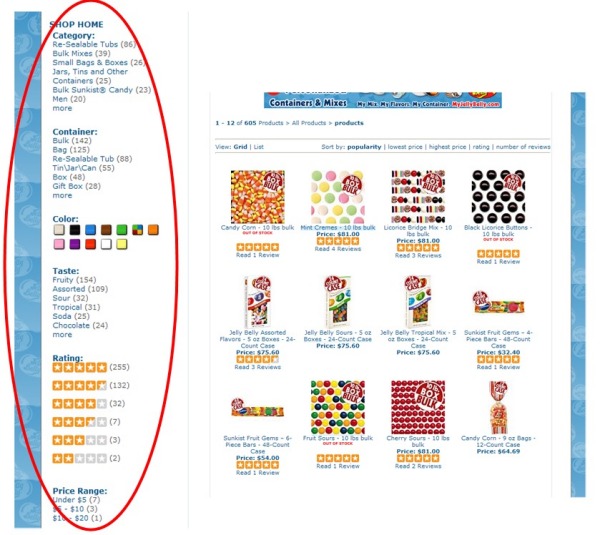
Refinements or facets, are one of the most important ways to address the myriad ways your online visitors can search your site. They allow visitors to narrow down search results based on certain product or content characteristics, so that searches can be completed in less time.

Refinements


But how do you choose which refinements to use? Do you mirror your product and catalogue structure, and run the risk of creating un-useful refinements? Or do you create refinements visitors are interested in? And in this case, which are they? By making a plan for determining which refinements to display and how to display them, you can find the happy medium – that is, the refinements that meet the needs of your customers, and that mirror your product and content choices. In this two-part series, we’ll cover best practices tips for both understanding what refinements to include, and how best to display them.

Which refinements to include?

The first step in choosing refinements is to examine the content that is indexed in your site search, and how this content is structured or broken down. For instance, your content might include product pages, blog posts, video, help-desk information, and social media content. Each type of content will have its own unique structure, which will dictate how you create refinements. For example, the structure for products could include price, category, brand, color, size, in-stock items, and so on – it all depends on your particular mix of products.

In some cases, structure can be inherited from other data. For example, products may have customer reviews, which in turn have ratings, and perhaps user-generated tags. Blogs may have structure such as author, date published, tags, and comments. These structures will provide you with a list of possible refinements to include in your site search.

Another way to uncover possible refinements is to examine popular keywords in your site search reports to see how many people are searching with refinement-related terms, like colors or gender (e.g. “men’s blue parka”). Another good source: SEO traffic reports from your analytics package, which give you an overview of what people are requesting from search engines.

Keep in mind that it’s not necessary to make every possible refinement available to your customers. Too many refinements will confuse the user, and some of the more obscure refinements will likely not get used very often. Have some conversations with your customers and ask them how they would like to be able to search and refine on your site. After these conversations, you may decide that some refinements will be displayed only after the visitor has selected another facet – for example, after people select a category, they’ll be able to select a subcategory.

In some cases, you may not have the data to provide the refinements. For example, customers of an online furniture store may want to be able to refine their search results by room. To add this facet, you need to add a “room” field to your product database. This can be an intensive process, so you should make sure such a facet adds value.

In next month’s newsletter, we’ll offer some advice on how to display refinements within site search results.

Read More

Rich Auto Complete is looking good

Posted by Shaun RyanAugust 25, 2010Site Search2 comments

We have a growing number of customers implementing Rich Auto Complete. We have some preliminary data from them and the results are looking very interesting. First of all some background…

What  is Auto Complete

The precursor to Rich Auto Complete is Auto Complete. This shows search terms below the search box that match the characters you have typed into a search box. This is a common feature on web search engines, such as Google and is now a standard site search feature on many sites. We have been providing auto complete to our clients for a couple of years now. It’s a great feature because it helps searchers with their query formation, it reduces errors, and adds a little serendipity to the search experience.

dilbert auto complete

What is Rich Auto Complete?

Rich Auto Complete is a search feature that shows search results as you type into the search box. This is normally implemented using AJAX, which captures the keystrokes as they are made and sends the partial search term to a server which provides search results which match the partial search term. The example below from Best Buy Eyeglasses is showing a mixture search suggestions and products.

bestbuyeyeglasses

Some sites, such as Apple have had Rich Auto Complete for a long time. We have begun offering it to our customers over the past few months and are getting a lot of interest in this feature. The initial data from the analytics are looking very promising.

So what difference does it make?

First of all some qualifiers – this data is very preliminary, taken from only a few sites (not from the sites mentioned above).

  • A lot of people use this: 33% of people who search used the Rich Auto Complete (clicking on either a search suggestion, or a product)
  • Those that use this feature convert at twice the rate of those that don’t
  • The average order value for people who use this feature is 17% higher than for those who search and don’t use this feature.

We haven’t done an A/B test yet, so it could be that the people who use this feature would convert at a higher rate, with a higher average order value anyway. However the indications are that this is going to be a popular feature that significantly improves the performance of your website.

Why does it work?

Rich Auto Complete shortens the path from searching to buying. By allowing people to click on products directly from the search box it skips the need to see the search page.

The future

I’m sure that you will see Rich Auto Complete appearing on many sites over the coming months and years. It will start to become a standard feature. Linda Bustos from the Get Elastic blog predicted this last year. I’m only a year behind – but I support that prediction.

PS: Interestingly this hasn’t become a standard feature on the web search engines. Maybe this is because it significantly increases the bandwidth and query volumes they would need to support on their servers. I do remember seeing reports that Google was testing something like this a while back. This week there was another report about a Google test where they would update the whole search results page as you typed.

Read More

Digital Media Sites Need Good Site Search Too

Posted by geoffbAugust 3, 2010eCommerce, Site Search

Earlier this week we announced our new Learning Search for Publishers, a new variation of our hosted site search product aimed at the online publishing/digital media industry. The value proposition of a good site search in online publishing is similar to that of e-commerce: it improves the visitor experience, increases page views and can result in more sales. For publishers, our offering takes it a step further by providing useful data about search terms and resulting items clicked on to advertisers, giving them an opportunity to deliver more targeted ads to visitors.

Take our customer Dilbert.com (which we also announced yesterday). Dilbert.com recently added our site search to the popular cartoon strip site, making it much easier for fans to search the 20-year archive by character name or theme/topic (warning: if you engage in this activity you may find yourself wasting a LOT of time).

Dilbert’s previous site search didn’t allow for this, so people either had to know the exact date of the cartoon strip or search by character and hope they found it. Since the Dilbert.com site is supported by display ads, as well as licensing revenues (people license the comic strip for use in books, t-shirts, company newsletters and other things), a good site search is important to its business. Since deploying our site search, page views are already up 3 percent (a substantial number given that the site sees more than 1 million visitors a month), and the company says they also expect licensing sales to also increase.

Another benefit of an effective site search on a digital media site is the ability to drive visitors to the variety of content available – for example, videos and blog posts, and revenue-generating content, such as subscriber-only articles (some of our customers have also seen revenue increases from more people clicking on articles behind the pay-wall). Without the ability to refine and help narrow down searches to find the desired content, visitors are not likely to remain on the site or make return visits. And higher page views mean that online publishers can set higher advertising rates.

We’re excited about entering this new market and see lots of opportunity among media sites in need of better, more impactful site search. We’ll be talking more about the challenges publishers face and how site search can address them in the coming months, as well as some of the unique benefits our customers have gotten from using Learning Search.

Read More

Bring Social Media Content into Site Search Results to Increase Visibility

Posted by Shaun RyanJuly 28, 2010Newsletter, Site Search, Social Media1 comment

If you’re like most online businesses, by now you’ve probably taken the plunge into social media marketing. Maybe you have a company blog, or you’ve created a Facebook page and/or a Twitter feed to help build community – or perhaps you’ve created a YouTube channel for your company and product videos. But once you do all the hard work of creating this social media content, how do you attract an audience? There are many techniques to make site visitors aware of your social media initiatives. Here’s one that you may not have thought of.

Adding social media content to site search results is a great way to bring attention to your efforts in this area. Visitors who are searching for specific content on your site will see relevant social media posts within your search results, and will be encouraged to click through to your various pages – and hopefully, become fans and followers. Additionally, the added content can further help them in their purchasing decisions, and engage them with your company.

The addition of social media content provides a richer searching experience for your visitors and provides more opportunities to direct them to information to learn more about your products and services. Some of our customers have started doing this, so that when visitors enter their search terms in the search box, the search results will include links to posts on Twitter, Facebook and other sites.

Many ecommerce sites make the mistake of only providing site search for their products. We recommend that you add all of your content to site search – both content on your site (products, videos, blogs, helpdesk information, etc.) and off your site (Twitter, Facebook, YouTube, etc.)

When you’re ready to add social media content to your site search, we have good advice to offer. If you’d like to find out more about social networking and site search, contact us.

Read More

Sign up for Our Webinar with Brian Walker of Forrester

Posted by geoffbJuly 26, 2010eCommerce, Site Search, Webinar

register_now2

On Wed., July 28 we’re hosting a free webinar featuring Forrester Research Principal Analyst Brian Walker. The webinar, “Unlock Powerful Customer Information to Generate Higher Conversions with Site Search,” will cover a variety of topics, among them –  how site search data can reveal valuable information about customers and their research and purchasing intentions, and what you can do with this data to improve other marketing efforts and ultimately, your business. Brian is a reputable expert on e-commerce technologies and the user experience, and he has great insights to share about how retailers can make more effective use of site search to deliver the type of content and information people require to make a purchase.   BrianWalker150

In the webinar, Brian will discuss things like how you can discover from site search information whether customers are finding products in stock (or not) or if they’re looking for products not available on your site that you might want to add, and what products are trending in popularity. Site search data can also reveal long-tail keywords that are useful for SEO and paid search campaigns, and can help you determine how best to guide shoppers to items they seek through behavioral features like Related Search suggestions and Auto Complete.

The webinar will also discuss how you can incorporate site search data into other marketing activities, like personalized emails; on-site merchandising, banner advertisements and promotions; and content development, and the role site search plays on the mobile platform.

We hope to make the webinar interactive, so if you plan to attend please come prepared with questions and comments. You can sign up to attend this webinar at https://blog.sli-systems.com/brian-walker-forrester-site-search-webinar.php.

Read More

Congratulations to our Mobile Commerce Survey Winner!

Posted by geoffbJuly 26, 2010eCommerce
A couple months ago we conducted a survey about trends in mobile commerce (see the article here). We had more than 400 responses, which provided us with some great data about retailers’ readiness for mobile commerce.

We want to congratulate Barbara Hurst from Sally Beauty, who is the winner of our survey drawing for a Flip Mino HD video camera. We hope Barbara is enjoying her camera and look forward to seeing any video clips she chooses to share – maybe some footage from eTail West next month or another retail event.

Read More

IRCE 2010: Success in the Windy City

Posted by geoffbJune 30, 2010Conferences, eCommerce, Site Search

This year’s Internet Retailer Conference and Exhibition was a great success – thanks to the team at Internet Retailer who worked so hard to pull off an amazing event!

Probably to nobody’s surprise, mobile commerce was a big theme this year. As our recent survey revealed, 80% of retailers haven’t yet tackled the mobile arena, but my guess is that’s going to change quickly in the months to come. Given the early results from some of our customers, it seems clear that having a mobile web site is not just about keeping up with trends, it’s good for business.

SLI had quite a presence at IRCE, with 14 members of our team on the show floor, and we also sponsored drinks on two nights (hopefully you enjoyed a cocktail or two on us). Three of our customers presented, and we saw lots of traffic to our booth. We also had a drawing for a 3-D TV and 3-D DVD Blu-ray player – the winner was Lada Heep, eChannel manager for Thomson Reuters. Congratulations, Lada!

If you were at IRCE 2010, hopefully we had a chance to connect – but if not, feel free to drop us a note if you have any questions or requests. Next stops are eTail East (Aug. 9-12, Baltimore), Search Engine Strategies San Francisco (August 16-20) and Shop.org Annual Summit (Sept. 27-29, Dallas). We hope to see you there!


IRCE2010

Read More

With Rich Auto Complete, pictures help tell the story and convert customers

Posted by Shaun RyanJune 30, 2010Newsletter, Rich Auto Complete, Site Search3 comments

Visitors to your website should always be offered easy ways to navigate your site, shortening the time it takes from the beginning of their search to their discovery of just the right product or content. A couple of years ago, we introduced Auto Complete, which makes searching faster by providing suggestions for keyword terms as visitors type. It helps site visitors formulate their queries and reduce spelling errors, speeding up the experience and adding a little serendipity.

We’ve now gone a step further with our latest search enhancement, Rich Auto Complete. The new twist is that in addition to seeing suggested keyword terms as they type, site visitors will also see product images and product descriptions connected to those keyword terms. This allows visitors to access the content they are looking for without even viewing a site search page.

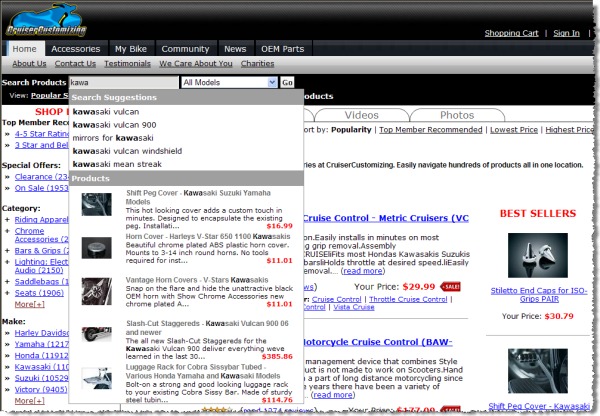
You can see how this works on our customer’s site, Cruiser Customizing. If you’re on the site’s home page and you begin typing the search term “kawa,” you’ll be given several completed search terms, such as “kawasaki vulcan.” In addition, you’ll see a list of  kawasaki-related products with accompanying thumbnail images. As you continue to type your search term, the suggested products and accompanying images will change based on the characters you’ve entered:

Rich Auto Complete

We’re confident that Rich Auto Complete will become a popular site search feature for our customers – we’re already seeing heavy usage of it, and we think it will become standard on leading e-commerce sites. It’s clear that Rich Auto Complete, in combination with an intuitive site search, can help site visitors find what they need and complete their purchases. If you’d like to try out Rich Auto Complete to see what impact it can have on your conversions and orders, contact us.

Read More

New Office Space Broadens our Horizons

Posted by EdHoffmanJune 23, 2010eCommerce, Site Search

Earlier this month we moved our North American headquarters into a new space in downtown San Jose. Our new location at 333 W. San Carlos Ave. is bigger, giving us plenty of room to grow. And if the past year is any indication, continued growth seems certain.  (The views aren’t too bad either.)

 As we continue to innovate new site search features and techniques and pursue new markets, demand for our solutions has grown. And so have our sales, marketing, development and customer support teams.

We’re also now fairly central to many of our customers and technology partners located around the Bay Area. Of course, we serve retailers and other Internet sites around the globe – and our UK and New Zealand offices have grown as well.

If you’re in the area, stop by and see us in our new location. And if you’re game, our team will gladly introduce you to the tempting grasshopper appetizers at the nearby Mezcal.

USBuilding
Read More

Posts pagination

< 1 … 10 11 12 13 14 15 16 … 22 >
Facebook
Twitter
LinkedIn
YouTube
Flickr

Stay up to date with SLI

Featured Posts

  • Maximize Revenue with Enhanced Product Impact Testing
  • Top Five Ways to Prepare for Peak Season
  • Facets, Facets, Who’s Got the Facets?
  • Personalization: It’s Kind of a Big Deal
  • M is the New E: Mobile Commerce Trends and Predictions

Categories

About SLI Systems

  • What We Do
  • Who We Are
  • Why SLI

Learn

  • Webinars
  • News Room
  • Events

Connect

© Copyright SLI Systems, 2018. All Rights Reserved | US: (866) 240-2812 | Legal