SLI home
User login

A BLOG FOR E-COMMERCE LEADERS

  • Blog
  • Resources
  • Webinars
  • Customer Experience Scorecard

SLI Blog

Posts with site search Tag

Three crucial elements to a great e-commerce customer experience

Posted by Bob AngusJuly 5, 2018Customer Experience, Resources, User Experience

Missing the basics on your e-commerce site can cause more than two-thirds of shoppers to flee, according to Retail Dive.

As a result, many shoppers could be leaving before they even hit the “Add to Cart” button. Fortunately, there’s good news.

We have identified three fundamental elements to a great e-commerce customer experience:

  1. Performance
  2. Aesthetics
  3. Relevance

We even created a checklist!

We call it the P.A.R. Checklist. Our e-commerce customer experience checklist identifies the functionality your e-commerce site offers and provides simple suggestions on what you can do to improve.

Let’s break down each of those key performance, aesthetics, and relevance elements.

  1. Performance – The Need for Speed

Performance is the top priority. If your site isn’t fast, your aesthetic and relevance efforts won’t have much impact at all. According the E-commerce Benchmark KPI Study, “reducing the average load time by 1.6 seconds would increase annual revenue growth by 10%.”

A delay in product page load or a search query may result in a lost customer. Forever.

Famously, back in 2006, Amazon presented one of the first studies linking a clear causation between page load time and online customer revenue. Through A/B testing, they showed every 100 millisecond delay in page rendering time resulted in a 1% loss of sales.

More recently, Intuit increased conversion rates 24% when they cut load speed from 15 seconds to 7 seconds. And they gained an additional 8% conversion boost when load time went from 7 seconds down to 2 seconds.

If that wasn’t enough pressure, Google now analyzes page speed as a key factor for its organic search-ranking algorithm.

Bottom line: You need to be fast.

Three Ways to Increase Performance of Your Site

The biggest performance killers are often the same things that make your site such a rich engaging experience. Your website is full of product images, content, Javascript, and CSS page elements. That bloats every page.

Fortunately, you have several ways you can increase site speed while keeping your online store appealing to customers.

  1. Your best first step is to reduce your page size. For e-commerce sites, the best way to do this is to optimize the size of the product images you show.
  2. Reduce the number of requests. Many browser requests are fired off every time a visitor hits any page on your site. Many requests ask for the same elements for each page. Speed things up by caching the elements that are repeatedly downloaded.
  3. Shorten the distance to your customers by using a Content Delivery Network (CDN). The closer your data centers are to your customers, the faster your website loads. CDN services give you a global network of servers. That shortens the distance to your customers, which your website host alone cannot provide.

Google offers even more recommendations to minimize unnecessary bloat on your website.

Your Action Item: Visit Google PageSpeed Insights. Enter your website URL. See how Google rates your performance. Follow Google’s optimization suggestions to get your site up to speed.
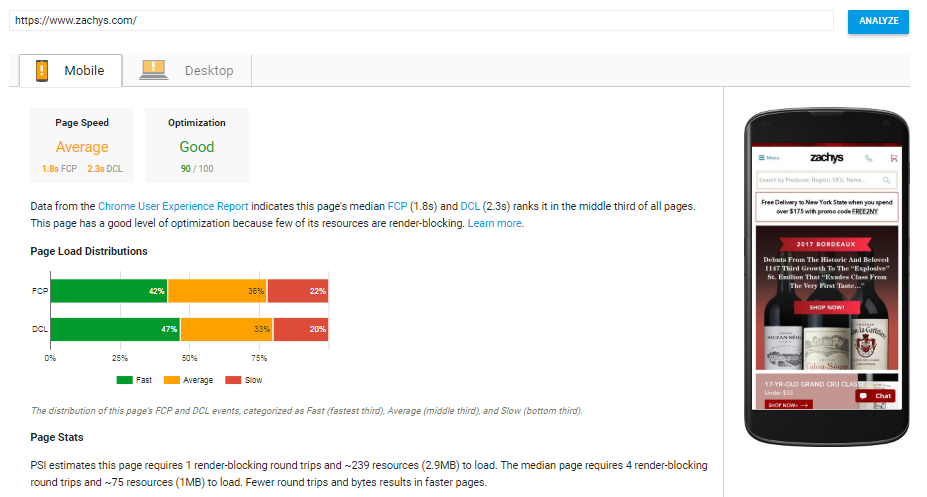
Google will give your site's speed a clear rating and insight on how to improve.Now that you’re up to speed, let’s boost sales with top e-commerce aesthetic best practices.

  1. Aesthetics Are More than Beauty Alone

Online businesses all want beautiful websites. You want your products to appeal to shoppers. But a beautiful website doesn’t mean it’s tuned to sell.

Your top priority is to drive transactions. Your key pages need to be focused on sales and appearance. Otherwise, those shoppers are “just looking” at your beautiful website. And you’re dramatically less likely to make a sale.

The Best Place to Start Online Merchandising

Do you merchandise specific products on your homepage? If not, you need to. You want to get your visitors directly to a product page where they can purchase.

Yet, many e-commerce sites use valuable homepage real estate to promote general categories and shopping ideas, not specific products. Or online stores display big, beautiful “brand experience” images that push anything sales-related down below the fold.

As a result, visitors are just browsing. They might find the site attractive. But they typically won’t move forward toward purchase. They meander. And pretty quickly they are off your site. Nothing in their cart. Or best case, an ineffective homepage simply means shoppers need to make more clicks to maybe find what they want. That’s not good either.

Your Action: Merchandise specific products that visitors are likely to add to their shopping carts right away. Better yet, use AI to determine which products to feature.

Get shoppers in a buying mindset with product recommendations like “Top Sellers” and “What’s Hot” on your homepage.
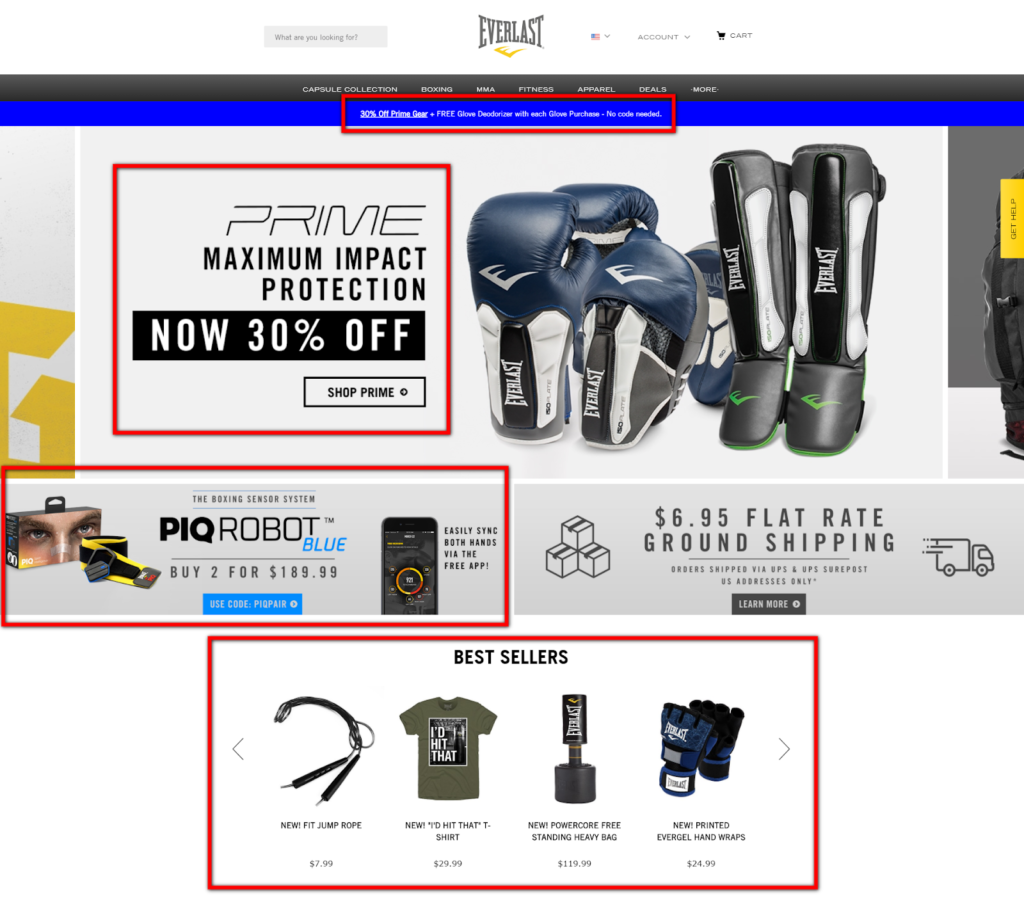
Your homepage should get shoppers in the buying mindset with "Best Sellers" and other promotions.You can apply this same beautiful, yet impactful merchandising approach to other critical shopping elements, like your navigation, category pages, product pages, and your shopping cart.

The P.A.R. Checklist gives you even more concrete actions you can take to boost sales with a better, more aesthetic shopping journey.

So you know how to increase your site speed. And you’re tuning your site to be beautiful and effective at selling.

Now let’s address the critical e-commerce factor that helps you go from great to world-class.

  1. Relevance – The Secret Weapon to a Higher Conversion Rate

Fast product discovery is critical to sales. Shoppers can’t buy what they can’t find.

Your customer experience needs to be tuned to answer one question: “What is my visitor most likely to buy right now?”

That’s relevance.

Relevant product discovery is proven to increase site-wide conversion rates 19% and average revenue per visit 72%, according to sales analysis of 40 top retailers.

So you need to merchandise hyper-relevant products throughout the shopping journey.

Your Search Box Is Your Revenue Box

SLI studies have found that visitors who use search buy at a 2.7x greater rate than visitors who just browse.

Search users show a higher buying intent by indicating exactly what they want, often including the brands, specifications, materials, and colors they are looking for.

Your search results need to offer more than simple keyword matching from product feed data. You also need to factor in behavioral data from previous visitors.

The most effective e-commerce sites display hyper-relevant search results with the products shoppers are most likely to buy. You can further accelerate the path to purchase with autocomplete functionality in your search box.

Display relevant suggestions as soon as shoppers begin to type. Make sure to order those suggestions based on popularity to further speed up the purchase path.

Your Action: Turn your autocomplete into rich autocomplete. Expand the suggested terms to merchandise specific products with images. Eliminate extra browsing and make your suggestions visual to enhance conversion rates.
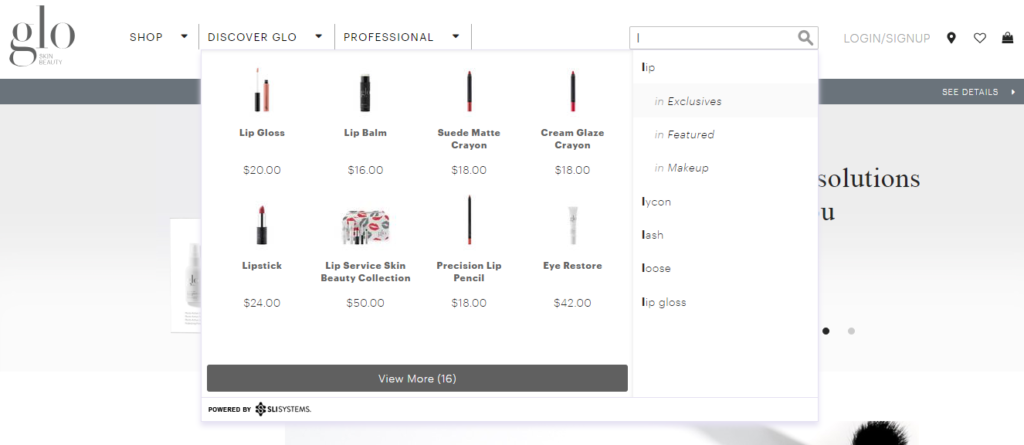
SLI Rich Auto Complete visually displays the most relevant product names, categories and images as users type into the search box, reducing the number of clicks from search to purchase.

In fact, relevancy is crucial to optimizing many online merchandising functions. Your product recommendations engine, personalization features, and even your SEO efforts can be dramatically improved with greater relevance.

Is Your E-commerce Website Up to P.A.R.?

You understand why Performance, Aesthetics, and Relevance can have a big impact on your online sales. Now it’s time to evaluate your e-commerce website.

You’ve got a prioritized to-do list instantly ready for you. The P.A.R. Checklist provides easily actionable recommendations for each element. And each best practice is ranked in priority order.

Improve E-commerce Conversion Rate with 5 Critical Enhancements

Posted by Bob AngusDecember 13, 2017Customer Experience, eCommerce, Merchandising, Navigation Tips, Personalization, Recommendations, Rich Auto Complete, Site Search Tips, User Experience

Your e-commerce business is full speed ahead. But that’s not good enough. You’ve been tasked with higher and higher growth expectations.

ecommerce sales buy button

And now you have even more at stake. You are likely spending more and more to drive traffic to your site. You can’t let that big investment in advertising fizzle with diminishing ROI.

Good news. You have a high-impact driver you can execute against right now.

Improvement to your conversion rate is the greatest lever at your disposal. Even a small conversion rate increase can generate big revenue gains.

This comprehensive guide to e-commerce conversion rates helps you build a winning game plan for your online store, including:

  • What e-commerce conversion benchmarks to use
  • How to analyze your conversion rate
  • How to optimize 7 critical conversion rate drivers

Let’s start by understanding how you can best measure conversion rate.

What is a good e-commerce conversion rate?

Online retailers track many conversions throughout their customer experience. Any action goal can be considered a conversion. A click on your email, a click on an advertisement, or a newsletter signup are considered conversions.

The conversion metric you really want to focus on is a purchase. Your sale conversion rate is calculated by simply taking the number of purchase transactions and dividing that by the total unique visitors to your online store during a time period.

That’s pretty straightforward. But what is a good conversion rate to set as your target goal?

This 2017 holiday shopping to date, average e-commerce conversion rates are showing growth: desktop 4.5% (up 10.6% YoY), smartphone 2% (up 12.3% YoY), tablet 4.3% (up 9.3% YoY), according to Adobe Digital Insights.

And Amazon boasts an amazing 74% conversion rate for its Prime members and 13% for non-Prime visitors back in 2015, based on a Millward Brown Digital study. In comparison, the same study showed the average conversion rate for Top 500 merchants is 3.32%.

Are those the right conversion rate benchmarks for you? Probably not.

It is interesting to set an aspirational goal against Amazon or other leaders that compete in your industry. However, you are best served by benchmarking where your own store is now. Then set a course for continual improvement to drive conversion optimization goals and strategies.

Measure your overall sales conversion rate for your entire website the past year. That’s your starting point. That’s the number you want to beat in 2018.

Then the key is to drill down into your sales-rate performance for different contributing factors and customer segments. That’s where your actionable insights really happen.

Now let’s explore the best way to analyze your conversions to enlighten your growth plans.

How You Can Analyze Your Conversion Rate

Conversion rate is a very useful metric to track. But the real impact to your e-commerce business is analyzing and understanding what is driving your performance and why.

That deeper conversion analysis helps you:

  • Determine what segments are contributing to your overall conversion rate
  • Identify the root causes
  • Prioritize and track success of your optimization game plan

The first step is to build a dashboard that tracks and trends your conversion rate. Google Analytics and many e-commerce platforms provide a dashboard that lets you see your conversion rate over different periods of time.

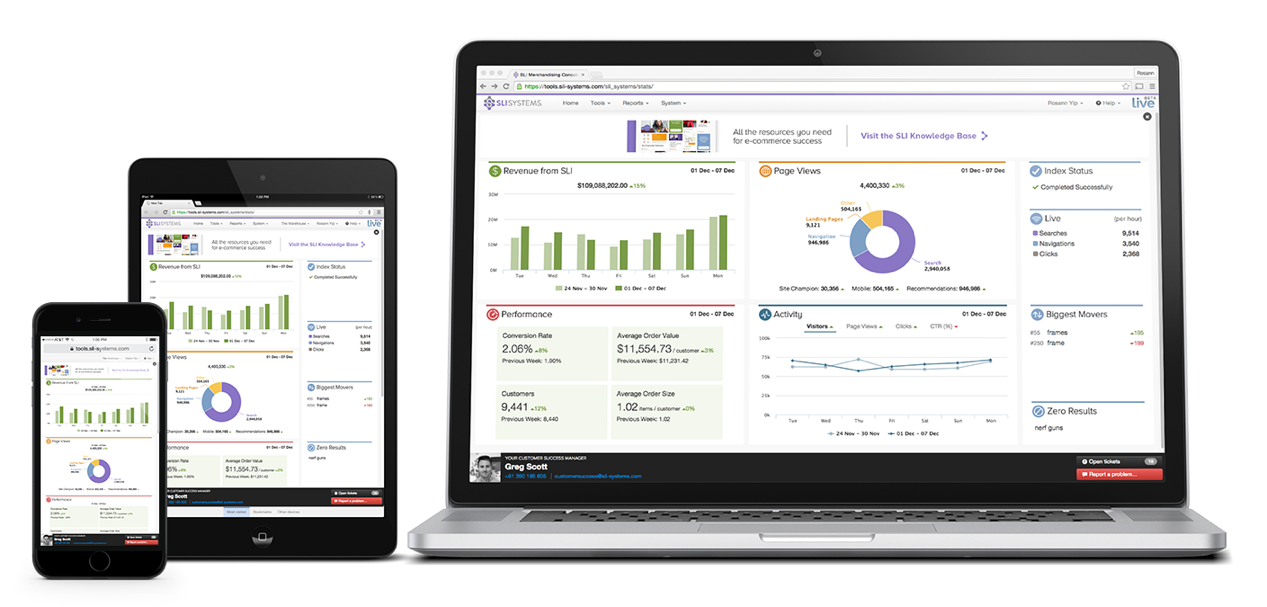
SLI Systems also has a very powerful dashboard built into the Commerce Console. You get an helpful view of your shoppers’ activities and conversion rate through their shopping journey.

Ecommerce conversion rate dashboard - SLI Systems Commerce Console

Or you can simply use a spreadsheet. Capture your monthly unique visitor metrics and plug in your corresponding sales transaction data to calculate your conversion rates. Again, simply divide transactions by unique visitors to get the conversion rate percentage.

Next you’ll start the drill down analysis.

What Is Driving to Your Conversion Rate?

Your overall conversion rate calculation is an average. Many different factors drive that single number. Some factors contribute significantly more than others. It’s your job to break down those key drivers to find growth opportunities.

Start by segmenting your conversion rate data into categories.

The most common way to split up your data is by different customer audiences. Different types of customers have a different relationship with your e-commerce business. They may also have different purchase intent, which directly impacts your conversion rate.

Your analysis can uncover those segments that likely have differing intent to purchase. Then you can calculate the conversion rate for each segment. And you’ll see which audiences have the greatest influence on your overall conversion rate.

Here are several helpful ways to segment your audience.

  • First-time visitors vs. returning visitors – First-time visitors often make up a big majority of online traffic. But it stands to reason that those first-time visitors who may be unfamiliar with your brand are less likely to purchase than returning visitors.
  • Acquisition channel – Where visitors come from can help tell you how likely they are to buy. Segment by channels like organic search, paid search, social media, advertising, and affiliates.
  • Device – The device visitors use may indicate different intent as shown in the Adobe data insights mentioned earlier.
  • Location – Are you a global brand or do you sell domestically? Traffic coming from different international locations may be browsers, not buyers.
  • Other demographics – Google Analytics can help you analyze other demographics like gender, age, or interest affinity groups.

Other popular segmentation you can use to uncover key conversion rate drivers include:

  • Product category – Conversion rates may be higher for different products based on the volume sold, price range, or deliverability. For example, you would expect the online conversion rate to be lower for expensive furniture than easily shipped lower-priced home decor.
  • Promotions and seasons – Different discounting periods or traditional shopping seasons may affect conversion rates.
  • Website elements – You can track conversion rates by different elements of your customer experience.

Make sure you look at your conversion rate over time. Don’t just take a single snapshot in time to make your decisions. A single data point or particular shopping season can skew what you see and may lead you to incorrect decisions.

Calculate your segmented conversion rates into monthly or weekly increments. Go back in time as far as you can. Then you can chart trends and make year-over-year and month-over-month comparisons.

Starting with one segmentation method is also recommended. Add that to your dashboard. Keep tracking that segmented data to see how you are performing. Then expand your analysis to other segment categories.

Your conversion rate analysis helps you find your growth opportunities. But it doesn’t tell you exactly why those different segments are performing the way they are.

Why Is Your Conversion Rate Increasing (or Decreasing)?

Now you can dig a little deeper to understand why your conversion rate is increasing or decreasing. Find the root cause by adding a second dimension to your analysis of a particular segment category.

What is the behavior or characteristic about a given segment that is likely causing sales to go up or down?

The best way to do this is to add one of the other segment categories as that additional dimension. For example, if your primary segmentation is based on acquisition channel, then you can drill down using product category purchased or device used or location demographics.

Analyze that data. Look for trends. Make comparisons.

Maybe your conversion rate was 6% coming from Google Adwords. But the Adwords conversion rate for desktop users was 8% versus 2% for smartphones and 4% for tablets. Now you have an understanding of how the device contributes to that channel’s conversion rate, taking the volume into consideration.

And how did that paid search channel breakdown compare to your other channels? For example, smartphone conversion rate maybe 4% from your emails and 1% from social media.

Identify big shifts and changes. Discover anomalies.

Using the Google Adwords example again, maybe starting in July you see an increase from 5% to 7%. And that higher rate seems to have continued for several months.

Then hypothesize. Ask “why?”

That increase in July may have corresponded with an increase in your PPC bids or budget. Or maybe you launched a new set of keywords for a hot brand. You could hypothesize why the increase happened and continued.

This additional lens into your primary segmentation can uncover the root cause. You are now ready to take action with that data-based knowledge in hand.

How to Prioritize Your Optimization Plan

You are armed with lots of data and valuable analysis. You can now more easily prioritize the action you want to take and build an optimization game plan.

Typically you’ll want to pick one to run every quarter. That single-focus test approach helps you isolate the incremental sales and conversion rate you’ve achieved. You also give enough time to achieve improvements, validate the results with enough traffic, and eliminate most anomalies by running the test for a longer period of time like two or three months.

Which tests should you run first?

It’s always good to start with the test you feel can have the biggest financial impact. Estimate the revenue impacts for all the top activity ideas you have identified. How much would sales increase by each incremental tenth of a percent increase in conversion rate?

Then look at the level of effort and investment cost of running the test. If an activity may have a high-revenue upside while requiring little extra work, then you’ve found a great place to start.

Let’s look at some of the highest conversion boosting opportunities you have.

5 Critical Enhancements for Bigger E-commerce Conversion Rate Optimization

The best conversion rate optimization tests consider the customer experience journey. Understand the different interactions from the first moment a shopper lands on your website, through finding and choosing a product, and all the way to checkout and completing the purchase.

You make many different enhancements to your online customer experience. Here are five design improvements proven to increase conversion rates:

autocomplete site search to increase ecommerce conversion rate

1. Win More High-Purchase Intent Shoppers

Arguably one of the best ways to increase your conversion rate is to win more sales from visitors who already have a high intent to purchase. So how do you know that someone comes to your site with the intention of buying?

Shoppers signal their intent when they use your site search.

SLI studies have found visitors that use search buy at a 2.7x greater rate than visitors who just browse.

Make the act of searching even easier by enticing those visitors who have a specific purchase in mind.

Position your search box in the header and in the center of every page. Provide an engaging prompt to search in the search field. And make the box large and distinctive from other forms. Don’t tuck the search box into the corner or hide it behind a magnifying glass icon that searchers have to click.

Speed up the search by suggesting possible terms as visitors start typing the first letters of a keyword. This autocomplete functionality draws from your product feed to indicate that productive search results are available. Better yet, you can rank the autocomplete terms by the most popular keywords by clickthrough and purchase data, not just keyword matching.

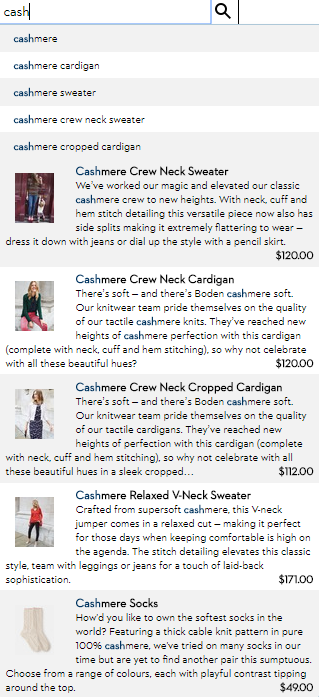
Pro Tip: Enhance your autocomplete feature by presenting specific products in the search suggestions. Display the product name, image, and price for the most relevant products. Boden speeds up the purchase process doing just that.

This enhanced functionality helps your visitors identify products they are looking for even more quickly. Then send them directly to the product page. Skip the extra category page browsing. Bypass the search results page. Get high-purchase intent shoppers directly to a product.

2. Wow Visitors with Visual Merchandising

The key elements of a product landing page are designed to showcase the product so that customers can easily make a purchase decision – product title, descriptions, specs, purchase options, ratings, reviews, and, of course, pricing and discounts.

This product feed information gives shopper the facts. However, we humans actually make purchase decisions emotionally much of the time. Shoppers love the wow factor. That’s where online visual merchandising excels.

e.l.f Cosmetics shows off their eye shadow products with beautiful images and attractive videos from Instagram. These social media images inspire shoppers. Better yet, many of the pictures are user-generated content from customers.

ecommerce visual merchandising with instagram - e.l.f. Cosmetics

Similarly, fashion sites often display extra images since shoppers can’t actually hold the item in their hands. Visual merchandising best practices, like model videos, product pictures from many angles, and custom images that change with color selection, can help drive more sales.

Pro-Tip: Help customers visualize what their experience will be after they make the purchase. Show action shots and product videos that depict how the product is used, what the buyer gets in the box, or how to install it.

3. Merchandising that “You May Also Like”

The top job of merchandising is to promote the products a visitor is most likely to buy. One of the best online merchandising techniques is to use a “You May Also Like” product recommendation strategy on the product page.

Showing alternative products that are similar to the product being viewed is proven to increase conversion rates.

Unfortunately, many e-commerce sites determine the recommended products using simple category and keyword matching. This approach focuses on the product feed data only.

Fortunately, online stores have massive amounts of behavioral and transactional data in addition to product feed data. “You May Also Like” product recommendations that include actual customer behavior are more likely to convert.

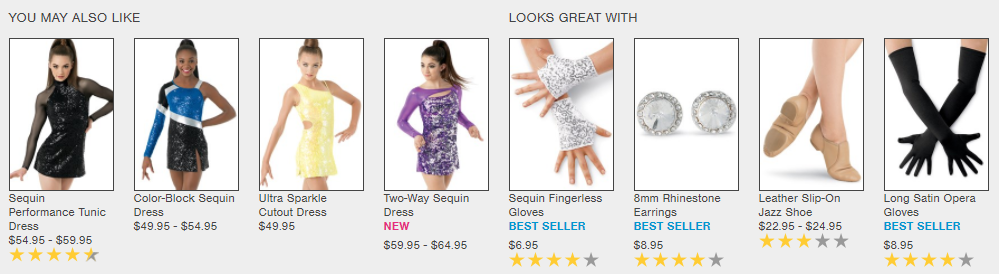
For example, Dancewear Solutions recommends several contemporary dance dresses on a product page. It also merchandises complementary products that go with the dresses based on what customers had made purchases in the past.

ecommerce product recommendations engine - Dancewear Solutions

Pro Tip: Customers love a personalized shopping experience. In-store salespeople give a personal touch to help customers get exactly what they want. Now artificial intelligence is helping online stores create a similar personal customer experience.

E-commerce personalization uses machine learning to sift through massive amounts of behavioral data to quickly provide smart product recommendations. Contextual personalization can display products that customers are even more likely to buy based on gender, size, brand preference, or the shopper’s location.

4. Help Shoppers Get What They Want Faster

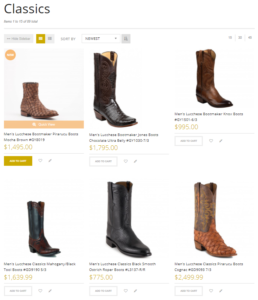
ecommerce merchandising category page buy now button - Allen's Boots

Smart e-commerce companies create as few steps as possible to get to checkout. Customers are more likely to complete their purchase when you allow visitors to add products to shopping carts or go to checkout directly wherever they are on your site.

Don’t limit the use of “Add to Cart” or “Buy Now” buttons to your product pages. Anywhere you merchandise products, even your homepage, is an opportunity for customers to commit to purchasing without an extra click to the product page.

Pro Tip: Include “Add to Cart” button directly in the your category pages and search results pages. That’s what Allens Boots did. This quick enhancement helps speed the conversion, particularly if your customer knows exactly what they want.

5. Eliminate Rational Roadblocks with Content

Don’t rely solely on the product description provided by the manufacturer to influence a buyer. Inform your customers about what a product can do. Offer how-to articles, demo videos, and comparisons against other similar products.

Content has a strong influence on e-commerce conversions both rationally and emotionally. How-to content helps remove rational doubts or questions that make shoppers hesitate. Video content in particular also has an emotional trigger for sales as customers can visualize themselves using the product.

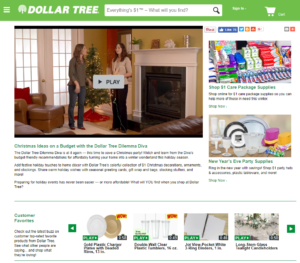
Dollar Tree uses videos to show shoppers curated product ideas and demo top-rated customer favorites.

video merchandising for ecommerce - Dollar Tree

Pro-Tip: Include a set of Frequently Asked Questions (FAQs) on the product product. Ask your customer service team for questions that they get about the product. Review common reasons for returns. Think of questions you would have if you were going to pay your own hard-earned money. Then create a strong set of FAQs written in the language that customers use.

There are hundreds more conversion-rate tips that you can test. Make sure to download these best practice e-books to find new ways you can improve your conversion rates:

  • Get the SEO-Driven Revenue You’re Missing

  • The Big Book of Site Search Tips

  • Use Creative Content to Convince Online Shoppers to Buy

  • The Big Book of Navigation Tips

Image Credit: Wikimedia Commons


E-commerce Merchandising: The Ultimate Guide to the Newest Techniques

Posted by Bob AngusNovember 16, 2017Analytics, Artificial Intelligence, Customer Experience, E-commerce Research, eCommerce, Merchandising, Navigation, Navigation Tips, Personalization, Recommendations, Refinements, Resources, Rich Auto Complete, Site Search, Site Search Tips, Testing, User Experience

E-commerce merchandising has one goal in mind – connect shoppers with the right product so that they “Add to Cart” fast. Merchandise well and you’ll increase conversion rates and boost your average order values.

But execution is always incredibly difficult.

You have different visitors with different mindsets toward actually buying. Those shoppers are engaging with different parts of your website through their shopping journey.

On top of that, you have to wrangle massive SKU quantities, constant product and pricing changes, and frequent promotions.

E-commerce merchandising is complex.

It is no longer as simple as choosing the products you want to move, setting an attractive discount, and plastering the offer all over your valuable real-estate.

You need to figure out what each shopper is most likely to buy right then.

The leading retail brands are employing the newest e-commerce merchandising techniques to successfully unlock the complex code to winning more sales. They approach effective merchandising along three dimensions:

  • Understanding different customers need different merchandising strategies
  • Deploying the right techniques along the shopping journey
  • Delivering the right product that is most likely to be purchased

Plus, they’re using data to drive that complex decision at scale. And you can too.

Let’s breakdown what you can do to optimize these three elements… and dramatically increase your sales.

Customer-Focused E-commerce Merchandising Strategies

“Traditional” merchandisers that worked for brick-and-mortar retail stores often had a pure product buying background. They would master the data. But that mastery focused inward to the business for the purpose of increasing unit volumes, maximizing margins, and avoiding too much unsold inventory.

Yes. You still need to successfully manage your product buying to be profitable through your online channel. But you also need to understand what’s pulling through those sales and why.

Today, world-class merchandisers start from a different perspective. They think about the customer first. Then they apply their product expertise and merchandising skills to fit what their customer segments want.

You will want to incorporate specific merchandising strategies to help win these different types of customers – from visitors “just browsing” to your most valuable returning buyers.

Earn loyalty with returning visitors and customers

The first segment of shoppers you should consider are your return visitors and previous buyers. Why? Your conversion rates should be significantly higher than first-time visitors.

Better yet, you have some easily executed tactics available to boost extra sales.

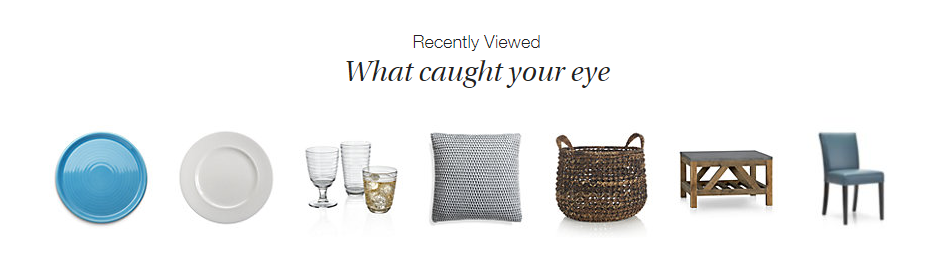
Ecommerce Merchandising Strategy Product Recommendations - Crate and Barrel Home Page Screenshot

Crate and Barrel promotes “Recently Viewed” items on every product page. This makes it super easy for a returning visitor to jump right back to what they were interested in, without having to browse around your site.

This product recommendation strategy also works great on major entry points into your site like the home page or in your shopping cart.

Another source of product data to use for “personalized” products recommendations is your customers’ wish list shopping cart history. These customers have already clearly indicated exactly what they want. So you should boldly give it to them.

Other uses of your visitors’ shopping history include:

  • Highlight a special promotion for wish list items
  • Recommend complementary products that go great with a recent purchase
  • Show a reminder for abandoned cart items
  • Add an easy “Order Again” button
  • Create custom product landing pages for shoppers who clicked your retargeting ads

All of these online merchandising strategies can help grow loyal, repeat buyers and encourage returning visitors to buy more.

But what if someone is a first time visitor? Fortunately, there is another segment of high-value shoppers that you can convert with powerful merchandising.

Win high-purchase intent shoppers

Certain customers come to your site ready to buy. The question is: Are they going to buy from you or go to your competitor?

Who are these high-purchase intent shoppers? They are the visitors that use your site search functionality. SLI studies have found that visitors that use search buy at a 2.7x greater rate than visitors who just browse.

Search users have indicated exactly what they want. They often include a specific product option like a color, size, or material in their query. So you need to quickly get them to the product page for the best selling match.

Don’t make these folks navigate their way to what they want. No extra clicks. You’ll likely lose them even if you have a great price and an amazing free shipping offer.

In fact, there is one merchandising technology that dramatically helps you convert these must-win buyers – autocomplete.

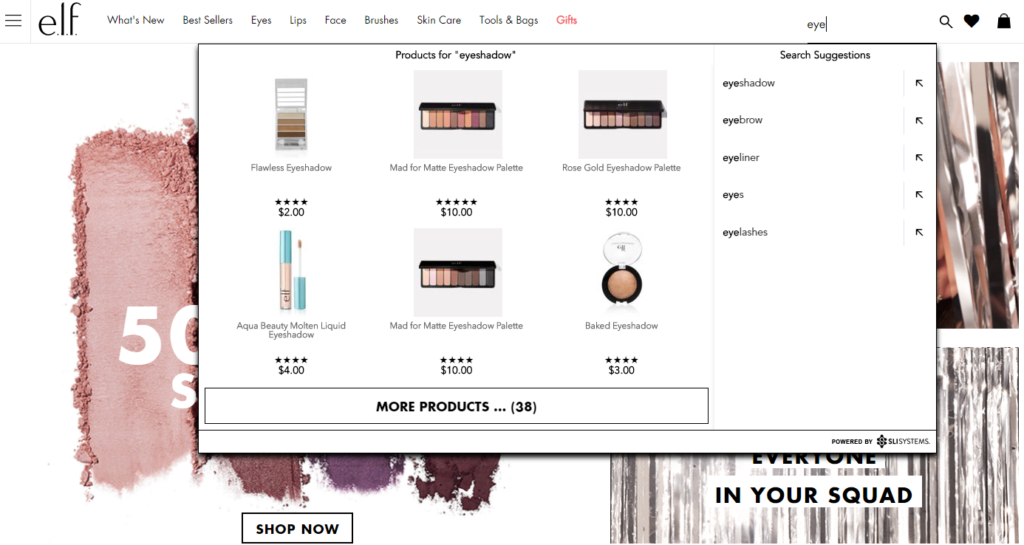
Visual Merchandising Autocomplete E-commerce Site Search - e.l.f. Screenshot

A great autocomplete example is e.l.f Cosmetics. They go beyond simply displaying matching text keywords as the searcher types. They display specific product results while adding visual merchandising with appealing product images.

You are more likely to convert these shoppers by showing a product, not a category. Again, less clicks and browsing is what you want.

That’s just the start. Lock in more sales from high-purchase intent shoppers with other tactics that use search data to improve merchandising.

Now let’s turn our attention to another customer segment, who likely make up the majority of your traffic.

Convert browsers into buyers

Some customers have an idea in mind but may not be ready to buy. In a brick-and-mortar retail analogy, these folks are the “No thanks. Just browsing” shoppers.

They may be “looky loos.” However, your merchandising can effectively nudge these visitors toward a purchase.

Classically online retailers attempt to attract these browsing shoppers by promoting categories or themed product groups like seasonal or clearance categories. However, this approach just keeps them clicking through your site and you hoping they stumble on something that sparks a sale.

And that’s one of the big reasons why many visitors leave an online store with an empty cart. The merchandising kept them in a browsing mindset, not a buying one.

Do not be afraid to promote specific products. Smart online merchandisers are now curating and promoting sets of individual products, not general categories, on their highest traffic pages.

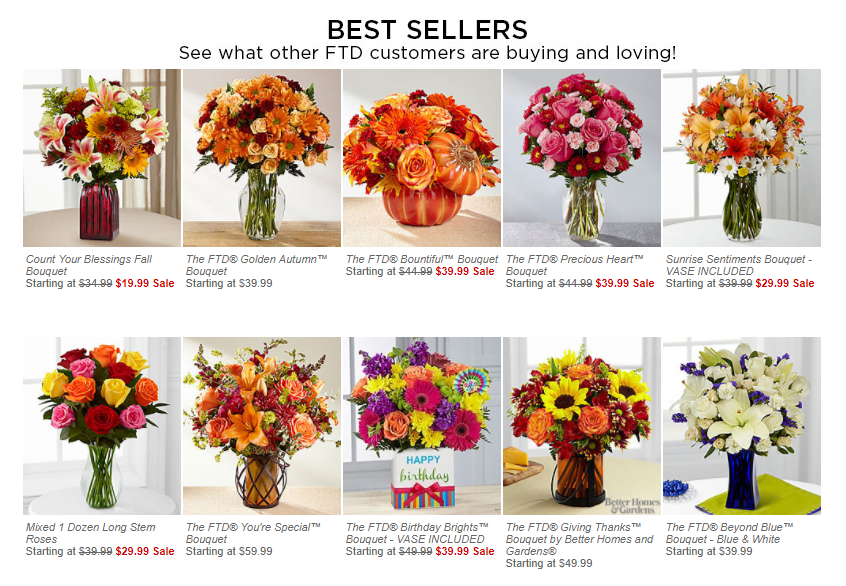
Product Recommendations Strategy - FTD Best Sellers Screenshot

FTD.com gives a big portion of their home page to promote their Best Seller products. What those product recommendations do is switch the shopper to an active “Oh. I need that too.” mindframe. And out of a passive “just looking” mode.

Tap into your massive SKU list to find the top sellers, new products arrivals, seasonal products, or specific sale items. Use your merchandising data analysis expertise.

Then continually test which products are getting the most clicks and conversions.

Simply promoting specific products can help increase the possibility of an impulse purchase, or more likely, can create a desire to come back to your site when they are ready to buy.

Now that you’re thinking from a customer perspective, let’s take your merchandising strategies to the next level. You can optimize the customer experience by where those visitors are on your site.

Merchandising Best Practices For E-commerce Websites

There is a flow to how people shop.

A brick-and-mortar retail store starts merchandising right up front as you walk in the door. Then throughout all the aisles, displays, and checkout counters. The whole store experience is intentionally designed to drive more sales.

An online customer experience also has its flow. Your e-commerce shopping journey can be designed to maximize sales too.

Every part on your site is a merchandising opportunity – the home page, navigation menus, category pages, product pages and your checkout pages.

Hundreds of online site search tips and navigation best practices have been published that can have a big impact on your sales.

Here are the top online merchandising tactics for your e-commerce website that are red hot right now.

Visual Merchandising on Product Pages

Let’s start where customers most often click “Add to Cart” – the product page.

Many elements of the product page help merchandisers showcase that that this is the right product at the right price – product title, descriptions, specs, purchase options, ratings, reviews, and, of course, pricing and discounts.

This information appeals to the rational part of your shopper’s brain.

The part that usually makes the ultimate buying decision is the emotional part of the human brain. That’s where online visual merchandising excels.

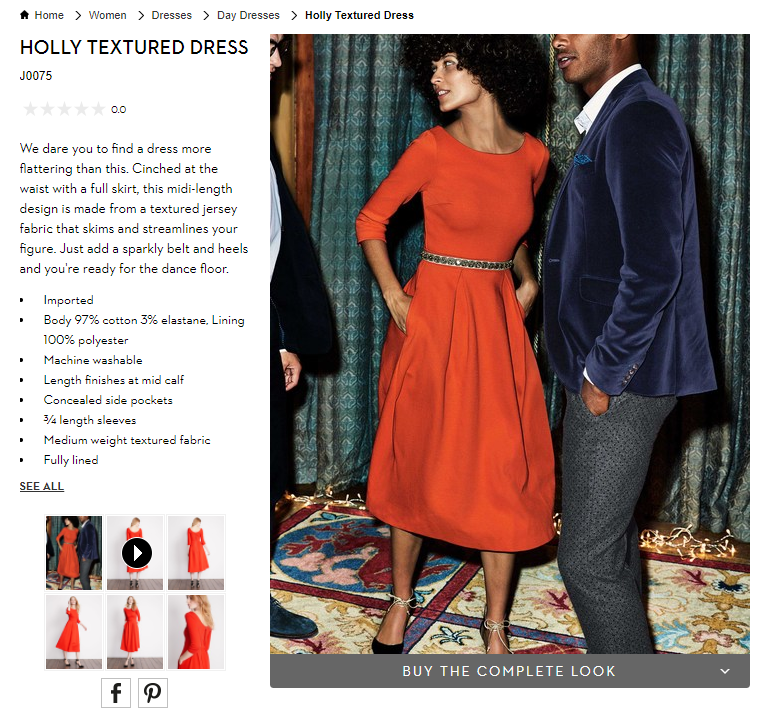
Ecommerce Visual Merchandising - Boden Product Page Screenshot

You also want to show off your products. Boden uses model videos, shows products from many angles, and switches custom images by color selection. These extra images give shoppers context when they can’t actually hold the item in their hands. You want them to easily envision what their experience will be after the purchase.

To help shoppers visualize, update product pictures instantly when they select different options like color and allow shoppers to zoom in to the smallest details.

Also, show action shots and product videos that depict how the product is used, what the buyer gets in the box, or how to install it.

Now augmented reality applications are being tested too. From arranging virtual furniture in a picture of your home to trying on different outfits in selfie mode on your smartphone, this next generation of visualization is an e-commerce merchandising innovation you will want to explore.

Personalized Product Recommendations

Product recommendations have long been a valuable online merchandising tool. You can tune your recommendations strategies using best practices for each different page on your site. Now recommendations technology is getting even smarter.

Smart product recommendations are personalized to the individual shopper in real-time. The products displayed adjust automatically based on user activity, preferences, and sales trends.

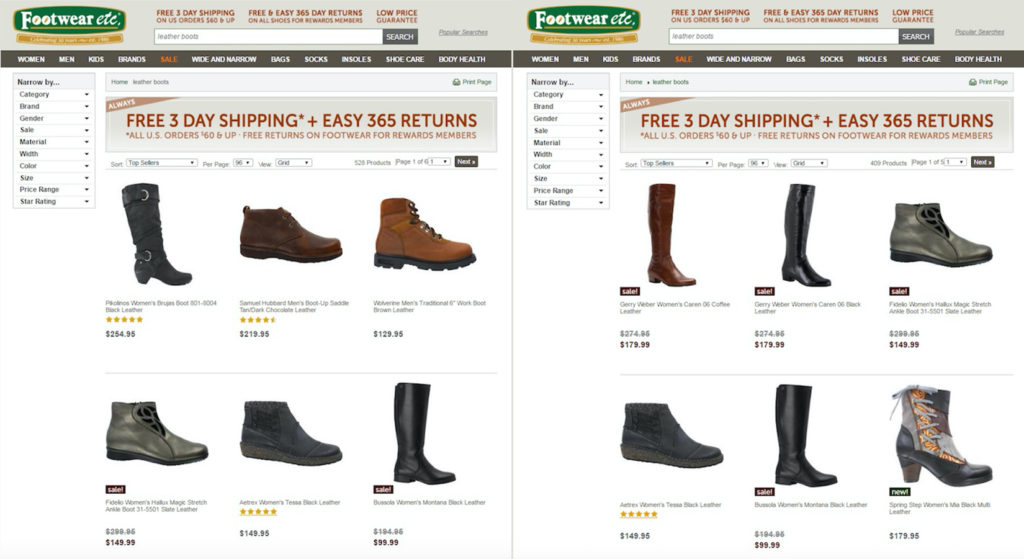
E-commerce Personalization - Footwear Etc Screenshot

Footwear etc. adds a level of personalization based on gender. Product recommendations, search results and category pages use the products or pages previously viewed by the shopper. If a shopper starts out browsing women’s sandals, then recommended product results would boost women’s shoes or accessories on subsequent pages. The screenshot above shows before and after results when a shopper searches for “leather boots”.

This type of contextual personalization can be tuned for many different facets, including gender, size, brand preference, or location.

Not only are these higher-converting recommendations displayed in real-time, but this personalization works for first-time visitors just as well as returning shoppers.

Complementary Sales in the Shopping Cart

You also want to extend those product recommendations to your shopping cart and checkout experience. Just like your grocery store places a rack of candy and magazines in the checkout line, online stores have a great opportunity to capture extra sales right at the point of purchase.

Only for online stores, this upsell merchandising strategy can be even more profitable.

Again, you can personalize the products you merchandise based on real-time data. You know what products they have added to their cart. You know the other products they have viewed.

And most importantly, you know what other products complement those items.

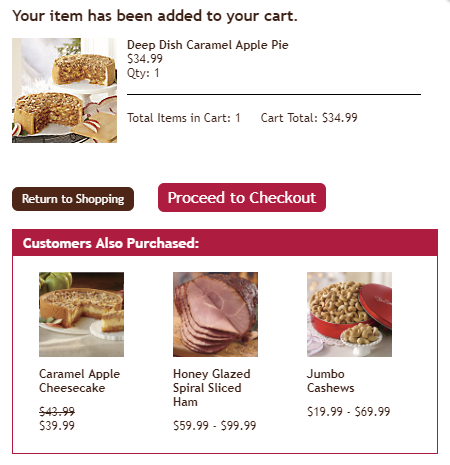
Online Merchandising Product Recommendations in Shopping Cart - Swiss Colony Screenshot

Swiss Colony promotes “Customers Also Purchased” at the beginning of their shopping cart experience.

Other popular recommendation strategies in the checkout experience are “You may also like” and “Complete the set.”

Just be careful to use complementary products. Do not necessarily use the exact same product recommendation logic as your product page. You don’t want to accidently promote an alternative to the product your customer has already decided to buy.

At best, that mistaken recommendation is ignored, meaning a wasted upsell opportunity. At worst, your customer stops and doesn’t complete their order because now they’re not sure if they’re buying what they really want.

So make sure that you are tuning the product recommendations in your shopping cart to complementary products that add to your sales, not disrupt them.

Now let’s use powerful data analytics and technology to deliver the best results without extra work.

Merchandise the Right Product to Win the Sale

You understand the customer. You know how to merchandise for each step of the online customer experience.

Now we can put it all together with great data and your product expertise to personalize the shopping experience… and get the sale.

Data Mining for E-commerce Merchandising

Your website analytics, your product systems, and your e-commerce platform transaction system combine to provide an astonishing array of data. That data can be mined and used to fuel your merchandising decisions.

You just need to look at what you have.

Data you know about your customer:

Your website analytics software offers useful demographic information about your customers and deep insights into what they are doing on your site.

Here are some of the most useful data types that can help your e-commerce merchandising strategy:

  • Traffic Channel: Where did your visitor come from?
  • History: Are they a first-time visitor or returning shopper?
  • Behavior: Where did they go on your site and what did they do there?
  • Gender: Are they female or male?
  • Age: How old are they?
  • Device: Are they on a mobile device, tablet or traditional computer?
  • Geography: Where in the world are they?

Now pair that up with what you know about transactions stored in your e-commerce platform.

E-commerce Platform Data:

Every past purchase provides information that helps you understand what customers are likely to buy in the future.

  • Product Sold: What product exactly is purchased?
  • Options: What sizes, colors, styles, and other product options are purchased?
  • Price: How much did it cost and what was the discount?
  • Order quantity: How many did customers buy per purchase?
  • Time/Date: When did the purchase occur?
  • Payment Method: How did they pay – credit card type, PayPal, on credit/layaway?
  • Shipping: How did the customer want this delivered?
  • Abandoned Carts: What products are selected but never actually purchased?

Best selling products should always be at the top of your merchandising list. But there is even more product data available to you. And that’s your merchandising experience.

Data from your experience:

Lastly, your own experience and intuition adds the special sauce to your merchandising data recipe.

  • Social trends:What’s hot right now with your customers?
  • Brand trends: What product brands can help pull in buyers?
  • Seasonality: What holiday or seasonality drives purchases?
  • Inventory: How much is in stock?

Compile all of this data, analyze it, and determine what products your customers are most likely to buy right now.

However, the challenge with the plethora of available data is… there’s so much data. It’s incredibly difficult and time consuming to effectively wrangle all the valuable data to merchandise to every single visitor on every single webpage for all your products.

That’s where new artificial intelligence technology helps.

Artificial Intelligence Fuels E-commerce Automation

Automating your data processing to power real-time merchandising decisions is quickly becoming a must-have for online retailers.

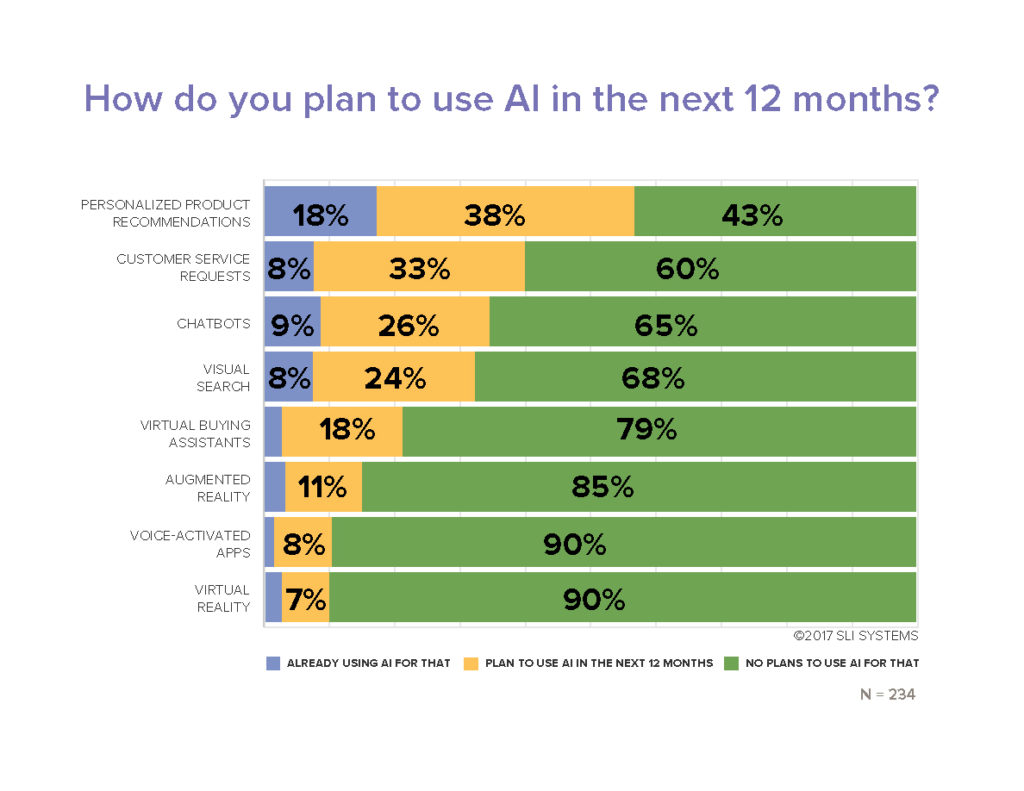
Fifty-four percent of e-commerce sites have already implemented or plan to add AI in the future, according research from the Q3 2017 E-commerce Performance Indicators and Confidence Report. And 20% expect to add AI within the next 12 months.

So what is the most popular applications for AI right now?

Not surprisingly, merchandising techniques are at the top. Personalized product recommendations is number one. Fifty-six percent of online retailers report that they are already using artificial intelligence in their product recommendations strategies (18%) or plan to implement within the next 12 months (38%).

Other merchandising solutions and visual merchandising technologies are also being accelerated thanks to AI. Virtual buying assistants, chatbots, visual search, augmented reality (AR), and virtual reality (VR) are all designed to help shoppers purchase the right product fast.

Ecommerce Artificial Intelligence Applications Research Chart - EPIC Report Q3 2017

More automation definitely helps maximize results in less time. And in new ways.

But is artificial intelligence going to take your merchandising job away? Absolutely not.

You won’t hand over the keys entirely to your automation systems. You need to maintain a mix of merchandising techniques and always be testing to get the maximum results.

Testing Your Merchandising Strategy Mix

“Always be testing” is more than just a matra. It’s a requirement to truly maximizing your conversion rates and your total online sales.

Most every online retailer tests performance of different on-page merchandising elements. That helps determine your optimal page design. For example, a simple A/B test of your search box location can pay off big by converting high purchase-intent shoppers.

Or determine how many products should be displayed in your product recommendations. Pro tip: SLI Systems’ merchandising best practices show that 4 or 5 products are ideal. And that scrolling carousel presentation of more products doesn’t generate significantly more incremental sales.

Another high-impact test determines the best rules for your site search and product recommendation results. Keyword matching algorithms alone likely do not give your shoppers the most relevant product results, which lowers your conversion rates.

Merchandising-savvy online retailers use a prioritized mix of multiple rules to drive the most sales. They combine artificial intelligence results with pre-defined tuning rules, product and category keyword matching, and sales leader products to generate the maximum online revenues.

More E-commerce Merchandising Tips

The key to your online merchandising success is to figure out what each visitor is most likely to buy.

It’s not easy. But you can drive many more sales leveraging a deep understanding of your customers, the latest technology, and the leading edge online merchandising strategies.

We’ve shared the newest merchandising techniques here. And you have many more proven strategies and tactics available to you. Make sure to grab the hundreds of site search best practices, e-commerce navigation tips, and watch what leading retail brands are doing in these online merchandising webinars.

All Things Amazon and Personalization Prevail at SLI Connect NYC

Posted by Chris Brubaker, Chief Marketing OfficerNovember 9, 2016Conferences, eCommerce, Personalization, Search Conferences, Site Search, SLI Buyer Engine, Uncategorized

sli-connect-2016-top-image

Dozens of e-commerce companies, thought leaders and SLI partners convened this fall at Carnegie Hall in New York City for our third annual SLI Connect event. During packed presentations and breakout sessions the group tackled many issues and opportunities for online retailers today. Among the over-arching themes were strategies to compete with Amazon, ways to offer a personalized experience, and best practices in quickly connecting buyers with the products they are most likely to buy.  Here are some highlights.


Many Ways to Compete with Amazon

 E-commerce is growing 12%, offering many opportunities to grow sales. As SLI Systems CMO, I shared ways that online merchants can seize the greatest share of sales, particularly when competing with Amazon, which is “ruthlessly efficient in selling online.” SLI’s goal is to give everyone else the tools that the big players have, so that they can increase traffic, turn shoppers into buyers, and sell more to each buyer. SLI enables a virtuous cycle of predictive product discovery: increased site traffic powers the SLI Buyer Engine to improve user experience; this converts more shoppers into buyers and increases AOVs; then, analysis of user behavior drives new site traffic. It’s the beauty of processing data streams in real time.

eShopportunity Founder Fahim Naim offered methods for retailers to expand sales, using examples from e-commerce trailblazers Jet.com, Boxed.com and Enjoy.com. Offer membership and subscription options to drive engagement, use sample boxes for trials and awareness, and add marketplaces to expand the share of wallet. He also explained key trends to watch, such as:

  • Showcasing video on mobile; customers are 64% more likely to buy after watching a video
  • Increasing personalization via emails; Jupiter said relevant emails drive 18x more revenue
  • Personalizing the site experience, including search, recommendations and displays
  • Ensuring site search considers out of stocks, smart autocomplete, trending items, location
  • Making use of augmented/virtual reality, like apps from IKEA and Converse

 Jeff Fox with SLI partner Feefo shared how customer reviews and ratings provide invaluable business insights for teams, service and products functions across industries. He net out best practices in capturing the customer experience to drive sales, including engaging genuine customers, evaluating feedback and responding, expanding content reach, driving traffic to the website, sharing reviews across social platforms and generating Gold stars to increase Google QS. In fact, Google rewards you for having an improved quality score by lowering your Adword spend – and in some instances, good ratings can cover your ad spend.


From Site to Paid, #SearchIsSexy

 SLI Chief Innovation Officer Shaun Ryan recapped the evolution of e-commerce and site search, beginning in 2001, covering the rise of user-generated content, social media – from Myspace to Pinterest, e-mail marketing, SEO and paid Search/Google Shopping, mobile, personalization, video, and marketplaces. He explained that the future of site search is about perfecting cross-channel selling, buying for profiles (implicitly OR explicitly letting users specify who they are buying for), and for non-Amazon merchants, exploring the (controversial) opportunity to collectively use preferences to offer a better experience for the shopper.

 Panel session moderator Melissa Campanelli, with Total Retail publishing, who earlier spoke on the state of retail amidst digital disrupters (notably the presidential election) (watch video here), asked the panel whether search has lost its edge, like email, the group agreed that search remains important given the strong value/intent to buy when someone uses a site search box. One panelist explained “Amazon is great if you know what you want but it sucks if you just want to browse. Think about how can people browse and find things easily. Not many sites do this well.” Another panelist added, “Search is sexy” – and a new hash tag was born: #searchissexy.

Greg Bauman of e-commerce paid search management firm ROI Revolution shared Google Shopping strategies, including tracking keywords, spending where the cost for CVR is less (such as with umbrellas in AZ vs. OR), and not using up your daily budget before peak hours. It’s important to leverage the data Google gives you when defining your strategy. Optimize your titles with the most impactful keywords at the front of a description (using brand or manufacturer; not company) and descriptions using the fewest number of keywords that will increase views. And, use Custom Labels to make use of best sellers or clearance based on seasonality, price, profitability, and stock location.


Make it Easy and Personalized

SLI customer Everlast teamed with SLI partner Bronto to share a results-packed case study about their use of Bronto’s software for email management. The duo provided a detailed playbook with strategies for list growth and customer segmentation, as well as how lifecycle messaging drives revenue. By executing on a series of well-timed – yet unpredictable – personalized email messages, Everlast has seen 13% list growth in less than one year.

On the future of e-commerce, panelist Marc Lippmann, Managing partner with Debra Lippmann cosmetics, stressed the value of providing shoppable content. That is, enabling shoppers to buy an item, in the moment, while they are looking at commerce content and video. Delivering frictionless mobile checkout is also critical for future success. Marc explained that Apple Pay is revolutionizing mobile commerce, with users calling the feature “delightful!”


To learn more about e-commerce personalization, read how SLI Enhanced Search Personalization™ instantly and dynamically personalizes the shopping experience for both first-time visitors and loyal customers in real time.

Master 2015 Holiday Trends to Clinch 2016 Holiday Sales

Posted by Chris Brubaker, Chief Marketing OfficerSeptember 7, 2016eCommerce, Mobile/Tablets, SEO, Site Search, Site Search Tips, Uncategorized

tipsEvery year it seems like just as we start settling into the summer haze, holiday planning kicks into high gear! Since 31.5% of the $343 billion transacted online occurred in the fourth quarter last year (U.S Commerce Dept), smart retailers can’t afford to nap (for too long) in that beach chair. If those numbers don’t get you on your feet, take this in. During the 2015 holiday season:
  • Non-store sales (mostly online) grew 9%, compared to 1.9% in-store sales growth (NRF)
  • Sales from desktop surpassed $1 billion on 16 days during Holiday 2015 (Comscore)
  • The average transaction size via desktop was higher than mobile and in-store. More than half of consumers increased the amount of shopping they did online this year (NRF)

It’s no time to panic though. You’re right on time. Instead, let’s reflect on key trends from 2015 to ease back into and clinch holiday sales this year:

#1. Consumers actively shop online on Thanksgiving Day (and earlier that week).

This is no longer in question (or taboo). In 2015, online sales increased 21% over Thanksgiving 2014 (IBM). For perspective, this is 58% over the 2012 holiday. On Thanksgiving 2015, AOV was $123 (surprisingly on par with Cyber Monday) and estimated web sales were $1.73 billion (Adobe). Other top revenue days to keep in mind this season include (Custora):

  • Cyber Monday: 6.3% of holiday revenue, $3.07 billion in web sales
  • Black Friday:2% of holiday revenue, $2.74 billion in web sales
  • Sun, Nov 29 (3%), Sat, Nov 28 (2.8%), Tue, Nov 24 (2.7%) and Wed, Nov 25 (2.2%)

PRO TIP: Arm your site with strong promotions early in the holiday season. Last year, Amazon offered Black Friday deals an entire week early. Macys.com Black Friday deals started the day before Thanksgiving, and Walmart.com followed suit offering deals early on Thanksgiving Day. U.S. consumers made 47% of their online purchases by the end of Cyber Monday (Comscore).

#2. Consumers shop heavily on their mobile devices.

While we all know this at this point, the numbers really drive the message home. During the 2015 holiday season, U.S. mobile sales increased 59% to $12.65 billion, which is 18% of U.S. holiday e-commerce sales; and mobile traffic exceeded desktop traffic every day during the season (Comscore). What’s more, based on research from 8,000 brands and 35,000 e-commerce shops, IBM found 31% of Nov/Dec web sales occurred on mobile.

PRO TIP: If they can’t find it, they can’t buy it. Given the space and speed challenges of smartphones, a prominent search box can be the best gateway to quickly finding and buying products on mobile sites and apps. The most important site search feature is relevance. If you provide relevant and fast search results, visitors are more likely to find what they’re looking for and make a purchase (e.g. push the most popular results for a search term to the top of the list).

#3. Consumers are coming to and buying from your site via Search.

Search brought in 29% of retailers’ online sales during the 2015 holiday season, second only to Affiliates (Adobe). Other acquisition methods include Direct (22%), Email (15%) Display (2.5%) and Social (1.4%). What’s more, 56% of searches were conducted on a smartphone or tablet during the 2015 holidays (NRF). Fortunately, if your site meets the following five criteria, you have an excellent starting point to succeed with your search engine rankings:

  1. Your products and content are relevant to the search phrases shoppers actually use
  2. Your site is mobile-friendly
  3. Many highly credible sites link to yours
  4. Your page load times are sufficient
  5. You score well in engagement signals such as bounce rate, time on site, and pages visited per session

PRO TIP: It’s no secret that Amazon wins broad keyword searches. It’s imperative to understand the importance of more specific keyword searches, called long-tail terms. While 70% of search traffic is long tail, most retailers just focus on the top 10-20% of keywords. To find these valuable long-tail terms, review your top site search terms, map these keywords to the products you sell, and then create keyword-optimized landing pages. Shoppers who find your site via long-tail search terms are more likely to find and buy exactly what they want.

Now that you’ve eased back into holiday planning and mastered just three (of many!) takeaways from the 2015 season, here’s some more good news: there are two more shopping days this year between Thanksgiving and Christmas Eve. That’s 48 more hours of opportunities to provide your customers with amazing, personalized online customer experiences to clinch 2016 holiday sales. So recline (for a bit longer), start planning, and enjoy the last few days of summer!

For more tips, check out our guides to Site Search and the Mobile Experience and How to Get the SEO-Driven Revenue You’re Missing.

Infographic: Why Site Search Matters

Posted by Dawn MortensenJune 30, 2016eCommerce, Infographic, Site Search, Site Search Tips, Success Stories

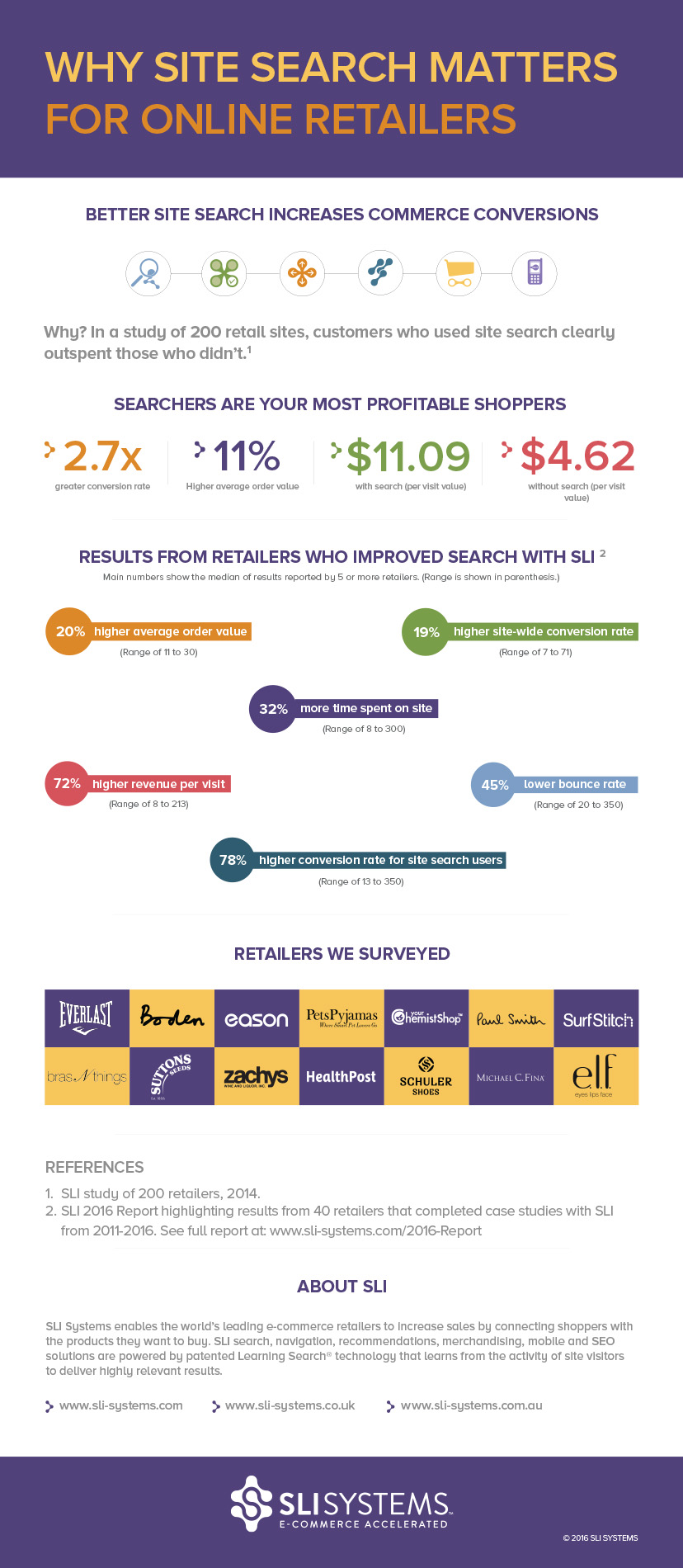
If you find yourself wondering what you can do to increase traffic, revenue and cart sizes for your online retail business, there’s plenty of research to show that the search box is the right place to start.

The below infographic is based on the new report: “How 40 Retailers Transformed Their Businesses Using SLI Systems,” which tells the stories of retailers like Everlast, Boden, Paul Smith and e.l.f. cosmetics. These retailers have implemented advanced site search and other e-commerce acceleration solutions from SLI and have shared their results with us.

As you read the infographic and report, start imagining what’s possible for your commerce site!

Infographic - Site Search for Online Retail

Infographic: Why Site Search Matters for Online Retailers

Hook “Spearfisher” Shoppers for E-commerce Success

Posted by Shaun RyanApril 20, 2016Mobile, Site Search Tips

spearfisherAt SLI, we’ve always known that shoppers who search are the most valuable. Why? Because these shoppers tell you what they want to buy which gives you a fantastic opportunity.

According to the recent Forrester Research report “Must-Have eCommerce Features,” it’s critical that retailers support “spearfishers” – or shoppers who already have a specific product or brand in mind (versus those aimlessly browsing).

To achieve this, Forrester suggests casting one’s hook with easy-to-use site search, including autocomplete, and clear categories to support spearfishers who want to find, buy and move on. Additional research upholds Forrester’s findings as:

  • 8 seconds is the average time visitors spend before deciding whether or not to remain on a site (MarketingSherpa)
  • 43 percent of visitors immediately go to the search box (MarketingSherpa) and searchers are 2-3x more likely to convert than non-searchers
  • 50 percent of users prefer to use a site’s internal search engine, as opposed to navigating the site (E-Commerce Times)

It’s clear that many online shoppers are spearfishers, which is why it is important for retailers to quickly serve up the products they are looking for.

Top Tips to Hook Spearfishers with Smart Site Search

Here are our top tips to help you provide your most focused shoppers with a satisfying search experience that leads to improved conversions and sales:

Autocomplete with Graphics – Type Less, Buy More

WineA critical feature for speed in site search is the ability to show product results with images from the first letter a searcher types. It gives shoppers one-click access to products they want to buy, reducing the number of clicks from search to purchase.

For even better guidance, also show search suggestions based on category, brand or department to let shoppers quickly jump to the right section of results. For example, a search for wine at Fortnum & Mason immediately shows popular choices and categories for wine gifts, wine glasses, wine and cheese, etc.

Moreover, allow users to preview products of interest right within the autocomplete box. For instance, update products displayed when users hover over search suggestions to give them more choices and increase engagement.

Jump Directly to a Results Page When You Know the Answer

Use redirects when you want to take visitors to a particular page on your site, rather than showing search results for a query or class of queries. For example, if there is only one result, it may make sense to take the visitor directly there, rather than showing them the search results page. When visitors type in a specific product or SKU numbers, take them directly to the product page.

Create Landing Pages Related to Specific Keywords

Sports UnlimitedFor some popular search terms, you may want to redirect users to a specific site search page tailored to that search keyword. For example, you may already have landing pages dedicated to particular brands. When visitors search for specific brands, you can send them to the related brand page instead of a generic search results page.

For example, Sports Unlimited serves up a landing page for any Under Armour brand searches. We recommend examining your site search reports to identify the most popular searches. Then consider whether you can provide a better experience by having dedicated landing pages for some searches.

Optimize the Mobile Experience

Speed and ease are especially critical for mobile “spearfisher” shoppers. Ensure your autocomplete helps you capture sales from your small-screen shoppers with dedicated mobile and tablet designs that automatically display options correctly regardless of device size and orientation.

As John Tomich stated in a recent article for Multichannel Merchant, “A successful mobile interaction with your customer is one in which everything is obvious, easy and fast.” He cites that mobile shoppers overwhelmingly prefer social logins for ease of use. Express checkout and easy payment options are as critical here as with any shopping site.

Learn more about supporting “spearfishers” to accelerate your e-commerce sales by reading our Quick Guide to Better Site Search and Rich Auto Complete solution brief.

Dressbarn Wins Award for Customer Engagement Success Using SLI

Posted by Tim CallanDecember 16, 2015eCommerce, Merchandising, Site Search, Success Stories

rtp cust engageThis year, industry-leading retail magazine Retail TouchPoints recognized 18 innovative retailers with a 2015 Customer Engagement Award. According to Retail TouchPoints, each winner has gone the extra mile to delight, surprise and satisfy shoppers. SLI is honored to be recognized with Dressbarn, the Silver Winner in the E-Commerce Innovation category.

“Customer engagement has become a key focus for retailers striving for success in today’s omnichannel world,” said Retail TouchPoints Editor-in-Chief Debbie Hauss. “The award winners are ahead of the curve and are achieving business success in this increasingly competitive marketplace.”

Among the winners this year, Dressbarn joins retail giants AT&T, Barneys New York, Kate Spade, Kohl’s, Payless ShoeSource and Pep Boys.

Dressbarn Uses SLI Learning Search to Create Great Omnichannel Customer Experiences

A major priority for Dressbarn is to always provide a great customer experience, regardless of the channel. One way the retailer continues its mission is to use SLI Learning Search® (and search data) to offer its customers a unified, seamless experience, making it easy for customers to find what they’re looking for across all channels.

Online

Dressbarn pays close attention to online trends, monitoring site search activity and on-page analytics, to optimize landing pages, PPC ads, email campaigns, site search and more. For instance, this past summer, Dressbarn saw a spike in search volume and conversion on the keyword Camryn dress. Dressbarn used its top-performing keywords report to identify the Camryn dress as a product to feature across channels to take advantage of its recent popularity.

Dressbarn quickly created a landing page using SLI Landing Page Creator™ just for the Camryn dress and then promoted it via the home page, email campaign and PPC ads. With search data in hand, Dressbarn also was able to fine-tune the page’s meta tags for better SEO. Conversion rates and sales soon skyrocketed.

Mobile

Dressbarn also provides its customers with a mobile-friendly experience. To adapt to the physical limitations of the mobile user experience, the retailer implemented SLI Mobile’s prominent search bar (vs. tiny magnifying glass) and easy-to-select refinements on search and navigation pages (e.g. color, size), speeding the shoppers’ path to purchase. The retailer also resizes all images into thumbnails, increasing the page load speed and customer engagement.

On its mobile site, Dressbarn has seen noteworthy results engaging customers and increasing conversion with SLI Rich Auto Complete™. Rich Auto Complete™ delivers a search experience with fast, visual and dynamic results. Shoppers are able to type less and buy more. With Rich Auto Complete, the time it took a shopper to find a product and complete a purchase decreased significantly, and mobile site search usage increased by 25 percent.

In-Store

At Dressbarn brick-and-mortar stores, the retailer offers associates and shoppers an endless inventory of products and information via iPads on display. If a product isn’t on the rack at the time, customers are able to use site search to look up the product, review the product description and get a clear idea of how it would look. This was a unique opportunity to use Dressbarn’s digital properties to make its stores more effective and its customers more informed and engaged.

For Dressbarn, it’s not all about making the sale right at that instant, but about building a seamless and delightful omnichannel experience that creates loyal customers who love Dressbarn and want to have a life-long relationship with the retailer.

Congratulations again to Dressbarn for a well-deserved win.

To learn more about Dressbarn’s winning merchandising strategies, view recent SLI webinar with Dressbarn E-Commerce Marketing Manager Sri PV: Merchandising Matters.

How Online Bathing Suit Shopping Could Save Summer

Posted by Christina StublerJune 23, 2015Merchandising, Site Search, User Experience

Summer is officially here. But before your shoppers can splash in the pool or lounge on the beach, there is one necessary item of attire that must be purchased – a bathing suit.

Is there anything quite like bathing suit shopping? Or should I say, is there anything quite like purchasing undergarments to wear in public in front of friends, their husbands and their children?

Traditionally, beachgoers could look forward to the following shopping experience:

1. Drive to the store.
2. Locate the ever-disorganized bathing suit selection.
3. Find a print and pattern that isn’t revolting.
4. Rifle through racks for the correct size.
5. Head to the fluorescent-lit dressing room walled with multiple, full-length mirrors.
6. Try it on. Hate it and deeply regret not sticking to those lose-weight-get-in-shape New Year’s resolutions.
7. Exhaust all options at that store.
8. Repeat the entire process, losing hours (and a good portion of self-esteem) in the black hole of bathing suit shopping.

Could someone please bring me a mai tai? I’m having anxiety just thinking about this.

Luckily, we live in the era of online shopping. Smart and thoughtful online retailers have the opportunity to transform the bathing suit buying experience into something that feels like a vacation. Here’s how:

1. Showcase your summer selections with editorial-style landing pages. You can create an entire poolside look – hat, sunglasses, bag, skirt, sandals and bathing suit – and drive potential shoppers directly to the tailored landing page by using dedicated URLs in email campaigns, social media posts or pay-per-click advertising.

2. Guide visitors to the perfect suit with a product finder that feels like a personal shopper. By asking a series of questions, you can lead shoppers to a great selection based on budget, style and even body type. For instance, one shopper might want a bikini under $80 to show off her athletic frame while another might want a one piece that will make her look 10 pounds slimmer regardless of the cost. Either way, your shoppers will appreciate your expert guidance.

Screenshot 2015-06-22 09.11.31

3. One swimsuit definitely does not fit all. Make sizing simple and boost buying confidence by including measurement guidelines. Taking Shape does this right with an easy-to-understand sizing chart on its website tsplus14.com.au.

4. At a minimum, visitors should be able to search by style, color and size. But make sure they can also easily see what’s in stock along with ratings and reviews. No point in falling in love with a suit that’s not available in your size, and a rave review (“I look so good in this thing it’s all I wear!”) can help seal the deal.Screenshot 2015-06-22 09.29.16

5. Save the day with in-store pick up. As an online retailer with brick-and-mortar locations, giving shoppers the ability to shop online and find the item at the nearest location is a serious convenience, especially for those who may have delayed shopping until the day before the big swim party.

Let your shoppers save the mai tais for the beach by giving them a bathing suit buying experience that’s truly relaxing!

B2B, It’s Time to Step Up Your Game

Posted by Christina StublerMay 11, 2015eCommerce, Site Search Tips, User Experience

b2b_blue_600x600 You found your niche in the lucrative (albeit lackluster) world of B2B e-commerce. It’s been great. Your clients don’t need anything fancy, you say. You can hum along with a website that walked right out of 2008 and it doesn’t matter. Because really, your customers aren’t here to shop (not in the traditional, show-me-something-pretty way). They just want to buy what they need and get back to work.

But here’s the thing: If you aren’t making it lightning fast and super simple for your customers to find and buy what they want, somebody else will. Somebody named Amazon. As Amazon launches “Amazon Business,” B2B sites would be wise to step up their game. Here’s how to get started:

  1. Start with search. Compared to non-searchers, searchers have an 11% higher average order value and a 2.7 times greater conversion rate, so it’s important and revenue-boosting to listen to what they say. Site search is key. If people quickly move from search to navigation or leave your site altogether, your site search isn’t doing its job. Good site search delivers relevant results fast.


  1. Showcase your expertise. You’ve created a virtual library of case studies, blogs, consumer guides and videos – all with the hope of educating and converting your prospects into customers. But can they find any of it? Andersen Windows is a good example of how to deliver search results with a wow factor. Type “French doors” in the search box, and you’ll get products along with support information, technical documents, photos and videos. Using SLI Learning SearchTM, Andersen Windows makes all of its non-product information incredibly easy to find.


  1. Be open to possibilities. At Spectrum Chemical, the search box invites users to input “Product Name, Catalog Number, Manufacturer, CAS #” – a confidence-boosting move that makes users feel they can’t go wrong. Smart search will allow you to create appropriate synonyms and tune your results so that visitors find what they are looking for, even if they type it in slightly different ways. Technical specifications and measurements are a great example. For instance, if someone typed 2.5, 2 ½ or 2-1/2, you’d want them to get the right results. In addition, features like SLI Rich Auto CompleteTM help people know they are on the right track by showing results as soon as they begin typing.


Remember, your search box is where your customers tell you exactly what they want in their own words. Advanced site search will give you the ability to easily pull reports and spot trends, like your site’s top search phrases and those ending in “no results.” Use this data to tailor your merchandising efforts and make it easier for visitors to find what they want to buy. Because being B2B is no longer an excuse for not delivering the very best to your customers.

Load More

Stay up to date with SLI

Featured Posts

  • Maximize Revenue with Enhanced Product Impact Testing
  • Top Five Ways to Prepare for Peak Season
  • Facets, Facets, Who’s Got the Facets?
  • Personalization: It’s Kind of a Big Deal
  • M is the New E: Mobile Commerce Trends and Predictions

Categories

About SLI Systems

  • What We Do
  • Who We Are
  • Why SLI

Learn

  • Webinars
  • News Room
  • Events

Connect

© Copyright SLI Systems, 2018. All Rights Reserved | US: (866) 240-2812 | Legal