SLI home
User login

A BLOG FOR E-COMMERCE LEADERS

  • Blog
  • Resources
  • Webinars
  • Customer Experience Scorecard

SLI Blog

Cool search box

Posted by Shaun RyanDecember 4, 2011Site Search, Site Search Tips1 comment

Ed Hoffman just pointed out an interesting search box on the LA times site. When you click on the search box it pops up to a larger box and includes a link to their advanced search.
Before you click
LA times box
After you click
LA times big box

As part of our site search tips – we recommend making the search box large enough to handle most of your queries. If you’re just not able to afford the real estate then this is a nice compromise. Note: There are other benefits to having a large search box – the most important being a large search box is easier to find. You want it to be easier to find to encourage people to search because typically people who search will convert 2-3 times better than people who don’t.

I think search is less important on a news site than, say an ecommerce site. I think the LA times approach of having a small search box that gets larger when you click on it is sensible. Nice work LA times!

Read More

5 Quick Ideas for Holiday Merchandising in Search and Navigation

Posted by Shaun RyanNovember 14, 2011Mobile, Navigation, Newsletter, Site Search, Social Media

The process of prepping your online storefront for holiday shoppers begins earlier every year – but there’s still time for last-minute “quick hits” that can help boost conversions and encourage shoppers to browse (and shop) longer on your site. Along with FitForCommerce, we’re presenting several of these quick-hit ideas in a free webinar on Wednesday, November 16 – read on for a sneak peek:

#1: Optimize holiday search terms: Review your shoppers’ most popular search terms from last year, and make sure you’ve matched these terms to the best products. Also, optimize searches that include general holiday-related keywords (like “gift” or “dad present”) to make sure results are relevant.

#2: Use site search as “your ears to the floor”: Site search gives you a real-time picture of what your customers want from your site. Review site search keywords and adjust landing pages and home pages as needed.

#3: Merchandise search and landing pages: Don’t miss out on opportunities to highlight products and special offers when visitors come to search results or landing pages. Create a gift finder that can help shoppers find gifts based on recipient and price, or add a special holiday product category that’s powered by search.

#4: Add holiday messages to navigation and search: Allow shoppers to reorder search results based on holiday-related categories like “top holiday picks” or “best-selling gifts.” Also, promote special holiday deals using banners or other messages within search – such as deals on shipping or free gift-wrapping.

#5: Incorporate mobile and social into the holiday shopping experience: More and more shoppers expect to do some of their holiday gift-buying from their mobile devices, and they want to research products via their social networks. Add social content into search results, and make mobile search and navigation as user-friendly as possible.

Looking for more ideas as you ramp up for holiday shoppers? Register for the November 16 webinar.

Read More

When it Comes to Navigation, Always Find Ways to Improve

Posted by Terry CostaNovember 3, 2011eCommerce, Navigation, Navigation Tips

Over the past several weeks we’ve shared with you some of the advice provided in our downloadable “Big Book of Navigation Tips.” Perhaps one of the key take-aways in the Big Book is that your job of enhancing navigation is never done – there are always more improvements that can be made. Product catalogues, buying trends, and customer behaviors all change, and a good retail site is one that keeps up with these shifts – whether seasonal or otherwise.

In the last section of the book, we provide some tips for how you can keep up with the trends and continuously improve your site’s navigation to engage visitors and convert them into happy customers. Below are a couple tips to get you started. You can find the complete set of these and other tips in the “Big Book of Navigation Tips“.

1. Run multivariate tests to continue improving your navigation — As you go through the process of updating your site navigation, you will need to test, test more, and test again. It’s a good idea to test different layout options, refinements, categories, and results orders to make sure you’re providing your visitors an optimal user experience and improving your chances to convert them into customers.

2. Examine your search logs for site navigation option cues — If you’re having trouble deciding what categories you should select for site navigation, looking at what people are searching for on your site is a great place to start. The search terms visitors are using in the search box is a good indication of how they may want to navigate on your site. For example, if there are a lot of queries with manufacturers’ names then manufacturer (or brand) should probably be a navigation option. If people are searching for waterproof products, consider adding this as a navigation option. Your analytics or site search software should be able to provide this information. It’s also important to look at your analytics on a regular basis, as new trends may dictate the need for new categories.

Read More

Help interrupted users return to their previous session with Search History

Posted by Shaun RyanOctober 6, 2011Color, Newsletter, Refinements, Related Search, Rich Auto Complete, Site Search

In an ideal world visitors will come to your website, find what they want and make a purchase. In the real world only a small portion of users will follow this pattern. Many will get interrupted, distracted, or need more time to make a decision for whatever reason. The search history feature is a simple way to allow users to return to their previous session – and the items they were interested in.

An online storefront needs to make it easier for visitors to get directly to the products or information they want in order to improve the chances they’ll make a purchase and increase their engagement with your brand. Enhancing your site search facilitates this no-hassle experience, and there are many ways to do this – for instance, using Rich Auto Complete, offering related search suggestions, and adding refinements. Displaying a search history is another way to improve your site’s usability and drive sales.

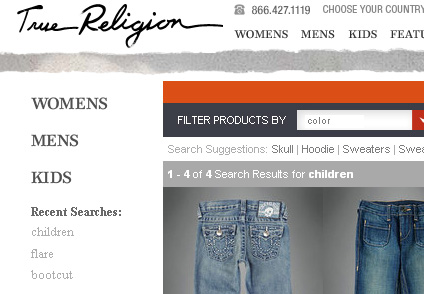
As visitors are searching, you can record their queries and make it easy for them to perform these searches again when they come back to the site without having to re-enter keywords, or even remember what they searched for. Displaying the search history in a clearly labeled “Recent Searches” box can serve as a reminder of their previous session and give customers access to the items they’re interested in with just a click or two. You can add the search history list to your search results pages, as well as product pages and your home page, so that visitors can access this list from anywhere on your site.

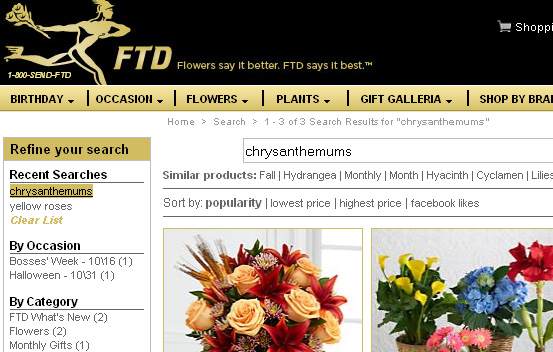
Here’s how the search history works one of our customers, FTD.com. If a shopper searches for “yellow roses,” then “chrysanthemums,” these search terms will appear in the Search History list at the top of the search refinement bar at left, even after they leave the site and then come back:

FTD


A nice feature to offer with search history is the option to “clear list,” as you can see in the FTD.com example above. Similarly, you can also allow visitors to select which terms to delete. Visitors may decide the list is out of date and they may want to delete it; or, if it’s a shared computer, they may not want someone in the same household to know what they’re buying for a birthday gift.

Like FTD.com, the website for True Religion jeans places the search history at top left, just above the list of refinement options:

True Religion

Search history is yet another tool for making your site a little easier to use and a little easier to buy from. If you’d like to add search history to your site, we can help – contact your SLI customer success manager.

Read More

Navigation Tips for Mobile Devices

Posted by Terry CostaOctober 4, 2011Navigation Tips

Most likely there is an increase in the percentage of visitors who access your site from a mobile device – whether to research products they may buy later (on their PC or in the store), or to make a purchase on the spot. Navigation is one of the most important aspects of your mobile site, and navigation links – along with the search box – should get prominent placement on your homepage. Navigation on your regular ecommerce site won’t just transfer over to the mobile platform; you need to keep mobile navigation extremely simple and easy to follow so your visitors remain engaged. The more streamlined your navigation, the faster visitors can find what they’re looking for, which can mean more sales (and less abandonment) for you.

Below are a couple tips to get you started. You can find the complete set of mobile navigation tips and more in the Big Book of Navigation Tips. Next week will be our final post on the topic as we wind down this series – but don’t worry, the “Big Book” will continue to be available on our site.

1. Add a search box to the bottom of the page — When visitors scroll to the bottom of the page and cannot find what they’re looking for on the page. You can add a search box and some navigation links to the bottom of the page. This gives visitors an option to easily continue exploring on your site without having to scroll up to the top.

2. Make links large enough to use on touch screen devices — Most mobile devices have touch screens, so make sure your links are big enough for your visitors to click on without accidentally clicking on a different link. Visitors will be frustrated by this if they have to try several times to reach the page they want. If you don’t correct this, they will give up and abandon the site completely.

Read More

Merchandise Navigation Pages for More Click-Throughs

Posted by Terry CostaSeptember 21, 2011eCommerce, Navigation, Navigation Tips, Site Search

Just like in a physical store, it’s important to merchandise your navigation pages with information about what products are on sale, the promotions you’re running, what items are marked for clearance, and any other specials that you’re offering. There are a few ways to showcase this information – refinements, banners, and specialized landing pages are a few examples. Below are a couple tips to get you started.

1. Have merchandising-specific refinements — Refinements don’t have to be limited to product details. Visitors want to know what sales items, special offers, bundles and clearance items, you’re offering. Allowing them to refine by these factors is a great way to improve the usability of your site, and guide visitors to items you are promoting, while improving conversion potential.

2. Rank the products in a way that makes sense for your business — Many companies choose to order their products by popularity. This minimizes the amount of clicks people will typically make to get to the products they’re looking for. Consider also showing your highest margin products first, or the ones you have excess stock for.

You can separate the results into “items on special promotion” and “most popular items” for example, or show all items in the same results list, but with the top 5 items in excess stock first followed by the most popular items. We occasionally encounter websites that rank their products alphabetically by default. This is almost always a non-optimal way to rank your products, although it is sometimes a useful sort option.

For more tips, download the full ebook – Big Book of Navigation Tips.

Read More

Improve SEO with Simple Tweaks in Navigation

Posted by Terry CostaSeptember 12, 2011eCommerce, Navigation, Navigation Tips, Site Search

When approaching navigation it’s important to remember that search engine spiders are a key audience. Google, Bing and other search engines analyze site navigation structures as they crawl your site to understand what’s important. For example, if a product page is only two clicks away from the home page it will be considered more important than one that is four or five clicks away. Not only should the pages be able to be crawled, but in many cases they should also be indexed. So be sure to follow SEO best practices when designing navigation pages so they rank well in natural search results.

Below are some tips to help you in this regard. You can find the complete set of SEO tips by downloading the complete “Big Book of Navigation Tips,” available from our website. Next week we’ll provide some tips related to online merchandising in navigation so be sure to check back.

1. Ensure your navigation pages can be crawled by Internet search engines. To ensure your navigation pages can be crawled by Internet search engines, use short URLs that include useful keywords to your navigation pages (e.g., category or subcategories) with very little parameters. Avoid using javascript-produced links because the spiders may have trouble interpreting these. Also ensure that navigation pages are not excluded in your robots.txt file.

2. Include title and <h1> tags on your navigation pages. Customize your title and <h1> tags to include the category title of each category page. These are both located at the top of category pages and are factors that search engines consider when ranking a page. The text in the title tag appears in the search engine results – so it should be accurate, unique and compelling. You may also want to include subcategories within the title tag to help rank for those more specific keywords.

3. When making any changes to your navigation, consider what to do with your old navigation links. The main issue is the old navigation links may have generated great SEO results. You will likely want your new navigation pages to benefit from your old navigation pages’ popularity. The recommended way of handling this is to use a 301 redirect. This will redirect the old navigation links to any equivalent new navigation link. By doing this, the value of the old page will be linked to the new page, minimizing the negative impact on your SEO.

Read More

Got Questions about Navigation? Download Our “Big Book of Navigation Tips”!

Posted by Shaun RyanAugust 30, 2011Navigation, Newsletter, Site Search

When you’re trying to find something on a poorly designed or overly cluttered website, it can feel like you’re in one of those computer games where you’re trapped in a dark hallway and don’t know which room to choose. Will clicking on a given tab help get you where you want to go, or will you end up in a website “black hole”? Will navigation refinements help you locate the item you need – or will you remain adrift in a sea of products?

When done right, navigation can have a huge impact on your online conversion rate and brand reputation. Likewise, poor navigation can destroy your brand’s credibility and make it hard to attract loyal customers.

While navigation is more an art than a science, there are guidelines you can follow that will create a positive shopping experience for your customers. Based upon our years of providing expert advice and tips in this area, we were able to compile a bunch of best practices. Our initial “Big Book” on site search tips, the “Big Book of Site Search Tips” was so well received that we decided to create a new downloadable “Big Book” around the topic of site navigation called the “Big Book of Navigation Tips” –to help ensure that your visitors don’t get lost trying to navigate through your site. The 50-plus tips – on everything from navigation design to integrating reviews to mobile navigation – can help you shorten the time it takes for visitors to enter your site, find just what they’re looking for and make a purchase.

Many of the tips in the new “Big Book” are easy to put into place and won’t require wholesale changes to your site navigation. For instance, you can eliminate refinement options that visitors don’t use very often, which will help streamline the user experience. You can figure out which options are not proving popular by checking your navigation reports.

Another great tip: Make sure your navigation pages help your SEO efforts by using short URLs that include useful keywords. Also if your navigation links are produced by JavaScript then you should have a non-script version so the search engines can find and follow them.

There’s also a whole section on mobile navigation, which is extremely useful given the rapid growth rate mobile shopping has seen in recent months and will likely continue to see in the months to come. If you have any uncertainty about how to construct the navigation of your mobile site, this book can offer the guidance you need.

The more you do to improve site navigation, the less likely it is that visitors will abandon your site – in fact, with streamlined, easy-to-follow navigation, they’ll stick around longer and likely spend more money. Download the “Big Book of Navigation Tips” today, and let us know what you think – you can send feedback to newsletter@sli-systems.com.

Read More

Refinement Display: Narrow Down Broad Categories in an Easily Digestible Way

Posted by Terry CostaAugust 29, 2011eCommerce, Navigation, Navigation Tips, Site Search

Refinements are an important part of navigation, as they help narrow a broad category so visitors get to items they’re looking for more quickly – and also help them get to particular items to suit their needs such as size, brand, style, or price faster. There is no shortage of options for how to present navigation refinements, which means some retailers offer too many choices or they present refinements in a way that confuses the visitors. Below are a couple of tips to guide you in this area. You can find a whole slew of refinement tips by downloading the complete “Big Book of Navigation Tips,” now available from our website.

Next week we’ll cover SEO, so stay tuned.

1. Consider using sliders for continuous refinements Test the placement of refinements – Using sliders for refinements like price or size range take up less space and are a nice tool to use along with AJAX to build smooth transitions from one information display to the next. Some visitors may find them more complicated than the alternatives – links or drop downs with fixed ranges, or text boxes allowing you to specify an upper and lower limit. So test and make sure your visitors do understand how they work and consider offering alternatives. Make sure your sliders work well on a touch screen device, and if they don’t you can  provide alternative way of displaying them.

2. Make sure navigational images can’t be confused as products – Navigation usability tests were conducted by showing participants a retail site with three product subcategories represented by an image and the associated text description. Many participants misunderstood that  the images were representations and took them to be three product images and assumed there were only three products. You should try to avoid these types of misunderstandings as much as possible. You can minimize confusion on navigation pages by showing products as well as subcategories. You can show other cues that will help differentiate between subcategories and products – such as showing the number of results they’ll see if they click on the subcategory images, label the subcategory images clearly and make sure there’s a clear distinction between the layout of your products and subcategories.

Read More

100% Uptime – Guaranteed!

Posted by Terry CostaAugust 23, 2011eCommerce

There are companies that guarantee 100% uptime – a bold claim in anyone’s book, but what is this claim really worth? It would be an impressive feat to achieve – but I would be surprised if any provider genuinely managed to achieve this lofty aim.

In our experience we have used providers with such guarantees, and then had downtime despite the promises. This is when you realize that the important part of the uptime guarantee is what the provider offers when things fail despite the promises.

SLI has learned over the years that each component of a system can fail, see our recent blog post The Story of the outage That Wasn’t on how we have enhanced our approach over the 10 years we have been in business. SLI has multiple servers, in multiple locations with multiple hardware, network, and DNS providers to provide resilience when items fail.

When making decisions about your providers, it’s important to look further than the uptime promise. The better providers admit that failures happen and plan for these contingencies, they have transparent communications and are always working to improve their systems.

Read More

Posts pagination

< 1 … 30 31 32 33 34 35 36 … 64 >

Stay up to date with SLI

Featured Posts

  • Maximize Revenue with Enhanced Product Impact Testing
  • Top Five Ways to Prepare for Peak Season
  • Facets, Facets, Who’s Got the Facets?
  • Personalization: It’s Kind of a Big Deal
  • M is the New E: Mobile Commerce Trends and Predictions

Categories

About SLI Systems

  • What We Do
  • Who We Are
  • Why SLI

Learn

  • Webinars
  • News Room
  • Events

Connect

© Copyright SLI Systems, 2018. All Rights Reserved | US: (866) 240-2812 | Legal