SLI home
User login

A BLOG FOR E-COMMERCE LEADERS

  • Blog
  • Resources
  • Webinars
  • Customer Experience Scorecard

SLI Blog

Aim for Holiday Merchandising Perfection

Posted by Dawn MortensenOctober 23, 2015eCommerce, Merchandising, Mobile, Webinar

There’s a great deal of science behind online retail, especially this time of year. Holiday shopping projections and results are measured by every retail organization and publication from August through February. Smart retailers analyze these numbers to create merchandising strategies that maximize their conversions.

webinar brontoAt SLI Connect last month, Jim Davidson, Head of Research at Bronto Software, shared his latest findings on what retailers believe shoppers want versus what consumers actually expect for the 2015 holiday season. Following are a few interesting points from his presentation, “Creating Holiday Perfection Online,” which he will share in an SLI webinar next week.

Highest Converting Holiday Promotions
Bronto surveyed retailers and shoppers to learn which holiday promotion messages work best for online buyers versus in-store buyers. One of the discoveries was that 38% of shoppers will not buy if free shipping isn’t offered.

Mobile Shoppers: Browsing or Buying?
We know there’s an increasing trend toward using smartphones or tablets to shop online. However, because some retailers are slow to make their sites mobile-friendly, many mobile shoppers still turn to their desktops or go to a store to make the purchase. Bronto found that 22% of shoppers plan to actually make a purchase on their smartphone this holiday.

Even with holiday merchandising in full swing, there are plenty of digital promotions yet to be executed and much fine tuning to be done in the next two months of 2015. Listening to the retail analysts, along with optimizing your site search and mobile search, can help you achieve perfection.

Learn more by registering for the webinar “Creating Holiday Perfection Online” on Tuesday, October 27, at 11:00 a.m. PDT.

Read More

Consider the Power of User-generated Content

Posted by Helmut BerieOctober 14, 2015eCommerce, Ratings and Reviews, SEO

User-generated content in the form of ratings and reviews can deliver powerful SEO benefits to your e-commerce site. Many e-commerce platforms, including Magento, now have built-in ratings and reviews. Other platforms offer extensions in their marketplaces to support user-generated content. Regarding the importance of user-generated content, Search Engine Journal offers the article, Why Should UGC be a Part of Your SEO Strategy?

  1. Unique content for product detail pages: The language used by reviewers is different than the language used in product descriptions. When you include this unique “review language” in product detail pages, you create unique content. Your pages can no longer be considered duplicate to any other page on the internet.


  1. Rankings boost from unique terms used in reviews: Internet search engines understand the language used by reviewers is not the same as the language provided by manufacturers. Search engines use review language to reinforce the topic of the product detail page. As a result, pages might rank better for phrases they already ranked for and they might rank additionally for phrases introduced via reviews.


  1. Social proof: Favorable reviews and ratings act as social proof. Studies show that products are purchased more often when there is proof that other consumers liked those products as well.


Keep in mind that ratings and reviews only help your page rankings if they are part of the pages themselves. For maximum impact they must be visible as part of initial page loads, without use of iframes and without hiding the information behind tabbed or accordion-type controls.

We recommend showing rating and review information only after several reviews have been collected. Otherwise a low review count might negatively impact the perception of desirability for the products on your site.

Ratings & Reviews Partners of SLI include Feefo, Reevoo, Bazaarvoice, Power Reviews and TurnTo.

For more tips on improving your SEO, download our white paper “How to Get the SEO-Driven Revenue You’re Missing.”

Read More

The Next Innovation in E-commerce: Enhanced Rich Auto Complete

Posted by Tanmay BholaOctober 5, 2015eCommerce, Rich Auto Complete, Site Search

racThe world of e-commerce is constantly evolving. When site search was first introduced, the functionality was clumsy at best and completely frustrating at worst. Shoppers typed their entire search query before seeing if the site had what they were looking for. This involved a lot of guesswork and often led to no results or irrelevant results – even when the site had the product shoppers wanted.

In 2008, SLI Systems launched Auto Complete. As soon as users started typing their search query, a search box dropdown instantly displayed search suggestions. In 2011, we were the first site search provider to add images and product suggestions to this experience, which gave birth to SLI Rich Auto CompleteTM and allowed shoppers to find relevant products faster. Each improvement to our Auto Complete experience has increased conversions and customer engagement.

The E-commerce Evolution Continues

Today, we are excited to announce industry-leading enhancements to Rich Auto CompleteTM. Our new Rich Auto Complete experience has been designed from the ground up to speed the path to purchase and engage shoppers on any size device.

After considering a number of usability factors, best practices and client requests, we redesigned the entire experience to increase e-commerce sales, enhance product discovery and reduce the risk of returning “no results.”

RAC Blog ShotGreat for Shoppers

Our latest version of Rich Auto Complete provides better guidance to shoppers as soon as they engage with the search box. We added the ability to show search suggestions based on category, brand or department, which lets shoppers jump to the right section of results. For example, a search for jeans at a large department store might show options for jeans in Women, jeans in Men and jeans in Kids.

Our new dynamic content feature allows users to preview products of interest right within the Auto Complete box. We do this by updating products displayed when users hover over search suggestions, which gives them more choices and increases engagement.

In addition, the new Rich Auto Complete helps you capture more sales from your small-screen shoppers. We’ve created dedicated mobile and tablet designs that automatically display options correctly regardless of device size and orientation. As a result, shoppers can type less and buy more.

mobile_racPowerful for Retailers

Rich Auto Complete uses patented SLI Learning Search® technology to continuously re-rank product suggestions based on user activity. This allows you to showcase the most relevant products to your shoppers, and you can tune the results to control the order in which products appear.

SLI Systems has always customized the look and feel of our solutions to match your e-commerce site. Our new Rich Auto Complete now includes a variety of design options so that you can choose an experience that fits your brand and delights your shoppers.

Our SaaS platform allows your site to evolve alongside our e-commerce solutions. Existing Rich Auto Complete customers will enjoy these new features at no additional cost. New customers can look forward to combining the power of Learning Search® with industry-leading Rich Auto Complete to create a premium search experience

Learn more about accelerating your e-commerce by reading our Rich Auto Complete product brief.

Read More

Navigation: The Art of Good Usability

Posted by Christina StublerOctober 1, 2015eCommerce, Navigation, User Experience

NavTips_Email_Body_400x200Well-designed site navigation leads shoppers straight to the items they want, much like a well-designed satellite navigation system directs drivers to their destinations.

Great site navigation helps visitors avoid wrong turns and dead ends, but poorly designed navigation has the opposite effect: Shoppers lose their way and their patience, causing them to abandon the path to purchase before the journey even begins.

As an e-commerce retailer, you don’t want your visitors to fall into even a second of frustration, or they could be lost. A staggering 88% of online consumers are less likely to return to a site after a bad experience (Econsultancy).

One challenge of creating intuitive site navigation is accounting for different shoppers’ preferences. Some visitors are familiar with your site and others are new. Some will start at your home page, while others enter your site through a product page or landing page. Certain users always start at the search box, while others strictly navigate or use a mix of search and navigation. No matter the path, all visitors want you to bring them to the exact products or information they are looking for as quickly as possible.

The design of great site navigation is both an art and a science. After more than 14 years of helping the world’s leading e-commerce retailers turn shoppers into buyers, experts at SLI Systems have gathered an array of best practices to speed the path to purchase for shoppers in every industry, which we share in our “Big Book” series.

Our newest release of “The Big Book of Navigation Tips” includes more than 50 site navigation tips to help you lead your shoppers straight to their desired destinations.

Topics include best practices for:

  • Overall site design
  • Integration with ratings and reviews
  • Refinement display
  • SEO
  • Merchandising
  • Smartphones and tablets

Download your copy today and stay tuned to this blog for more articles about site navigation in e-commerce.

Read More

Announcing Next-generation Learning Navigation

Posted by Lauri LarjoSeptember 24, 2015eCommerce, Merchandising, Navigation, SEO, User Experience

learning_navIn the drive to turn your visitors into buyers, navigation is a critical part of the shopping journey. More than 70% of site visitors navigate their way to the products they have in mind. But if your navigation is clumsy or confusing, those shoppers are more likely to bounce than buy.

Site Navigation as a Tool for Merchandisers, Content Marketers and SEO Pros

Originally we launched SLI Learning Navigation® in 2006 to provide a consistent experience across a site that also uses SLI Learning Search®. Learning Navigation® has always leveraged our patented learning technology to continually re-rank products based on user activity. Over the years, our navigation solution evolved based on customer feedback.

Today we are excited to introduce the next generation of SLI Learning Navigation – completely rebuilt for improved SEO and better merchandising. The newest version of Learning Navigation is designed to give you more control over your SEO while creating a better user experience based on industry best practices.

Our revamped navigation solution dynamically generates clean, search engine-friendly URLs, making it easier for shoppers to find your products during an organic search. Our new interface allows you to quickly edit URLs, titles, headings, meta tags and page descriptions, giving merchandisers and content marketers more direct control over factors that affect their SEO.

Learning Navigation also helps you avoid SEO issues with duplicate content by controlling which pages search engines index. The navigation pages provide refinement and filtering options for the whole product catalog.

Learning NavigationBring Your E-commerce to the Next Level

Adapting to the evolving e-commerce experience and expectations of our customers is at the core of SLI – to continuously enhance our offering, accelerate your sales and provide these improvements seamlessly via our SaaS platform. We are excited to help you bring your e-commerce to the next level with this newest version of Learning Navigation.

For new customers, we recommend signing up for Learning Search together with Learning Navigation to gain the maximum benefits of SLI learning technology. For existing SLI Learning Navigation customers, our SaaS platform allows us to easily upgrade your Navigation for no cost at your discretion.

To learn more about Learning Navigation, click here.

Read More

Why In-Person Connections Can’t Be Beat

Posted by Tim CallanSeptember 21, 2015Conferences, eCommerce, Search Conferences

SLI ConnectNo matter how advanced conferencing technology becomes, there’s no substitute for meeting someone face-to-face. Shaking hands, sharing conversation over a nice meal, sitting together to brainstorm new strategies for online retail success – none of these experiences is replicated through meetings using Skype, WebEx or GoToMeeting.

The Wall Street Journal article “The New Face of Face-to-Face meetings” cites an Oxford Economics study showing that every dollar invested in business travel results in $12.50 in added revenue and $3.80 in new profits. Face-to-face meetings are necessary, and even profitable, for reasons both obvious and research-based:

  • A handshake tells a lot about a person, and you can’t shake hands with a monitor
  • Facial expressions and other body language can communicate more than the words we use
  • Non-verbal cues help us predict a person’s trustworthiness (Science Daily)
  • In-person meetings are usually more casual and more likely to be considered “off the record,” so it’s possible to get more done in less time
  • Sharing a common experience is a building block of a long-term relationship
  • In-person meetings are simply more memorable than digital conversations

Connecting with Customers

Knowing the importance of connecting in-person, we hold SLI Connect events each year in North America, Asia Pacific and the UK. It’s a unique opportunity to mingle with our customers, other retailers and industry leaders to discuss current e-commerce topics, explore future possibilities and learn from each other’s experiences.

Our SLI Connect event is Thursday, September 24, at Carnegie Hall in New York City, and there’s still a couple days to register. Our agenda, speaker list, venue details and sign up form are available at www.sli-connect.com.

If you’re already scheduled to attend, you can follow real-time updates on Twitter using the hashtag #sliconnect. We can’t wait to share some non-verbal cues and build some common experiences (i.e. shake hands and have some fun together).


Read More

Infographic: 6 Mobile Merchandising Tips for the Holidays

Posted by Dawn MortensenSeptember 16, 2015eCommerce, Infographic, Merchandising, Mobile, Mobile/Tablets, Press, Site Search Tips

mobile merchandising tips holiday 2015


This latest infographic by SLI Systems was also published in Multichannel Merchant on September 10.

Read More

For a Successful B2B Site, Take Advice from B2C

Posted by Christina StublerAugust 31, 2015eCommerce, Mobile/Tablets, Site Search

b2b_orange_600x350

The business-to-business industry is rarely considered glamorous. But don’t let its reputation fool you. Think of the almost-invisible wallflower who shows up to prom transformed and looking like a knockout. That’s B2B, and based on the numbers, it should stand for Big and Beautiful.

With more B2B buyers expecting to find what they need online, a growing number of B2B companies are embracing e-commerce. According to a survey by TradeGecko Pte. Ltd., 41% of wholesalers said e-commerce would be their top sales channel in 2015, up from 31% in 2014. In addition, 24% said they will sell online for the first time in 2015 (TradeGecko).

B2B Shoppers Have Higher Expectations

Shoppers have come to expect a customer-centric online experience, and B2B sites would be wise to step up their game. The addition of Amazon Business to the e-commerce scene only increases the pressure to act more like B2C. Why should shopping for work be any less efficient (and fun) than shopping for yourself? B2B buyers want a seamless online experience – even though the B2B path to purchase is usually more cumbersome.

The B2B buying process often requires in-depth research, approval from multiple stakeholders and possibly price negotiation. This combination of complexity and great expectations means your site has more chances to hit (or miss) the mark.

Here are a few ways you can do this:

Showcase Your Expertise

Nothing against your sales team, but your corporate web site is the first choice among executives for learning about business products and services, according to the 2015

Sullivan survey “Executive Buying Behavior.” Make sure potential buyers can easily find the information they desire, whether it’s demo videos, case studies, consumer guides or blogs. A superior site search experience will deliver product results and non-product content, so your visitors find everything they are looking for and more.

Go Anywhere, Be Everywhere

Work-life balance often means blurring the lines between both – and getting tasks done when you can. Research is no longer constrained to the dual-screen desktop at the office. Your customers might be traveling for business or couch surfing from the comfort of their home. Either way, go with them via their smartphone or tablet. As a bonus, the more mobile friendly you are, the higher you will rank in Google’s search page results.

Be Supportive

Set a gold standard for customer service. While today’s B2B shoppers want to independently scope out what you’ve got, they also want to know you’re there when they need you. Make it easy to place orders, track orders, make payments, get answers to frequently asked questions, find technical documentation and talk to a real person.

For more tips on creating an exceptional online shopping experience that will win loyal customers, take a look at this B2B Industry Brief from SLI Systems.

Read More

Increase Positive SEO Signals and Reduce Negative Signals

Posted by Helmut BerieAugust 20, 2015eCommerce, SEO, Site Search

My last blog outlined the main SEO tools that businesses need. Tools like Google Analytics and Webmaster Tools, when set up correctly, help you monitor both the positive and negative factors that affect your site’s SEO.

SEO E-commercePositive signals to watch and improve include:

Mobile friendliness – The degree to which your site is mobile friendly will affect your SEO. In April 2015, mobile friendliness became a significant ranking factor for Google in determining a page’s position on the SERPs for Google visitors on mobile devices. Use Webmaster Tools (WMTs) such as Google Search Console or Bing Webmaster Tools to monitor and improve your site’s mobile friendliness. As a separate tool, Google offers a quick test that reviews your URL and reports whether the page has a mobile-friendly design.

Keyword rankings – When your site contains relevant, quality content related to search phrases frequently used by visitors of Internet search engines, then these are positive signals for your SEO. Use WMTs to see which keywords and pages rank highest; use this information to determine which content on your site is most influential. Avoid the temptation to pack more of those high-ranking keywords into every page of your site – this could backfire and send out negative signals. Instead, use the keyword data to guide your content development and focus.

Links from other sites to yours – The links you naturally earn from sites with high domain authority (like when you’re mentioned in an e-commerce industry article) equate to positive signals that increase your rankings. However, resist the urge to outright ask publications or associations to add a link to your site – Google has mysterious ways to discern whether a link is simply requested or actually earned. Instead, create standout blogs and provide valuable industry news through social media and PR efforts. When you deliver information that others want to share, you truly earn links that boost your overall SEO efforts.

Structured Data – Structured data improves the bots’ understanding of the entities (products, organizations, blog posts, video objects, etc.) referenced on your site. You can improve the visibility of your pages by marking up the main entities and ensuring organizational markup is present on all pages. Check that structured data used on your side is understood correctly using the tools provided by Bing and Google. Keep in mind that incorrectly implementing structured data might do more harm than good.

Negative signals to watch and minimize include:

Crawl errors – A common crawl error that triggers a warning from WMT is a soft 404. If search engine bots pick up on pages that no longer exist and a no-results page is shown but not accompanied with a 404 http return code, this is a negative quality signal against the domain. To be clear, showing no-results pages is not a bad practice in itself – there are even possibilities to engage with visitors on them. However, they always need to be accompanied with a 404. On spotting soft 404s, you should immediately engage with your web designers to ensure the no-results page behaves as expected. Once the fix is in place, you might choose to “fetch” or “fetch and render” the no longer existing page to ensure it is returning the desired 404 response.

Large number of URLs on site – WMTs will send you warnings if you use too many URLs on your site, which could negatively affect your SEO. To correct this problem, you need to take a hard look at the pages that are already found. The WMT warning message will contain some example URLs; go through the list and confirm whether you want all of these URLs to be indexed. In addition, check for canonicalization issues. Ensure you have blocked access to your site search so that the bots cannot crawl your search. Even if someone links to a result page of your local site search, you don’t want Internet search engine bots crawling the page and adding it to their indexes.

Also think about indexation depth within your site navigation so you can avoid too many pages getting indexed. Generate an impressions/clicks report from the top pages to understand how much attention your deeper pages generate. Limit access to deep pages and consider not allowing all navigation refinements to be indexed.

HTML signals for missing, duplicate, too long or too short meta descriptions or title tags – Meta data still matters, and it’s easy to add any missing meta descriptions or title tags. WMT offers HTML improvement suggestions to show you any meta data that needs correcting. Simply add a description or title that is relevant to the topic and content of the page, within the provided character limits, and then you’ve resolved your problem.

If these tips were helpful, feel free to download our SEO Guidebook, “How to Get the SEO-Driven Revenue You’re Missing.”

Read More

The New Rules for Back to School

Posted by Christina StublerAugust 10, 2015eCommerce, Mobile/Tablets

color_pencils 2.0“Don’t you love New York in the fall? It makes me wanna buy school supplies. I would send you a bouquet of newly sharpened pencils if I knew your name and address.” —You’ve Got Mail

The time-honored tradition of buying new clothes, shoes, backpacks, pencils and notebooks in anticipation of the school year is a serious retail event – second only to the winter holiday season.

The National Retail Federation predicts the average back-to-school family will spend $630 while the average back-to-college family will spend $899 for an industry total of $68 billion this year.

But the tradition is changing. Shoppers are shifting how and when they will buy back-to-school supplies, according to recent surveys by the National Retail Federation and Deloitte.

Regarding the when, there is a trend toward procrastination. Deloitte’s 2015 Back-to-School Survey reveals 31% of consumers won’t complete their shopping until after school starts this year. Many are reusing supplies and restocking as needed.

How parents and students are shopping is also changing. Brick-and-mortar stores are still the main place of purchase. But for the first time in the Deloitte survey, online shopping was the second most common response when participants were asked, “In what types of retail environments do you plan to do your back-to-school shopping?”

In 2012, only 20% of respondents said online sites were among their top five back-to-school shopping destinations. This year, that number was 44%.

The top back-to-school spending categories are clothes, electronics, shoes and school supplies such as notebooks and backpacks, according to the National Retail Federation. Deloitte’s survey broke spending down even further to find that electronics are more likely to be bought online than other back-to-school purchases.

As online shopping gains popularity among the back-to-school crowd, the use of smartphones and tablets is also increasing. More than 40% of back-to-college shoppers are using mobile devices to research and price compare, and more than 30% plan to make purchases via their smartphones or tablets, according to the National Retail Federation.

Free shipping is a big selling point, but so is the option to buy online and pick up at the store, which will be used by almost half of back-to-school shoppers, according to the National Retail Federation.

Mobile shoppers are also using smartphones to find store locations and locate in-store products. Meaning retailers that want an A from parents and students should focus on providing a strong omnichannel experience, including mobile-friendly sites with geolocation services and accurate in-store inventory.

Read More

Is Your Merchandising Working?

Posted by Kemberly GongJuly 30, 2015Merchandising, Site Search, Webinar

As important as it is in brick-and-mortar stores, the need to design your online store to sell most effectively can’t be overstated. Building online merchandising equivalents of in-store experiences promises that shoppers will not only find what they came to your site to find, but will discover products they didn’t even know they wanted, until you showed them.

Good brick-and-mortar merchandising can:

  • increase traffic by offering attractive visual experiences
  • increase sales by featuring products through promotions and displays
  • build loyalty through appealing, easy-to-access settings

Likewise, good online merchandising can increase traffic, increase sales and build loyalty with the same techniques, but with slightly different implementation. As you build out the merchandising functionality on your site, keep these best practices in mind.

Let Your Data Drive Programs

Knowing what your shoppers are interested in helps you respond to current trends and anticipate future promotional opportunities. When customers search, they’re telling you exactly what they want. Leverage data from search keywords and browsing behavior to power your email and advertising campaigns to get the most traction for your time and money.

Use shoppers’ behavioral data Pet360.com Rankings for the top-searched or top-purchased products rise to the top of results, and it is easy to spot any unusually high results. With Landing Page Creator™, we can easily create campaigns and pages that target specific customers with specific deals.


Make Discovery Easy

Isn’t it helpful when you enter a store and a sales associate helps you find the exact item you’re looking for? Make the same true for online experiences. Again, it all begins with data. Track your shoppers’ search terms and browsing behavior to discover which products are most popular for top search terms on your site. Then, when customers search for those terms, display the most popular products in the first couple of rows. You’ll be more likely to show shoppers exactly what they want right away, which means fewer clicks, higher sales, and repeat customers.

Go above and beyond your shoppers expectations by tailoring search results to your shopper’s personal preferences. For example, implement tools that learn from individual shoppers’ behavior to automatically refine search and navigation results based on gender, size, or brand preference.

Since personalizing search and navigation results to individual shoppers, Footwear, etc. saw a 10% increase in revenue per visitor. They also saw a 5% increase in conversion rate and average order value (AOV).


You’ll give shoppers the feeling ofSecond, show the most relevant products visually as the search query is entered, through rich autocomplete. And third, tie the most popular keywords to promotions that you feature on your home page.

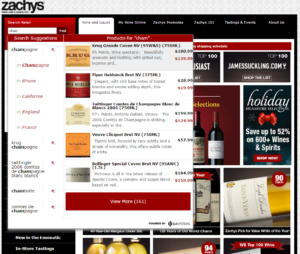
Zachy’s Wine and Liquor provides an enhanced customer experience using patented Rich Auto Complete™ technology from SLI Systems. As shoppers begin typing into the search box they are immediately presented with pictures, descriptions and pricing of relevant, popular products displayed right alongside the search suggestions. Since implementation, Everlast’s revenue from search grew from 1% to 10% of total revenue.

zachys

Merchandise Across Channels

Don’t forget the mobile experience! A streamlined mobile experience that works around the physical constraints of a mobile device will make it easier for shoppers to find (and buy!) what they want. For instance, keeping your search box front and center on every page is critical to keeping shoppers on your site so they don’t waste time navigating an entire site. Additionally, adding refinements in large, tap-friendly dropdowns lets shoppers narrow down to the most applicable results.

Management and Analytics

Sound like a lot of work? It doesn’t have to be. Thanks to the power of machine learning, you can automate all the best practices mentioned above, freeing up your time for other strategic projects. And with little to no intervention required from your IT department.

These ideas just scratch the surface of making your site a super-powered merchandising machine. We recently spoke with Sri PV, E-Commerce Internal Marketing Manager at Dressbarn, about how he puts these online merchandising fundamentals (and many more) into practice every day. You can hear the full discussion here.

Read More

SEO Tools E-commerce Businesses Need

Posted by Helmut BerieJuly 20, 2015eCommerce, SEO

SEO ToolsThere are hundreds of SEO tools to choose from, but every business should start with two basics: Google Analytics (GA) and Webmaster Tools (WMT).

For baseline measurement of your site traffic and SEO performance, not only should you have a GA account, along with Google and Bing WMT accounts, but you need to ensure they are set up correctly. They will provide valuable insight on your site’s performance and monitor the factors that affect your site’s SEO.

This blog covers offers tips on getting the most out of GA and WMT, as well as suggests third-party tools that are helpful to improve your SEO. This is part of our blog series on SEO.

Google Analytics

Google Analytics (GA) offers all the basic knowledge you need to track your site traffic and evaluate factors that affect your SEO. When set up properly, GA provides analytics on:

  • Search Traffic – amount and quality of traffic coming from search engines, including visitor demographics and how they found your site
  • Keyword Effectiveness – which keywords are driving traffic and conversions
  • Content Performance – which site pages and landing pages are driving the most traffic
  • Sales and Conversions – which search results and pages users click on that result in a sale
  • Engagement Metrics – which parts of your site have the best/worst engagement metrics
  • Rich Segmentation of Traffic – specific segmentation of metrics (e.g. segmenting metrics by device type)

To get the most out of your GA reports, Google offers a setup checklist that includes steps for installing a tracking code, identifying goals for what you want to track, linking to AdWords and/or AdSense, optimizing keywords, and tracking e-commerce performance against keywords and marketing campaigns.

There are a number of common mistakes made with GA setup that can significantly skew your results – and therefore, the quality of the data you’re using. For Google Analytics to be effective, you need to make sure you filter out fake traffic from botnets and avoid using too many profile filters. Also, it’s a good idea to use other analytics tools to double check your GA numbers. For more on common mistakes to avoid when setting up Google Analytics, watch this SLI recorded webinar.

Webmaster Tools

Webmaster Tools are both Google Search Console and Bing Webmaster Tools. Webmaster Tools (WMTs) provide you with important information needed to monitor factors that will influence your site’s SEO. WMTs go beyond Google Analytics to provide insight on how your site is viewed by search engines. It will notify you of broken links, crawl errors, HTML errors and other potential problems. You’ll most likely want to set up Google Search Console first. With recent changes to traffic distribution, however, Bing’s Webmaster Tools (showing data for both Bing and Yahoo!) should not be ignored.

To decide which WMT to focus on first, check your GA statistics for insight into which organic search sources drive the most traffic to your specific site. Then set up your WMT account. SEO expert Bruce Clay has a free online newsletter that goes through the WMT set up process in detail. Or you can get yourself started with Google at www.google.com/webmasters/tools.

Once your analytics, Webmaster Tools, site pages and URLs are properly set up, it’s time to monitor, tweak and repeat on a regular basis. Your Webmaster Tools will become your best friend, as they offer insight into how you can increase the positive signals and reduce the negative signals that will affect your site’s SEO

Third-party SEO Tools

There are hundreds of third-party tools available to further improve your SEO. Take a look at a few of these resources to see what might work well for you. Also, don’t forget to look at what third-party tools your direct competitors are using – if they’re more successful than your site in SEO, it’s a good idea to know what they’re doing to get there.

Here are a few third-party SEO tools that are popular:

  1. Moz, SEM Rush, Search Metrics: Several inexpensive, powerful tools that track your ranking of keywords over periods of time include Moz, SEM Rush and Search Metrics. These tools can also show you when a competitor started a campaign that targets your keywords.
  2. SpyFu: For between $79 and $1,000 per month, SpyFu shows you your competitors’ most profitable keywords and ads. This offers insight into their success so you can build a strategy to beat them at it!
  3. Screaming Frog: This low-cost tool crawls your site and provides an onsite SEO audit so you know where to improve SEO elements like URL, page title, meta description or duplicate page issues. Screaming Frog can also reveal issues with your site navigation and discoverability of content.The free version may be sufficient for spot checks. Make sure your site can sustain the load the tool might generate.
  4. Google Instant Search: For an incredibly simple, free tool for keyword discovery, start typing a keyword into a Google search box to see which suggested, common search phrases pop up first. As an example, when you type “pants for,” you’re shown different suggestions than when you type “jeans for.”
  5. Ubersuggest: Another easy-to-use tool for keyword generation, Ubersuggest.org is a free resource where you can plug in keywords, choose a language and source, and receive further keyword suggestions.


For more on improving your site’s SEO, please download our free white paper, “How to Get the SEO-driven Revenue You’re Missing.” Also take a look at SLI Systems’ solution for improving SEO, SLI Site Champion.


Read More

Christmas in July? The More (Sales) the Merrier!

Posted by Christina StublerJuly 14, 2015eCommerce, Merchandising

^F4DAD660483473260EA5D4FE26EE12DA0E23D897E35805D695^pimgpsh_thumbnail_win_distrLike many, I wasn’t planning on a shopping spree this week, but now I feel it’s unavoidable. I started making a mental wish list as soon as I heard Amazon’s Prime Day described as “more deals than Black Friday.”

Now with Walmart and others joining the frenzy, Wednesday will be a must-not-miss shopping day. Just like that, the power of the words “Black Friday” have magically created a shopping holiday on a normal weekday in the middle of the year surrounded by no real shopping occasion.

Of course, Christmas in July sales aren’t new, and there’s a reason they work. We aren’t feeling the pain from last year’s holiday purchases and we aren’t yet concerned about saving for the upcoming holiday season, either. In fact, it’s the perfect time to buy something you’ve been eying for yourself.

While many retailers have mid-summer sales, the idea of many retailers having them at the same time creates an event – and compels shoppers to buy. (Think of the original Black Friday and Boxing Day.)

But why should Amazon and Walmart have all the fun? It’s not too late to ride the tide of Prime Day with your own better-than-Black-Friday sale. The beauty of online retailing is merchandising can be changed quickly based on what’s trending. In this case, it’s a mid-summer sale, and I say, the more the merrier.

For more merchandising strategies, check out this blog post or download our white paper “Use Site Search Data to Improve Merchandising.”

Read More

Advice for Amazon: Be Honest with Search Results

Posted by Dawn MortensenJuly 8, 2015eCommerce, Merchandising, No Results, Site Search, Site Search Tips

Amazon’s practice of misleading customers with search results is again on trial, after the 9th Circuit U.S. Court of Appeals overturned a lower court ruling on a trademark infringement suit by Multi Time Machine, Inc. (MTM).

Amazon trademark lawsuit by MTMMTM charged Amazon with infringing on its trademark by creating “a likelihood of confusion” when customers search Amazon for “MTM Special Ops Watch,” which is the name of a military-style watch sold by MTM. Amazon uses the MTM Special Ops name multiple times on search results pages, even though they do not sell MTM watches.

Now MTM is entitled to a new trial, or Amazon may try to settle. Either way, it’s time for Amazon to stop fooling its shoppers. Whether they win or lose the case, Amazon should think more about site search best practices that will win loyal customers.

Here’s some advice on how Amazon and other retailers can expertly handle searches that turn up zero results:

  1. Be honest. Search results should never be tricky. The search box is the one area of your site where customers get to tell you exactly what they want. Smart retailers either give customers what they ask for or apologize for not having it. If you mislead customers into looking at other items, they’ll soon realize that you aren’t showing what they want. They’ll feel fooled and will leave frustrated.
  1. Think of the customer experience first. Online businesses depend on repeat customers. You’re not a temporary pop-up shop trying to get quick impulse buys without the concern of having buyers return to your store. When you show customers that you understand what they’re requesting and you’re doing your best to help them find it, it builds lasting respect.
  1. Be smart about merchandising on no-results pages. When you don’t have the specific product or brand that a customer requests, you can still offer alternate items without insulting his or her intelligence. There are a number of possible responses, like “We’re sorry we don’t carry items from that brand, but the following brands are popular with our customers.” In the case of MTM watches, Amazon should state up-front: “We don’t sell MTM watches, but here are similar products you might like.”Sports Authority SLI Systems Site Search
  1. Give suggestions for better search results. Sports Authority handles the no-results page by offering a “Did you mean _____” suggestion, along with the text: “You may have typed your word incorrectly or are being too specific. Try using a broader search phrase or try one of our most popular search phrases,” followed by a word cloud of popular searches.
  1. Reduce the number of no-results pages. Be sure your site search provider includes synonyms and alternate spellings in your search to reduce the number of “no result” searches. After implementing this practice with SLI Systems Learning Search®, Sports Authority saw a 300% reduction in no-results searches.
  1. Study the search terms that end in no results. In its Big Book of Site Search Tips, SLI encourages clients to review their Top No-results Search Report regularly to see what customers look for that does not come up in search results. Paying attention to no-results searches often uncovers opportunities for new items to add to the inventory. It also allows businesses to craft creative responses to a specific no-results result.

Maternity no-results page exampleUK clothing retailer Oasis handles a search for maternity clothes with the message: “Whoops, we’re sorry we don’t cover bumps – shop our accessories instead.”

Beyond potential legal ramifications, Amazon should change the language on its search results pages for the sake of delivering what customers want. Other retailers can follow best practices from the start, and not have to worry about trademark infringement.

Read More

When #LoveWins, Smart Merchandisers Win

Posted by Tim CallanJuly 2, 2015eCommerce, Merchandising, No Results, SEO, Site Search, Site Search Tips, Social Media

FTD roseThe U.S. Supreme Court opened a new opportunity for merchandising on Friday, June 26. Whether or not you agree with the 5-4 decision making same-sex marriage legal in all 50 states, it’s undeniable that it’s a prime marketing opportunity for retailers. Earlier this week, Multichannel Merchant published more than 20 examples of “How E-commerce Responded to the Marriage Equality Decision.”

For e-commerce businesses wanting to capitalize on the surge of online shoppers looking for items related to gay pride and same-sex weddings, below are my recommendations:

  1. Watch and respond to top search terms: Pay attention to changes in shopper behavior over standard baseline behaviors prior to the Supreme Court ruling.  In particular, look at search keywords for new or increasingly popular terms.  For example, a jeweler may see a sudden spike in a phrase like “men’s engagement ring.”  Because the search box is the one place on your site where shoppers can articulate their shopping missions without being channeled by your site navigation, search terms are strong early indicators of changes in shopper intent.


  1. Consider which products are a fit. The types of products you offer will vary based on your industry segment.  The above example cites a change in jewelry preferences, but a florist may see an increase in desire for rainbow floral arrangements or a party supply retailer might sell more rainbow-colored decorations. You may decide that none of your products logically tie in to this current event, in which case you’ll want to wait until you have related products or skip this merchandising opportunity entirely. Shoppers are less likely to respond to a promotion that seems forced.


  1. Look at top search terms with poor click-through rates. Search terms with low click-through rates can identify recent demand that your site and inventory are not meeting.  Sometimes you can solve these shortcomings simply by adding synonyms to your database. Other times you can address them with special promotions or merchandising information.  In the long term, these terms may reveal new areas for inventory expansion.


  1. Create just-in-time merchandising campaigns. Create campaigns for products expected to be popular among supporters of gay marriage.  Use custom banners and landing pages or even tune search results and recommendations to more ably direct shoppers to the products they are likely to want in this area.  For example, a retailer may create a custom landing page around a phrase like “Pride party” with a themed banner and curated product results.


  1. Remember SEO/SEM. Keep your SEO/SEM team apprised of top trending terms to ensure your keyword strategy is up to date.


Among the SLI Systems customer base, we have noticed the word rainbow coming up as a term with poor results so far this week.  We advise appropriate retailers to examine the word rainbow specifically to see if it is a trending term that deserves one of the responses detailed above.

Current events, as well as holidays, seasons and trends, are great positioning points for retailers. If you keep an eye on what your shoppers are already searching for online, you’ll find an endless number of ways to merchandise your products.

For more merchandising strategies to drive your online revenue, download our white paper “Use Site Search Data to Improve Merchandising.” Also, take a look at this video to see what you can do with our latest merchandising solution, SLI Landing Page Creator.


Read More

How Online Bathing Suit Shopping Could Save Summer

Posted by Christina StublerJune 23, 2015Merchandising, Site Search, User Experience

Summer is officially here. But before your shoppers can splash in the pool or lounge on the beach, there is one necessary item of attire that must be purchased – a bathing suit.

Is there anything quite like bathing suit shopping? Or should I say, is there anything quite like purchasing undergarments to wear in public in front of friends, their husbands and their children?

Traditionally, beachgoers could look forward to the following shopping experience:

1. Drive to the store.
2. Locate the ever-disorganized bathing suit selection.
3. Find a print and pattern that isn’t revolting.
4. Rifle through racks for the correct size.
5. Head to the fluorescent-lit dressing room walled with multiple, full-length mirrors.
6. Try it on. Hate it and deeply regret not sticking to those lose-weight-get-in-shape New Year’s resolutions.
7. Exhaust all options at that store.
8. Repeat the entire process, losing hours (and a good portion of self-esteem) in the black hole of bathing suit shopping.

Could someone please bring me a mai tai? I’m having anxiety just thinking about this.

Luckily, we live in the era of online shopping. Smart and thoughtful online retailers have the opportunity to transform the bathing suit buying experience into something that feels like a vacation. Here’s how:

1. Showcase your summer selections with editorial-style landing pages. You can create an entire poolside look – hat, sunglasses, bag, skirt, sandals and bathing suit – and drive potential shoppers directly to the tailored landing page by using dedicated URLs in email campaigns, social media posts or pay-per-click advertising.

2. Guide visitors to the perfect suit with a product finder that feels like a personal shopper. By asking a series of questions, you can lead shoppers to a great selection based on budget, style and even body type. For instance, one shopper might want a bikini under $80 to show off her athletic frame while another might want a one piece that will make her look 10 pounds slimmer regardless of the cost. Either way, your shoppers will appreciate your expert guidance.

Screenshot 2015-06-22 09.11.31

3. One swimsuit definitely does not fit all. Make sizing simple and boost buying confidence by including measurement guidelines. Taking Shape does this right with an easy-to-understand sizing chart on its website tsplus14.com.au.

4. At a minimum, visitors should be able to search by style, color and size. But make sure they can also easily see what’s in stock along with ratings and reviews. No point in falling in love with a suit that’s not available in your size, and a rave review (“I look so good in this thing it’s all I wear!”) can help seal the deal.Screenshot 2015-06-22 09.29.16

5. Save the day with in-store pick up. As an online retailer with brick-and-mortar locations, giving shoppers the ability to shop online and find the item at the nearest location is a serious convenience, especially for those who may have delayed shopping until the day before the big swim party.

Let your shoppers save the mai tais for the beach by giving them a bathing suit buying experience that’s truly relaxing!

Read More

Improve SEO with User-friendly URLs

Posted by Helmut BerieJune 17, 2015SEO, User Experience

There is a compelling correlation between well-ranking webpages and them having user friendly URLs. Therefore, improving your site’s URLs is one of many simple ways you can optimize your SEO. Just follow these guidelines:

Identify the Top Keywords to Use – In the actual URL, use keywords that summarize the topic and content of the page. These are often the same keywords as used in the page titles. Making URLs SEO-friendly starts with the discipline of creating quality content where each page is focused on one main topic that can be described in 1-3 words.

Keep the URL Short – Use a few keywords only to keep the URL as short as possible. Any keyword required to state the page topic should be in the URL but nothing else. This not only helps in SEO, but also makes it easy for users to copy and paste or even remember the URL.

Use Real Words – Avoid use of numbers, special characters (with the exception of hyphens, which are recommended to separate words) or made-up words – unless they are a key component of your brand. Only use words that someone might search for. Try to stay clear of URL query strings (URL part following a “?” towards the end of the URL) entirely.

Remove Articles – Take out unnecessary words like “the,” “and” and “an.”

Use Hyphens – A simple hyphen is the best way to separate words; they’re found to be easier to use and to read than an underline mark, period or white space between words.

Use a Consistent Case – Be consistent in whether you use lowercase, uppercase or camelcase words in your URLs. Whichever you choose, follow the same style for all.

Avoid Canonicalization Issues – These issues can arise when multiple URLs direct to the same webpage. Most home pages, for example, can be called up by using any of the following structures:

  • http://sitename.com
  • http://www.sitename.com
  • http://www.sitename.com/index.php
  • http://www.sitename.com/index.htm
  • http://www.sitename.com/index.html

However, you want to choose one preferred URL for each page and have the others use a canonical tag. Otherwise, your page authority for these pages can diminish, which negatively impacts your SEO. In addition, you are wasting crawl capacity that might prevent some pages from getting crawled.

Generally speaking, canonicalization issues are considered bad website design, and once they are spotted by Internet search engine bots, it will negatively impact the rankings of the entire site. It is common for duplicate content issues to be canonicalization issues in disguise. If content moves, you should set up a 301 redirect from the old URL to the current page. By grouping the duplicate pages together in this way, their combined ranking signals work together for better overall search engine ranking.

We will continue with this blog series on Improving Your E-commerce SEO. Please subscribe to our blog to ensure you are informed about new posts. Also, download our free white paper, “How to Get the SEO-driven Revenue You’re Missing” for more best practices on improving your e-commerce site.

Read More

The Buzz from IRCE 2015

Posted by Tim CallanJune 10, 2015Conferences

SLI has been at every IRCE for the past 11 years, but this year was especially exciting as we hosted a live podcast from our booth, over-packed a room at Lawry’s for an invitation-only retailer dinner, revealed our latest merchandising solution and shared cocktails and e-commerce tips among many new friends, as well as existing customers.IRCE SLI Podcast

The SLI booth was buzzing with activity – and with the enjoyment of free margaritas during the Tuesday night cocktail hour! Throughout the show, we offered live demos and taped podcasts with customers including Dollar Tree, Yarn.com, Carolina Rustica, Steiner Tractor and Zachys Wine and Liquor. Subscribe to this blog’s RSS feed to be sure you don’t miss these podcasts, which offer advice and success stories from top retailers.

Hundreds of retailers approached us, seeking to understand how SLI can help them increase top-line revenue. Many wanted to hear about SLI Landing Page Creator, which makes it easier than ever to create SEO-friendly landing pages that display learning-based search results. Retail Touchpoints offered a nice write-up on how 2 Wheel Parts supply is using Landing Page Creator in PPC campaigns and other promotions.

We had many discussions about the increasing importance of video and other non-product content for retailers; there was a great deal of interest in how we integrate this content into the rest of the online purchasing experience. (We happen to have an e-book on this topic, “How Creative Content Convinces Online Shoppers to Buy.”)

Other retailers were interested in SLI Mobile, especially after seeing the effect of Google’s “Mobilegeddon” algorithm change in April. We also met up with long-time industry partners and established new partnerships at the show.

In short, IRCE 2015 was a great success. We look forward to working with both our newest customers and our long-time fans to ensure the rest of 2015 is filled with rising revenue.

Read More

Announcing SLI Landing Page Creator

Posted by Kemberly GongJune 3, 2015Merchandising

We’re excited to announce the launch of SLI Landing Page Creator™, which offers new enhancements for merchandisers to speed the path to purchase through targeted landing pages. Landing Page Creator completes the SLI Merchandising suite with the ability to build and customize content to include handpicked products and integrated banners or visual, editorial-style pages.

Home Sale LPWe built SLI Landing Page Creator with merchandisers in mind: it’s simple to create, schedule and deploy custom landing pages that power your omnichannel marketing – through social media, email, pay-per-click ad campaigns and in-store applications. Additionally, merchandisers can create clean URLs and fine tune SEO with custom keywords, page descriptions and social media meta data, all within a simple drag-and-drop interface.

We’re also excited to let you know that landing pages utilize SLI’s Learning Search technology to include product lists that automatically update to reflect real-time changes in pricing, availability and product attributes.

You can offer shoppers unique, curated product sets that will appeal to their interests, new trends or other promotions and ensure that they are accessible to the way they shop – from mobile, social and email. Empower your merchandising team to make quick merchandising decisions and track the success of campaigns with real-time reporting and analytics.

If you’d like to learn more about SLI Landing Page Creator, click here.

Read More

A Review of the Basics: SEO Terms & Principles

Posted by Dawn MortensenMay 28, 2015eCommerce, SEO

This is the first post of a blog series on how to improve SEO on your e-commerce site, so it makes sense to start with the basics:  some main SEO terms and descriptions of various SEO disciplines. If SEO is what you do for a living, you’ll know these inside and out. But for those working in e-commerce with only partial SEO knowledge, this is a good place to start.

SEO Terms You Should Know

Bot – also referred to as a spider or crawler, a bot is a piece of software used to crawl your site. Internet search engines use them to gain an understanding of your entire site and its individual pages. There are desktop-specific and mobile-specific bots. Well-behaved bots identify themselves with a unique “user agent” string that is logged as part of the page request in your web server’s access logs.

SEO – search engine optimization – the practice of increasing the quantity and quality of the traffic that you earn through the organic results in Internet search engines. (Rand Fishkin, “What Is SEO,” Moz).

SERP – search engine results page – the page on which Internet search engines (e.g. Google, Bing, Yahoo!) show search results after a visitor submits a query.

Ranking Factors – there are many ranking factors that search engines consider to determine your SERP position, including basic document relevance (relevant terms, word count, proving words), number of backlinks, site speed, anchor texts in internal and external links, engagement signals (bounce rate, time on site, pages visited per session), support for mobile devices, domain authority, etc.

Index Size – the number of pages you have listed in Internet search engines. There are two index sizes – the number of pages an Internet search engine knows about and the number of pages it has actually crawled and can send its visitors to. The first number is significantly higher (in particular for e-commerce sites) than the second and can result in unfavorable “large index size” messages sent to your Webmaster Tools account.

Snippet/Rich Snippet – the listing shown on a search engine results page below the title is a snippet; other details added to the snippet (e.g. review stats, price, availability, etc.) make it a Rich Snippet. A Rich Snippet causes your listing to be larger and appear more predominant on the SERP. In addition, the larger your listing the further it pushes down your competitors’ listings and the more likely it is to catch the attention of a searcher.

Rich Snippet Markup (RSM) – code elements that are added to the HTML of the webpages showing product or other information. RSM allows the Internet web engine crawlers to better understand the information shown on the webpages. If the information on the page is well understood and the page itself is considered RSM-relevant, the search engine might honor this with a rich snippet on the SERP or it might improve the ranking of the page containing the RSM.

DA, or Domain Authority – this term was coined by Moz but is widely used in the SEO community. DA is the best prediction for how a website will perform in SEO rankings. It’s used to compare one site to another or to track the strength of your site over time. The collection of domain-level ranking factors determine a site’s domain authority.

PA, or Page Authority – this term was coined by Moz but is widely used in the SEO community. PA is a metric predicting how well a webpage will rank in Google’s search results for a particular search phrase. A collection of page-level ranking factors determine a site’s page authority. The same page will have different PAs depending on the search phrase for which the page ranks.

Penguin / Panda / Hummingbird / Pigeon – a series of major algorithm updates from Google focusing on different aspects of ranking webpages.

  • Penguin focused on identifying and rewarding sites with a high number of legitimate inbound site links, while also identifying and penalizing sites with spammy “black hat” inbound links.
  • Panda focused on interpreting which content is of high quality. It allows Google to reward pages that have highly relevant content and penalize those that use black hat practices such as content spinning or keyword-stuffing to try to give a higher SERP ranking to irrelevant content.
  • Hummingbird focused on measuring the semantic relevance of webpage content in relationship to search queries. It focused on “intent” and not so much on exact keyword matching. It is less about what searchers are asking for and more about what they actually want.
  • Pigeon focused on identifying localized content and giving higher rankings to localized content searched for from a corresponding region.

Meta Description Tag – an HTML attribute that describes a webpage’s content and is frequently used on SERPs. A well-written meta description is important for gaining high clickthrough rates, as it sums up the information on the webpage. The meta description tag should be unique for each page on your site to improve its efficiency (Moz).

Title Tag – an HTML attribute often used on SERPs to provide an accurate and concise description of a page’s content. One popular format is to include the following three elements, in this order:

  • 1) primary targeted keyword 2) secondary targeted keyword 3) | your brand name
  • Example: Fashion Jewelry | JewelsRUs

WMT, or Webmaster Tools – Google (Google Webmaster Tools – GWT) and Bing (Bing Webmaster Tools – BWT) provide tools that allow webmasters to check the performance of their sites, monitor any crawling and indexation issues, test certain aspects of their sites affecting indexation and apply configuration to the way the search engines treat site information. Understanding the information provided within WMT is crucial to understanding the performance of your site.

Types of SEO Activities

There are various SEO disciplines or activities, each of which has a number of significant subdisciplines. Here’s a brief summary of each discipline and how it may be used to improve SEO on e-commerce sites. Not all activities need to be executed all the time, but it is a good idea to consider these items as a checklist when working toward optimizing your website.

On-page and off-page SEO: On-page SEO is any activity, on individual pages or the entire site, which is completed in an effort to boost ranking in Internet search engines (e.g. optimizing h1 tags). Off-site SEO is not related to the site but will cause ranking improvements indirectly (e.g. link acquisition, brand management, etc.).

Technical SEO: This encompasses any activity performed to ensure the site is technically sound so that bots can crawl it efficiently and effectively. Technical SEO is mostly on-page SEO and excludes content creation.

Local and international SEO: Local SEO focuses on ensuring high rankings for searches with local intent. International SEO focuses on sites with multiple geographic locations and possibly different languages. The aim is for the site to rank well in each target market and to avoid duplicate content issues.

Content creation and marketing: This discipline focuses on identifying relevant topics, creating highly engaging site content and ensuring this content is reaching target audiences. Content creators should keep in mind that great content doesn’t always yield immediate SEO results. As an example, it can take years of quality blogging to establish a new site’s domain authority. Content must be created and marketed to reach its audiences and provide an SEO benefit.

Site analysis/audits: This includes looking at specific metrics to identify why your site or competitors’ sites are ranking or not ranking well for particular phrases or topics. Site audits also typically focus on technical SEO and link profiles.

Competitive analysis: This includes the practice of understanding why competitors’ websites rank well for particular phrases or topics. This information is valuable for identifying how you can rank higher than your competition. It might also help you understand the level of effort required to outrank your competition on particular phrases or topics.

Brand management: This is the practice of ensuring your own brand is perceived well in all target markets or market segments. The higher the brand awareness for your business, the stronger your domain authority.

Come Back for More

Return to this blog in the coming weeks to learn specific ways you can use SEO to increase your e-commerce revenue. Also listen to our recent Webinar: How to Get the SEO-driven Revenue You’re Missing.


Read More

The 2015 Guide for Improving E-commerce SEO

Posted by Dawn MortensenMay 18, 2015eCommerce, SEO

SEO graphic blogAs a retail executive or e-commerce professional, your goal is to produce more revenue. You want site traffic that is high in quantity, but also in quality – you need it to convert.

Search Engine Optimization (SEO) is just one practice out of many in your tool belt. Unless SEO is your full-time job, it’s nearly impossible for you to fully keep up with the details of constant algorithm updates that affect your site’s rankings, like the recent mobile-friendly updates from Google and Bing (a.k.a. “mobilegeddon”).

Plus, it can be difficult to know which SEO-related activities can drive more revenue without causing damage to your site’s rankings.

To help, I’d like to present our new SLI Systems white paper, How to Get the SEO-driven Revenue You’re Missing.

The easy-to-use 22-page guide will help you identify what’s possible with SEO and start on the path to improvement. Whether you have an in-house expert, use an outside agency or need to learn how to do basic SEO on your own, this paper will help you know where you want to go with SEO and outline the main steps to get there. Topics covered include:

  • Why you need to pay attention to the changing SEO landscape
  • A review of the basics: Top SEO principles
  • Two SEO tools you need to set up correctly before doing anything else
  • Six steps to improving the SEO of your e-commerce site
  • Major SEO “no-no’s” that can damage your site’s reputation
  • New streams of SEO-driven revenue most retailers miss out on
  • How user-generated SEO increases traffic and conversions without negative SEO

At SLI Systems, our search and SEO experts continually monitor and improve the on-site search of more than 1,000 client sites in the e-commerce industry. With more than a dozen years in business, we have gained unique insight into SEO best practices and opportunities, and we’re happy to share them with you.

Enjoy our new white paper now, and stay tuned to this blog for more articles on the topic of SEO in e-commerce.


Read More

B2B, It’s Time to Step Up Your Game

Posted by Christina StublerMay 11, 2015eCommerce, Site Search Tips, User Experience

b2b_blue_600x600 You found your niche in the lucrative (albeit lackluster) world of B2B e-commerce. It’s been great. Your clients don’t need anything fancy, you say. You can hum along with a website that walked right out of 2008 and it doesn’t matter. Because really, your customers aren’t here to shop (not in the traditional, show-me-something-pretty way). They just want to buy what they need and get back to work.

But here’s the thing: If you aren’t making it lightning fast and super simple for your customers to find and buy what they want, somebody else will. Somebody named Amazon. As Amazon launches “Amazon Business,” B2B sites would be wise to step up their game. Here’s how to get started:

  1. Start with search. Compared to non-searchers, searchers have an 11% higher average order value and a 2.7 times greater conversion rate, so it’s important and revenue-boosting to listen to what they say. Site search is key. If people quickly move from search to navigation or leave your site altogether, your site search isn’t doing its job. Good site search delivers relevant results fast.


  1. Showcase your expertise. You’ve created a virtual library of case studies, blogs, consumer guides and videos – all with the hope of educating and converting your prospects into customers. But can they find any of it? Andersen Windows is a good example of how to deliver search results with a wow factor. Type “French doors” in the search box, and you’ll get products along with support information, technical documents, photos and videos. Using SLI Learning SearchTM, Andersen Windows makes all of its non-product information incredibly easy to find.


  1. Be open to possibilities. At Spectrum Chemical, the search box invites users to input “Product Name, Catalog Number, Manufacturer, CAS #” – a confidence-boosting move that makes users feel they can’t go wrong. Smart search will allow you to create appropriate synonyms and tune your results so that visitors find what they are looking for, even if they type it in slightly different ways. Technical specifications and measurements are a great example. For instance, if someone typed 2.5, 2 ½ or 2-1/2, you’d want them to get the right results. In addition, features like SLI Rich Auto CompleteTM help people know they are on the right track by showing results as soon as they begin typing.


Remember, your search box is where your customers tell you exactly what they want in their own words. Advanced site search will give you the ability to easily pull reports and spot trends, like your site’s top search phrases and those ending in “no results.” Use this data to tailor your merchandising efforts and make it easier for visitors to find what they want to buy. Because being B2B is no longer an excuse for not delivering the very best to your customers.

Read More

Four Pillars of Interactive Marketing for B2B E-commerce

Posted by SLI SystemsMay 6, 2015eCommerce

Guest blog by Gian Genovesi, e-commerce account manager for Briteskies, an SLI partner

Many people think of interactive marketing as a priority for B2C e-commerce organizations, but not as relevant for B2B. This is not the case. The essentials of interactive marketing are just as applicable to B2B e-commerce as B2C, and in fact, the interactive marketing strategy should not differ between the two markets.

Just as in B2C, there is a tendency for B2B e-commerce companies to focus on solely SEO and SEM, which our e-commerce delivery lead, Gian Genovesi, equates to a sports team focusing exclusively on scoring as many points as possible. Increasing the points your team scores, similarly to the traffic your site obtains, is a factor of success, but in no way the end-all-be-all in e-commerce success. After all, of the top ten scoring offenses in NFL history, only one has won the Super Bowl.

four-components-IM-2While SEO and SEM are effective ways to drive traffic, traffic is only one variable in the e-commerce equation and should not be the sole focus. There are four aspects to consider when creating tactics for increasing the revenue of your e-commerce site, and paying attention to all of them together is far more impactful than honing in on just one.

1. Traffic

In its most basic sense, traffic is simply visitors to or hits on your website. However, it is important to consider where this traffic is and should be coming from just as much as its volume. Are you attracting the right kind of traffic? You want visitors coming to your site from related or otherwise beneficial sites, which helps turn visits into conversions.

Some B2B-specific tactics to ensure that you are getting views from the right places include:

  • Organic SEO
  • Pay-Per-Click Advertising
  • Content and Inbound Marketing
  • Online Display Advertising
  • Social Media Advertising and Networking
  • External Link Building
  • Off-Line Advertising

2. Conversion Rate

This is, of course, is the number of people becoming customers or clients out of the number of people visiting your site. The industry standard is 1%-3% of visitors becoming customers, but it is also important to consider who is converting and what is incenting them to convert, not just the percentage alone.

User experience is always the first factor in the conversion rate of a site. The employees purchasing for their company during the workday are the same people who go home and shop online for themselves in the evening, and they deserve a consistent and user-friendly experience no matter which context they are in. Important factors to keep in mind are:

  • Pertinent Search Results
  • Relevant Layered Navigation
  • Ratings and Reviews
  • Automated Email Reminders
  • Online Chat and Immediate Customer Service

3. Average Order Value (AOV)

Now that you have your site visitors becoming customers, how do you entice them to buy more? In B2B, there is often more involved in someone increasing his or her order value than just adding another item to the cart. Business purchase decisions often require more time and input from more people than the typical B2C purchase, so it is important to keep B2B-specific tactics in mind, including:

  • Personalized Marketing based on Customer Segmentation
  • Cross-Sells and Up-Sells
  • Pricing and Promotions
  • Search Results and Weighting
  • Product Subscriptions and Bundling

4. Customer Lifetime Value (CLV)

If a customer has trusted you enough to purchase from your e-commerce site once, how do you get them to convert again? They chose your product or service and gave you their payment information, so how do you entice them to keep coming back?

The best way to increase CLV is to reward customer loyalty. When attempting to re-engage with a previously converted customer, you want to be memorable, but not annoying. Some resources to use to increase CLV in B2B are:

  • Favorites Lists
  • Reward Points
  • Newsletters
  • Special Offers and Private Sales
  • Social Media Broadcasting
  • Frequent Buyer Programs
  • Recurring Orders

Focusing on these four pillars of interactive marketing, instead of developing a singular focus on one, will significantly improve the chances of your B2B e-commerce site seeing success in the online marketplace.

Need more information about interactive marketing? Feel free to contact Briteskies. Briteskies is a partner of SLI Systems.

About the Author: Gian Genovesi is the e-commerce Account Manager for Briteskies. He has a fiery passion for serving and aiding clients in fully leveraging the value, features, and functions of their e-commerce systems. With a myriad of experience in leveraging e-commerce systems and their wide array of supporting systems and strategies, Gian constantly strives to put his clients in an optimal position for success in the online channel.

About Briteskies: Headquartered in Cleveland, Ohio, Briteskies is a full-service solution for e-commerce, enterprise software, iSeries, and the integration of these business-critical systems. We assist our customers in bringing their brands, products and services to the online marketplace. We’re a Magento Silver Solution Partner, Premier IBM Business Partner and a JD Edwards Gold Partner with iSeries Application Specialists and an in-house JD Edwards practice.

Read More

After Mobilegeddon, Focus on Site Search for Mobile-Friendliness

Posted by Shaun RyanApril 30, 2015eCommerce, Mobile, Mobile/Tablets, SEO, Site Search

Mobile commerce is exploding! The majority of traffic to e-commerce stores is coming from mobile devices (Shopify 2014) and mobile commerce is growing three times faster than overall e-commerce. In its “Spotlight on Modern Retail 2015,” NRF found that during the first three quarters of 2014, retailers reported their mobile sales grew a whopping 87 percent!

Well aware of the growing mobile masses, on April 21st Google expanded its mobile-friendliness ranking signal to reward mobile-friendly sites with higher search rankings and demote those that fail its test. (a.k.a. “mobilegeddon,”). While the full results are still to be seen, action by many online retailers is still needed. To guide developers, the search giant also provided them with the top things to know when building a site for mobile devices. Here’s how e-commerce site search fits in and can help contribute to your mobile success.

outline-steps#1: Make It Easy

Google’s #1 recommendation for building a mobile-friendly site is: Make It Easy For Customers. Heavily contributing to the ‘mobile-friendly’ signal is whether or not visitors, after landing on a mobile page, can easily complete the tasks they want to accomplish by solely using the mobile site. For instance, when visitors using smartphones search for new running shoes on Sports Authority, the company’s mobile-friendly site helps them easily find and buy the shoes they want, which in turn will now help Sports Authority fare better in Google smartphone rankings.

Mobile-optimized site search helps retailers connect shoppers with the products they’re seeking, making it easy for mobile visitors to find, research and/or complete a purchase (their main objective). Given mobile’s space and speed challenges, the search box is the best gateway to finding products and content on mobile sites. That in turn has a big impact on engagement metrics such as conversion rates, bounce rates, average time on site, average pages requested per session and more, which affects its ‘mobile-friendly’ signal and mobile search ranking.

Helping site visitors easily complete their objectives now has a direct impact on mobile search rankings, making good site search more important than ever before.

#2: Measure Effectiveness

Google’s second recommendation for building a mobile-friendly site is: Measure The Effectiveness Of Your Site. Optimized site search is a vital part of delivering a satisfying shopping experience to mobile users as it helps visitors quickly and easily engage with the site – often increasing conversion rates and average order values, and lowering bounce rates. Leading e-commerce companies, including international cosmetics brand e.l.f. Cosmetics and specialty retailer WebUndies.com, have experienced impressive measured results with mobile-optimized site search.

Lesley Klein, director of e-commerce at e.l.f. Cosmetics, reported: “Conversion for mobile visitors using site search is four times the rate vs. mobile users who don’t use search. With 30% of our online traffic coming from mobile devices, we’re providing a seamless shopping experience no matter how or where people come to e.l.f.”

Terri Hunsinger, co-owner at WebUndies.com, found: “Mobile site search has been very effective in bringing 2,500 products to the forefront for customers who are trying to search on small devices where it can be difficult to see our broad product selection. People are spending more time and more money and are more engaged because of the accurate search results they are seeing.”

As with sites like e.l.f. and WebUndies.com, optimized mobile sites make it easy for customers to shop. Whether Mobilegeddon ends up significantly impacting SEO or not, your optimized mobile search will strongly contribute to better online shopping experiences and conversions.


Read More

SLI Receives Magento Partner Award and Other 2015 Accolades

Posted by Eileen ElamApril 28, 2015eCommerce, Press, Site Search, Success Stories

SLI Receives Magento’s Highest Partner Honor

Last week at Magento Imagine, SLI received the “2015 Magento Technology Partner Spirit of Excellence Award for North America.” The annual award recognizes partners who have delivered exemplary service to Magento clients. Evaluations are made across a number of critical elements such as commitment to quality deployments, merchant satisfaction, growth, penetration in emerging markets, innovation and strategic planning.

Magento is the provider of the world’s fastest growing e-commerce platform. We are thrilled to partner with them in providing SLI Learning Search Connect™ as an easily downloadable Magento extension.

Magento Spirit of ExcellenceRetail Innovator 2015

Also in 2015, SLI has received other distinctions stemming from the company’s dedication to achieving high ROI for its customers and its commitment to exemplary service for its partners. This follows a record year of awards for SLI, which received a total of 10 awards in 2014 for technology, customer-use scenarios, and customer support. We are proud to acknowledge these accolades for 2015 (and it’s only April!).

SLI Customer Wine Enthusiast Receives Retail TouchPoints 2015 Retail Innovator Award

Wine Enthusiast’s CMO Glenn Edelman was named a winner of Retail TouchPoints 2015 Retail Innovator Award. Wine Enthusiast uses SLI Dynamic Product Banners™, which automatically displays banners with items related to a visitor’s original web search on product pages. Edelman will be recognized at the Retail Innovation Conference, June 16-17 in New York City.

“With SLI Dynamic Product Banners, visitors are more prone to stay and buy from our site rather than clicking back to Google where they could end up on a competitor’s site,” said Edelman. “In fact, when visitors interact with the banners, we see a 48% increase in revenue-per-click and a 14% increase in conversion rates. The banners also have a real impact on lowering bounce rate from the site’s landing pages.”

Read more about their success in our Wine Enthusiast case study.

SLI Customer Lakeshore Learning Recognized by eTail West for Search Excellence’

Lakeshore Learning, supplier of school supplies for preschools and elementary classrooms, was named a 2015 finalist in eTail West’s Best-in-Class Awards for ‘Search’ innovation and excellence. By implementing a rich set of features and refinements by SLI, Lakeshore Learning has been able to improve its site’s customer experience and offer personalized products relevant to shoppers.

As discussed in our Lakeshore Learning case study, the company used SLI Learning Search™ and SLI Site Champion™ to make even more of its content easy to find.

“Multi-faceted search allows customers to quickly narrow down hundreds of products and still maintain a clean and robust search experience,” said Sam Sarullo, VP of E-commerce at Lakeshore Learning. “Personalizing the site to draw people into areas most helpful for them has been a big improvement. Since implementing Learning Search™ we have seen double-digit online revenue growth, while average order values went up 30 percent and conversion rates rose nearly 19 percent.”

Site Champion™ dynamically creates SEO landing pages based on actual user searches that are indexed by Google and other Internet search engines. Lakeshore Learning has seen a return of $127 for every $1 spent on SLI Site Champion.

To learn more about how SLI provides award-winning results for customers like Harry & David and Sports Authority, check out more of our case studies and video testimonials.

Read More

Top 30 E-commerce Countries Include 7 in Americas

Posted by Christina StublerApril 10, 2015eCommerce, Mobile/Tablets, Site Search

It’s big news that the U.S. leapfrogged to the number one spot in the A.T. Kearney 2015 Global E-commerce Index this week. But don’t miss the fact that the Americas as a whole took seven of the top 30 spots with Mexico making the list for the first time.

The Global E-commerce Index ranks the top 30 countries for market opportunity in online retail. Rankings are based on nine variables including macroeconomic factors, consumer adoption of technology and shopping behavior.

According to the A.T. Kearney report, global online sales from mobile and desktop will reach $995 billion this year and $1.1 trillion next year. That’s good news for all retailers in the e-commerce space. But some significant opportunities are being uncovered in the Americas.

Making the list from the Americas:

Country Ranking
United States 1
Canada 11
Mexico 17
Chile 19
Brazil 21
Venezuela 24
Argentina 29


An improved economy and continued growth helped the U.S. go from third to first and trump China as the global e-commerce leader. E-commerce sales worldwide rose to $840 billion in 2014 with the U.S. accounting for more than a fourth of that number at $238 billion.

Mexico, which has never been ranked before, debuted at spot 17 on the Global E-commerce Index. The A.T. Kearney report credits a young and connected population for Mexico’s much-higher-than-average 32% year-over-year growth in online sales. Mexico’s total online sales hit $6.6 billion in 2014. And the news continues to get better with similar growth expected over the next five years.

Even though Brazil slipped to 21st place on the index, the country grew about 18% year-over-year and e-commerce sales were a strong $13 billion in 2014. “Online retailers still find Brazil to be a growing e-commerce market that is impossible to ignore,” the A.T. Kearney report states.

The Nielson Global Survey of E-commerce, released in August 2014, also put a spotlight on Latin America, noting that the emerging region has the highest online browsing rates.

“Latin Americans are enthusiastic online shoppers, but the online retail infrastructure has not yet caught up with offering conversion opportunities,” said John Burbank, president of strategic initiatives for Nielson.

Latin American shoppers are most often browsing online for electronic equipment, mobile phones, clothes, cars and motorcycles, and tour and hotel reservations, according the Nielson report. The highest buying category in Latin America is airline tickets and reservations, which historically is a starting point as consumers gain confidence in the online shopping experience.

Worldwide, e-commerce grew more than 20 percent in 2014, according to the A.T. Kearney report. But online sales overall remain less than 10 percent of total retail sales—so no matter what corner of the globe you’re in, your e-commerce market has room to grow.

Read More

At Inaugural SLI Connect AU, Retailers Discover How to Stay Competitive

Posted by Tim CallanApril 2, 2015Conferences, eCommerce, Search Conferences, Site Search

SLI Connect AU photoOur inaugural SLI Connect AU is a wrap! I would like to thank all of our engaging speakers and thoughtful attendees for making our first SLI Connect in Australia a great success. Speakers included SLI customers Bras N Things and Appliances Online along with industry leaders from Testivate, ChannelAdvisor, SKUVantage, Harris Farm and ShopBot. We brought together Australia’s leading online retailers to discuss and learn about the top e-commerce challenges and opportunities for the coming year, and we came away with some powerful insights.

The Aussie E-Commerce Boom

According to SLI Connect speaker Mark Gray, managing director at ChannelAdvisor, the Australian e-commerce market is growing at a breakneck rate. Mark said: “Australians spent $16.4 billon on online retail in 2014! This level is equivalent to 6.8% of spending at traditional brick and mortar retailers” (source: NAB Feb, 2015).

Moreover, Testivate Founder and Principal Analyst Steven Noble, who also presented his findings at SLI Connect, reported that Australian retailers are adopting global e-commerce best practices and meeting U.S. and EU competition head on.

Aussie Retailers’ Biggest Worry

Even with business booming, we learned via an SLI survey at the show that half of these leading Australian retail brands worried about losing business to international competitors in the past year. SLI Systems Regional VP Mark Brixton said: “The results show local retailers are concerned by the increased willingness of Australian shoppers to interact with international retailers.”

In response to this pressure, the vast majority of Aussie retailers have taken action to ensure they remain relevant in a increasingly competitive market by implementing advanced e-commerce solutions, including sophisticated site search (80%) and mobile and tablet optimization (67%).

SLI customer and presenter Duncan Brett, general manager of e-commerce at Bras N Things, shared how learning-based site search, navigation and recommendations solutions from SLI are helping Bras N Things tailor product searches for customers and increase sales from top search terms over time.

The Omnichannel Future

Similar to our experience at SLI Connect UK, retailers discussed moving toward omnichannel retailing as fast as possible. Neil Thomas, general manager at ShopBot, wisely suggested in his presentation that “it is time to think about dropping the ‘e’ from ‘e-commerce platform’ and calling it what it is really becoming – a commerce platform.”

Duncan of Bras N Things further emphasized that the brick and mortar store and e-commerce store should be “a joint force and not another source of competition.”

As the buying journey becomes more complex, so too does the competition. It’s inspiring to see so many retailers in Australia and across the globe using learning site search as a competitive advantage to drive conversion rates and sales worldwide.

The next SLI Connect event is planned for September 24, 2015 in New York City! Save the date and stay tuned – registration will open soon.

Read More

For SEO, Check Off Mobile-Optimized Site Search (By Apr 21!)

Posted by Tim CallanMarch 23, 2015eCommerce, Mobile, Mobile/Tablets, SEO, Site Search

Now that more than half of all time spent shopping online is done via mobile devices, mobile commerce is growing three times faster than overall e-commerce. In its “Spotlight on Modern Retail 2015,” NRF found that during the first three quarters of 2014, retailers reported their mobile sales grew a whopping 87 percent!

To meet these quickly changing usage patterns, Google is again adapting its algorithms to help users discover more mobile-friendly content. On April 21, Google will expand its mobile-friendliness ranking signal to make it even easier for users to find ‘mobile-friendly’ websites in search results.

outline-stepsAccording to Google, “This change will affect mobile searches in all languages worldwide and will have a significant impact in our search results. Consequently, users will find it easier to get relevant, high quality search results that are optimized for their devices.” And if anyone wants to test mobile web pages, Google provides a handy tool: The Mobile Friendly Test.

Mobile-Optimized Site Search Boosts SEO

Heavily contributing to the ‘mobile-friendly’ signal will be whether or not visitors, after landing on a mobile page, can complete the tasks they wanted to accomplish by solely using the mobile site.

For instance, when visitors using tablets search for new running shoes on Sports Authority, the company’s mobile-friendly site helps them easily find and buy the shoes they want, which in turn will help Sports Authority fare better in Google rankings after the April 21 algorithm change.

Mobile site search is a vital part of delivering a satisfying shopping experience to mobile users as it helps visitors quickly and easily engage with the site. Given mobile’s space and speed challenges, the search box is the best gateway to finding products and content on mobile sites. That in turn has a big impact on engagement metrics such as conversion rate, bounce rate, average time on site, average pages requested per session and more, which has a direct domain-wide impact on its ‘mobile-friendly’ signal and mobile search ranking.

For a complete guide to providing mobile shoppers with a great user experience, download the new white paper Site Search and the Mobile User Experience.

Mobile 101 – New Webinar!

Join us on Tuesday, March 24 at 10:00 a.m. PDT for a new SLI Webinar, Mobile 101 – Best Practices, to learn more about how to convert mobile shoppers with an engaging mobile user experience (and in turn, boost your mobile search ranking!). Registration is open until 8 a.m. PDT on March 24, plus an on-demand version of the webinar will be available soon.

Read More

At SLI Connect, Retailers Imagine an Omnichannel Future

Posted by Tim CallanMarch 18, 2015Conferences, eCommerce, Site Search, Success Stories, User Experience

SLI Connect is sparking exciting e-commerce discussions on both sides of the globe this month.

shaun SLI connectEarlier in March, we had our most successful SLI Connect UK yet. With an unprecedented 200 attendees from 150+ leading retailers such as Harrods, Harvey Nichols, Tesco, Jigsaw London, Warehouse, Chemist Direct and Paul Smith, we could not have asked for a better or more expert turnout. I want to thank all who attended and presented for your invaluable participation at the show.

At the end of the month, we will hold our next SLI Connect in Australia – SLI Connect AU.

Through discussions with customers and colleagues at SLI Connect UK, it was clear that the future of e-commerce is flush with opportunity. We’ve all heard the buzzword ‘omnichannel,’ but the reality comes down to this: true ‘omnichannel’ means the channel becomes totally invisible to the customer. To make the omnichannel experience seamless and successful, the retailer must subtly meet shoppers at all points in their user journeys in a personalized manner. Here are two real-world examples I was fortunate to learn about at SLI Connect.

Fashion Retailers Move Toward Omnichannel

Top clothing retailer Jigsaw is positively moving toward omnichannel retailing. Jigsaw’s Head of E-commerce Kate Holt presented at SLI Connect, where she revealed that Jigsaw was experiencing a massive rise in smartphone traffic. She informed us that 55% of traffic and 44% of sales came from mobile devices! Jigsaw uses SLI Mobile to ensure its mobile shoppers are quickly finding the items they want to buy. Kate reported that the results to date have been staggering, with revenue up 47% and conversion rate up 30%.

Leading clothing retailer Warehouse is also working toward omnichannel retailing by executing a robust personalization strategy, according to SLI Connect presenter and Warehouse Digital Trading Manager Liam Price. Through Warehouse’s popular blog ‘Tales of the City’; various payment, delivery and returns options; product recommendations (via SLI Learning Recommendations); and advanced site search (via SLI Learning Search), the retailer’s e-commerce site is experiencing a 7% increase in visitors and 3.4% increase in conversions.

In fact, a test run by Warehouse found that when SLI Learning Recommendations were removed from the product page, total revenue fell by 2%!

Multichannel, Omnichannel – It’s Just Retail!

E-commerce industry analyst Linda Bustos says it best, “Whether you refer to it as multichannel or omnichannel, the ways in which your consumers are researching, purchasing, and interacting have evolved, effectively backing most brands into a largely-reactive corner…organizations must realign with experience-driven systems to build relationships with, and sell to, the modern consumer.”

The two savvy retailers mentioned above are personalizing the e-commerce experience, making the ‘channel’ virtually unseen, to meet the needs of their modern shoppers and drive e-commerce sales. SLI Connect attendee Jon Woodall from Space48 summed it up nicely: “Forget omnichannel, it’s retail!”

SLI Connect Australia – Less than Two Weeks Away!

There’s still time to register for SLI Connect Australia, which is coming to Sydney on 31 March 2015 at the Quay West. More retailers and e-commerce professionals will gather there to discuss and explore the future of e-commerce, with speakers from ChannelAdvisor, Shopbot, Bras N Things, Appliances Online and more. We hope you can be part of this powerful event!

Read More

Five Site Features that “Speed Shoppers” Love

Posted by Dawn MortensenMarch 9, 2015eCommerce, Mobile, Navigation, Ratings and Reviews, Rich Auto Complete, Site Search, Social Media, User Experience

50+ years ago, futurists predicted that advances in technology would provide a life of ease. Instead, we use today’s technology to do more, faster – even with shopping. As an increasing number of online shoppers want to find, buy and get on with life as quickly as possible, here are five must-have features for e-commerce sites that want to meet the needs of these “speed shoppers.”

1. Learning-based Site Search

Speed shoppers are likely to go straight to the search box and expect relevant results within the first few items displayed. To deliver such on-target results, a site search provider needs to offer technology that learns from multiple aspects of user activity and continually re-ranks items that are most relevant. The smarter the technology, the better the accuracy and speed for shoppers.

2. Autocomplete with Graphics

aero finalA critical feature for speed in site search is the ability to auto-populate product results and images from the first letter a searcher types, as offered by SLI Rich Auto CompleteTM. If I want to quickly find polo shirts and I start typing “polo,” I appreciate a retailer who shows me “polo” shirts after just typing “po.”

In this example, the retailer also uses SLI Learning SearchTM technology, which intelligently infers that by typing “po” I was most likely looking for a polo shirt and not a “pocket tee” or “popover hoodie.” Smart – and fast.

3. Social Content and Reviews Integrated Into Search

Keep in mind that not all speed shoppers know exactly what they want when they search. A last-minute gift-buyer, for instance, may search for “makeup set” at e.l.f. cosmetics, but before clicking “buy” the giver wants to make sure it’s a quality product. Since e.l.f. incorporates a special “As Seen In” feature into its search, the gift shopper can see that this item has been featured in magazines like O and Woman’s Day. And if that doesn’t instill enough confidence to click “buy,” the shopper can see that it’s a 4-star product with more than 61 reviews. This quick-reference information, placed on the product page, can make a speed shopper giddy about the efficiency of it all.

4. Easy Payment Options

Online shoppers are quickly getting fed up with multiple-step checkouts that require them to provide personal and financial information. As more consumers experience the convenience of PayPal, Apple Pay, Google Wallet or similar payment options, paying with credit cards could soon become a relic. Be sure you offer the payment experience your customers prefer, or they’ll find other sites that do.

5. Optimized Mobile Experience

Speed and ease are especially critical for mobile shoppers. The smaller the screen size, the smaller the amount of patience a customer has before giving up. As John Tomich stated in a recent article for Multichannel Merchant, “A successful mobile interaction with your customer is one in which everything is obvious, easy and fast.” He cites that shoppers overwhelmingly prefer social logins for ease of use. Express checkout and easy payment options are as critical here as with any shopping site. Other critical features are those that will improve findability, like learning-based search and navigation.

The investment in meeting the needs of speed shoppers will undoubtedly pay off. Speed shoppers are usually searchers, which are 2-3x more likely to convert than non-searchers. And when you meet speed shoppers’ needs for efficiency, they’ll quickly become some of your most loyal repeat customers.

Read More

Posts pagination

< 1 2 3 4 5 6 7 … 22 >
Facebook
Twitter
LinkedIn
YouTube
Flickr

Stay up to date with SLI

Featured Posts

  • Maximize Revenue with Enhanced Product Impact Testing
  • Top Five Ways to Prepare for Peak Season
  • Facets, Facets, Who’s Got the Facets?
  • Personalization: It’s Kind of a Big Deal
  • M is the New E: Mobile Commerce Trends and Predictions

Categories

About SLI Systems

  • What We Do
  • Who We Are
  • Why SLI

Learn

  • Webinars
  • News Room
  • Events

Connect

© Copyright SLI Systems, 2018. All Rights Reserved | US: (866) 240-2812 | Legal