SLI home
User login

A BLOG FOR E-COMMERCE LEADERS

  • Blog
  • Resources
  • Webinars
  • Customer Experience Scorecard

SLI Blog

Infographic: Why Site Search Matters

Posted by Dawn MortensenJune 30, 2016eCommerce, Infographic, Site Search, Site Search Tips, Success Stories

If you find yourself wondering what you can do to increase traffic, revenue and cart sizes for your online retail business, there’s plenty of research to show that the search box is the right place to start.

The below infographic is based on the new report: “How 40 Retailers Transformed Their Businesses Using SLI Systems,” which tells the stories of retailers like Everlast, Boden, Paul Smith and e.l.f. cosmetics. These retailers have implemented advanced site search and other e-commerce acceleration solutions from SLI and have shared their results with us.

As you read the infographic and report, start imagining what’s possible for your commerce site!
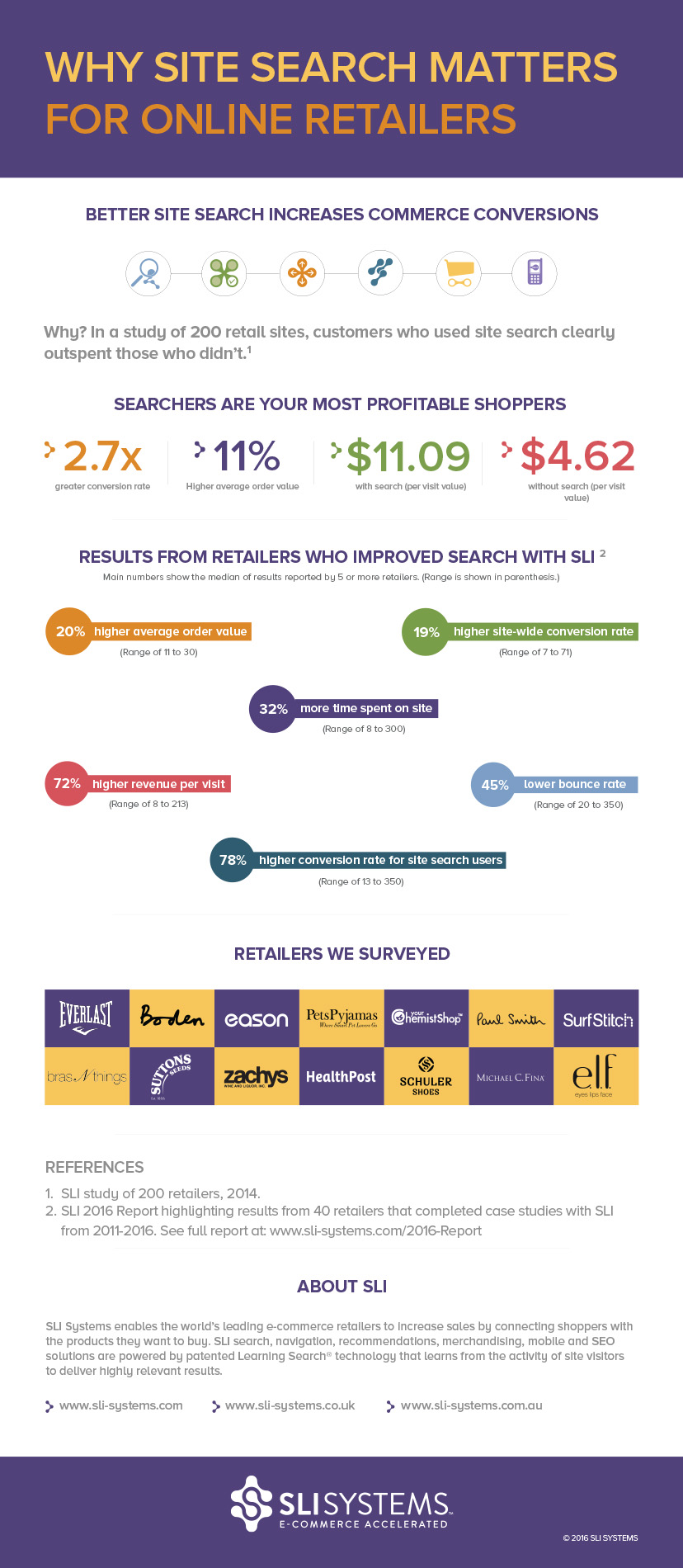
Infographic - Site Search for Online Retail

Infographic: Why Site Search Matters for Online Retailers

Read More

Seamless Search Drives High Growth for Superette

Posted by Aparna GrayJune 23, 2016eCommerce, Site Search, Success Stories

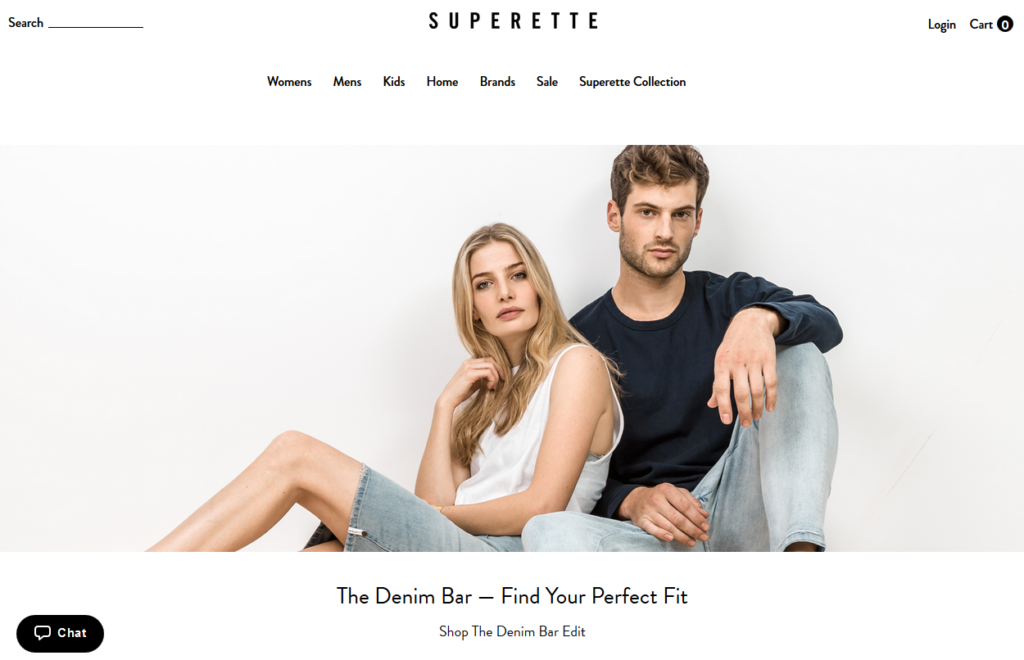
Superette image2When fashion brand Superette launched in 2002, it was purely a brick-and-mortar store. Almost 15 years on and the brand has cemented itself as one of Australasia’s leading online style destinations. On the road to success, Superette sought out the technology, expertise and support of SLI Systems to establish an outstanding online customer experience through advanced site search technology. They weren’t disappointed. With thanks to SLI Systems, Superette’s expansive e-commerce store now seamlessly guides customers through more than 5,000 products. And the results speak for themselves – with online sales rising 57 percent year on year.

Entering the world of e-commerce

Keen to tap into a rapidly expanding online retail market, Superette launched its first e-commerce site back in 2010. Initially, the company used its e-commerce platform’s default site search function, which required that each product be configured for search. But with 3,500-5,000 products offered online at any given time, the task quickly became daunting for the resource-strapped team. More importantly, the default search function was delivering irrelevant results and low conversions.

Superette image3Delivering fashion at your fingertips

Superette E-commerce Director James Rigden quickly recognised that if the business was to grow, it needed to improve its online experience and help customers find what they wanted with ease. In 2013, James set about exploring more advanced site search options and SLI Systems came out on top.

“After speaking with SLI Systems about their capabilities and resources, it was clear that they were the professionals and knew what they were doing. They were also here in New Zealand, offered one-on-one expert service and were doing some great things in the market, so we jumped on board,” said Rigden.

SLI Systems implemented SLI Learning Search®, which learns from visitors’ site search activity and clickthroughs to deliver the most relevant results. The move had a rapid business impact, resulting in an average of 3x higher per-session value for those using site search. In tandem, Superette deployed SLI Site Champion® and gained high-quality organic search traffic by dynamically creating SEO-optimised landing pages that are indexed by Google and other Internet search engines.

The solution has extended Superette’s SEO footprint and made more content findable. Today, Superette has nearly 2,000 site pages indexed in Google, comprising approximately 10 percent of the brand’s entire search engine footprint.

Results that stand out

Superette has seen significant growth as a result of employing SLI Systems technology. The company has been able to identify customer trends and deliver highly relevant results, lowering bounce rates by nearly 50 percent and increasing per-session value. This change in its e-commerce strategy has meant Superette has been able to grow its business by an impressive 57 percent year on year.

To learn how your company could benefit from improved site search, set up a site search analysis with our team.

Read More

Strategies to Drive Online Revenue (Part 2)

Posted by Matt SparrowJune 15, 2016eCommerce, Merchandising

MerchandisingAs we discussed last time, data mined from site search activity can be used to improve your merchandising in a number of ways. Use the following merchandising practices to help deliver a stand out shopping experience to your customers.

Offer More Products to Your Visitors

Often shoppers will enter your site through a product link from a search on Google or Bing rather than directly from your home page. When visitors land on a single product page, you run the risk of showing them an item that’s not the most relevant to their search, and you may miss out on letting them know you offer other products they might like.

You can solve this problem by presenting a merchandising banner that shows products relevant to their original search term. These merchandised landing pages can keep customers engaged and drive more page views and conversions.

Use Synonyms for Global Reach

Using synonyms is a great way to improve the relevance of your search results and avoid pitfalls like “no results” dead ends. Synonym groups are usually created by gathering words together that are correlated. The result is that a search for any of the words in that group will also trigger a search for the corresponding synonyms.

Synonyms allow you to adapt to the different words that people use to search, and keep your search results relevant. Even when different countries speak common languages, not everyone uses the same words to refer to the same products.

Make Search Results Highly Visual

When it comes to presenting search results in a simple and engaging manner, product images are indeed worth a thousand words. Displaying one search result image that’s significantly larger than the other thumbnail images is a merchandising practice that improves conversion and boosts sales. Larger product images that convert well include results from top searches, highest-rated products, best sellers and high-margin products.

Showcase Your Products’ Social Status

Today’s shoppers respond well to social validation from others. You can provide this support by showcasing social approvals, ratings, reviews and recommendations. Encourage your customers to share the best products from your site across their social networks by integrating social media buttons onto your pages.

Additionally, showing the recommendations of other influencers (e.g. top editors, celebrity curators, popular or emerging stylists) within search results is another merchandising practice that taps popular opinion to build community and grow sales.

For more tips, download our popular e-book Use Site Search Data to Improve Merchandising.

Read More

Strategies to Drive Online Revenue (Part 1)

Posted by Matt SparrowJune 9, 2016eCommerce, Merchandising

MerchandisingOne of the keys to e-commerce success is to be relevant. Deliver the products and information customers seek and you’ll thrive. But remaining relevant in today’s ever-evolving e-commerce world isn’t easy. It requires the right tools to quickly present the most valuable information for an engaging and consistent shopping experience, and it entails listening to shoppers and testing to understand what works and what doesn’t.

When site visitors search for a product, they are telling you what they want in their own words. This direct understanding of customers’ intent enables you to deliver compelling merchandising messages, provide relevant information and offer the right products to your shoppers all while enhancing the user experience.

Data mined from site search activity allows you to anticipate market changes and trends, so you can align your merchandising practices accordingly. The proper merchandising controls let you easily and quickly test and refine product assortments, promotional messages and the placement and presentation of non-product content on your search and navigation pages.

In this post, I’ll share tips from our popular e-book Use Site Search Data to Improve Merchandising.

Drive Impulse Buying with Ribbon Overlays

Ribbon overlays are digital stickers you can apply to individual search results to visually accentuate something special about the product, such as best-seller status, out of stock, free shipping, top-rated products, limited availability, newly added products or videos.

Online videos are a popular way to boost site conversions. You can use ribbon overlays to highlight when product videos are available. These overlays offer an additional incentive for customers to click the product because seeing the product in action may convey tangible information such as fit and size faster than reading product specifications. Managing ribbon overlays should be straightforward. For example, once the ribbon is designed, your merchandising tool should allow you to flag the applicable products in the data feed with the specific information you want to display, such as sale, free shipping or video.

Tune Results for Perfect Promotion

There are times you want to promote certain products to your customers on a search results page. Conversely, there may be results you wish to push to the bottom or hide for that particular search string. Tools to create tuning rules should be easily accessible in a merchandising console so you have complete ability to promote or demote particular products based on your desired outcomes. While tuning is an important component of merchandising, it can interfere with the placement of learning-based results and push relevant results below the fold.

Curate a Custom Experience with Landing Pages

You can also use merchandising tuning rules to create curated landing pages. If you would like to promote a series of special holiday products, for example, you can create a landing page that loads when the word “holiday” is searched. At the same time, you can create a dedicated PPC link that directs users to that page. When you use the same PPC link in email marketing campaigns, you can track the success of your campaign in Google Analytics.

For more tips, read our popular e-book Use Site Search Data to Improve Merchandising.

Read More

Help DIY-ers Get Things Done this Summer

Posted by Christina StublerMay 25, 2016eCommerce, Site Search Tips

DIY photoThe weather’s warm. The days are long. Some call it summer. For others, it’s do-it-yourself season – and it officially kicks off with the upcoming Memorial Day weekend.

Online sales for hardware and home improvement retailers continue to grow, and it’s no wonder.

The Internet boasts an endless supply of project ideas, before-and-after galleries and video tutorials. Most recently, Nifty’s “stuffed animal zoo” video made the rounds on my Facebook feed, and it was enough to make me want to try my hand at building something. (I didn’t but I still might.)

Customers with varying levels of expertise (me versus a professional) is one of the challenges retailers in this space face. Another issue is that certain products – appliances versus building materials, for example – are searched for in different ways. Appliance or décor purchases may be driven by price, brand or appearance, whereas those looking for a tool or part need to match a particular specification, such as gauge, thread size or dimension.

However, the right e-commerce solutions can help you overcome these hurdles and deliver an exceptional shopping experience.

Provide Highly Relevant Search

If shoppers can’t find what they want in the first page of results, they are likely to believe you don’t carry the item and abandon your site. Show customers the most relevant items first and you’ll increase the likelihood that they’ll make a purchase. Automatically present relevant products, images and other information as soon as visitors start typing letters into the search box.

Search by Various Measurement Units

Are your products specified by measurement in fractions or decimals? Site visitors don’t always search for products using the same unit names or symbols. Whether they search “8.5 x 12.375” or “8 ½ x 12 3/8,” your site search should accommodate searches with standard or metric units so customers are always presented with the right products.

Match Full or Partial SKUs or Part Numbers

Many tools and building materials are referenced by a SKU instead of a product name. Additionally, customers visiting your site may only have a manufacturer’s part number as a reference for what they need. Make sure your search can match full or partial SKUs, making it easy for customers or customer service teams to find a product quickly.

Target Your Customers by Location

Your customers’ needs and your ability to deliver might be different based on geography. Make sure your site search can integrate geolocation services to allow deeper segmentation of products by location. This allows you greater control over regional variations in price, function or other attributes. Additionally, you can point them to the closest store.

Index Educational Information & Specs

Whether you target B2B or B2C customers, education is an important factor in your e-commerce site. New homeowners may want basic information on how to make repairs, while contractors or architects may need technical specifications. Keep all of your documents, online articles, video tutorials, reviews and other non-product content easily searchable, so customers always find what they need.

For more tips, check out the SLI industry brief Do It Yourself: Hardware, Appliances and Tools.

Read More

Fighting for Better E-commerce, Everlast Finds Its “Big Win” in SLI

Posted by Dawn MortensenMay 11, 2016eCommerce, Site Search, Success Stories

Everlast Image for Blog 10May16

Each time I interview an SLI customer for a case study, it’s a privilege to hear firsthand how our solutions make a significant impact on retailers’ growth. One of my most recent interviews was with Everlast E-commerce Director Mike Ebert, who told me that site search was one of the first things he looked at when he joined Everlast in mid-2014, and that implementing SLI was one of the biggest “wins” he’s had in the changes made since.

“I’ve known about SLI forever and wanted to work with you guys since I was on the agency side,” Ebert said.

“At Everlast, one of the first things I looked at was how easy it was for people to find things on the site. I typed in red boxing gloves and didn’t get any boxing gloves, which was a problem! Only 1% of traffic was engaging with search and only 0.15% of that traffic was converting. It was a blip in what it contributed to Everlast’s revenue,” he said.

Everlast, whose brand is older than the zipper (the company was founded in 1910), controls about 85% of the boxing products market, according to SportsOneSource LLC. Mike knew it was time Everlast.com became a larger revenue-contributing part of the global business, and he set out on a number of new projects to make that happen.

Search First

First, Mike worked with SLI to implement SLI Learning Search®, SLI Rich Auto Complete™ and SLI Learning Navigation®. Moving from Yahoo site search to SLI, Everlast immediately resolved the problem of customers not being able to find the products they were looking for. The results were clear: with SLI, conversions for site search increased 6x.

“I knew I could get SLI up and running quickly and deliver benefits right away,” Ebert said. “It didn’t take much and it produces results.”

Everlast’s success is showcased in an SLI case study.

Replatforming Second

After solving the problem of product findability, Ebert next tackled the job of looking for a new platform and a design agency to create a modern, mobile-friendly site.

Ebert chose the Magento platform, then worked with e-commerce site development specialists Blue Acorn to create a sleek new fitness-inspired site, based on Magento Edition 1.14’s native responsive functionality. The new design makes use of Everlast’s stunning product photography, creates a better user experience and makes administrative management much easier. Read more about this process in Blue Acorn’s case study with Everlast.

Merchandising Third

Everlast also solved its need to showcase products in unique ways with the SLI Merchandising Console. With the ability to create banners on results pages and promote specific products, Everlast is now able to merchandize to two separate customer groups – its longtime customer base of boxing enthusiasts, and a new group of customers looking to add boxing to an overall fitness routine.

For additional promotional efforts, Everlast began working with Bronto to improve its email communication. Now when new customers come to the Everlast site and sign up for emails, they receive a “Welcome” series of emails – these drive 38% of total email revenue, while accounting for only 2.3% of email sends.

“SLI is our big win,” Ebert said, “Now revenue from search represents 10% of Everlast’s revenue.”

He added: “You guys and Bronto are the best tech implementations we have.”

We’re glad to hear it, Mike. Keep fighting for better e-commerce!

Read More

Infographic: How We Shop for the Love of Mom

Posted by Christina StublerMay 3, 2016eCommerce, Infographic

Mother's-Day-Infographic2may2016_blog

Read More

Hook “Spearfisher” Shoppers for E-commerce Success

Posted by Shaun RyanApril 20, 2016Mobile, Site Search Tips

spearfisherAt SLI, we’ve always known that shoppers who search are the most valuable. Why? Because these shoppers tell you what they want to buy which gives you a fantastic opportunity.

According to the recent Forrester Research report “Must-Have eCommerce Features,” it’s critical that retailers support “spearfishers” – or shoppers who already have a specific product or brand in mind (versus those aimlessly browsing).

To achieve this, Forrester suggests casting one’s hook with easy-to-use site search, including autocomplete, and clear categories to support spearfishers who want to find, buy and move on. Additional research upholds Forrester’s findings as:

  • 8 seconds is the average time visitors spend before deciding whether or not to remain on a site (MarketingSherpa)
  • 43 percent of visitors immediately go to the search box (MarketingSherpa) and searchers are 2-3x more likely to convert than non-searchers
  • 50 percent of users prefer to use a site’s internal search engine, as opposed to navigating the site (E-Commerce Times)

It’s clear that many online shoppers are spearfishers, which is why it is important for retailers to quickly serve up the products they are looking for.

Top Tips to Hook Spearfishers with Smart Site Search

Here are our top tips to help you provide your most focused shoppers with a satisfying search experience that leads to improved conversions and sales:

Autocomplete with Graphics – Type Less, Buy More

WineA critical feature for speed in site search is the ability to show product results with images from the first letter a searcher types. It gives shoppers one-click access to products they want to buy, reducing the number of clicks from search to purchase.

For even better guidance, also show search suggestions based on category, brand or department to let shoppers quickly jump to the right section of results. For example, a search for wine at Fortnum & Mason immediately shows popular choices and categories for wine gifts, wine glasses, wine and cheese, etc.

Moreover, allow users to preview products of interest right within the autocomplete box. For instance, update products displayed when users hover over search suggestions to give them more choices and increase engagement.

Jump Directly to a Results Page When You Know the Answer

Use redirects when you want to take visitors to a particular page on your site, rather than showing search results for a query or class of queries. For example, if there is only one result, it may make sense to take the visitor directly there, rather than showing them the search results page. When visitors type in a specific product or SKU numbers, take them directly to the product page.

Create Landing Pages Related to Specific Keywords

Sports UnlimitedFor some popular search terms, you may want to redirect users to a specific site search page tailored to that search keyword. For example, you may already have landing pages dedicated to particular brands. When visitors search for specific brands, you can send them to the related brand page instead of a generic search results page.

For example, Sports Unlimited serves up a landing page for any Under Armour brand searches. We recommend examining your site search reports to identify the most popular searches. Then consider whether you can provide a better experience by having dedicated landing pages for some searches.

Optimize the Mobile Experience

Speed and ease are especially critical for mobile “spearfisher” shoppers. Ensure your autocomplete helps you capture sales from your small-screen shoppers with dedicated mobile and tablet designs that automatically display options correctly regardless of device size and orientation.

As John Tomich stated in a recent article for Multichannel Merchant, “A successful mobile interaction with your customer is one in which everything is obvious, easy and fast.” He cites that mobile shoppers overwhelmingly prefer social logins for ease of use. Express checkout and easy payment options are as critical here as with any shopping site.

Learn more about supporting “spearfishers” to accelerate your e-commerce sales by reading our Quick Guide to Better Site Search and Rich Auto Complete solution brief.

Read More

Aussie Retailers Imagine the Future of E-commerce at Annual Summit

Posted by Aparna GrayApril 12, 2016eCommerce, Search Conferences

SLI Connect AU photo 2SLI Systems welcomed leading retailers and e-commerce experts from across Australia to the second SLI Connect Sydney summit last week. Hosted at the iconic Sydney Opera House, the event featured a strong lineup of top brands, including Krispy Kreme, Nisbets, Shopbot, eStar, Braintree, Temando, ChannelAdvisor and Bronto Software. Throughout the day, speakers and guests alike discussed the future of e-commerce and how retailers need to evolve in a fast-changing world.

Change is constant in the e-commerce industry

Consumer purchasing habits are changing. Smartphones and tablets now account for 55 percent of time spent shopping online. And we no longer make purchases through one channel alone.

As Tim Davies, known in the industry as “Mr. eBay” explained, “sometimes we begin buying on one device and then move onto another before making a purchase. Brands need to respond with an omnichannel approach.”

Importantly, it’s no longer just millennials who are digitally savvy. The older generation, those known as digital dinosaurs, are now taking their shopping habits online. And with more disposable income, they offer a new opportunity for e-commerce retailers.

SLI Connect AU photoRetailers embrace new technology to remain competitive

Despite acknowledged challenges from international competitors, there was a real sense of optimism in the room. Retailers are taking steps to remain competitive, with nine out of 10 having updated their e-commerce strategies in the last year and adopting new technologies, such as optimising for mobile.

One of our keynote speakers, Krispy Kreme’s Digital Business Manager, Richard Schulman, emphasised the role of e-commerce tools in providing a high-quality customer experience and, ultimately, driving sales.

“It’s no secret that e-commerce retailers need to streamline their websites and make sure that they are easy to use for the average punter, but the secret is how,” he said. “Most businesses don’t realise how easy it is, or how important it is.”

It’s time to go mobile

The importance of mobile was a key theme throughout the day. Mobile commerce now accounts for 11% of e-commerce sales – and this figure is set to rise.

The growth in mobile has huge implications for e-commerce. No retailer wants to provide a poor mobile user experience as it creates friction for shoppers in finding and buying.

More than half of the retailers at SLI Connect had optimised their website for mobile and tablet – and those who hadn’t, have made it a priority for 2016.

No “silver bullet” for long-term success

Looking to the future, Blair Cassidy, VP of product management at SLI Systems, painted a compelling vision for the role of virtual reality in the future of e-commerce. He challenged innovative retailers to take the lead in implementing this promising technology.

But while virtual reality and other online retail technologies have much to offer e-commerce in the future, a key takeaway from the event was that no single approach or tool holds the key to success.

“There is no ‘silver bullet’ for success,” said panel member, John Menagh, director of sales at eStar. “Retailers must ensure their online and offline strategies are in harmony, so that consumers receive a consistent, high-quality experience of your brand, where ever they are.”

So that’s it for this year’s SLI Connect Sydney! A big thank you to all who attended, guests, speakers and sponsors, and for making our second SLI Connect such a success. The next SLI Connect event is planned for September 15, 2016 in New York City at the magnificent Carnegie Hall! Save the date and stay tuned – registration will open soon. Click here to view survey results from SLI Connect UK, which was held in March.

Read More

Spring Clean Your E-commerce Site

Posted by Jennifer Hadley, Customer Success ManagerApril 7, 2016Mobile/Tablets, Site Search

PetFoodDirectEven those who aren’t in the e-commerce space know that the holiday season is the most profitable time of the year. But that doesn’t mean the other three seasons can’t be revenue-generating.

While you’re prepping for Holiday 2016, you can still please plenty of shoppers (and boost your business’ bottom line).

Spring is the perfect time to refresh your site. It is the season of spring cleaning and tax refunds, both of which can motivate consumers to treat themselves. Speaking of, I think I have some space for a new pair of shoes. …

So how can you attract and convert these shoppers?

Curate aesthetically pleasing landing pages

First impressions are everything. Impress and attract shoppers by curating unique landing pages for specific audiences. For instance, create pages that showcase your new spring inventory of sunglasses or patio furniture. Include links to these pages in your email marketing campaigns. (You can send me the one with the spring sandals.)

Use high-quality product photos and lots of them so shoppers really get a sense of your items. Seeing products from all angles, or clothing on a real person, will make shoppers feel more confident about adding items to their carts and checking out.

Lure shoppers deeper into your site with eye-catching banners that boast relevant content. After shopping for sandals, I will want to look for a new spring bag too.

Optimize for different devices (if you haven’t already)

Don’t be that online retailer that shows shoppers desktop results on mobile. Nobody has time for that! There is nothing more annoying for shoppers than having to zoom into desktop results on their mobile devices. In fact, they probably won’t bother and will instead move on to a site easier to use.

Shoppers are coming out of hibernation and no longer sitting at desktop computers or curling up with their laptops in bed. Make sure they can still enjoy a seamless shopping experience on your e-commerce site when they are out and about using mobile or tablet devices.

Set up your site search for seasonality

If I search for “sunnies,” I expect search results that contain (hot) sunglasses. Set up your site search to handle seasonal synonyms like “sunnies” and “sunglasses” so that shoppers don’t instead run into pesky no-results pages.

It should go without saying that your search should return relevant and popular items based on the search term. Consider conducting a site search audit and make sure the items that you would expect to be returned are coming up in search.

While you’re getting your site ready for winter code freeze, make sure you aren’t ignoring eager spring shoppers and spring clean your site.

For more recommendations on how you can improve your site, set up a site search analysis with our team.

Read More

SLI Systems to host SLI Connect Australia next week!

Posted by Aparna GrayMarch 30, 2016eCommerce

It’s that time of the year again! On Wednesday, April 6, SLI Systems will hold its second annual SLI Connect event at the Sydney Opera House.

At the one-day e-commerce summit, you will hear from leading retailers who will be discussing, exploring and learning from each other’s e-commerce opportunities and challenges.

The day will include keynote speakers, presentations and an interactive panel from prominent online retailers and will end with an exclusive reception – all of which will provide quality networking opportunities.

This year, agenda highlights include:

  • Opening keynote: A Future of E-commerce – Virtual Personalisation given by Blair Cassidy, vice president of product management for SLI Systems
  • ChannelAdvisor customer presentation with Nisbets
  • E-commerce expert panel with ShopBot, eStar and Braintree
  • Joint presentation given by Temando with Krispy Kreme Australia: Making Dough(nuts): An E-commerce Success Story
  • Bronto customer presentation with 2XU
  • Closing keynote address given by Mr. eBay himself, Tim Davies, president of the Professional eBay Sellers Alliance in Australia (PeSA Australia)

The 2015 SLI Connect had a number of key takeaways including how Australian retailers can be more competitive with international entrants taking market share. This year’s SLI Connect will take a look at how brands have responded to this in order to remain competitive in an ever-growing global market.

We hope to see you there, register here!

Read More

Your Shoppers Shouldn’t Need Luck

Posted by Christina StublerMarch 17, 2016eCommerce, Recommendations, Site Search, User Experience

cloverSome people are just born lucky. You know the ones. It doesn’t matter if they are at a garage sale, flea market or thrift store, they are going to find exactly what they are looking for every time. It’s going to be the perfect size, the hottest color and an outrageously good deal. Their natural good fortune seems to be the only help they need.

Good for them, I say. But luck is not everyone’s lot in life.

What about the unlucky ones. The ones who can’t find a parking spot let alone a pair of Jimmy Choo’s for a screaming discount in the exact right fit and shade.

Yes, I know this is a first-world problem. But life is hard enough for the I-never-catch-a-break crowd. Shopping shouldn’t be a burden too. I can hear them muttering, “Why bother looking for a new dress. I never find anything I like anyway.”

Online retailers, you have the power to make even your most unlucky shoppers feel like they’ve won a million bucks.

First of all, I’m going to assume that if you are reading this blog you value site search. Hopefully, you are already delivering amazingly relevant search results based on what shoppers are most likely to buy. (If you have any questions about this, feel free to call us.) OK, moving on.

Give good recommendations. Almost every site has recommendations these days. That doesn’t mean they are any good. Don’t clutter the shopping experience by displaying random products. Smart recommendations provide a personal shopping experience. For instance, people who bought that lipstick also bought this blush. It’s like a knowledgeable salesperson is walking your shoppers through your store, and that makes shoppers feel cared for and understood.

Build buyer confidence. If you think you are unlucky, you might be hesitant about making an online purchase. After all, you might want to see the product in person before deciding to buy. Help shoppers overcome this mental hurdle by showing them every angle of the product in easy-to-view photos. In addition, catwalk and customer videos provide that almost in real life experience. This can be helpful when selling everything from clothes and accessories to dirt bikes and motorcycles.

Provide a seamless experience from any device. Don’t even try to ignore this one. We are a society addicted to our phones and tablets and phablets. Make sure your shoppers can shop at any time from any device. In addition, if your site is not mobile-friendly, it will hurt your site’s ranking in Google’s organic search results. (By the way, you’re invited to the upcoming Internet Retailer webinar: Mobilegeddon: Not Over Yet.)

The bottom line is this: The smarter your site is, the luckier your shoppers will feel. And who doesn’t like feeling lucky?

For more tips on improving your shopping experience, check out our Big Book of Site Search Tips.

Read More

Win Parent Shoppers with a Baby-Friendly Site

Posted by Christina StublerMarch 9, 2016eCommerce, Mobile, Site Search

What once was considered a niche market is now a booming billion-dollar industry. Savvy parents are ready to spend a pretty penny to give their bundles of joy the best start in life. Despite declining birth rates in many countries, the global baby care market is growing at a CAGR of 7% and is expected to reach $66.8 billion by 2017, according to Transparency Research (2014).

surfstitchYou don’t have to have a dedicated site for baby products to win these valuable customers. Many health and pharmacy retailers are catering more to the “parent and baby” demographic. Even lifestyle and outdoor retailers are adding infant and toddler items to their product offerings.

Here are a few ways that any online retailer with baby or toddler products can gain a greater share of parents’ and grandparents’ spending.

Focus on Mobile

Browsing the Internet with both hands free is considered a luxury for new parents. Swaying back and forth with a tiny infant in arms and a smartphone in hand is a much more common scene. Consider your site new-parent ready if the desperately sleep deprived can find what they are looking for while only using their thumbs. You’ll want to enhance the real estate of smaller screens while delivering relevant results with speed.

bodenIn addition, think about how best to streamline the purchase process for mobile shoppers. The fewer clicks, the better. Make sure shoppers have the option to save payment and shipping information so they only have to enter it once.

Make the Experience Highly Personal

A few months make a world of difference when it comes to what a baby needs and what parents want to buy. For example, moms and dads of newborns are searching for the perfect swaddle while parents of 6-month-olds are introducing solid foods and encouraging their babies to sit on their own.

When parents sign up to receive emails, gather the dates of birth, sex and names of their children. Tailor email campaigns and curate landing pages with products that match the baby’s age and each exciting developmental stage. In other words, send emails specific to celebrating a baby’s first birthday when the child turns 1, but avoid cluttering up your customers’ inboxes with irrelevant messages about newborns when their baby is already a toddler.

Your clickthrough rate on emails will be higher when parents know you are giving them valuable information specific to their kids. Also, keep in mind that parents will open a majority of those emails on a smartphone or tablet, so make sure both the email and the landing pages are tailored for the mobile experience.

Is it a Binky, Paci, Dummy, Soother or Comforter?

Does your site speak Baby? The pacifier alone has more than 100 pet names. Learning your customers’ language means they will more likely find the products they had in mind. Alternatively, ignoring synonyms, misspellings and popular pet names could lead to search queries ending in a “no results” page by mistake.

In-Store or Curbside Pick Up

Out of diapers and wipes? Need a humidifier for baby’s first cold? Sometimes even overnight delivery isn’t fast enough. If you are a retailer with brick-and-mortar locations, consider allowing customers to complete their purchases online and pick up products the same day at the store. Or even better, deliver their orders curbside to their cars. This will save parents time and keep them from having to wake a sleeping baby.

Chemist Direct Mother & Baby ExampleCater to Moms

Babies aren’t the only ones who need special care. Retailers can gain brand loyalty before the little one even arrives by helping moms-to-be navigate fertility issues, morning sickness, stretch marks and postpartum preparation. These categories are often labeled “conception,” “pregnancy” and “maternity.”

For more tips on delivering an exceptional online shopping experience that will win over parents and grandparents shopping for baby and toddler items, take a look at our E-commerce Baby Boom industry brief.

Read More

The Path to Selling Includes Sharing

Posted by Dawn MortensenMarch 3, 2016eCommerce, Site Search, Social Media

How-to Videos for E-commerceYour online retail site is about more than just the products you sell. It’s also a valuable resource for your users. It should be engaging, offering unique photos, videos, articles and features that shoppers won’t get anywhere else. This content is a powerful tool that you can use to boost your brand and elevate your sales.

The creative use of content can give e-commerce customers a unique and memorable shopping experience – one that creates brand loyalty and convinces customers to buy.

There are many types of non-product content you can use to enhance your shoppers’ experience, and ultimately lead them to a purchase. Some of the top content types used on retail sites are social posts, blogs and how-to articles.

Showcase social posts

A social media strategy is a given for any online merchant today. When you integrate content from your social media networks into your main website, you can deliver more information to buyers and get them excited about purchasing your products. Show that your social pages offer reliable, valuable content and it will compel users to keep coming back for more.

Social content is especially important because it gives the consumer a window into how others are using the products they’re considering purchasing. Some photos, videos or blogs might appeal to a consumer’s practical decision-making by showing the quality and price of the item. Other posts might strike an emotional response, creating a desire for the item because it’s fun or in-fashion. Either way, social content can be a strong influencer in motivating shoppers to buy.

To take your social strategy to the next level, you can also tune in to the Tuesday, March 8 PracticalEcommerce webinar: 5 Ways Social Listening Can Drive Ecommerce Sales.

Be a blogger

A blog is an excellent way to incorporate great non-product content into your retail site while also showcasing your brand’s individual voice. It can also generate some great organic traffic to your site, since search engines like Google and Bing rate quality, consistent content higher in the rankings. A relevant blog naturally improves your SEO. As search engines increase in sophistication, the days of stuffing blog posts with relevant keywords are over. When you create posts that are relevant to your brand, they will naturally place high in search rankings. It also follows that other sites will want to link to this useful content, increasing the reach of your blog posts.

Giving customers insight into your company helps shoppers feel like they can get to know your brand and what it stands for, which helps to create loyalty that will drive future sales.

Offer how-to articles and videos

Inform your customers not only about what your product is, but also about what it can do. Offering how-to articles, particularly in the form of nicely edited videos, display your brand’s expert knowledge to users. When shoppers see that your company is an authority in the field, they will return to your site as a reliable resource again and again. Maybe they’ll come for those valuable instructions, but they are also very likely to come back to make purchases.

Make it Easy to Find

Whichever type(s) of content you integrate into your retail site, you have to be sure users will see it. Be sure it shows up in your search and navigation results. Then feature it prominently using tabbed results pages.

For the full set of tips and examples of integrating content into your e-commerce site, download our e-book: Use Creative Content to Convince Online Shoppers to Buy.

Read More

Get Ready for Bunnies & Blooming E-commerce

Posted by Christina StublerFebruary 18, 2016eCommerce, Merchandising, Ratings and Reviews, Rich Auto Complete, Site Search

Boden SpringLove was so last Sunday. Now spring is in the merchandising air.

Never mind the polar vortex hitting the East and Midwest. Easter and its Bunny are arriving Sunday, March 27 – a full three weeks earlier than last year when it hopped onto the scene April 20.

With this year’s abbreviated shopping season, every merchandising day matters. Whether your shoppers celebrate Easter or just long for spring, this is the time to remind them that warmer weather is on the horizon.

Easter is historically the fifth largest spending holiday of the year (after Valentine’s Day but before Father’s Day, Super Bowl, Halloween and St. Patrick’s Day), according to the National Retail Federation.

Candy WarehouseEven if you’re boasting the most beautiful in-store displays, there’s good reason to focus your attention on winning online spring shoppers. Last year, online Easter shoppers planned to spend an average $221.39 – a whopping 58 percent more than brick-and-mortar Easter shoppers, according to the National Retail Federation.

What will shoppers put in their baskets? Food, clothing, gifts, candy and flowers are the top five spending categories for Easter. But don’t make your visitors hunt for what they want.

Boden dressesRead their minds. If shoppers type “Easter” in your site’s search box, make sure your site returns relevant results right away. Candy Warehouse is crushing this by instantly showing search suggestions and product results.

Curate a collection. Boden is using a banner to prompt shoppers to “Make room for new-season dresses.” But the merchandising doesn’t stop there. Clicking on the banner takes shoppers to a collection of spring dresses.

H&D EasterShow the love. Harry & David’s search results not only showcase the most relevant products, but shoppers can quickly see which items have the best and most reviews. This is a great to give browsers the social proof they need to make a buying decision.

For more tips on improving your e-commerce merchandising, download our free white paper Use Site Search Data to Improve Merchandising.

Read More

Help Cupids Find the Perfect Valentine’s Day Gift

Posted by Christina StublerFebruary 10, 2016eCommerce, Infographic, Merchandising, Site Search

Cupids (disguised as last-minute shoppers) are aiming their arrows at the hearts of their beloveds. Guide them to the perfect gifts with insight from last year’s Valentine’s Day e-commerce trends, as well as by following these 5 tips to help online shoppers find what they’re looking for this Valentine’s Day.

Another way you can give love a nudge and fuel romance is to follow the tips and tricks in the infographic below from The Shelf. (Hint: If you aren’t marketing to men between 25 and 34 years old, you are missing the mark.)

download-(27)_edv3

Read More

Amazon & You: How to Win

Posted by Tim CallanFebruary 5, 2016eCommerce, Merchandising, Site Search

Last week SLI Systems sponsored the Internet Retailer webinar Amazon & You: Top New Competitive Strategies for 2016. eShopportunity founder Fahim Naim and Medelita CMO Dan Stephchew took a look at what is emerging as the best ways for online retailers to compete with Amazon.

The webinar was jam-packed with examples from the recent 2015 holiday shopping season (including how to gracefully opt out of Black Friday without killing your sales).

While Amazon is undeniably a Goliath, you can beat the e-commerce giant by turning its weaknesses into your strengths. Here are a few key takeaways:

Help shoppers find what they are looking for. Amazon isn’t the easiest place to shop. It can feel like you are wandering through a huge warehouse without a soul in sight to help you. You have little choice but to base your purchasing decisions on price and reviews.

Fahim advises, “Do a better job of helping customers engage and find relative products.”

An effective way of providing a more satisfying shopping experience is by delivering relevant site search results. Engage customers further by offering a product or gift finder, which suggests a collection of products based on a series of questions. This level of personalization is impossible to deliver via the Amazon interface and it allows you to build brand loyalty.

Treat shoppers differently. Amazon is one-size-fits-all. There is no room to massage your message for different audiences. As a result, you miss the opportunity to create tailored offers for different shoppers, like first-time buyers and loyal customers. You can outshine Amazon in this area by leveraging your email marketing with content and offers designed to reach specific shoppers.

Own long-tail search terms. It’s OK if Amazon wins broad keyword searches. Shoppers who find your site via long-tail search terms are more likely to find exactly what it is they want to buy. You can build landing pages specific to these keywords. (To learn more about this, check out the webinar Advanced Data Mining.)

For more competitive strategies, watch the Internet Retailer webinar. To see how SLI Systems can help you implement these strategies, join us for our next live demo on March 8.

Read More

EASY – A Deciding Factor for E-commerce Technology

Posted by Dawn MortensenJanuary 28, 2016eCommerce, Navigation, Site Search

Easy to use technology for E-commerceEasy is a critical feature for today’s technology solutions – easy-to-implement, easy-to-use, easy-to-measure and easy-to-update. Of course solutions need to be effective and results are the number one point of comparison. But if you’re in the position of choosing technology and you’ve narrowed your options to those with proven results, you’re likely to choose the one that will make it easier for you or your team to achieve the results you want.

After all, there’s only so much you alone can do – you need technology that expands your abilities, rather than giving you one more thing that requires your expertise.

This is how Michael Schuler of the Minneapolis-based Schuler Shoes felt about the company’s website. A year ago, he was the only one who could customize merchandising banners and SEO since it required going into the code to make modifications. He knew this process wasn’t sustainable as the business expanded its product catalog. He needed a merchandising solution that was straightforward enough for anyone on his team to use – he needed it to be easy for his employees to edit promotions and optimize SEO.

Michael Schuler also needed a site search and navigation solution that would provide a consistent product-finding experience for shoppers. He wanted to make it easy for shoppers to find and buy what they were looking for.

At the same time, Schuler was moving the business to a new e-commerce platform and he needed a hosted site search and navigation provider that would easily integrate with the latest version of Magento.

Of course Schuler wanted the solution to work well – choosing a vendor with a solid history, reliable infrastructure and clear, proven results was a given. But easy was a key theme in his search for the right vendor. In the end, he chose SLI Systems as the best fit to achieve his goals. As stated in a case study on Schuler Shoes:

“We chose SLI because it fits well with Magento and offers the features we needed. SLI Learning Search Connect easily plugged into our Magento platform, quickly improving the shopping experience and simplifying merchandising and promotions,” said Schuler.

In fact, yesterday SLI Systems announced it’s the first and only Magento Gold Partner to offer a site search extension for Magento 2.0. Our commitment to “easy” meant that we wanted to have our plugin for Magento 2.0 ready as soon as our customers needed it.

Schuler also achieved his goals of making it easier for his team to manage merchandising and SEO, along with making it easier for shoppers to find the products they wanted.

“With SLI site search, navigation and refinements, we have seen 20% fewer bounces and a 7.5% increase in the time visitors spend on the site, indicating the solutions are helping customers in the ‘pre-shop’ phase before they buy from us in-store or online,” Schuler said.

If you’re in the position of choosing a new technology vendor, look for easy – easy-to-implement, easy-to-use, easy-to-measure and easy-to-update. Add easy-to-show results to this list (as we’ve done with our latest SLI Dashboard), and you’ll be set. Michael Schuler found a solution that was all this, plus provided better results than his previous solution. For him, it was an easy choice.

Read More

A New Look at the Shopper Journey – Introducing the SLI Dashboard

Posted by Rachel UpsonJanuary 21, 2016dashboard, Merchandising, Reporting and Analytics, User Experience

devices_dashboard“Big data” is all the buzz. It’s a challenge to merchants and data providers alike. Complex calculations on large volumes of data can be fascinating to a programmer. But these aren’t just numbers – they represent real-life actions of people on a website. If we aren’t careful, our calculations can outsmart the spirit of these actions, resulting in meaningless (or at least misguided) data for merchandisers.

Recently we undertook a project to create a new dashboard for the SLI Merchandising and Reporting Console. With more than 100 metrics already available in our console, it would have been easy to present some of these and call it a day.

But we decided it was time for a fresh start. We talked to our customers about what was most important to them. Then we went further – all the way back to the basics. We examined our underlying calculations to ensure the way we tracked data considered customers on their shopping journey and not just purchases.

Many existing reporting systems, including our own, count events like transactions and compare them to other events like page or session counts. But tracking events in isolation doesn’t always reflect how shoppers behave. Consider a shopper who starts browsing in the early evening, breaks for dinner and returns to make a purchase after putting the kids to bed or the shopper who has a late-night browsing habit and completes her purchase after midnight. Many analytics simplify and examine activity based on a set time period. As a result, each of the previous examples would likely be considered as two sessions – one that failed to convert and one that succeeded – when in actuality each was a single shopper.

A session-focused versus shopper-focused model can cause e-commerce sites to worry needlessly about conversion rates when in actuality the trouble is with how their analytics views the data.

Another example of analytics skewing reality is when a customer completes a transaction and then realizes he forgot something and makes a second purchase. Should one customer be treated as two just because he completed a second transaction? When considering conversions, is a shopper who transacts twice buying one item each time really more valuable than the shopper buying two items in a single transaction? We don’t think so.

The new SLI Dashboard now includes shopper-focused attribution. As a result, SLI looks at all of a shopper’s activity in the 24 hours leading up to a transaction, regardless of when it occurred. A site visitor with activity before midnight that continues into the next day is counted once, and multiple conversions from a single customer are treated as one successful conversion.

Conversion rate and average order value are critical measures of your e-commerce site. You need them to be an accurate representation of how many people successfully found what they were looking for, how many items people bought and how much they spent. The new SLI Dashboard provides a real-life view of how your customers are interacting with your site. In a world of numbers and calculations, let’s remember our customers are people too.

Read More

Refining Your Site Navigation (Part 2)

Posted by Lauri LarjoJanuary 13, 2016Color, eCommerce, Merchandising, Navigation Tips, Refinements, SEO, User Experience

As we discussed last week, the purpose of refinements is to allow shoppers to find what they are looking for more quickly. By indicating specific characteristics to narrow down the number of options shown in a category, visitors don’t have to scroll through pages of products to find the right one.

There are some simple ways you can deliver an exceptional shopping experience through your refinements.

SLI Color PaletteConsider a Color Palette

Color palettes provide a visually appealing way to show color options for a particular product. Plus, it takes the guess work out of identifying colors with names like vermilion (a reddish orange) or verdigris (a yellowish green). Color palettes are often displayed on the left column with other refinements.

Show Products in the Right Color

Display products in the color shoppers requested. For example, if the default image for a shirt is red, but it is also offered in blue, show the blue shirt when shoppers refine the category to blue.

If your product is available in several colors, let visitors see the color options from the navigation page. One effective way of doing this is to allow visitors to hover over the color palettes directly under the picture of the product. The color of the product changes, while other products on the page remain unchanged.

Use Images

The human brain processes images faster than text. Consider using images to signal certain refinements, such as apparel type (dresses, shirts, pants), brands, ratings, colors and shapes. Of course, images won’t work for some refinements, so use your judgment. Make sure the images you use are clear and simple, so your customers won’t be left guessing.

SLI Navigational ImagesUse Easy-to-understand Navigational Images

If you use navigational images to identify subcategories, make sure they are easy to understand. You want to make sure shoppers don’t accidentally confuse the subcategory images for the product selection.

Provide the following visual cues:

  • Show products as well as subcategories
  • Include the number of results for each subcategory
  • Label the subcategory images clearly
  • Distinguish between the layout of your products and subcategories

Offer Multiple Ways to Unselect Refinements

Let visitors easily change and remove refinements. Customers may want to navigate to the top or up one or several levels within a category. Use a Show All link or a breadcrumb trail to enable a quick link back to a category page or higher navigation levels. Breadcrumb trails help visitors see
 exactly where they are on the site and what refinements have been used.

Another best practice is to use an X or checkmark beside the selected refinements. This allows visitors to easily remove a refinement selection without deleting all the selected refinements and gives shoppers the flexibility they need to find the item they’re looking for. A Clear All option offers a quick “back-to-the-top” navigation alternative.

For more tips on how to improve your site navigation, download our Big Book of Navigation Tips.

Read More

Refining Your Site Navigation (Part 1)

Posted by Lauri LarjoJanuary 6, 2016eCommerce, Merchandising, Navigation Tips, Refinements, SEO, User Experience

Refinements allow visitors to quickly narrow down their product selections as they travel through your site. This is one of the best ways (aside from using the search box) that visitors express to you exactly what they want.

The right use of refinements can make the shopping journey easy and intuitive. From broad category pages, you can break down choices into more specific subcategories. On a furniture site, for example, shoppers might start with the Living Room category then navigate to Sofa and Armchairs, Coffee and Side Tables or Living Room Lighting, depending on what they need.

In addition, providing refinements for brand, price, style and color can help shoppers pinpoint the products they had in mind. In my next two blog posts I will outline some practical ways refinements can help you improve your site navigation.

Don’t Show Too Many Refinements

Instead of showing every possible refinement (which can overwhelm shoppers), examine your analytics to see which refinements are used the most and which are hardly used at all. For example, do you really need the option to refine jeans by the number of pockets? If it is useful to your visitors, then show this option only when it’s relevant. A simple list of refinements versus a convoluted one increases your chances of improving your conversion rates.

Only Show Refinements with Results

Show relevant refinements for each category and make sure each refinement option contains results. You may be tempted to provide general refinements across your site for all category pages, but this can lead to a frustrating shopping experience. For example, you wouldn’t want to provide a refine-by-color option if an item is only available in one hue.

SurfStitch_SLIShow the Number of Products for Each Refinement

By indicating the number of products for each refinement, shoppers quickly understand how many results they can expect to find under each option. This guides them to consider other refinements if necessary and assures them they have seen all possible products.

Provide Different Ways of Ranking Products

Let visitors easily re-rank the criteria for how products are shown. Shoppers might want to view products by best sellers, highest rated, new arrivals, most expensive or least expensive. As a default, show products in order of most relevant or most popular. Once a visitor chooses a new order, remember the preference to spare him or her the hassle and frustration of re-ranking products on each category page.

For more tips on how to improve your site navigation, download our Big Book of Navigation Tips.

Read More

A Spending Miracle

Posted by Christina StublerDecember 30, 2015eCommerce, Mobile, Ratings and Reviews

Like a good little elf, I started Christmas shopping in October. But despite my weekly purchases all the way through Super Saturday and Sunday, retail sales were reportedly sluggish throughout the holiday season.

People noticed that the malls weren’t quite as manic on Black Friday. Maybe because “Black Friday” deals stretched into early November or perhaps because significantly more people were shopping online.

Like many, my holiday shopping included a combination of in-store and online purchases, gifts for others and items for myself. I shopped with my phone in hand, often checking both prices and reviews when I was in a store or late-night browsing before bed.

Without a sleigh of my own and with family scattered across the country, the convenience of buying online and shipping directly to recipients provided an added bonus of skipping the lines at the post office to mail presents.

Yet, hours before the clock struck Christmas, there was strong doubt that retailers would hit the 3.7% rise forecasted by the National Retail Federation for in-store and online sales.

On Christmas Eve, Reuters reported “U.S. retailers at risk of missing modest holiday sales goals.”

Santa must have needed some last-minute gifts because the numbers reported this week – with Christmas Day behind us – reveal a sort of spending miracle (and proof that I wasn’t the only one shopping).

“Holiday spending is up, and online shopping was a winner,” declared the Boston Globe.

Retail sales were up 7.9% – more than double what was expected – according to data released by MasterCard SpendingPulse, which does not reveal dollars spent.

Not surprising, online retailers ended up on the Nice List with a 20% surge in sales compared to the same Black-Friday-to-Christmas-Eve timeframe as last year, according to the SpendingPulse report.

It seems Santa likes the convenience of online shopping, too.

For the latest in e-commerce news, trends and best practices, explore the SLI Knowledge Base.

Read More

Dressbarn Wins Award for Customer Engagement Success Using SLI

Posted by Tim CallanDecember 16, 2015eCommerce, Merchandising, Site Search, Success Stories

rtp cust engageThis year, industry-leading retail magazine Retail TouchPoints recognized 18 innovative retailers with a 2015 Customer Engagement Award. According to Retail TouchPoints, each winner has gone the extra mile to delight, surprise and satisfy shoppers. SLI is honored to be recognized with Dressbarn, the Silver Winner in the E-Commerce Innovation category.

“Customer engagement has become a key focus for retailers striving for success in today’s omnichannel world,” said Retail TouchPoints Editor-in-Chief Debbie Hauss. “The award winners are ahead of the curve and are achieving business success in this increasingly competitive marketplace.”

Among the winners this year, Dressbarn joins retail giants AT&T, Barneys New York, Kate Spade, Kohl’s, Payless ShoeSource and Pep Boys.

Dressbarn Uses SLI Learning Search to Create Great Omnichannel Customer Experiences

A major priority for Dressbarn is to always provide a great customer experience, regardless of the channel. One way the retailer continues its mission is to use SLI Learning Search® (and search data) to offer its customers a unified, seamless experience, making it easy for customers to find what they’re looking for across all channels.

Online

Dressbarn pays close attention to online trends, monitoring site search activity and on-page analytics, to optimize landing pages, PPC ads, email campaigns, site search and more. For instance, this past summer, Dressbarn saw a spike in search volume and conversion on the keyword Camryn dress. Dressbarn used its top-performing keywords report to identify the Camryn dress as a product to feature across channels to take advantage of its recent popularity.

Dressbarn quickly created a landing page using SLI Landing Page Creator™ just for the Camryn dress and then promoted it via the home page, email campaign and PPC ads. With search data in hand, Dressbarn also was able to fine-tune the page’s meta tags for better SEO. Conversion rates and sales soon skyrocketed.

Mobile

Dressbarn also provides its customers with a mobile-friendly experience. To adapt to the physical limitations of the mobile user experience, the retailer implemented SLI Mobile’s prominent search bar (vs. tiny magnifying glass) and easy-to-select refinements on search and navigation pages (e.g. color, size), speeding the shoppers’ path to purchase. The retailer also resizes all images into thumbnails, increasing the page load speed and customer engagement.

On its mobile site, Dressbarn has seen noteworthy results engaging customers and increasing conversion with SLI Rich Auto Complete™. Rich Auto Complete™ delivers a search experience with fast, visual and dynamic results. Shoppers are able to type less and buy more. With Rich Auto Complete, the time it took a shopper to find a product and complete a purchase decreased significantly, and mobile site search usage increased by 25 percent.

In-Store

At Dressbarn brick-and-mortar stores, the retailer offers associates and shoppers an endless inventory of products and information via iPads on display. If a product isn’t on the rack at the time, customers are able to use site search to look up the product, review the product description and get a clear idea of how it would look. This was a unique opportunity to use Dressbarn’s digital properties to make its stores more effective and its customers more informed and engaged.

For Dressbarn, it’s not all about making the sale right at that instant, but about building a seamless and delightful omnichannel experience that creates loyal customers who love Dressbarn and want to have a life-long relationship with the retailer.

Congratulations again to Dressbarn for a well-deserved win.

To learn more about Dressbarn’s winning merchandising strategies, view recent SLI webinar with Dressbarn E-Commerce Marketing Manager Sri PV: Merchandising Matters.

Read More

Are Gender Filters Necessary to Search for Toys?

Posted by Shaun RyanDecember 10, 2015eCommerce, Enterprise Search, Navigation, Refinements, Site Search

genter based search filtersIt was an interesting move when Toys R Us removed the gender filters from its UK website. There has been pressure for toy retailers to do this to stop reinforcing gender stereotypes and Toys R Us obviously decided that this is best for their company. It’s interesting because it is potentially damaging the user experience, making it harder for customers to find the toy that they want.

In my opinion this won’t be the case. I really don’t think that people need a gender facet when searching for toys. The blogger that wrote this article agrees: “My Son Likes Barbie. That Doesn’t Make Him a Girl.” On the other hand, I suspect it will have little impact on changing the behavior of toy buyers.

In fact, this change may actually improve the user experience. It really has nothing to do with gender-based stereotypes but instead with user design. If the gender filter is indeed not necessary for finding the toys you want, then removing it will simplify the search and navigation pages, meaning the user can spend slightly more of their cognitive load on making a purchased decision, rather than on assessing which, if any of the filters they should select.

Assuming Toys R Us has personalized recommendations, it will be interesting to see if the machine learning algorithms behind these will reinforce the gender stereotypes. I suspect, to the disappointment of the pressure groups and Toys R Us, this will be the case.

Read More

Black Friday’s 2015 E-commerce Shift

Posted by Tim CallanDecember 3, 2015eCommerce, Infographic, Site Search, Site Search Tips

As the biggest shopping week of the holiday season draws to an end, the numbers are in. Exceeding analyst forecasts across the board, e-commerce sales soared, increasing 15%-16% due to sharp spikes on both Black Friday – traditionally a brick-and-mortar event – and Cyber Monday. In fact, Cyber Monday 2015 set a record as the biggest online sales day EVER, bringing in $3.07 billion!

Thanksgiving Weekend Shopping Peaks 2015Curious to see how search query volume stacked up this year, SLI analyzed more than 340 million queries across 500+ North American online stores. We are thankful to report that people were still mostly focused on family and food this Thanksgiving, as this Turkey Day (and the following Saturday) brought in the least amount of online activity during the 2015 Thanksgiving-to-Cyber Monday holiday timeframe. Family time FTW!

Of course all bets are off once folks wake up on Black Friday. Aligned with the day’s online sales surge, SLI data showed that Black Friday is spilling into the e-commerce world in a big way! While Cyber Monday still experienced the most online activity – nearly double that of Thanksgiving – SLI found Cyber Monday only brought in 11% more activity than new online heavy-hitter Black Friday.

According to the NRF, nearly 102 million people say they shopped in stores on Thanksgiving Day and Black Friday, BUT more than 103 million say they shopped online during this two-day stretch. Internet Retailer reported that “e-commerce accounted for $822 million spent in the first 11 hours of Black Friday, and discounts were mounting as online retailers jockeyed for position.” Ultimately, shoppers spent a whopping $2.72 billion online during Black Friday (14% more than in 2014).

In addition, much like our 2014 holiday study, night owls are consistently e-retailers’ most active shoppers. The peak online shopping hour was Cyber Monday at 10:00 p.m. EST. On Thanksgiving Day, the peak shopping hour was also 10:00 p.m. EST. Year-over-year, the exception has been Black Friday with a peak shopping hour of 12:00 Noon EST.

For e-commerce retailers, being ready for these shifting trends in peak days and hours is crucial to ensure they can reach their buyers and avoid site stress. This year Neiman Marcus, Target, and PayPal suffered extended outages that negatively impacted both sales and customer loyalty. Based on this year’s performance, we expect Black Friday to be neck-and-neck with Cyber Monday in 2016. Make sure your site is ready for this surge, and don’t forget to time-critical promotions for all those late-night shoppers out there.

For a 30-minute course on how better site search can keep your shoppers happy (and spending) through the rest of the holiday season and beyond, see our latest video presentation, Best Practices for E-commerce Site Search.

Read More

A Surge in Query Volume is Coming

Posted by Shaun RyanNovember 24, 2015eCommerce, Site Search

black-friday-rushThis morning (when I was supposed to be sleeping, but wasn’t because of jet lag), Flipboard popped up an article about Google’s scale that mentioned Google serves 1.2 trillion searches per year. That’s a lot! In the last year, SLI served over 15 billion searches across our more than 1,000 customer sites, which is about an 80th of what Google reportedly served. Given these numbers, I’m sure that across the web the number of searches within websites is higher than the number of searches on Google, Bing and the other web search engines.

With Thanksgiving, Black Friday and Cyber Monday coming up, SLI expects to serve more searches in the next seven days than any other week of the year. Thanksgiving is very much an American holiday, but the retail events surrounding it have become an international phenomenon. Retailers around the world take advantage of the opportunity to boost their holiday programs. Last year we saw large query volumes from our Brazilian retailer customers. UK retailers are jumping on the trend with £1.9 billion forecast to be sold in Black Friday sales.

The SLI team has been working to ensure we have plenty of capacity to meet the peak query volumes across the more than 1,000 sites that we power. In measuring search activity during Thanksgiving weekend last year, we found the highest day during this surge in shopping resulted in about 2.7x the normal number of queries. But the real peak is when the sales first open, the emails are sent and people rush to get the best deals. During a recent pre-Black Friday sale we saw the per-minute query volumes hit 200x their normal level.

Especially at this time of year, it’s vital that retailers’ infrastructure is ready to handle these peaks. SLI customers can rest assured: we are ready and waiting.

Read More

Retailers: Get Ready to Sell Rain Gear (and More)

Posted by Christina StublerNovember 19, 2015eCommerce, Merchandising

Outlook_map_Precip_2015_2F_2000In drought-drenched California, we are preparing for an extra holiday guest. But instead of washing sheets for the air mattress, we are fixing leaks and clearing gutters. El Niño, a climate event defined by warmer than usual Pacific Ocean temperatures that affects global weather patterns, is expected to bring heavy rains over the next few months to California as well as the entire southern tier of the U.S.

According to NOAA, this year’s El Niño is one of the strongest on record. Parts of California could see 40-50% more rain than average while Florida could get 70% more rain.

While some might wait and see, the wise will no longer ignore long-neglected winter chores.

What does this mean for retailers? Folks have a legitimate weather-induced excuse reason to shop. (You think I’m kidding, but I just bought myself three pairs of boots.) Here are some ways you can capture the attention of shoppers preparing for El Niño:

Treat El Niño like its own retail season. Look at your products with fresh eyes and think about what people might need to buy during an extra rainy season. Yes, people might want boots, hats, gloves, jackets, umbrellas and waterproof socks. But they might also need floor mats, windshield wipers, rain barrels, tarps, sand bags, heavy plastic sheets, generators and sump pumps. Parents will need activities for kids who are cooped up inside for days at a time. And let’s not forget the best in rain-proof beauty products, such as waterproof mascara and anti-frizz hair products.

If you sell anything your shoppers might want to weather the upcoming storms or make cabin fever more manageable, make sure they know what you’ve got. All the best practices of merchandising apply. Highlight special deals on El Niño-related items. Recommend products based on what shoppers are searching for. Curate landing pages to showcase your entire El Niño-related product selection.

Provide how-to guides. The Los Angeles Times offered readers 28 things to do to prepare for El Niño rains this season. The list includes must-do tasks for your home, garden and car. Many are DIY projects. For example, No. 18 on the list: Plant winter vegetables in raised beds or elevated rows. If you specialize in home improvement, garden or auto supplies, share your expert advice and provide shoppers with an El Niño checklist or direct them to already existing how-to guides so they are ready for the rain. They will appreciate that you are looking out for them.

Keep an eye on your popular search terms. The more it rains, the more people are going to realize they need certain things they hadn’t thought of. Make sure you are reviewing your most popular search terms. (If you are an SLI customer, make sure to look at your Poor Results report too.) Keeping in tune with what shoppers want will help you better merchandise the products you have. In addition, user-generated SEO will help your site be found as new, seasonal long-tail search terms gain in popularity.

Stay dry, friends. And for more merchandising tips, check out the SLI Knowledge Base.

Read More

How Catalogs Can Succeed in an Omnichannel World

Posted by Dawn MortensenNovember 12, 2015eCommerce, Merchandising, Mobile, Site Search, Site Search Tips

SLI Systems BlogRight after Halloween, the catalogs started arriving as usual for the time of year – Frontgate, Lego, Learning Express, Uncommon Goods, Crate & Barrel, Tinyprints and many, many more.

Each holiday shopping season, I find myself initially surprised at why retailers continue to send catalogs when more people are buying online instead. But then, as my kids start to flip through the catalogs to build their wish lists and I find myself earmarking pages over breakfast, I see why catalogs still work: Even though fewer people today will pick up the phone to make a catalog order, these colorful, glossy merchandising tools catch our attention in our homes, when we’re not intentionally thinking about shopping, and they drive us to the online or retail stores where we’ll make a purchase.

In this multi-channel (and increasingly omnichannel) world, there’s no reason for retailers to give up one form of merchandising that works, even if the actual purchase point for the customer changes. There are, however, many reasons to make sure that your different merchandising channels are working well together.

Here are a few tips for making sure that your catalogs are effective in driving shoppers toward a final purchase:

Know what actions you’re driving customers toward. Is your catalog a purchasing vehicle, an advertisement or both? Do you want people to have the option to place a phone order? If so, then the usual catalog best practices apply (a customer code on the back, a toll-free number on each page, clear color choices, item numbers, etc.). Or are you simply using your catalog to drive people to your online or brick-and-mortar store?

Each year I see more “catalogs” that promote products without providing a way to actually shop from the catalog. Learning Express doesn’t list item numbers or a toll-free number because they don’t offer shopping by phone; their catalog is simply a driver to their stores and web site.

Think about what will make shoppers buy from you versus a competitor. Special offers and promotions can make a big difference in whether your catalog encourages shoppers to go to your site or to a competitor’s site to complete a purchase, especially for products that are available through multiple vendors.

I have three learning-toy catalogs in a pile by my computer, each from a different retailer and each containing products that are available in at least one of the other catalogs. When I go to make my online purchases, I’m going to buy from the store that has advertised an offer I can’t refuse. If the offer is not compelling enough, I’ll just skip all three stores that sent me catalogs and buy the item from my favorite local-based online toy retailer.

Make sure shoppers can quickly find catalog items on your site. Once your catalog has done its job of making a shopper want an item that they carry, you’d better make sure that shopper can easily find the item in your online store. Don’t overlook the importance of having top-quality site search: if you don’t show the most relevant items first, whether the customer searches by item number, item name or a descriptive name, you’re not going to make the sale. Features like Rich Auto Complete™, faceted refinements and smart mobile navigation are now expected.

Remember that shoppers often go to their computers or tablets to finalize a purchase because of the speed and convenience of buying the item online rather than making a phone call. Other shoppers will use your catalog or web site to browse before walking into a store to try something on. But all shoppers need to easily find the products they’re looking for on their computers, phones and tablets. If you don’t make your products easy for them to find anytime and anywhere, then you’re not going to succeed in an omnichannel world.

Read More

Navigate Mobile Shoppers Toward Sales

Posted by Christina StublerNovember 5, 2015eCommerce, Mobile/Tablets, Navigation

NEW hands-coffee-smartphone-technologyMore than half of all time spent shopping online is done via smartphones and tablets, propelling mobile commerce to grow three times faster than overall e-commerce. In addition to site search, site navigation is one of the most important aspects of the mobile experience.

Here are some tips to help make sure your site navigation is ready for the mobile-and-tablet holiday rush.


Mobile Navigation

The limited space on smartphones and tablets magnifies the importance of intuitive navigation.

To best orient users and guide them through a mobile site (without cluttering the screen), use a simple design. Here are some main best practices:

  • Use drop-down menus with buttons or simple text so you can offer as many drill-down levels as needed while freeing up valuable real estate.
  • Use subpages to expand using familiar icons such as +, – and >. This allows shoppers to easily navigate through categories to exactly the products they are looking for.
  • Give category pages a look and feel similar to search results pages. This gives users a consistent experience across search and navigation.
  • Include a thumbnail image, product title, brief description, price and additional information such as ratings and discounts.

Include Refinements

Just as on your desktop site, refinements make navigation easier for mobile visitors. Since mobile devices have a lot less space for navigation, using a drop-down menu can be a good design choice. Presenting refinements this way saves screen space by hiding them when they are not in use. This helps reduce visual clutter on the mobile site and allows visitors to view more products and content without needing to scroll down.

Offer Infinite Scrolling

You may find that shoppers spend more time on your mobile site if you provide infinite scrolling.

Instead of requiring shoppers to click to the next page, infinite scrolling automatically loads more search results as the user nears the bottom of the page.

Make Links and Buttons Touch-friendly

When designing for touch-enabled devices, keep in mind the size of the human finger and thumb. The touch target for an index finger is 57 pixels and for a thumb it is 72 pixels. Making touch targets smaller than that can lead to user frustration and incorrect clicks. Moreover, don’t require users to pinch and zoom in order to navigate pages as these actions also lead to a negative user experience.

Direct Mobile Users to Mobile Pages

If you have a separate mobile site with a different URL, make sure to automatically send your mobile users to the correct site. You also need to direct search engines to this alternate site in order for your mobile pages to rank well in mobile search results. If you’re using responsive design, this shouldn’t be an issue.

Don’t Assume Desktop Features Will Work on Mobile Devices

A common mistake in mobile development is attempting to port desktop features directly to a mobile device. With a touch-enabled device, the user is not navigating the page with a mouse cursor so functions like hover don’t translate into a positive customer experience. At best, the user will attempt to click the item multiple times to activate the link; at worst, the user will be unable to click through at all and may abandon the site in frustration. Instead, optimize your development for the unique features and uses of each device type. Smartphone users and tablet users may use your site differently so consider both types of users.

For more tips on how to improve your site navigation, download our Big Book of Navigation Tips.


Read More

Top Costumes for Halloween 2015: Ready to Feel The Force?

Posted by Aparna GrayOctober 29, 2015eCommerce, Press, Site Search

Don’t be surprised if you have Princess Leia, Darth Vader or Yoda knocking at your door this Saturday, looking for treats. Star Wars mania is in full swing and is dominating the 2015 Halloween costume craze, as Hollywood blockbusters are again leading the costume trend this year.

SLI Systems Halloween DataData from SLI Systems found Star Wars is an unmatched force with nearly 37% greater interest than Minions – the next closest film. In fact, this Halloween season, consumers conducted twice as many costume searches for Star Wars characters than Frozen characters, which were the most-searched costumes in 2014. Anticipation of Star Wars: The Force Awakens is clearly attracting new generations, adding to decades of loyal fan numbers.

The top 5 most-searched movie-themed costumes of 2015 were:

  1. Star Wars (combines searches for Leia, Darth Vader and other characters)
  2. Minions (includes searches for Despicable Me)
  3. Frozen (includes searches for Elsa, Olaf and other characters)
  4. Marvel Universe (includes Hulk, Thor, Ironman, Spiderman and other characters)
  5. Maleficent


As noted in a recent Multichannel Merchant article, SLI studied site search activity across e-commerce costume retailer websites based in the U.S., Canada and Australia, analysing a total of more than 10 million consumer searches taking place between Sept 1 and Oct 20, 2015.

The SLI data team compared the most popular site search terms across costume retailer websites using our Learning Search® service and found interest in current events as well. For instance, searches for ‘Trump’ increased significantly, with 33x more searches than the same timeframe in 2014. The data also revealed, the search term “Trump” was 38% more popular than “Ironman”!

Here are some of the additional findings from SLI’s 2015 Halloween Costume Site Search study:

  • The top three most popular non-movie searches in order were: witch, pirate and zombie
  • Teenage Mutant Ninja Turtle-related searches remain popular but missed the Top Five movie-themed list, coming in 6thplace
  • Supergirl (and Superwoman) was 3.5x more popular than Trump and nearly 5x more popular than Ironman, the least popular Marvel super hero this season
  • Spiderman was the most popular Marvel super hero
  • Maleficent saw 3x the searches compared with (Princess) Leia

So if you haven’t already bought your Halloween costume for Saturday, there is still time. You can either buck the trend or join the legion of fans who will pay homage to the Star Wars franchise.

May the force be with you!

Read More

Posts pagination

< 1 2 3 4 5 6 … 22 >
Facebook
Twitter
LinkedIn
YouTube
Flickr

Stay up to date with SLI

Featured Posts

  • Maximize Revenue with Enhanced Product Impact Testing
  • Top Five Ways to Prepare for Peak Season
  • Facets, Facets, Who’s Got the Facets?
  • Personalization: It’s Kind of a Big Deal
  • M is the New E: Mobile Commerce Trends and Predictions

Categories

About SLI Systems

  • What We Do
  • Who We Are
  • Why SLI

Learn

  • Webinars
  • News Room
  • Events

Connect

© Copyright SLI Systems, 2018. All Rights Reserved | US: (866) 240-2812 | Legal